
Video trend

Sorry I'm Nervous AI: Speech Timing Checklist

The awkward pause is part of the Sorry I’m Nervous joke. This checklist gives approximate reference landmarks and a way to review a finished result with its restored speech audio. It does not claim that a paid output has already passed a lip-sync test.

Final video
18 seconds
Your input
1 photo
Quality
720p
THE ORIGINAL18 SEC / 4 / 3
Sorry I'm NervousYour photo. This scene.

Review the pause, not just the words

01

Opening: approximately 0–2.2 seconds

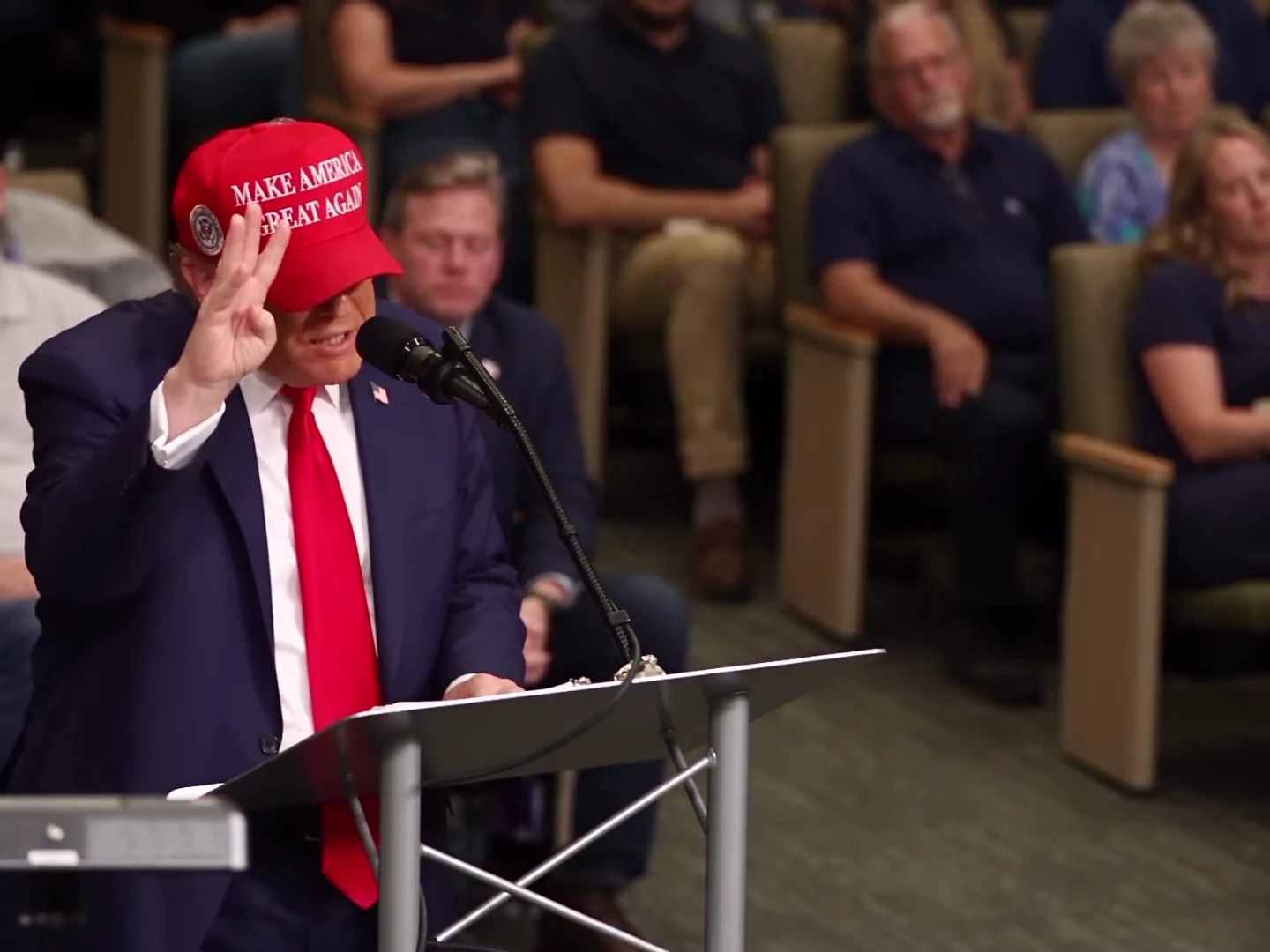
The clip starts during the statement about five permanent jobs. The raised hand helps mark the count. Check that the replacement speaker is present from the first frame and that the mouth starts with the existing speech rather than waiting for an invented introduction.
02

The count: approximately 2.2–5.5 seconds

The next phrases count two groups and begin a final item. Compare the visible finger changes and short mouth closures with the reference. A continually moving mouth during every gap can make the delivery look like a different sentence even when the restored soundtrack is correct.

03

The hesitation: approximately 5.5–8.1 seconds

The speaker falters before finishing the last phrase. Keep this interval when making a shorter edit: cutting directly from the count to the apology removes the setup. Review the mouth, head angle and raised hand together, since an isolated frozen face can break the scene even if the pause lasts the right length.

04

The apology: approximately 8.4–10.3 seconds

Listen for “I’m sorry, I’m nervous.” Play this section at normal speed first, then inspect individual frames if the voice seems to lead or trail the mouth. Check both the start of the apology and its last word; one aligned opening does not prove the whole line is synchronized.

05

After the line: approximately 10.3–18 seconds

The scene continues with the speaker and audience reacting. Preserve some of this aftermath when trimming the clip. Watch for identity changes after speech ends, and confirm the mouth does not keep delivering new words over the reference soundtrack.

06

Separate audio problems from visual problems

First listen to the downloaded file itself, then compare it with the preview. If the soundtrack is missing, that is different from an intact soundtrack paired with mistimed lips. If timing is off, do not assume a fixed audio shift will repair every word. This template has no user-facing per-word timing control; review the complete result before sharing.

Explore the Sorry I'm Nervous trend

How to make it

Add a photo for each role shown below. All roles need a photo.

The roles in the Sorry I'm Nervous original reference
Speaker in the Sorry I'm Nervous source video
Speaker
  1. 01

    Choose the speaker

    Upload one sharp photo with the face and hair visible. A front-facing head-and-shoulders photo with an unobstructed mouth gives the template a clear identity reference.

  2. 02

    Review the preview and quote

    Turn on the preview sound to hear the fixed speech. Choose 720p or 1080p and review the quote for the complete 18-second clip.

  3. 03

    Check the speech and reactions

    Review the face, counting fingers and mouth timing through the hesitation and apology. Download the MP4 with the speech soundtrack and label your post as AI-made parody.

01

One speaker to replace

One photo supplies the speaker's face, hair and outfit. The lectern, microphone and seated audience remain part of the scene.

02

Speech included

The download keeps the reference speech, including the hesitation and the line ‘I'm sorry, I'm nervous’. Uploading a photo changes appearance, not the words or voice.

03

Keep the room in view

The 4:3 frame leaves space for both the speaker and the audience reactions. The full sequence runs for 18 seconds.

04

An AI parody reference

The preview is an AI parody, not an authentic recording of the depicted person saying these words. It is the reference the template follows, not an Oakgen-generated example.

Photo tips

  • One clearly visible face per photo
  • Keep the mouth and hair unobstructed
  • Your photo supplies the outfit
  • Hear the full speech before generating
  • Review hands and mouth timing before sharing
  • Use agreed photos and label the result as AI-made parody

Questions & answers

What is the Sorry I'm Nervous AI trend?

It is a lectern speech parody named after the spoken line ‘I'm sorry, I'm nervous’. The speaker counts on their fingers, hesitates and apologises while a seated audience reacts. Oakgen's template replaces that speaker with the character in your photo.

Does the video include the speech?

Yes. The original reference soundtrack is kept in the download, including the spoken lines, hesitation and background sound. It is not a silent template, and your photo does not change the voice.

Can I write my own speech or clone my voice?

This template uses the fixed speech from the preview. It does not accept a replacement script, voice recording or custom dialogue.

Does my photo need the red cap and suit?

No. The template replaces the source speaker's cap, suit, tie, hair and face with your own appearance. A cap is requested only when your photo includes one; lettering and logos are not requested.

Is the preview made with Oakgen?

No. It is an AI parody reference, not an Oakgen-generated result or an authentic speech recording. Label your version as AI-made parody too.

How long is it, and is it vertical?

The video is 18 seconds in a 4:3 frame, with 720p and 1080p options. It keeps the wide room composition rather than cropping away the audience.

Is lip sync guaranteed?

No. The template gives the model the reference performance and timed dialogue cues, then restores the reference speech. Check the generated mouth movements, pauses and apology before sharing.

Can I use a pet photo?

The template instructs the model to retain the animal's species and markings and adapt the gesture to a paw. Pet mouth timing and anatomy need careful review; no pet result is shown here as a verified example.

How much does it cost?

956 credits per 720p video. The quote covers the complete 18-second clip. Review it before generating.

Ideas for your next video

Plan a story, keep your character recognizable, and make the finished clip your own.

Explore the video trend playbook →

Make your Sorry I'm Nervous video

Upload 1 photo. Everything else is set.

Make this video