ChatGPT
 Claude
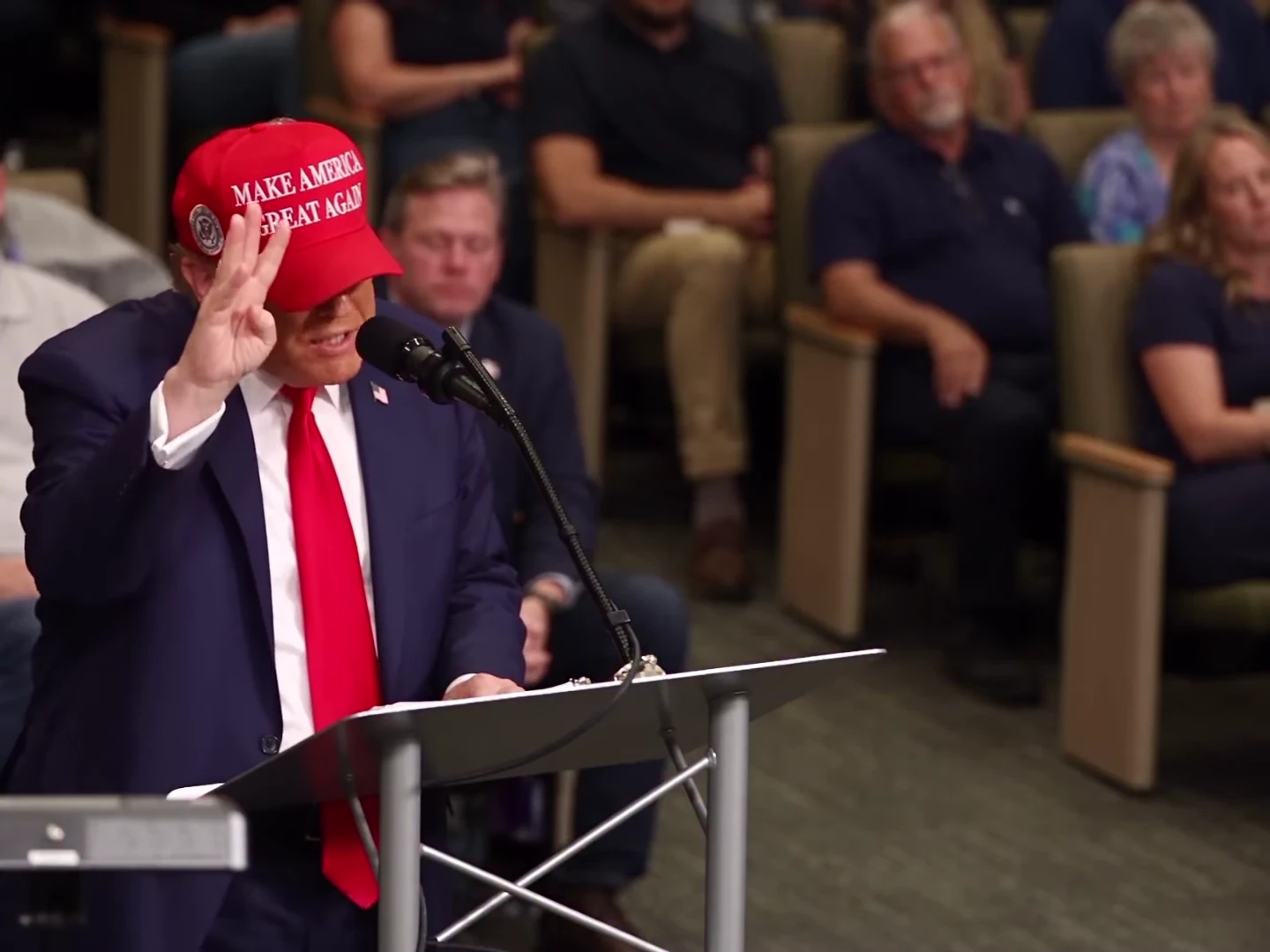
The easiest way to weaken the Sorry I'm Nervous meme is to remove the hesitation. The apology only makes sense because the speaker has just struggled with the sentence. In this 18-second AI parody, the pause, the spoken apology and the reaction afterward are separate parts of the same joke.
This article offers editing plans for the downloaded result. The timings below come from the reference and are approximate; choose final cut points by watching your own output. They are not measurements of a paid generation's lip sync.
Make the full scene before editing
Create the one-photo Sorry I'm Nervous parody with its speech, then choose the cut and layout for your post.
Know the three beats
The opening starts during a count of permanent jobs. By roughly 5.5 seconds, the speaker has reached the hesitant part. The final phrase resolves around 8.1 seconds, followed by “I'm sorry, I'm nervous” around 8.4–10.3 seconds. The rest of the 18-second scene holds the speaker and audience reaction.
Those landmarks explain where an edit can lose context. Starting immediately on “I'm sorry” removes the reason for the apology. Ending on the final word removes the aftermath. Neither choice is automatically wrong, but each creates a different joke from the full reference.
Use the speech timing checklist when checking the mouth against the restored soundtrack. The speech includes nationality references; listen to it in full before deciding how your caption reframes the scene.
Three ways to cut it
| Edit | What to keep | When it makes sense |
|---|---|---|
| Full scene | The complete 18 seconds, from the opening count through the reaction | The audience needs the full setup, or the aftermath is your favourite part |
| Setup and apology | The opening through the complete apology, plus a short reaction hold chosen from your result | A more compact post that still explains the hesitation |
| Reaction-led excerpt | The apology and a visible recovery, with a caption that supplies new context | A reply or reaction post where the surrounding conversation already provides the setup |
Make these cuts in an editor after downloading. The trend itself produces the fixed scene; these are not separate generation-duration options. Keep the full export as a master so you can change your mind without rebuilding the video.
For the compact version, avoid cutting on a mouth that is still moving or in the middle of a hand gesture. Play the ending with sound and look for a complete word followed by a natural visual pause. A hard cut after an unfinished motion can look accidental even when the audio has stopped.
Fit the 4:3 scene before cropping
The speaker is toward the left, not centred in a vertical talking-head composition. The counting hand, microphone and audience occupy space beyond the face. A centre crop can lose the gesture that helps establish the count.
Try a full-width fit inside a vertical canvas first. The spare area can hold a short setup caption above and an AI-made parody label below. Use a simple background and compare at phone size; the scene should remain easy to read without filling every pixel.
If you still prefer a crop, check it at the raised-hand opening, the hesitation and the later reaction. Do not judge only from the poster. The podium framing guide provides a more detailed pass for face, hand, microphone and audience visibility.
Write a setup, then let the audio answer
A caption can supply an everyday reason for the nerves. “When the meeting suddenly becomes your meeting” works as a setup for the lectern. “Practised it perfectly in the kitchen” frames the pause as a rehearsal failure. Put one idea on screen before the apology rather than asking viewers to read a paragraph while listening.
After the line, a small response such as “Back to the notes” can accompany the reaction. It is optional. If the expression already lands, leaving the frame clear may work better than another caption.
The caption and posting guide includes more original examples. Review any automatic subtitles yourself: hesitant speech is easy to transcribe incorrectly. Do not turn a guessed subtitle into a claim about what the audio says.
Choose the right kind of joke
This scene depends on audible words and a pause. The Pitch Invader Tackle format, added in the same collection, depends on a sprint, a slide and the physical aftermath. If your post must work with sound off, that difference matters: an action scene can be read visually, while this speech scene needs either audible dialogue or carefully checked captions.
That is a choice about the post, not a reason to force the same editing pattern onto both clips. Keep the distinctive setup of whichever template you choose.
Check the final post
Before posting, verify that the original voice remains understandable, the face stays consistent and the frame does not hide the counting hand. Keep the AI-made parody label visible in the platform's draft crop. The uploaded person did not make an authentic speech merely because their appearance is in the result.
If you have not generated your version yet, start with the one-photo creation guide, then return here with the full downloaded clip.
Frequently asked questions
Should I cut out the silence before the apology?
Keep the hesitation when you want the original joke to read. It explains why the speaker apologizes; cutting it can make the apology feel disconnected.
Can I turn the result into a vertical post?
Yes, in an editor. Fit the full 4:3 video inside a 9:16 canvas to retain the counting hand and audience, then place captions in the extra space.
Are captions generated as part of this template?
The template follows the scene and speech. The caption ideas in this article are optional edits you add afterward.
Can I replace the speech with my own script?
Not in this fixed template. It preserves the reference speech; a new audio track would need its own timing review and might no longer match the mouth movements.