
Video trend

Podium Meme AI: Keep the Full 4:3 Frame

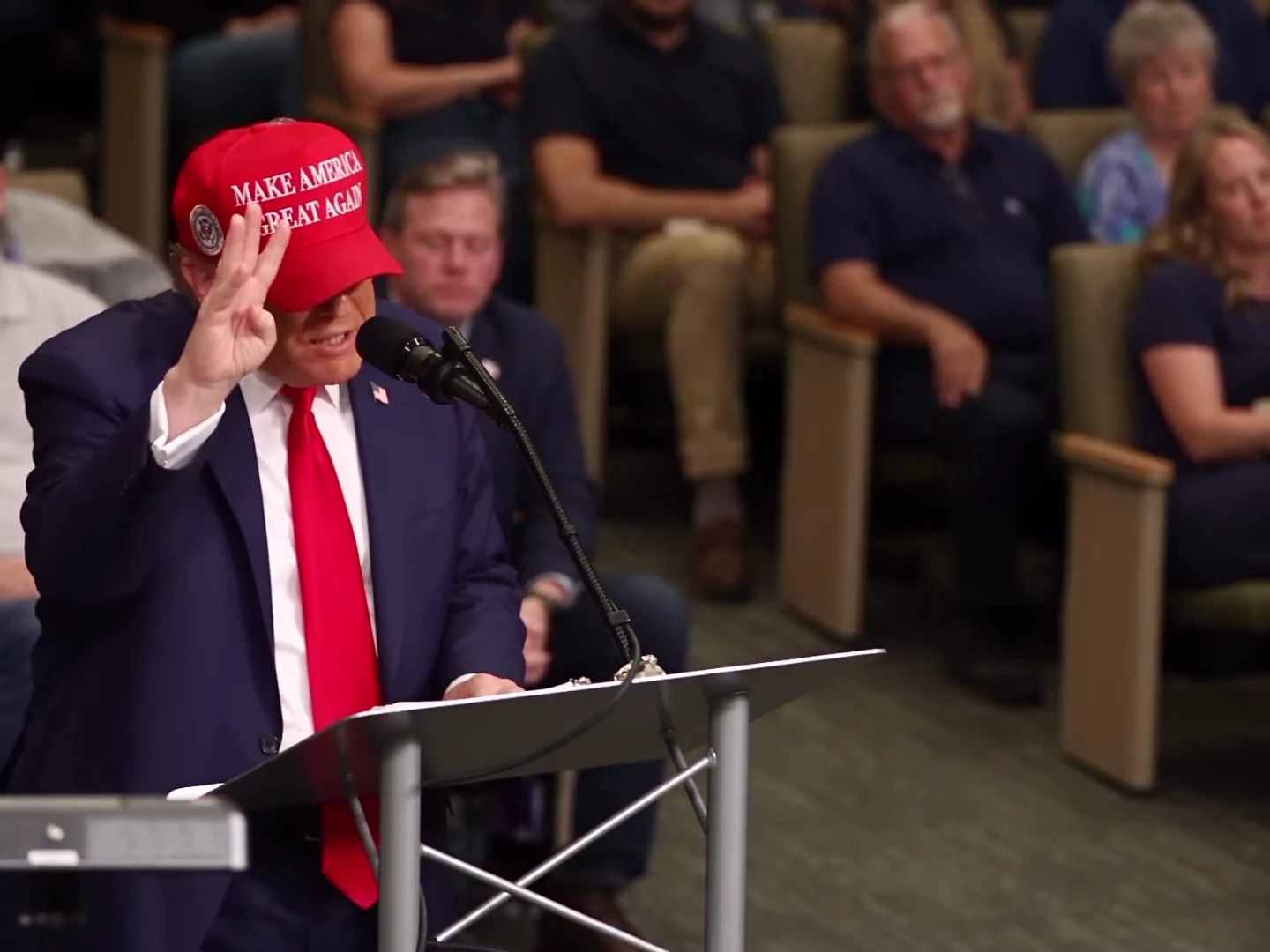
Sorry I’m Nervous is a 4:3 scene, not a native vertical reel. The speaker appears toward the left of the composition and the audience fills the background. The safest starting edit preserves that whole arrangement before adding text or changing the canvas.

Final video
18 seconds
Your input
1 photo
Quality
720p
THE ORIGINAL18 SEC / 4 / 3
Sorry I'm NervousYour photo. This scene.

A wider frame carries the reaction

01

Start with the native frame

The reference is 1440 by 1080 pixels, a 4:3 rectangle. The template follows that proportion for the 18-second video. Choosing 720p or 1080p changes the available quality setting, not the scene into 9:16. Check the exported file before selecting a canvas in your editor.
02

Fit the scene inside a vertical canvas

For a 9:16 post, place the entire 4:3 clip inside the taller canvas and use the spare space above or below for a short caption. This retains the speaker, lectern edge and audience. You can use a plain background; a busy moving background competes with the small gestures that carry the joke.

03

Check three things before cropping

A tight crop must retain the speaker’s face, the raised counting hand and the microphone. Preview the whole clip because the hand moves beyond the face at the opening. A crop that looks good on the poster can cut off fingers a moment later.

04

Keep enough audience to read the aftermath

The speech ends well before the clip does. If you crop away every background face, the later reaction can become a long shot of one speaker with less context. A wider fit lets the audience remain part of the pause after the apology.

05

Put text outside the performance

Try a setup caption in the upper margin and a small AI-made parody label below the fitted frame. If text must overlap the video, avoid the face, fingers and microphone. Read it at phone size, then remove any line that takes longer to read than its on-screen moment.

06

Export once and inspect the posted draft

Repeated resizing softens the face and makes small mouth movements harder to judge. Work from the downloaded result, keep a copy of the native version, and check the platform’s draft preview with sound. Confirm its interface does not cover your caption or cut off the apology.

Explore the Sorry I'm Nervous trend

How to make it

Add a photo for each role shown below. All roles need a photo.

The roles in the Sorry I'm Nervous original reference
Speaker in the Sorry I'm Nervous source video
Speaker
  1. 01

    Choose the speaker

    Upload one sharp photo with the face and hair visible. A front-facing head-and-shoulders photo with an unobstructed mouth gives the template a clear identity reference.

  2. 02

    Review the preview and quote

    Turn on the preview sound to hear the fixed speech. Choose 720p or 1080p and review the quote for the complete 18-second clip.

  3. 03

    Check the speech and reactions

    Review the face, counting fingers and mouth timing through the hesitation and apology. Download the MP4 with the speech soundtrack and label your post as AI-made parody.

01

One speaker to replace

One photo supplies the speaker's face, hair and outfit. The lectern, microphone and seated audience remain part of the scene.

02

Speech included

The download keeps the reference speech, including the hesitation and the line ‘I'm sorry, I'm nervous’. Uploading a photo changes appearance, not the words or voice.

03

Keep the room in view

The 4:3 frame leaves space for both the speaker and the audience reactions. The full sequence runs for 18 seconds.

04

An AI parody reference

The preview is an AI parody, not an authentic recording of the depicted person saying these words. It is the reference the template follows, not an Oakgen-generated example.

Photo tips

  • One clearly visible face per photo
  • Keep the mouth and hair unobstructed
  • Your photo supplies the outfit
  • Hear the full speech before generating
  • Review hands and mouth timing before sharing
  • Use agreed photos and label the result as AI-made parody

Questions & answers

What is the Sorry I'm Nervous AI trend?

It is a lectern speech parody named after the spoken line ‘I'm sorry, I'm nervous’. The speaker counts on their fingers, hesitates and apologises while a seated audience reacts. Oakgen's template replaces that speaker with the character in your photo.

Does the video include the speech?

Yes. The original reference soundtrack is kept in the download, including the spoken lines, hesitation and background sound. It is not a silent template, and your photo does not change the voice.

Can I write my own speech or clone my voice?

This template uses the fixed speech from the preview. It does not accept a replacement script, voice recording or custom dialogue.

Does my photo need the red cap and suit?

No. The template replaces the source speaker's cap, suit, tie, hair and face with your own appearance. A cap is requested only when your photo includes one; lettering and logos are not requested.

Is the preview made with Oakgen?

No. It is an AI parody reference, not an Oakgen-generated result or an authentic speech recording. Label your version as AI-made parody too.

How long is it, and is it vertical?

The video is 18 seconds in a 4:3 frame, with 720p and 1080p options. It keeps the wide room composition rather than cropping away the audience.

Is lip sync guaranteed?

No. The template gives the model the reference performance and timed dialogue cues, then restores the reference speech. Check the generated mouth movements, pauses and apology before sharing.

Can I use a pet photo?

The template instructs the model to retain the animal's species and markings and adapt the gesture to a paw. Pet mouth timing and anatomy need careful review; no pet result is shown here as a verified example.

How much does it cost?

956 credits per 720p video. The quote covers the complete 18-second clip. Review it before generating.

Ideas for your next video

Plan a story, keep your character recognizable, and make the finished clip your own.

Explore the video trend playbook →

Make your Sorry I'm Nervous video

Upload 1 photo. Everything else is set.

Make this video