One character owns the joke
A single photo casts the performer behind the cash-covered table. Use a person, pet or character with a clear face and distinctive appearance.
Video trend
One photo becomes the star of the stacks, toss and money-fan reveal.
Upload a clear photo for the performer you want to replace. The scene and its choreography are already set.
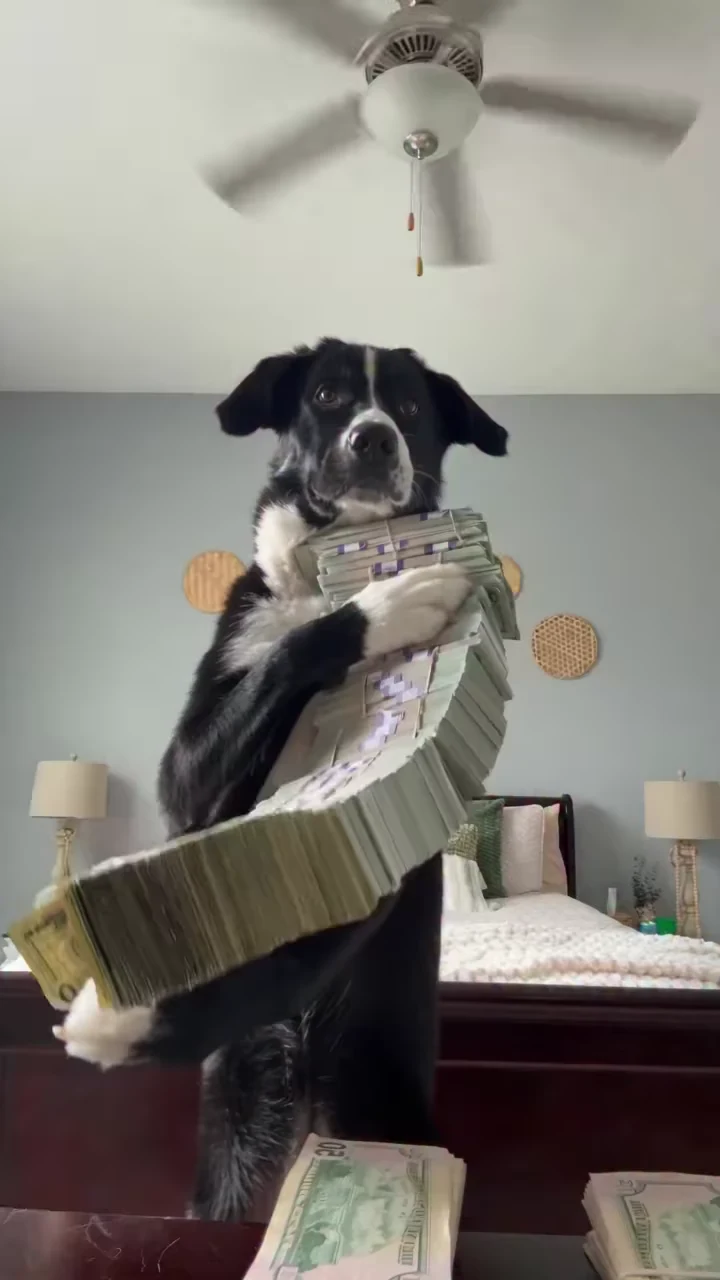 Cash-flex star
Use one clear person, pet or character photo. Keep the face visible and include the clothing or coat details you want the result to follow.
Pick 720p or 1080p. The quote covers the full cash-flex sequence.
Watch the hands or paws, bundles and face as the cash approaches the camera. Download the complete portrait MP4 with the reference sound.
A single photo casts the performer behind the cash-covered table. Use a person, pet or character with a clear face and distinctive appearance.
The reference begins with large bundles, moves through a toss and smaller stack, and ends with banknotes fanned toward the camera. Keep that build-up in your edit.
The supplied Reel's soundtrack matches Beretta (De Los Cerros La Escuela) by El De Las R's. The final video keeps the reference audio.
The roughly 14.71-second video retains the bedroom framing and final fan reveal. The preview is the supplied recreation, not an Oakgen-generated demonstration.
It is a character remake of a money-display sequence: large bundles, a toss and a final banknote fan. The supplied Reel casts a black-and-white dog and captions it Day 1 of selling catnip to kitties. Your photo casts the same lead role.
Yes. Choose one unobstructed photo that shows the animal's face and markings. The template is designed to keep animal traits while following the motion, but generated paws, anatomy and identity still need review.
The supplied soundtrack was matched to Beretta (De Los Cerros La Escuela) by El De Las R's. That is the sound in this reference, not a claim that every money-flex video uses the same recording.
No. There is one character-photo input. The cash, table, bedroom and movement come from the fixed scene; separate prop or location uploads are not available.
The full portrait 9:16 output is approximately 14.71 seconds at 24 frames per second, including the final close-up cash fan.
Fine print, note edges, fingers and paws can change during generation, especially as bundles cover the face or approach the camera. Review the action and identity; this template does not promise exact currency detail.
No. The preview is the supplied cash-flex dog recreation. It illustrates the reference sequence, not a video made from your photo.
We matched the dog recreation to a human money-flex performance: the bedroom, bundle gestures and soundtrack align. The edit keeps the movement and timing of that human performance, while this page previews the supplied dog remake.
796 credits per 720p video. The quote covers the complete video. Review the selected quality's quote in the tool before generation.
Plan a story, keep your character recognizable, and make the finished clip your own.
Plan a cash-flex meme around the stacks, reset and banknote fan. Includes three original caption scripts and a 15-second source beat map.
Check a Cash Flex AI video phase by phase for grip, banknote continuity and the face after the money passes, with a review log that points to the right fix.
The cash-flex dog reel plays Beretta (De Los Cerros La Escuela) by El De Las R's. See the matching human video we found and what is still unknown about it.
Upload 1 photo. Everything else is set.