Your whole look
Your photo guides the dancer’s face, hair, build and clothing. Show your full outfit so the edit can reference it throughout the dance.
Video trend
Take the stage in the Cheba Man dance challenge.
Upload a clear photo for the performer you want to replace. The scene and its choreography are already set.
 Dancer
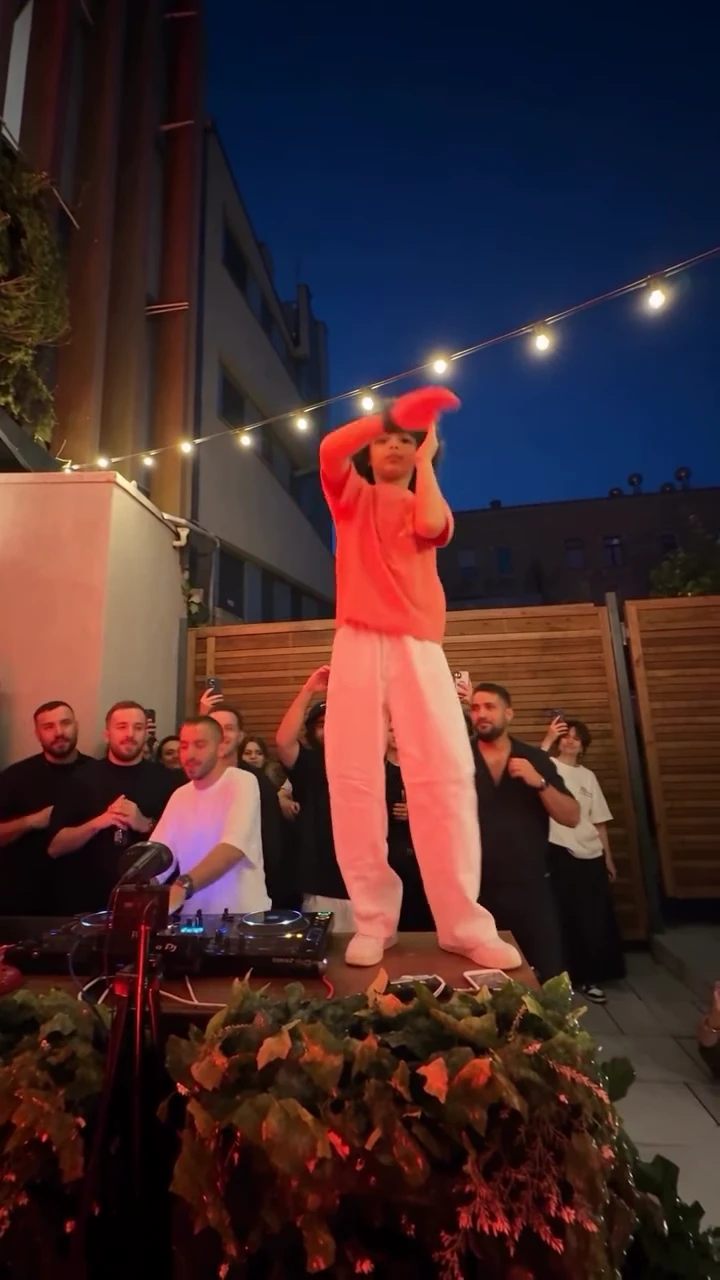
Preview the 16-second party clip and see the lead dancer you will replace.
Upload a clear full-body photo of one person. Keep their face, hair and complete outfit visible.
Check the dancer’s appearance, movement and surrounding scene, then download your portrait MP4 when you are happy with it.
Your photo guides the dancer’s face, hair, build and clothing. Show your full outfit so the edit can reference it throughout the dance.
The edit targets the curly-haired dancer in the red shirt and white trousers on the raised platform. The DJ and guests remain part of the reference scene.
The recipe asks to keep the keyboard, crowd, wall, string lights and hedge in place, following the source camera movement and dance timing.
Oakgen copies the original audio into your finished 16-second video. Review the movement and appearance before sharing your AI edit.
It is a dance challenge seen in party videos. This Oakgen template uses the Reel shared by Nour Hosny, featuring a red-shirted dancer on a raised platform beside a DJ and a crowd.
The recipe requests a full-person replacement using the face, hair, build, clothes and accessories visible in your uploaded photo. Use a full-body photo to show the outfit you want. AI results can vary.
Your photo replaces the main dancer in the red shirt and white trousers. The recipe asks to preserve the DJ, other guests, keyboard, party setting and camera movement. Check the finished edit because AI can alter details.
The template produces a 16-second portrait video using the source party clip. The reference and duration are fixed, so you only need to add your photo and choose a quality.
Yes. Choose 480p, 720p or 1080p before generating. The default is 720p. Higher resolutions cost more; your selected price is shown before you start.
Oakgen copies the original party clip’s audio into your finished video. The source guides the dance timing; review how the movement lines up with the music before posting.
Use a clear full-body photo of yourself or one person you have permission to use, with their face, hair and clothing visible. Some photos may be rejected by the model.
2,362 credits per 720p video. Choose a quality to see its exact price before you generate.
Render time varies with quality and demand. You can leave the page while it runs; the finished video is saved to your assets. Failed generations receive an automatic credit refund.
Yes. Review your edit, then download the MP4 from the tool or your assets and share it on Reels, TikTok or Shorts.
Upload a photo. Everything else is set.