
Video trend

"There Is a Light That Never Goes Out" and the I Love the Smiths AI Trend

Some people find this trend through the song rather than the line. The track the Listener has in the headphones is The Smiths' "There Is a Light That Never Goes Out". This page covers what that means for your video's sound and for posting.

Final video
24.04 seconds
Your input
2 photos
Quality
720p
THE ORIGINAL24.04 SEC / 16 / 9
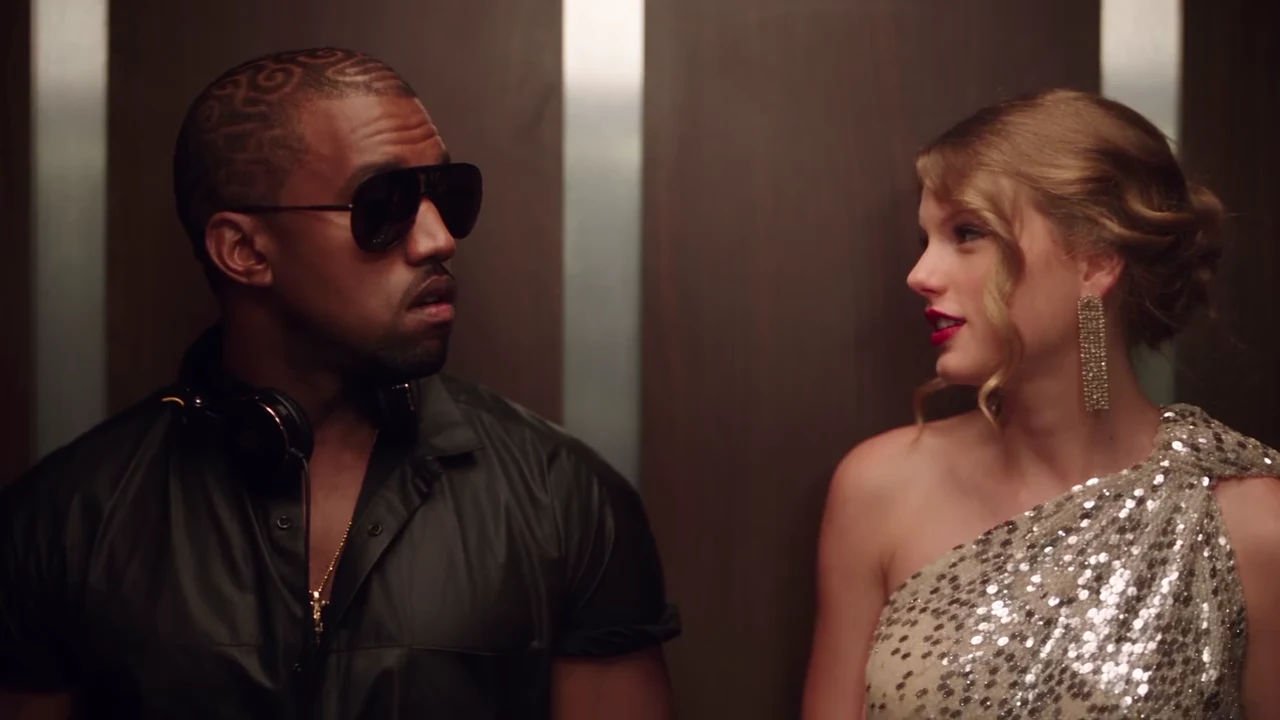
I Love the SmithsYour photo. This scene.

The song, the sound and posting

01

The song

"There Is a Light That Never Goes Out" is by The Smiths, from their 1986 album The Queen Is Dead. In the elevator scene it is the music in the Listener's headphones, and the line the Speaker sings, "To die by your side, such a heavenly way to die", comes from its chorus.
02

What your soundtrack contains

Your video keeps the reference clip's original audio: the two voices, the sung line and the music under the scene. It does not contain your voice, and the voices are not changed to sound like the people in your photos.

03

Why the music is not sent to the model

A well-known recording sent as reference audio can be refused by the video model, so this template sends only the separated dialogue, to time each mouth. The full original soundtrack is put back on the finished video afterwards.

04

Can I change the song?

Not inside the template: the sung line and the timing are tied to this scene. If you post with a different sound, the Speaker will still mouth the original lines, so it looks like a dub. Keep the original sound, or a sound that follows the same scene, so the mouths match.

05

Posting with sound

A platform may mute or limit a video whose soundtrack contains copyrighted music, depending on your account and region. If that happens, pick the platform's own sound for this scene if one is offered; the lines in your video follow the original scene's timing.

06

Make it

Two photos, 24 seconds, 16:9. Open the I Love the Smiths trend, add the Listener and the Speaker, and check the quote before generating.

Explore the I Love the Smiths trend

How to make it

Add a photo for each role shown below. All roles need a photo.

The roles in the I Love the Smiths original reference
Listener in the I Love the Smiths source video
Listener
Speaker in the I Love the Smiths source video
Speaker
  1. 01

    Pick the listener

    Upload a head-and-shoulders photo of the person who wears the headphones: face forward, hair fully visible, no hat. The listener is on screen for the whole video and ends alone in the elevator.

  2. 02

    Pick the speaker and the quality

    Upload the speaker's photo the same way; a photo that also shows the outfit helps, because the speaker walks out in a full-length wide shot. Choose 480p, 720p or 1080p and review the quote, which covers the whole video and both photo preparations.

  3. 03

    Check the scene

    Watch the line land on the speaker's mouth, the headphones come down and the walk-out in the wide shot, then download your 16:9 MP4 with the original sound.

01

The whole scene

All 24 seconds in 16:9: the headphones coming off, "I love the Smiths" said twice, the silent glances, the sung line, then the cut to the wide shot as the doors open and the speaker walks out.

02

The right mouth for every line

Each part of the scene is sent with its own slice of the isolated dialogue, so the speaker's lines and the listener's short replies are timed to the right face. The music is not sent to the video model; the original soundtrack is put back at the end.

03

Your own look

Each person keeps the face, hair and outfit from their own photo. The only prop the template adds is a plain pair of black headphones for the listener.

04

Any pair

Friends, a couple, coworkers, your crush, or you and your dog. The reference pair are replaced by grey silhouettes in the motion guide, so neither of them is reused.

Photo tips

  • One person per photo
  • Head and shoulders, face forward
  • Hair fully visible, no hat
  • Show the outfit if you can
  • Pick two people who look different
  • Use photos of people who agreed

Questions & answers

What is the I Love the Smiths AI trend?

It is the elevator scene from the 2009 film (500) Days of Summer remade with AI: one person stands in an office elevator with headphones on, the person next to them hears the music and says "I love the Smiths", has to say it again, sings a line of the song and walks out, and the first person is left stunned. Since early November 2026 people have been posting AI versions with other faces in the two parts. Oakgen's template puts the two people from your photos in it.

Is it the same as the 500 Days of Summer elevator scene trend?

Yes. "I Love the Smiths", the "500 Days of Summer elevator scene", the "Tom and Summer" elevator meet-cute and "I said I love the Smiths" are names for the same trend, and many posts use the hashtag #ilovethesmithstrend. This template follows the full 24-second scene, from the headphones coming off to the walk-out.

What song is in the I Love the Smiths scene?

The band is The Smiths and the song is "There Is a Light That Never Goes Out", from their 1986 album The Queen Is Dead. In the film it plays through the headphones, and the line the speaker sings, "To die by your side, such a heavenly way to die", is from its chorus. Some people search for the trend as the "There Is a Light That Never Goes Out AI trend".

What do they say in the scene?

The speaker says "I love the Smiths", the listener asks "Sorry?", and the speaker repeats "I said I love the Smiths" and says the listener has good taste in music. After a short surprised reply from the listener, the speaker sings a line, says "I love them" and walks out, and the listener mutters "Holy shit."

Who is in the reference clip?

An AI-made fan version with look-alikes of two famous musicians in the elevator. This template is an unofficial fan-style format, not connected to the film, its studio, The Smiths or anyone shown, and neither look-alike is kept in your video.

Do I need two photos?

Yes. The Listener and the Speaker each need a photo, because the motion guide replaces both people with grey silhouettes, so neither of them is kept.

Which photo plays which part?

Photo 1 is the Listener, on the left with the headphones, who stays in the elevator at the end. Photo 2 is the Speaker, on the right, who says "I love the Smiths" and walks out. To swap parts, swap the photos. Any pair works: two friends, a couple, coworkers or a person and a pet.

Do we wear the gown or the headphones from the clip?

There is no gown or costume: each person wears the outfit, hair and accessories from their own photo. The template adds one prop, a plain pair of black over-ear headphones for the Listener, which come down around the neck early on.

Is the sound kept?

Yes. Your video keeps the clip's original soundtrack, voices and music, whoever is in the photos. You do not record anything, and the voices are not changed to sound like the people in your photos.

Does the mouth match the words?

The scene's dialogue, separated from the music, is sent to the video model with each part of the scene, so the lines are timed to the right face; the music itself is never sent. These are instructions to a model, so check the close-ups and re-run if the lips clearly drift.

Can I do it with my pet?

Yes. Either part can be a dog, a cat or another pet: it keeps its own species, coat and markings and follows the same head turns and walk. The scene reads best when the Speaker is a person, because the Speaker has most of the lines.

Whose photos can I use?

Your own, or photos of people who agreed to be in the video. Do not upload photos of actors, musicians or anyone who has not consented, and label AI videos clearly when you share them.

How long is the video?

24 seconds in 16:9 landscape, in two shots: a close two-shot in the elevator for about 20 seconds, then a wide shot as the doors open and the Speaker walks out.

Is the preview generated by Oakgen?

No. It is the AI reference clip the trend comes from, used as the motion and timing reference, not an Oakgen result. Its two people are never reused.

How much does it cost?

4,939 credits per 720p video. The quote includes both photo preparations and the complete video. Check it before generating.

Ideas for your next video

Plan a story, keep your character recognizable, and make the finished clip your own.

Explore the video trend playbook →

Make your I Love the Smiths video

Upload 2 photos. Everything else is set.

Make this video