ChatGPT
 Claude
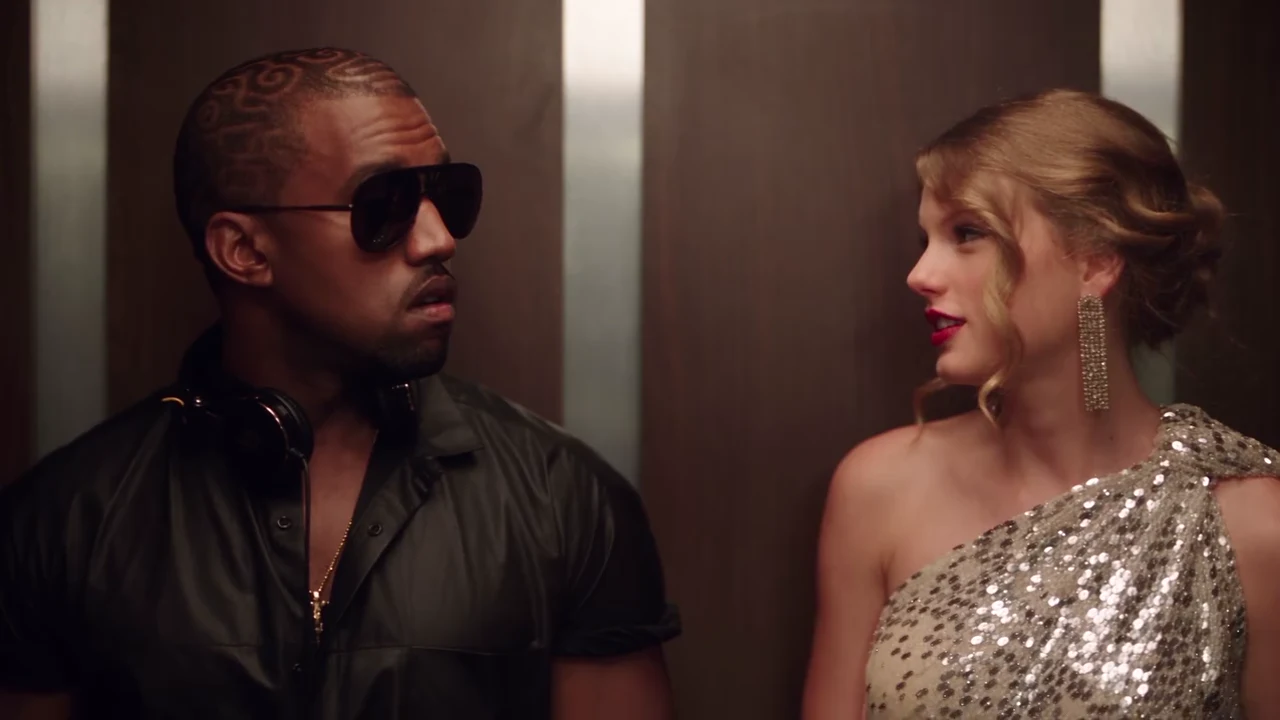
The I Love the Smiths AI trend is the elevator scene from (500) Days of Summer with new faces: one person stands in an office elevator with headphones on, the person beside them says "I love the Smiths", has to say it again, sings a line and walks out, and the first person is left alone and stunned. Oakgen's template puts your two people in it. This guide covers the photos, the quote and the checks that matter for a scene that is mostly faces and timing.
Put your two people in the elevator
Add a Listener and a Speaker photo, review your credit quote and make the 24-second I Love the Smiths video with the scene's original sound.
What the template gives you
One 16:9 landscape clip, 24 seconds long, with the reference clip's own voices and music. You replace both people. The elevator, the camera, the single cut and the timing of every line stay as they are.
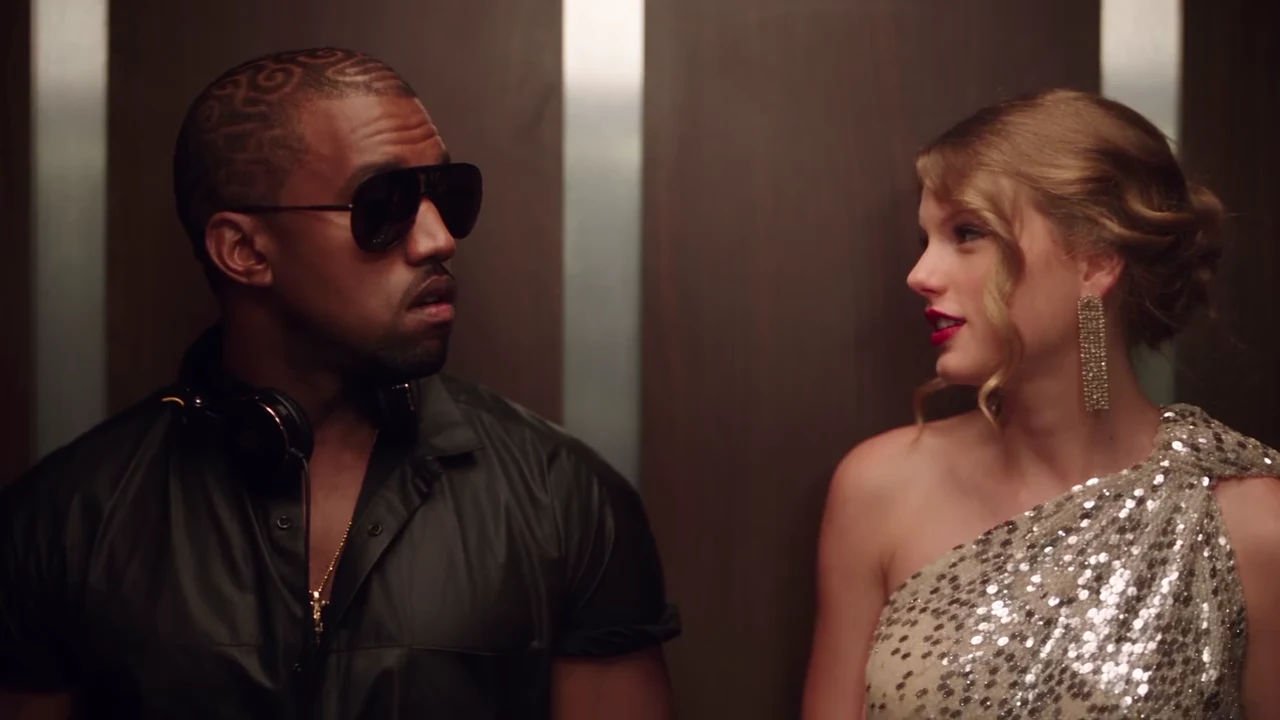
A frame from the AI reference clip, not an Oakgen output. Your Listener takes the place of the person on the left and your Speaker the place of the person on the right.
| Time (about) | What happens |
|---|---|
| 0 to 2 s | The Speaker says "I love the Smiths"; the Listener pulls the headphones down |
| 2.4 s | The Listener asks "Sorry?" |
| 3 to 4.5 s | "I said I love the Smiths" |
| 4.5 to 9.5 s | Silent glances |
| 9.5 to 12 s | The compliment about good taste in music and the Listener's surprised reply |
| 13 to 17.5 s | The Speaker sings a line and says "I love them" |
| 20 s | Cut to the wide shot; the doors open |
| 20 to 23 s | The Speaker walks out on the right |
| 23 s | The Listener, alone, mutters the last line |
Every line and who says it is on "I said I love the Smiths": every line and who says it.
Step 1: Pick the Listener's photo
The Listener is on screen for all 24 seconds and ends alone in the elevator, so the face matters most here. Use a head-and-shoulders photo, face forward, with the hair fully visible and no hat. Sunglasses only if you want them in the video: the template keeps what the photo shows and removes what it does not.
You do not need headphones in the photo. The template adds one plain pair of black over-ear headphones, which come down around the neck in the first three seconds.
Step 2: Pick the Speaker's photo
The Speaker has most of the lines and walks out in a full-length wide shot, so a photo that also shows the outfit helps. If the photo only shows the upper body, the template gives the Speaker plain trousers or a skirt and simple shoes that match the top, rather than the gown from the reference clip.
Pick two people who look different. Two similar faces in similar clothes are harder for the model to keep apart. Ideas for pairings, including a pet as the Listener, are on I Love the Smiths trend ideas.
Step 3: Read the quote
The quote covers the whole 24-second video and both photo preparations. It is billed as two parts of 12 and 13 seconds, because the scene is generated in two halves and joined. 480p is the cheapest way to see the scene; 720p and 1080p cost more.
Step 4: Check the result
Watch it once with sound and once without:
- The first line lands on the Speaker's mouth, and "Sorry?" on the Listener's.
- The headphones are plain, with no logo, and stay around the Listener's neck after they come down.
- Hair and outfits match each photo in the close shot and after the cut.
- The wide shot: both faces are still recognisable and the Speaker walks out on the right.
If a line lands on the wrong face, re-run. The full checklist is in Check your I Love the Smiths video before you post.
Step 5: Post it
Label the video as AI-made and only post photos of people who agreed to be in it. The soundtrack contains music, so the platform may mute or limit it in some regions; the song guide covers what to do then. For where the scene comes from and why it keeps coming back, read What the I Love the Smiths trend means.
Make your I Love the Smiths video
Two photos, one elevator, 24 seconds with the scene's sound.
Frequently asked questions
How many photos do I need for the I Love the Smiths AI video?
Two, and both are required: one for the Listener, who wears the headphones on the left, and one for the Speaker, who says "I love the Smiths" and walks out.
Do I have to record my voice?
No. The video keeps the reference clip's original voices and music. Your photos set the faces, hair and outfits, not the voices.
Is the music sent to the AI model?
No. Only the dialogue, separated from the music, is sent with each half of the scene so each line is timed to the right mouth. The original soundtrack is put back on the finished video.
How long is the video?
24 seconds in 16:9 landscape: a close two-shot in the elevator, then a wide shot as the doors open and the Speaker walks out.
Is the preview video made by Oakgen?
No. It is the AI reference clip the template is built from. Nothing in this guide is an Oakgen result.