
Video trend

Dog Lift Prank AI Video From Two Photos

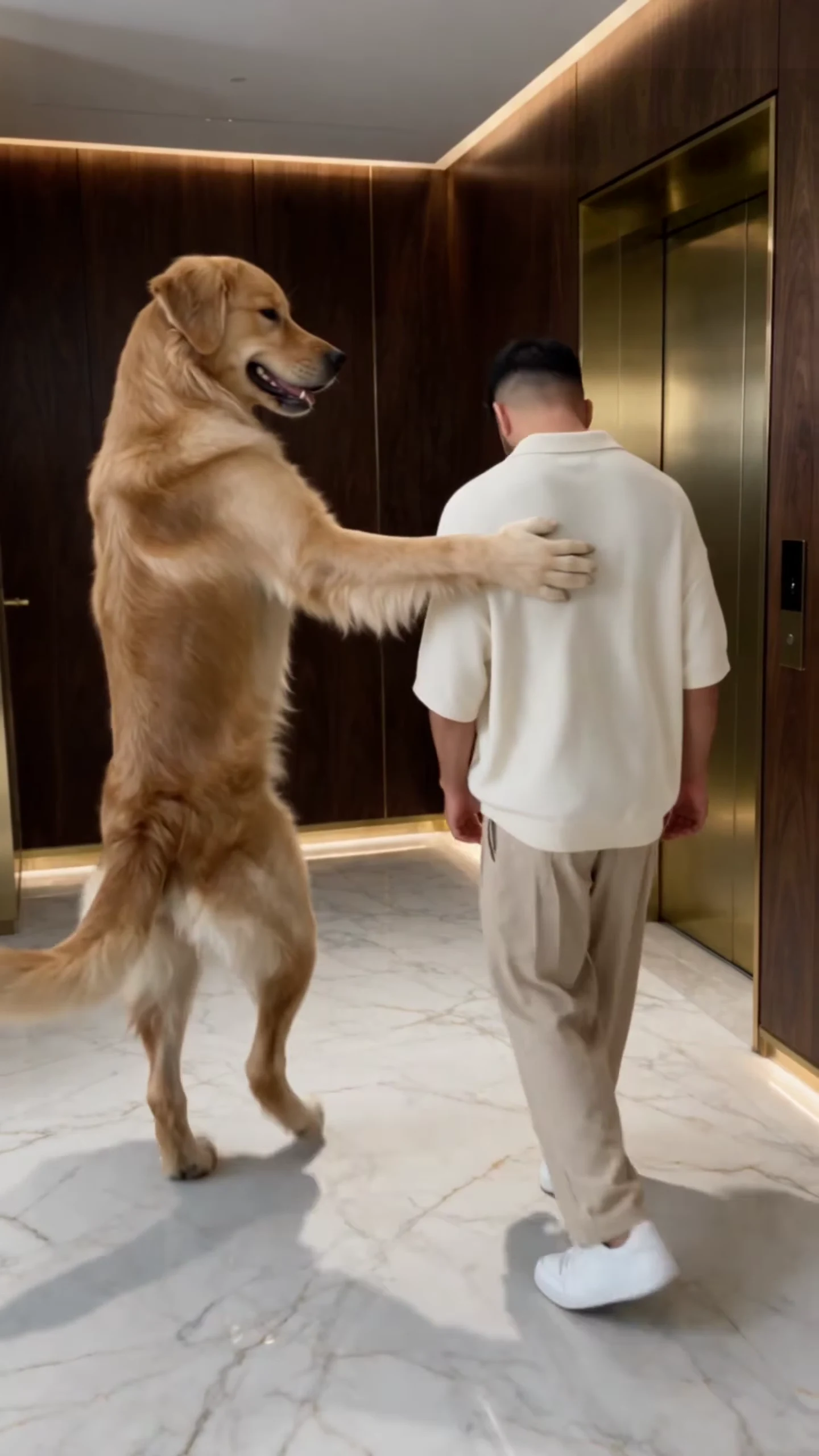
In the dog lift prank a golden retriever walks upright beside a man to a gold lift, presses the button for him, waits until he bends over to take off his sneakers and kicks him in, then throws the sneakers after him. In the US the same clip reads as an elevator prank. Oakgen's Dog Elevator Prank template recasts both of them from two photos. This page is about those two photos: what each one changes and what neither of them can change.

Final video
17.08 seconds
Your input
2 photos
Quality
720p
THE ORIGINAL17.08 SEC / 9 / 16
Dog Elevator PrankYour photo. This scene.

What each photo controls in the lift prank

01

Two roles, two required photos

The Prankster is the one who walks upright, smacks, presses the button, kicks and throws the shoes. The Victim is the one who gets kicked into the lift and ends up on its floor. Both slots need a photo before the template starts; an empty slot does not fall back to the original dog or man, because the motion guide replaces both of them with grey silhouettes.
02

What the Prankster photo sets

Species, face, eyes, ears, coat or hair, markings, build and any outfit in the photo. A dog stays a dog and does the whole routine on its hind legs, pressing the button and throwing with its front paws. A person stays a person and does it with hands and feet. A character keeps its own look. Nothing of the original golden retriever is kept unless your photo shows a golden retriever.

03

What the Victim photo sets

Face, hair, body and outfit, or a pet's species and coat. The one thing the template adds is the pair of white sneakers: the Victim takes them off at the lift door and the Prankster throws them in, so they are a prop of the scene rather than part of your photo. The original off-white polo and beige trousers are not kept; the Victim wears what your photo shows.

04

What stays fixed

The marble lobby with its dark walnut panels and warm cove lighting, the brushed-gold lift and its two orange armchairs inside, the handheld camera move, every action and its timing, and the original sound. You cannot change the room, add a third character or rearrange the beats inside the template.

05

Photos that work for each slot

One subject per photo, the whole body in frame, the face toward the camera, even light. For the Prankster a standing photo helps most, because it stands upright for most of the 17 seconds and walks right past the lens at the end. For the Victim a full-length photo matters because he bends over, falls and sits on the floor, so legs and feet are on screen a lot.

06

Lift or elevator: the same clip

The reference post itself tags the clip as both a lift prank and an elevator prank, so both words describe the same 17-second scene. The template is the same whichever word you search; only the caption you write changes.

Explore the Dog Elevator Prank trend

How to make it

Add a photo for each role shown below. All roles need a photo.

The roles in the Dog Elevator Prank original reference
Prankster in the Dog Elevator Prank source video
Prankster
Victim in the Dog Elevator Prank source video
Victim
  1. 01

    Add two photos

    Upload the prankster and the victim, one subject per photo: a pet, yourself, a character or someone who agreed to appear. Full-body photos with the face, legs and paws or hands visible work best.

  2. 02

    Review quality and price

    Choose 480p, 720p or 1080p and review the quote. It includes both photo preparations and the full video.

  3. 03

    Check the kick and the ending

    Watch that paws stay paws when the prankster presses the button and throws the sneakers, that the two never swap at the kick, and that the close pass at the end keeps the prankster's face, then download your portrait MP4.

01

Anyone can be the prankster

The reference prankster is a golden retriever walking upright, but your photo decides: your own dog, a cat, a friend or a character. An animal keeps its species, face, coat and tail; a person stays a person.

02

Anyone can be the victim

The victim gets smacked, pulls off a pair of white sneakers at the lift, is kicked in and ends up sitting on the lift floor. Put yourself, a friend or a second pet in that role. The white sneakers are the one prop the template adds.

03

The real lobby, the same timing

The marble lobby, the walnut panels and the gold lift stay as they are. The template follows the reference beat for beat in one continuous 17-second handheld take, with the original spoken lines and hit sounds.

04

The reference, not a result

The preview is the AI reference clip the trend comes from, with its watermark removed. It shows the motion and timing your video follows, not an Oakgen result.

Photo tips

  • One subject per photo
  • Both photos are required
  • Full body, face visible
  • Pets keep their species
  • Even light, no heavy shadows
  • Check the kick and the close pass

Questions & answers

What is the Dog Elevator Prank trend?

It is a 17-second portrait AI clip: a golden retriever walks upright beside a man to a gold lift in a marble lobby, smacks him on the neck, presses the call button for him, waits while he bends over to pull off his white sneakers, then kicks him into the lift and throws the sneakers in after him before strolling past the camera. Oakgen's template puts your two photos in those two roles and keeps the lobby, the timing and the sound.

Why is it called Dog Elevator Prank?

We did not find an established name for this clip, so Oakgen names it by what happens. The posts around it use words like lift prank, elevator prank and dog prank; lift and elevator mean the same thing here.

Do I need both photos?

Yes. Both roles are replaced in every video, so the prankster and the victim each need a photo before you can generate. Neither performer from the reference is kept.

Can my dog or cat be the prankster?

Yes. The prankster keeps the uploaded animal's species, face, coat and markings and walks upright on its hind legs, using its front paws for the smack, the button and the sneakers. Bodies very different from a tall retriever vary more, so review the video before sharing.

Can a pet be the victim, or a person the prankster?

Yes. Either role takes a pet, a person or a character photo and keeps its species. A person prankster does the walk, the smack and the kick with hands and feet. A pet victim still takes off the white sneakers at the lift, which is the oddest moment to check.

What does the victim wear?

Their own outfit from the photo, plus one template prop: plain white sneakers that come off at the lift and get thrown in after them.

Is there music?

No song. The video keeps the reference's original sound: short spoken lines and the hit sounds of the smack, the kick and the sneakers landing. Your photos do not change the voices.

Whose photos can I use?

Your own pets, yourself, or people who agreed to be in the video. Do not upload photos of celebrities, public figures or anyone who has not consented, keep it obviously a joke and label AI videos clearly when you share them.

How long is the video?

About 17 seconds in portrait 9:16, one continuous take from the walk to the lift to the prankster walking out of frame.

Is the preview generated by Oakgen?

No. It is the AI reference clip the trend comes from, with its watermark removed, not an Oakgen result. Review paws, hands and faces in your video before sharing.

How much does it cost?

3,596 credits per 720p video. The quote includes both photo preparations and the complete video. Check it before generating.

Ideas for your next video

Plan a story, keep your character recognizable, and make the finished clip your own.

Explore the video trend playbook →

Make your Dog Elevator Prank video

Upload 2 photos. Everything else is set.

Make this video