ChatGPT
 Claude
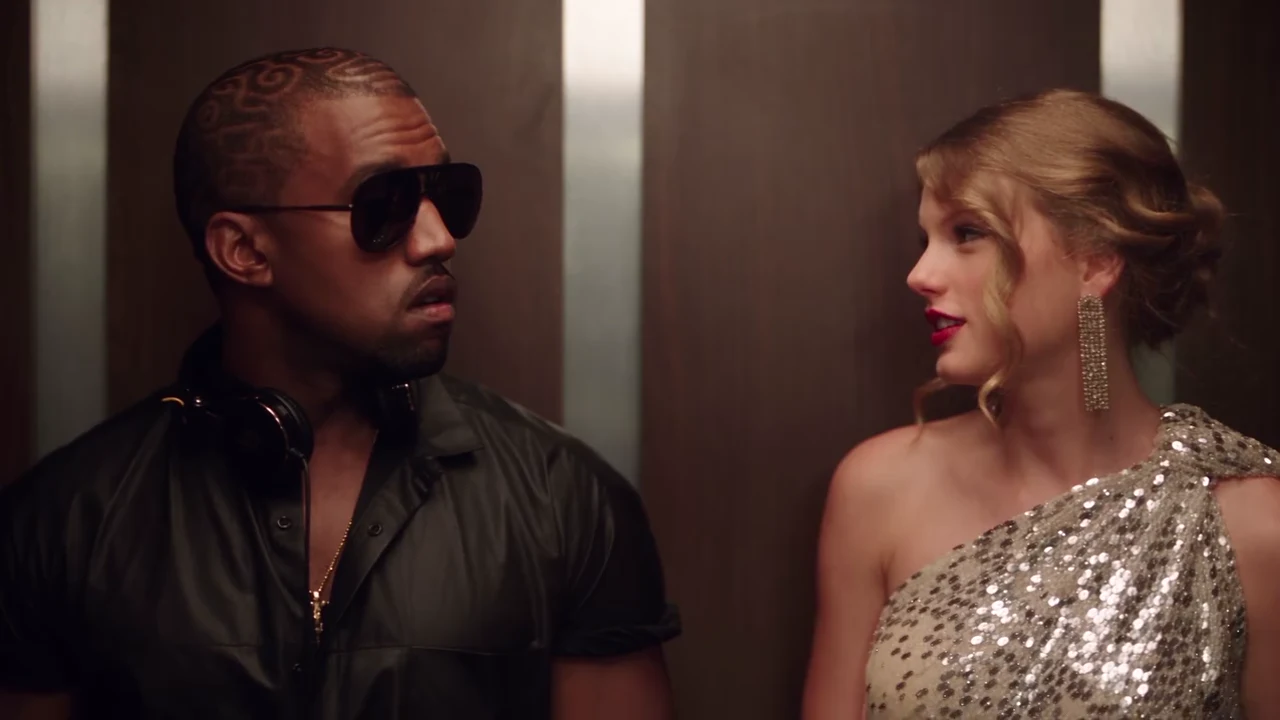
The I Love the Smiths scene is all faces and timing: a line, a missed line, a long pause, a walk-out. That makes small mistakes easy to spot. This checklist goes through the finished 24-second video in the order the scene plays, so you can decide in two viewings whether to post it or run it again.
Haven't made yours yet?
Add a Listener and a Speaker photo and make the 24-second elevator scene.
Watch it twice
Watch once with sound for the lines and once muted for faces, hands and clothes. Muted, you notice a wrong outfit or a melting hand much faster.
1. The first line is on the Speaker's mouth (0 to 2 s)
"I love the Smiths" belongs to the Speaker, on the right. The Listener should still be facing ahead with the headphones on. If the Listener is mouthing the line, re-run: the whole scene depends on who says it.
2. "Sorry?" is the Listener's (about 2.4 s)
A quick, small reply as the headphones come down. It is easy to miss; watch the Listener's mouth, not the Speaker's. The full script with timings is on "I said I love the Smiths": every line and who says it.
3. The headphones
One plain black pair, no logo or lettering, on the head at the start, then around the neck for the rest of the video. They should not reappear on the head or move to the Speaker.
4. The pause stays a pause (4.5 to 9.5 s)
Nobody should talk here. Glances, a half-smile, nothing more. Extra mouth movement in the pause usually means the model drifted; check the next line still lands where it should.
5. Hair, outfits and accessories match the photos
Compare each person with their photo: hairline, length and colour, glasses or no glasses, the outfit. The reference clip had sunglasses, a chain, long earrings and a sequinned gown; none of them should appear unless your photo has them. Check again after the cut at about 20 seconds: the wide shot is where outfits most often change.
6. The wide shot (20 to 24 s)
The doors open, the Speaker walks out on the right, the Listener stays. The faces are small here, so look for recognisable hair and clothing rather than detail. Both people should still be the same two people, with no third person and no swapped parts.
7. The sound
Your video keeps the reference clip's voices and music. The voices are not yours and are not changed to sound like your photos; that is expected. The soundtrack contains music, so a platform may mute or limit it in some regions. The song guide covers your options.
8. Caption and label
Label it as AI-made. Caption ideas that fit the scene: "how it started", "when someone recognises the song in your headphones", or tag the friend who got you into the band. Only post people who agreed to be in it.
When to re-run
Re-run when a line clearly lands on the wrong face, when a face stops looking like its photo after the cut, or when the walk-out goes wrong. Do not re-run for small differences in expression. If the same problem repeats, try clearer, front-facing photos with the hair fully visible; the generator page explains what each photo controls.
New to the trend? Start with What the I Love the Smiths trend means or the step-by-step How to make the I Love the Smiths AI video.
Make your I Love the Smiths video
Two photos, one elevator, 24 seconds with the scene's sound.
Frequently asked questions
When should I re-run my I Love the Smiths video?
When a line clearly lands on the wrong person, when a face no longer looks like its photo after the cut, or when the Speaker does not walk out. Small differences in expression are normal.
Why does the Listener have headphones I did not upload?
The headphones are part of the scene. The template adds one plain black pair with no logo; everything else the Listener wears comes from their photo.
Can I crop the video to vertical?
Yes, after downloading. The template makes 16:9 landscape. In the close shot the two people stand far apart, so a 9:16 crop shows one at a time; the wide shot crops more easily.
Should I label it as AI?
Yes. Label the video as AI-made and only post photos of people who agreed to be in it.