
Video trend

What song is the POPSTAR AI trend?

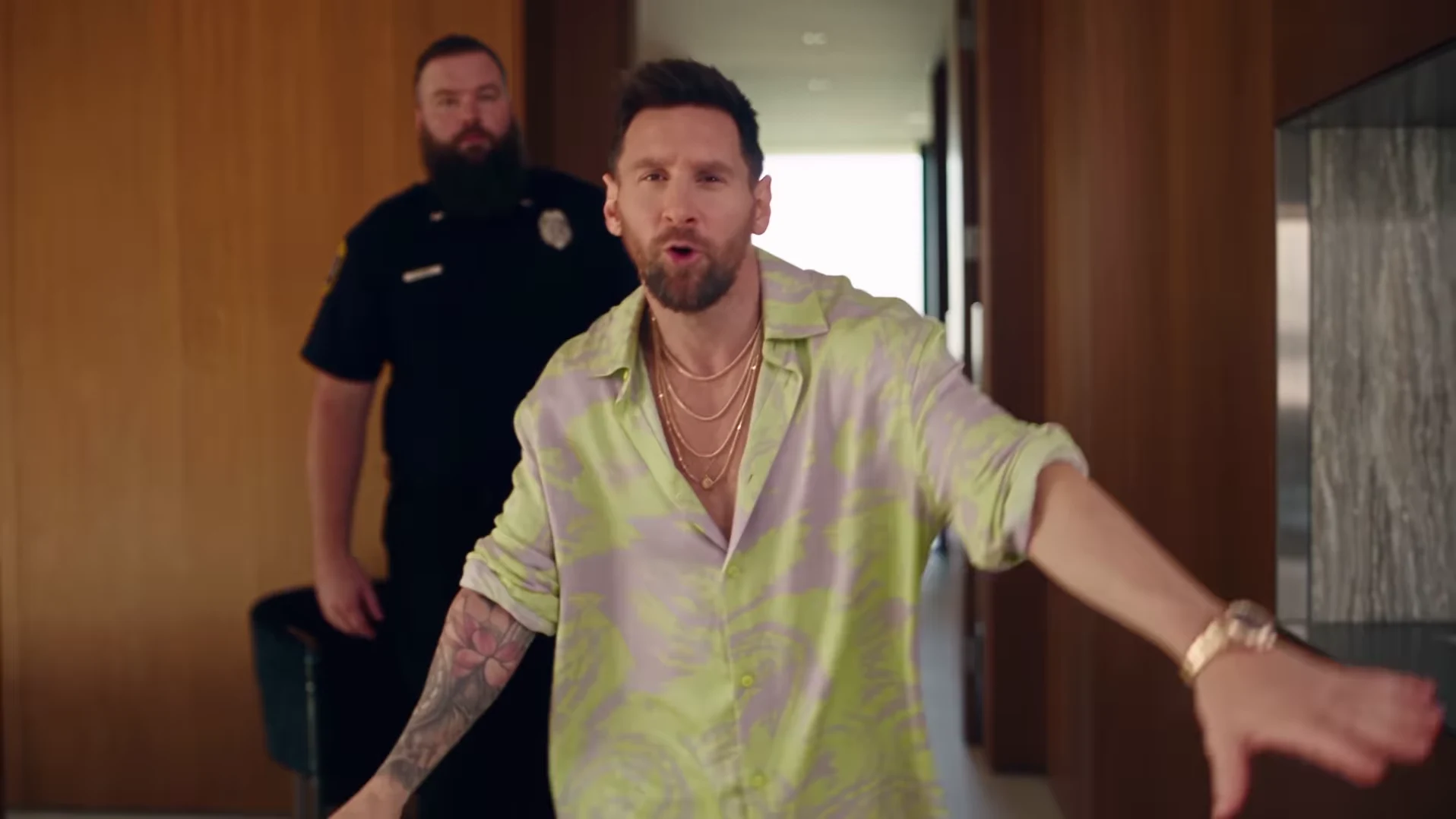
The song connection is POPSTAR by DJ Khaled featuring Drake; Justin Bieber stars in its official music video. Both Oakgen POPSTAR durations include sound from @nicolesgrid's separate AI reference automatically: the matching first 15 seconds for the 15s opening cut, or the full reference soundtrack for the default 30s walkthrough, at the original speed. Instagram labels that reel Original audio, which does not verify it as the commercial master. The preview is that credited external reference, not a verified Oakgen generation. Start by listening, then decide whether you want any sound changes.

Final video
30.04 or 15 seconds
Your input
1 photo
Quality
720p
THE ORIGINAL30.04 SEC / 16 / 9
Video length
Make the 30.04s version
POPSTARSource: @nicolesgrid

Listen to the included reference audio and check your download

01

Separate the recording credit from the video lead

Search for POPSTAR with DJ Khaled and Drake to identify the recording. Justin Bieber stars in the official music video; that appearance does not make it a Bieber recording. The AI reference credited to @nicolesgrid is a separate reel, whose caption credits Higgsfield Genjutsu. Keep those credits distinct when describing your post. Oakgen is independent of the artists and reference creator.

02

Know what audio comes with the download

New POPSTAR generations include the reference soundtrack automatically for either duration. The 15s cut uses the matching first 15 seconds; the 30s version keeps the full reference audio. You do not need to choose music or add a track to hear the finished walkthrough. This is the sound from the reference reel, labeled Original audio, rather than a verified commercial master. Its inclusion does not establish permission for reuse. Older silent files you already downloaded do not gain audio when the template is updated.

03

Unmute the preview and check a silent file

Unmute the preview player, start playback and check both player and device volume. Then open the untouched download in a local player; a muted preview alone does not mean the file has no audio. If the download seems silent, try another player and confirm it is a new generation rather than an older silent file. If a new file is silent in both players, retain it and the generation details for support before spending credits on a retry.

04

Make personal sound and captions optional edits

Keep the original download with its included audio. In a separate editor, you can mute it, record personal narration or replace the soundtrack with other audio you are permitted to use. Captions and a vertical crop are optional edits there too. If you replace the sound, mute the existing track first so the two recordings do not overlap unintentionally. Keep a separate edited copy so you can return to the original.

05

Review timing through your selected cut

Keep the audio and video together when trimming the included soundtrack. Listen through your selected cut. The 15s version ends at the start of the stairs, before the four wall portraits, bottle handoff and poolside finish; picture and sound ending there is expected. For 30s, check the later stairs and final doorway too. Included audio does not guarantee perfect lip sync. If you choose a different excerpt, align an entrance or gesture first, then review the rest; one matching beat does not establish that every mouth movement fits. Avoid stretching the entire video to force one moment into place.

06

Check both audible and muted playback before sharing

Reopen the finished edit outside the editor to confirm that it contains your chosen sound and the complete action from your selected duration. Check the opening face and guard in either cut, plus the staircase portraits and poolside ending in 30s. Then mute playback and check that captions still make sense. A line such as 'Me after my first sale' can explain the joke without music. You can deliberately export a silent caption version; describe the result as your AI recreation and check audio permissions for your intended post.

Explore the POPSTAR trend

How to make it

Upload a clear photo for the performer you want to replace. The scene and its choreography are already set.

The roles in the POPSTAR original referenceTour presenter
  1. 01

    Add one photo

    Upload a clear photo showing one face for the lead role.

  2. 02

    Choose a length and quality

    Select 15 or 30 seconds and a quality. The displayed credit price updates for your selection and includes preparing your photo.

  3. 03

    Review and download

    Check the presenter, scene transitions and sound, plus the wall portraits in the full version, then download your video.

01

Choose 15 or 30 seconds

The 15-second opening covers the bottle-carrying entrance, following guard and start of the stairs. Choose the full 30-second version for the wall portraits, bottle handoff and poolside finish. Preview either cut before choosing.

02

Your face and wall portraits

One photo guides the lead in both versions and their likeness in the four wall portraits in the 30-second version. The guards are background characters. Review the generated likeness through the turns and staircase shots.

03

Reference soundtrack included

The downloaded video keeps the audio from the credited reference, with its original timing. Unmute the preview to hear it. Captions or a different soundtrack can be added after download.

Photo tips

  • Show one face clearly in each photo
  • Use even lighting and an unobstructed face
  • Use photos you have permission to use
  • Review the full AI result before sharing

Questions & answers

What is the POPSTAR AI trend?

It recreates the mansion-walk scene associated with POPSTAR by DJ Khaled featuring Drake. Justin Bieber stars in the official music video. Oakgen uses the credited @nicolesgrid reference to put your photo in the lead role, including the wall portraits, and keeps that reference's soundtrack.

Is this the Drake or Justin Bieber POPSTAR trend?

Those names refer to the same song and music-video connection: DJ Khaled featuring Drake is the recording credit, and Justin Bieber stars in the official video. Oakgen is independent of these artists and does not provide a celebrity photo preset.

How do I make the POPSTAR AI trend?

Add one clear photo for the presenter, choose 15 or 30 seconds and a quality, and check the displayed price before generating. Review the face, guard, staircase and sound, plus the four wall portraits in the full version. Add captions or change the soundtrack in a separate editor if you want.

Is this the template previously called Mansion Tour?

Yes. POPSTAR is the updated public name for the same one-photo template. Your existing Mansion Tour link still opens this trend.

Is the preview an Oakgen result?

No. The preview is the original Instagram reference, credited above. It shows the scene to recreate, not a verified Oakgen output. Oakgen is independent of the original creator.

Does this use the whole reference?

The default 30-second version covers the full 30.04-second reference. The 15-second option uses its opening at the same speed, ending during the start of the staircase descent. Choose 30 seconds for the four wall portraits, bottle handoff and poolside finish. AI-generated details and motion can differ from the reference.

Can I choose 15 or 30 seconds?

Yes. Both lengths use one presenter photo and include the matching reference soundtrack. Switch between their previews, then choose a quality and check the updated credit price before generating.

How many photos do I need?

One clear photo for the lead role. Background characters do not need photos.

Does the finished video have sound?

Yes. New videos keep the soundtrack from the credited @nicolesgrid reference. Unmute the preview to hear it and check your downloaded video with sound enabled. Older downloads made from the previous silent reference are unchanged. You can replace the soundtrack after download if needed.

How much does it cost?

1,912 credits for 15 seconds or 3,874 credits for the full 30-second version at 720p. Both include preparing your photo. The selected price updates with length and quality before you generate.
Ideas for your next video

Plan a story, keep your character recognizable, and make the finished clip your own.

Explore the video trend playbook →

Make your POPSTAR video

Upload 1 photo. Everything else is set.

Make this video