
Video trend

POPSTAR AI bodyguard video: who does your photo replace?

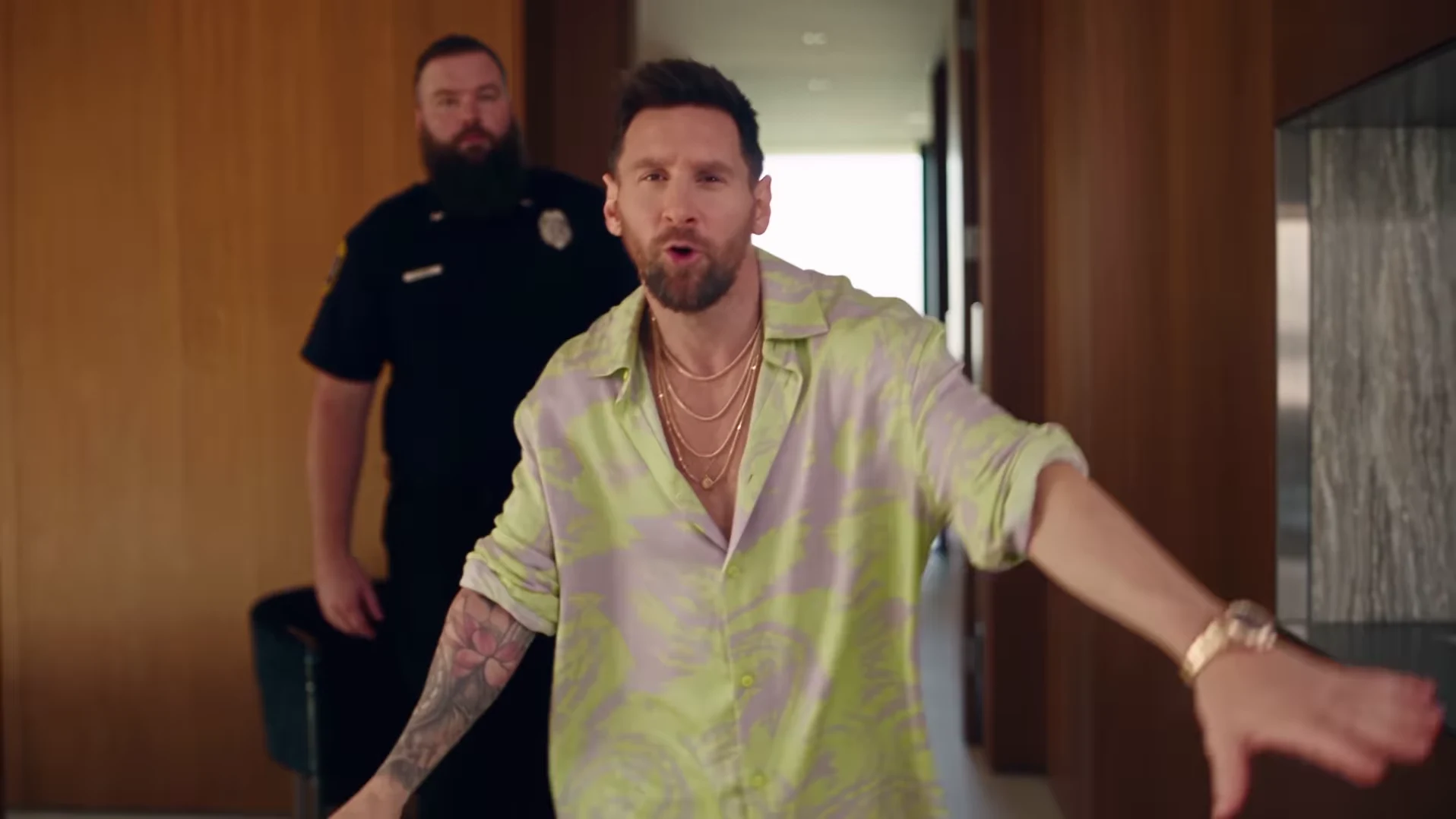
In the POPSTAR reference credited to @nicolesgrid, the person carrying the green bottle leads the mansion walk while a security guard follows. Oakgen takes one photo for that lead. Choose the default 30s full walkthrough or the 15s opening cut, which includes the bottle entrance, following guard, landing and start of the stairs at the same speed. The short cut ends before the four wall portraits, bottle handoff and poolside finish. Guards and party guests have no separate upload roles. The preview is an external reference, not a verified Oakgen result.

Final video
30.04 or 15 seconds
Your input
1 photo
Quality
720p
THE ORIGINAL30.04 SEC / 16 / 9
Video length
Make the 30.04s version
POPSTARSource: @nicolesgrid

Follow the lead through the bodyguard scene

01

Recognize the entrance before choosing a role

The lead starts in the upstairs corridor with a bottle, approaches the camera and opens their arms. The guard follows behind. Your selected photo belongs to the person making that entrance, not the taller background figure. Watching the first few seconds of the credited reference is a useful way to confirm that this is the POPSTAR scene you want to remake.

02

One input follows the lead into later shots

Both durations follow the same person from the entrance along the glass-railed landing to the start of the stairs. The 30s version continues down the staircase and shows the lead again closer to the camera downstairs. Its four wall portraits are also intended to show that person's likeness. You do not need separate photos for each camera angle, and adding a collage of several faces will not assign them to different people.

03

The guard is not a configurable co-star

This template has no separate bodyguard or party-guest photo slot. If the idea requires you and a friend as two independently chosen characters, this particular scene does not provide that cast control. Choose the lead photo because it suits the entrance and gestures; the guards and guests remain background characters rather than personalized additional performances.

04

Check the overlap at the landing and stairs

Watch where the guard passes behind the lead and where a railing crosses the body. Look for a face changing between people, clothing merging or an arm appearing to belong to the wrong person. Then watch the same moment at normal speed. A still frame can reveal a defect, while playback tells you whether it interrupts the scene.

05

Follow the bottle and the hands

Check the green bottle and the lead's grip during the entrance and broad gestures in either duration. In the 30s version, also inspect the downstairs return and the handoff as the lead turns toward the pool. That handoff should leave one bottle with the guard rather than duplicating it or keeping it in the lead's hand. The 15s cut ends before the handoff. If you trim a flawed moment later, preserve enough of the movement for the remaining action to make sense.

06

Keep the relationship visible in the final edit

A tight vertical crop can remove the guard and turn a recognizable entrance into a generic close-up. Compare the full landscape frame with your planned crop at the entrance and on the stairs before posting. For a joke about acting famous after a small achievement, the contrast between the confident lead and the following guard is useful visual context. Add that caption in a separate editor.

Explore the POPSTAR trend

How to make it

Upload a clear photo for the performer you want to replace. The scene and its choreography are already set.

The roles in the POPSTAR original referenceTour presenter
  1. 01

    Add one photo

    Upload a clear photo showing one face for the lead role.

  2. 02

    Choose a length and quality

    Select 15 or 30 seconds and a quality. The displayed credit price updates for your selection and includes preparing your photo.

  3. 03

    Review and download

    Check the presenter, scene transitions and sound, plus the wall portraits in the full version, then download your video.

01

Choose 15 or 30 seconds

The 15-second opening covers the bottle-carrying entrance, following guard and start of the stairs. Choose the full 30-second version for the wall portraits, bottle handoff and poolside finish. Preview either cut before choosing.

02

Your face and wall portraits

One photo guides the lead in both versions and their likeness in the four wall portraits in the 30-second version. The guards are background characters. Review the generated likeness through the turns and staircase shots.

03

Reference soundtrack included

The downloaded video keeps the audio from the credited reference, with its original timing. Unmute the preview to hear it. Captions or a different soundtrack can be added after download.

Photo tips

  • Show one face clearly in each photo
  • Use even lighting and an unobstructed face
  • Use photos you have permission to use
  • Review the full AI result before sharing

Questions & answers

What is the POPSTAR AI trend?

It recreates the mansion-walk scene associated with POPSTAR by DJ Khaled featuring Drake. Justin Bieber stars in the official music video. Oakgen uses the credited @nicolesgrid reference to put your photo in the lead role, including the wall portraits, and keeps that reference's soundtrack.

Is this the Drake or Justin Bieber POPSTAR trend?

Those names refer to the same song and music-video connection: DJ Khaled featuring Drake is the recording credit, and Justin Bieber stars in the official video. Oakgen is independent of these artists and does not provide a celebrity photo preset.

How do I make the POPSTAR AI trend?

Add one clear photo for the presenter, choose 15 or 30 seconds and a quality, and check the displayed price before generating. Review the face, guard, staircase and sound, plus the four wall portraits in the full version. Add captions or change the soundtrack in a separate editor if you want.

Is this the template previously called Mansion Tour?

Yes. POPSTAR is the updated public name for the same one-photo template. Your existing Mansion Tour link still opens this trend.

Is the preview an Oakgen result?

No. The preview is the original Instagram reference, credited above. It shows the scene to recreate, not a verified Oakgen output. Oakgen is independent of the original creator.

Does this use the whole reference?

The default 30-second version covers the full 30.04-second reference. The 15-second option uses its opening at the same speed, ending during the start of the staircase descent. Choose 30 seconds for the four wall portraits, bottle handoff and poolside finish. AI-generated details and motion can differ from the reference.

Can I choose 15 or 30 seconds?

Yes. Both lengths use one presenter photo and include the matching reference soundtrack. Switch between their previews, then choose a quality and check the updated credit price before generating.

How many photos do I need?

One clear photo for the lead role. Background characters do not need photos.

Does the finished video have sound?

Yes. New videos keep the soundtrack from the credited @nicolesgrid reference. Unmute the preview to hear it and check your downloaded video with sound enabled. Older downloads made from the previous silent reference are unchanged. You can replace the soundtrack after download if needed.

How much does it cost?

1,912 credits for 15 seconds or 3,874 credits for the full 30-second version at 720p. Both include preparing your photo. The selected price updates with length and quality before you generate.
Ideas for your next video

Plan a story, keep your character recognizable, and make the finished clip your own.

Explore the video trend playbook →

Make your POPSTAR video

Upload 1 photo. Everything else is set.

Make this video