
Oakgen.ai

Video trend

Burning Bridges AI Video: Put Your Face on the Party Lead

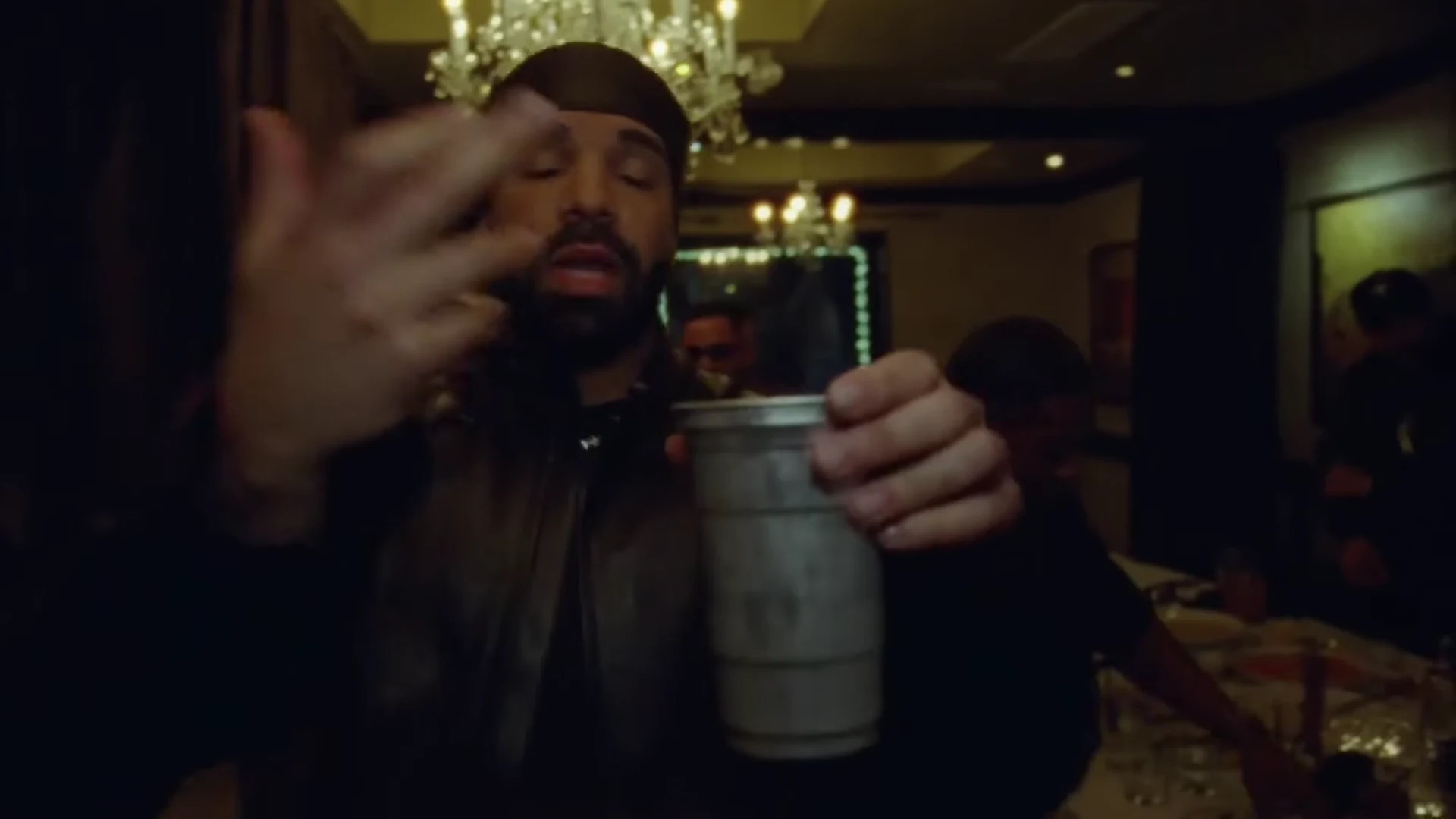
The Burning Bridges trend recasts one party scene from Drake's official music video: a man in a leather jacket and silver chain, holding a silver cup, performing straight into a handheld camera under crystal chandeliers while a crowd of men cheers behind him. In Oakgen's template you take that lead role from a single photo. This page is about that photo: what it changes, what it does not, and how to pick one that survives a camera that is often an arm's length from your face.

Final video
15 seconds
Your input
1 photo
Quality
720p
THE ORIGINAL15 SEC / 16 / 9
Burning BridgesYour photo. This scene.

Casting yourself as the lead

01

The one role

Only the man at the front takes your face. Everyone else in the room, the men in caps and jackets behind him, the man in the tan jacket at his side and the hands that reach in from the crowd, stays as background people. You add one photo and nobody else needs to be cast.
02

What your photo changes

Your face and your hair. The template carries them through the whole 15 seconds, from the opening where you look down into the lens, through the turn toward the crowd, to the end where you point straight at the camera and raise a hand by your face. The reference lead wears a black durag; the template drops it, so your own hair shows.

03

Why the jacket, chain and cup stay

The black leather jacket, the silver chain and the silver metal cup are the look of the trend, so the template treats them as costume and props. Whatever you wear in your photo, the video dresses you in the jacket and chain and puts the cup in your hand. A plain selfie works as well as a going-out photo.

04

The photo that holds up

This is a close-up trend. The camera is handheld and right in front of the lead for most of the clip, and the room is dim and warm, lit mostly by the chandeliers. Pick a photo with the face turned to the camera, the whole head and hairline visible, even light and no sunglasses, hat or hood. A photo that is already dark or heavily filtered gives the template less to work with in a dark room.

05

Why the photo is required

The lead in the reference is Drake himself, in his official video. The template is built to replace that face, so the studio will not start until you add a photo, and you should check the result for any trace of the reference face before sharing. Use your own photo or one of someone who agreed to appear. Do not upload a celebrity, a public figure or anyone who has not said yes.

06

What stays fixed

The chandelier-lit room, the crowd, the handheld camera, the timing of every gesture and the song. Your photo does not change the moves. The preview on the trend page is an excerpt of the official Burning Bridges music video, used as the motion and timing reference; it is not an Oakgen result, and Drake has no connection with Oakgen.

Explore the Burning Bridges trend

How to make it

Add a photo for the lead.

The roles in the Burning Bridges original reference
Lead in the Burning Bridges source video
Lead
  1. 01

    Add your photo

    Upload one clear photo of yourself or of someone who agreed to appear. A sharp, front-facing face with the whole head and hair visible works best; the outfit does not matter.

  2. 02

    Review quality and price

    Choose 480p, 720p or 1080p and review the quote. It includes the full video, your photo preparation and three scene preparations.

  3. 03

    Check the close-ups

    Watch your face when the cup comes up to the lens, the fingers in the fast hand flicks and the crowd behind you, then download your landscape MP4 with the original song.

01

You are the lead

One photo gives the lead your face, hair and build. The template is built to replace the face from the music video; check the close-ups before you share.

02

The party look stays

The black leather jacket with the striped sleeves, the silver chain and the silver cup are the look of the trend, so you wear them whatever your photo shows. There is no durag: your own hair stays visible.

03

The whole 15 seconds

The hand flicks across the lens, the cup raised to the camera, the points, the turn into the crowd and the close finish, on the original song, in one landscape clip.

04

The original as reference

The preview is an excerpt of the official Burning Bridges music video. It is the motion and timing reference, not an Oakgen result.

Photo tips

  • One person per photo
  • Sharp, front-facing face
  • Whole head and hair in frame
  • Any outfit works: the party look is added
  • Use a photo of someone who consented
  • Check your face in the close-ups

Questions & answers

What is the Burning Bridges AI trend?

It is a 15-second landscape AI clip that puts you in the lead spot of the party scene from Drake's Burning Bridges music video: a dim, crowded room under crystal chandeliers, a silver cup in your hand, flicking, pointing and performing right at the handheld camera while the crowd moves behind you. Oakgen's template puts your face and hair on the lead and keeps the look, the room, the crowd, the moves and the song.

Where does it come from?

From the official music video for Burning Bridges, the Drake song released in May 2026. The preview is the first 15 seconds of the video's chandelier-lit party scene. AI video tools now list one-photo recasts of the scene as the Drake Burning Bridges AI trend, a name that also borrows the song's viral "where she at?" line. Oakgen's 15-second excerpt does not include a hand-over-the-eyes gesture.

Is this made with Drake?

No. Oakgen is not affiliated with Drake or his label. The music video is only the motion and timing reference, and the lead's face is always replaced with the face from your photo.

Do I have to wear the outfit?

The look is part of the trend. Whatever you wear in your photo, the video dresses you in the black leather jacket with the striped sleeves and the silver chain and puts the silver cup in your hand. Your face, hair and build come from your photo, and no durag is added.

Is the song in the video?

Yes. Your video keeps the original audio of the excerpt: Drake's Burning Bridges. The lyrics contain strong language, so check where you post it.

Do I rap along?

The lead performs toward the camera the way the reference does, with the mouth following the song where the reference shows it. Lip movement is generated, so check the close-ups before you share.

Who else is in the video?

The crowd of people behind the lead stays as background people with their own appearances. Only the lead takes your face.

Whose photo can I use?

Your own, or a photo of someone who agreed to be in the video. Do not upload photos of celebrities, public figures or anyone who has not consented, and label AI videos clearly when you share them.

How long is the video?

15 seconds in landscape 16:9, following the handheld camera from the first hand flick to the close finish.

Is the preview generated by Oakgen?

No. It is an excerpt of the official music video used as the reference, not an Oakgen result. Review your face, hands and the cup before sharing.

How much does it cost?

3,102 credits per 720p video. The quote includes your photo preparation, three scene references and the complete video. Check it before generating.

Ideas for your next video

Plan a story, keep your character recognizable, and make the finished clip your own.

Explore the video trend playbook →

Make your Burning Bridges video

Upload 1 photo. Everything else is set.

Make this video