
Video trend

Toosie Slide AI Video: Put Your Face on the Suited Dancer

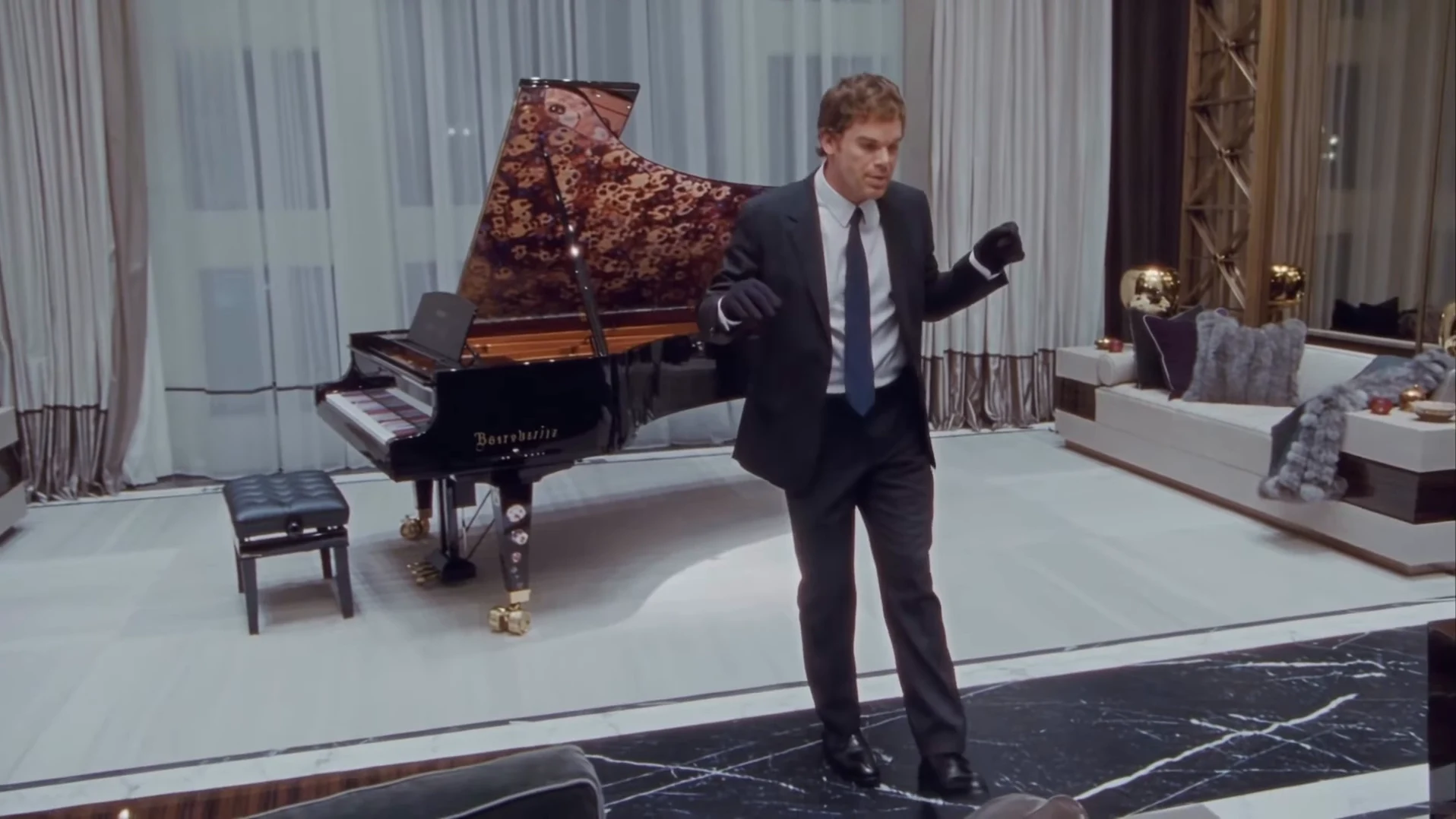
The Toosie Slide AI clip has one dancer, one room and one continuous 15-second take. You replace the dancer with a single photo; the black suit, the gloves, the grand piano and the song stay. This page is about that one photo: what it controls, what it does not, and how to pick one that survives the turns and slides.

Final video
15 seconds
Your input
1 photo
Quality
720p
REFERENCE RECREATION15 SEC / 16 / 9
Toosie SlideSource: @ausar.ai · original AI reel on Instagram

Casting yourself as the dancer

01

What the dancer does

The camera swoops in from a high wide view behind a dark sofa while the dancer, near the piano, opens both arms to the lens. From about 3.5 seconds the slides start: one foot lifts, the other slides, then the other way, with gloved fists up at chest height. At about 10 seconds the dancer crouches and turns toward the piano, and the last two seconds are a walk and slide into a final pose looking up to the right.

02

What your photo changes

Your face, your hair and your build. The template reads the face shape, the hairline and the haircut from your photo and keeps them through the whole take, including the turn away from the camera around 10 to 12 seconds, where the back of your head shows.

03

Why the suit and gloves stay

The suited, gloved dancer is the visual hook, so the template treats the black suit, pale shirt, dark navy tie, black shoes and black gloves as costume. Whatever you wear in your photo, the video dresses you in that look. A T-shirt selfie works as well as a photo in a suit.

04

The photo that works best

One person, face sharp and turned to the camera, the whole head and hair in frame, no sunglasses and no hat unless you want the template to guess the hair under it. Even daylight beats a dark bar photo. The dancer is small in the frame for the first second, so a clear face matters more than a full-body shot.

05

The photo is required

The dancer in the reference is an AI likeness of a TV character played by a real actor, so that face is never kept: the studio will not start until you add a photo. Use your own photo or one of someone who agreed to appear, never a celebrity or public figure.

06

What stays fixed

The room, the piano, the camera move, the timing of every step and the song. Your photo does not change the moves or add a cut. The preview on the trend page is the credited AI reference reel by @ausar.ai, not an Oakgen result.

Explore the Toosie Slide trend

How to make it

Add a photo for the dancer.

Dancer in the Toosie Slide source video
Dancer
  1. 01

    Add your photo

    Upload one clear photo of yourself or of someone who agreed to appear. A sharp, front-facing face with the whole head and hair visible works best; the outfit does not matter.

  2. 02

    Review quality and price

    Choose 480p, 720p or 1080p and review the quote. It includes the full video, your photo preparation and three scene preparations.

  3. 03

    Check the slide

    Watch the feet on the beat, the gloves on both hands and your face through the turns, then download your landscape MP4 with the original song.

01

You are the dancer

One photo gives the dancer your face, hair and build. The video never keeps the face from the reference.

02

The suit and gloves stay

The black suit, pale shirt, dark tie and black gloves are the look of the trend, so you wear them whatever your photo shows. Your hair stays your own.

03

The whole routine in one take

The full 15 seconds: the swooping opening, the side-to-side slides with gloved fists up, the crouch and turn by the piano and the walk to the final pose, on the original song.

04

A credited AI source

The preview is @ausar.ai's AI reel with the app's watermark removed. It is the motion and timing reference, not an Oakgen result.

Photo tips

  • One person per photo
  • Sharp, front-facing face
  • Whole head and hair in frame
  • Any outfit works: the suit is added
  • Use a photo of someone who consented
  • Check both gloves stay on

Questions & answers

What is the Toosie Slide AI trend?

It is a 15-second landscape AI clip of one person in a black suit and black gloves doing the Toosie Slide in a luxury living room with a grand piano, to the song "Toosie Slide". Oakgen's template puts your face and hair on the dancer and keeps the suit, the room, the moves and the song.

What song is it?

"Toosie Slide" by Drake, released in April 2020. The clip uses about 15 seconds of it, including the line "right foot up, left foot slide" that names the moves. We identified it from a transcript of the audio; the post itself did not carry a song label. Your video keeps that original audio.

Where does it come from?

From an Instagram reel posted by @ausar.ai, the account of an AI template app, on 23 October 2026. The dancer in it is an AI likeness of a TV character played by a real actor, so Oakgen's template never keeps that face and a photo is required. The room, the gloves and the piano echo the song's 2020 music video.

Do I have to wear a suit?

The suit is part of the trend. Whatever you wear in your photo, the video dresses you in the black suit, pale shirt, dark tie and black gloves. Your face and your hair come from your photo.

Whose photo can I use?

Your own, or a photo of someone who agreed to be in the video. Do not upload photos of celebrities, public figures or anyone who has not consented, and label AI videos clearly when you share them.

Does the dancer sing along?

No. The dancer does not lip-sync; the mouth stays closed or relaxed while the song plays, as in the reference.

What about the logo in the original?

The reel carried the creator app's "made with" badge in the top-left corner. Oakgen's reference copy has it removed and the template asks for no logos, badges or text, so you can add your own caption when you post.

How long is the video?

15 seconds in landscape 16:9, one continuous take from the opening camera move to the final pose.

Is the preview generated by Oakgen?

No. It is the credited AI reel used as the reference, not an Oakgen result. Review your face, hands and feet before sharing.

How much does it cost?

3,102 credits per 720p video. The quote includes your photo preparation, three scene references and the complete video. Check it before generating.
Ideas for your next video

Plan a story, keep your character recognizable, and make the finished clip your own.

Explore the video trend playbook →

Make your Toosie Slide video

Upload 1 photo. Everything else is set.

Make this video