
Oakgen.ai

Video trend

Champagne Car Roof AI Video: Put Yourself on the Roof

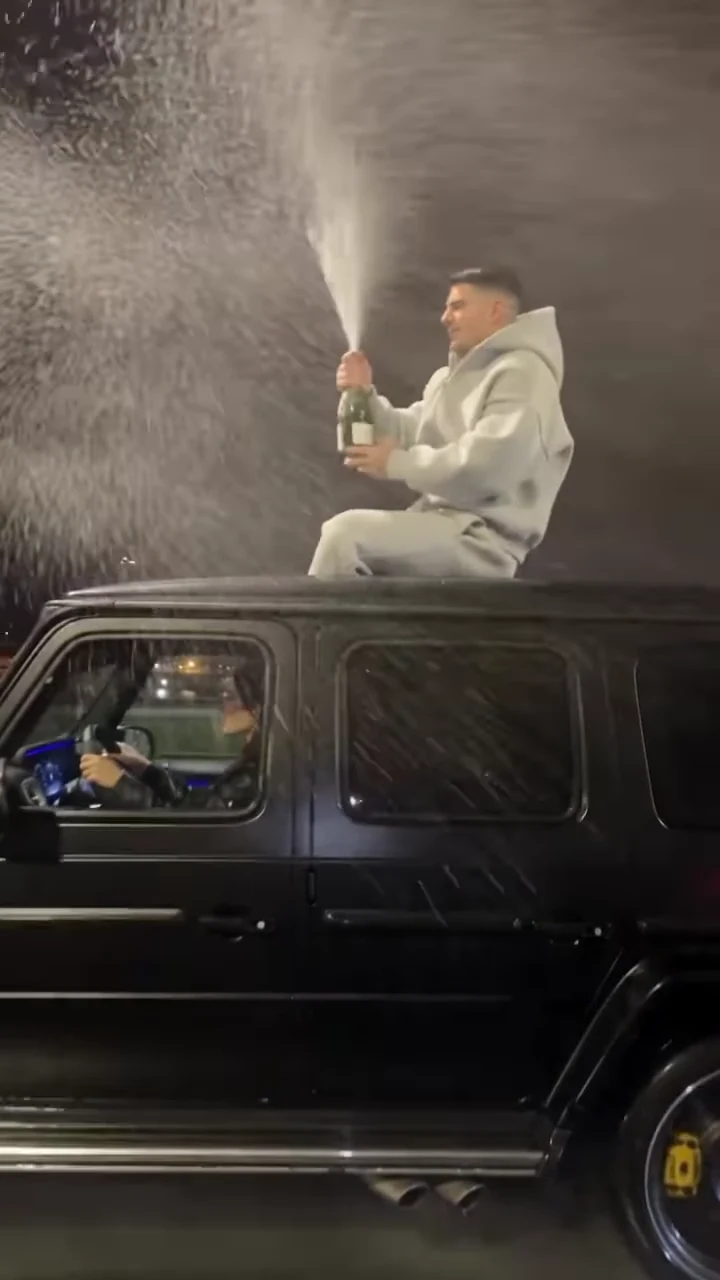
The champagne car roof clip has one star: the person sitting on top of the moving black SUV with the bottle. Oakgen's Champagne Shoot template puts you in that seat from a single photo. This page is about the photo: what it changes, what stays the same and how to pick one that survives a side-on shot through spray at night and a fast pull-away at the end.

Final video
9.5 seconds
Your input
1 photo
Quality
720p
THE ORIGINAL9.5 SEC / 9 / 16
Champagne ShootYour photo. This scene.

Casting yourself on the roof

01

One role, one photo

Only the person on the roof takes your face. The driver you can see through the side window stays a background person from the reference and is never cast. You add one photo, and the studio will not start without it, because the man on the roof in the reference is a real-looking face that the template is built to replace.
02

What your photo changes

Your face and your hair. The template carries them through every beat: holding the bottle up, the spray, the drink from the bottle, looking up as the bottle flies and the grin at the camera before the car pulls away. The reference man's short dark hair is not kept; yours is used instead.

03

Why the tracksuit stays

The light grey hoodie and matching grey sweatpants are the look of this trend, so the template treats them as costume. Whatever you wear in your photo, you appear on the roof in the grey tracksuit. That also means a casual selfie works as well as a dressed-up photo.

04

The photo that holds up

The camera stays beside the car at about roof height, so your face is seen side-on and three-quarter, lit by streetlights and partly behind the spray. Pick a sharp photo with your face turned toward the camera, the whole head and hairline visible, even light and no sunglasses, hat or hood. A dim party photo gives the template very little to work with in a night scene.

05

Whose photo to use

Use your own photo or one of an adult who agreed to appear. The clip shows drinking from a bottle and firing a handgun, so do not use a child's photo, and never use a celebrity or public figure. Tell the person what the clip shows before you make it.

06

What stays fixed

The wet highway at night, the city lights, the black G-Class and its driver, the camera that follows alongside, the timing of every beat and the original sound. Your photo does not change the stunt. You choose 480p, 720p or 1080p, review the quote in the studio and get a 9.5-second portrait MP4.

Explore the Champagne Shoot trend

How to make it

Add a photo for the rider.

The roles in the Champagne Shoot original reference
Rider in the Champagne Shoot source video
Rider
  1. 01

    Add your photo

    Upload one clear photo of yourself or of someone who agreed to appear. A sharp, front-facing face with the whole head and hair visible works best; the outfit does not matter.

  2. 02

    Review quality and price

    Choose 480p, 720p or 1080p and review the quote. It includes the full video, your photo preparation and three scene preparations.

  3. 03

    Check the stunt

    Watch your face through the spray, your hands on the bottle and the shot, and the driver staying unchanged, then download your portrait MP4 with the original sound.

01

You are on the roof

One photo gives the rider your face, hair and build. The template is built to replace the face from the reel; check it before you share.

02

The tracksuit stays

The loose light-grey hoodie and sweatpants are the look of the trend, so you wear them whatever your photo shows. Your hair stays your own.

03

The whole stunt, no birthday card

The bottle raise, the pop and spray, the drink, the throw and the shot at the bottle as the car pulls away, on the original sound. The reel's closing "Happy Birthday" title is cut, so you add your own caption.

04

The reference, not a result

The preview is the reference reel with its birthday title removed. It is the motion and timing reference, not an Oakgen result.

Photo tips

  • One person per photo
  • Sharp, front-facing face
  • Whole head and hair in frame
  • Any outfit works: the grey tracksuit is added
  • Use a photo of someone who consented
  • Label it as AI when you post

Questions & answers

What is the Champagne Shoot AI trend?

It is a 9.5-second portrait AI clip of one person riding on the roof of a moving matte-black G-Class on a wet highway at night. They pop a champagne bottle, spray it into the air, drink from it, throw it high, then shoot the bottle in mid-air with a handgun as the car speeds away under the streetlights. Oakgen's template puts your face and hair on the rider and keeps the look, the car, the road, the stunt and the sound.

Where does it come from?

From a reel that spread in October 2026, captioned in Russian as a trend for millions of views. TikTok trend lists call it the Champagne Shoot on G Class AI trend.

Is there a gun in it?

Yes. In the template the rider fires a handgun once at the bottle in the air, and the bottle bursts. Your Oakgen video is generated fiction: nobody is hurt and the only target is the bottle. How the reference reel was filmed is not confirmed. Never try it for real: riding on a car roof and firing a gun into the air are dangerous and illegal in many places. Some platforms limit videos that show weapons, so check their rules and label your video as AI.

Why does it end before the Happy Birthday text?

The original reel ends on a "Happy Birthday" title over the highway. Oakgen's template stops one frame before that title fades in, so your video has no birthday text and you can add your own caption, or none, when you post.

Do I have to wear the tracksuit?

The look is part of the trend. Whatever you wear in your photo, the video dresses you in the light-grey hoodie and sweatpants. Your face, hair and build come from your photo.

Is there a song?

Yes. Your video keeps the reel's original audio, a Russian-language song over the road noise. Oakgen has not identified the song.

Who else is in the video?

The driver seen through the side window stays as a background person. Only the rider takes your face. The car and bottle are rendered without readable badges, plates or labels.

Whose photo can I use?

Your own, or a photo of someone who agreed to be in the video. Do not upload photos of celebrities, public figures or anyone who has not consented, and label AI videos clearly when you share them.

How long is the video?

9.5 seconds in portrait 9:16, one continuous shot from a car driving alongside.

Is the preview generated by Oakgen?

No. It is the reference reel, with its birthday title removed, not an Oakgen result. Review your face, hands and the shot before sharing.

How much does it cost?

2,142 credits per 720p video. The quote includes your photo preparation, three scene references and the complete video. Check it before generating.

Ideas for your next video

Plan a story, keep your character recognizable, and make the finished clip your own.

Explore the video trend playbook →

Make your Champagne Shoot video

Upload 1 photo. Everything else is set.

Make this video