
Video trend

Burning Bridges Song in the AI Video: Lyrics and Language

The Burning Bridges template exports your video with the song already on it. That is the point of the trend, but it raises practical questions before you post: which part of the song you get, whether it is safe to play at work or for a younger audience, whether there is a clean version, and what to do if an app will not play it. This page answers those questions.

Final video
15 seconds
Your input
1 photo
Quality
720p
THE ORIGINAL15 SEC / 16 / 9
Burning BridgesYour photo. This scene.

The song on your video

01

What audio you get

Your MP4 carries the original song audio from the same 15-second stretch of the party the moves come from, a different 15 seconds of the song than the preview plays. It is "Burning Bridges" by Drake, from his 2026 album ICEMAN. The audio is not regenerated, so the music and the moves stay in step with each other the way they are in the reference.
02

It contains strong language

The song is explicit. A machine transcript of the preview's audio shows strong language, including slurs, and your video uses another stretch of the same explicit track. Treat the clip like any explicit track: not for a younger audience, not for a classroom or a work account, and not for a platform or group where explicit music breaks the rules.

03

Is there a clean version?

We did not find a clean or radio edit of "Burning Bridges" in our search, and the album listing we checked (Audiomack) marks the track as explicit. The template does not swap in a clean edit and does not bleep words. If you need a clean post, mute the clip or replace the audio yourself with a version you have the right to use.

04

The lead performs to the song

In the music video the lead raps along toward the camera. Your video keeps that kind of performance: you play to the lens, turn into the crowd and turn back, moving your hands with the music. It is not a lip-sync engine, so do not expect every word to match your mouth exactly; judge it the way you would judge any performance clip, by the moves and the timing.

05

When an app will not play the song

Some apps mute or restrict commercial music in some regions or account types. If yours does, add the song from the app's own music library instead and line it up with the stretch your clip uses, because the gestures were made to the original timing. Only add music you have the right to use.

06

Name the song, do not imply a link

Name the song in your caption if you like ("Burning Bridges, Drake"). Do not word the post as if Drake took part, approved it or knows you, and do not tag him. Say the video is AI-made. Oakgen has no connection with Drake.

Explore the Burning Bridges trend

How to make it

Add a photo for the lead.

The roles in the Burning Bridges original reference
Lead in the Burning Bridges source video
Lead
  1. 01

    Add your photo

    Upload one clear photo of yourself or of someone who agreed to appear. A sharp, front-facing face with the whole head and hair visible works best; the outfit does not matter.

  2. 02

    Review quality and price

    Choose 480p, 720p or 1080p and review the quote. It includes the full video, your photo preparation and three scene preparations.

  3. 03

    Check the close-ups

    Watch your face in the opening right at the lens, the fingers in the fast hand flicks and the crowd behind you, then download your landscape MP4 with the original song.

01

You are the lead

One photo gives the lead your face, hair and build. The template is built to replace the face from the music video; check the close-ups before you share.

02

The party look stays

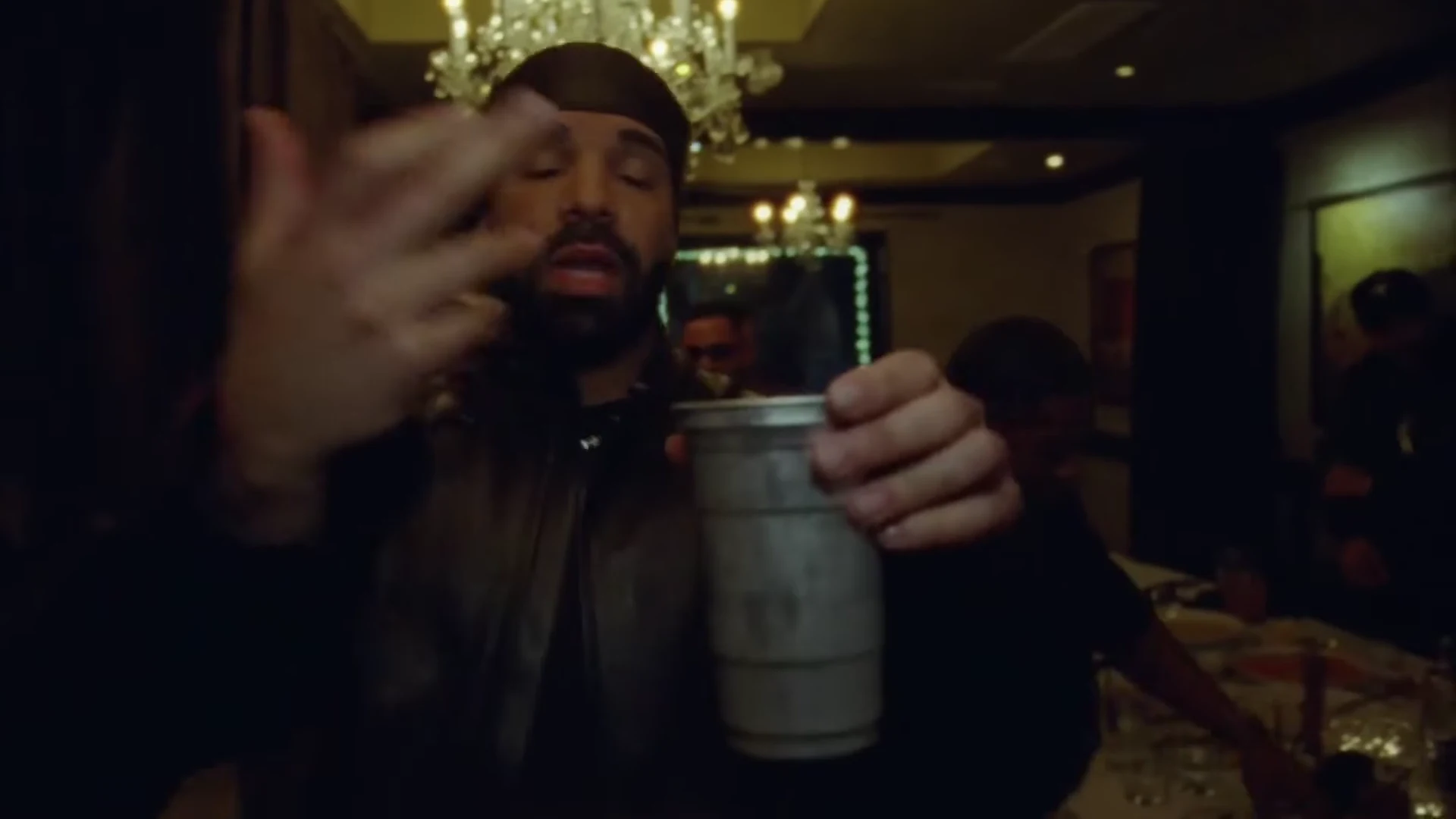
The black leather jacket with the striped sleeves, the silver chain and the silver cup are the look of the trend, so you wear them whatever your photo shows. There is no durag: your own hair stays visible.

03

The whole 15 seconds

The hand flicks across the lens with the cup held out, the points and spread arms, the turn into the laughing crowd and the hand over the eyes at the finish, on the original song, in one landscape clip.

04

The original as reference

The preview is the first 15 seconds of an excerpt of the official Burning Bridges music video. Your video follows a different 15-second stretch of the same party. The preview is not an Oakgen result.

Photo tips

  • One person per photo
  • Sharp, front-facing face
  • Whole head and hair in frame
  • Any outfit works: the party look is added
  • Use a photo of someone who consented
  • Check your face in the close-ups

Questions & answers

What is the Burning Bridges AI trend?

It is a 15-second landscape AI clip that puts you in the lead spot of the party scene from Drake's Burning Bridges music video: a dim, crowded room under crystal chandeliers, a silver cup in your hand, flicking, pointing and performing right at the handheld camera while the crowd moves behind you. Oakgen's template puts your face and hair on the lead and keeps the look, the room, the crowd, the moves and the song.

Where does it come from?

From the official music video for Burning Bridges, the Drake song released in May 2026. The preview is the first 15 seconds of the video's chandelier-lit party scene; your video follows a different 15 seconds of the same party. AI video tools now list one-photo recasts of the scene as the Drake Burning Bridges AI trend, a name that also borrows the song's viral "where she at?" line. Oakgen's 15-second version ends with the lead lifting a hand up to the forehead over the eyes, the cup raised in the other hand.

Is this made with Drake?

No. Oakgen is not affiliated with Drake or his label. The music video is only the motion and timing reference, and the lead's face is always replaced with the face from your photo.

Do I have to wear the outfit?

The look is part of the trend. Whatever you wear in your photo, the video dresses you in the black leather jacket with the striped sleeves and the silver chain and puts the silver cup in your hand. Your face, hair and build come from your photo, and no durag is added.

Is the song in the video?

Yes. Your video keeps the original song, Drake's Burning Bridges, from a different 15 seconds of it than the preview plays. The lyrics contain strong language, so check where you post it.

Do I rap along?

The lead performs toward the camera the way the reference does, with the mouth following the song where the reference shows it. Lip movement is generated, so check the close-ups before you share.

Who else is in the video?

The crowd of men and women behind the lead stays as background people with their own appearances. Only the lead takes your face.

Whose photo can I use?

Your own, or a photo of someone who agreed to be in the video. Do not upload photos of celebrities, public figures or anyone who has not consented, and label AI videos clearly when you share them.

How long is the video?

15 seconds in landscape 16:9, from the hand flick across the lens to the hand lifted over the eyes at the end.

Is the preview generated by Oakgen?

No. It is an excerpt of the official music video, not an Oakgen result, and your video follows a different 15 seconds of the same party. Review your face, hands and the cup before sharing.

How much does it cost?

3,102 credits per 720p video. The quote includes your photo preparation, three scene references and the complete video. Check it before generating.

Ideas for your next video

Plan a story, keep your character recognizable, and make the finished clip your own.

Explore the video trend playbook →

Make your Burning Bridges video

Upload 1 photo. Everything else is set.

Make this video