
Video trend

The Neymar Studio Hit, Second by Second

The template is one handheld studio clip with a single jump cut, and almost everything happens in the faces, so small problems are easy to miss on a first watch. This timeline, measured on the reference clip, lists what happens and what to look at in your own result before you post it.

Final video
20 seconds
Your input
3 photos
Quality
720p
THE ORIGINAL20 SEC / 9 / 16
Neymar Studio HitYour photo. This scene.

The timeline and what to check

01

0 to 4 s: the laugh

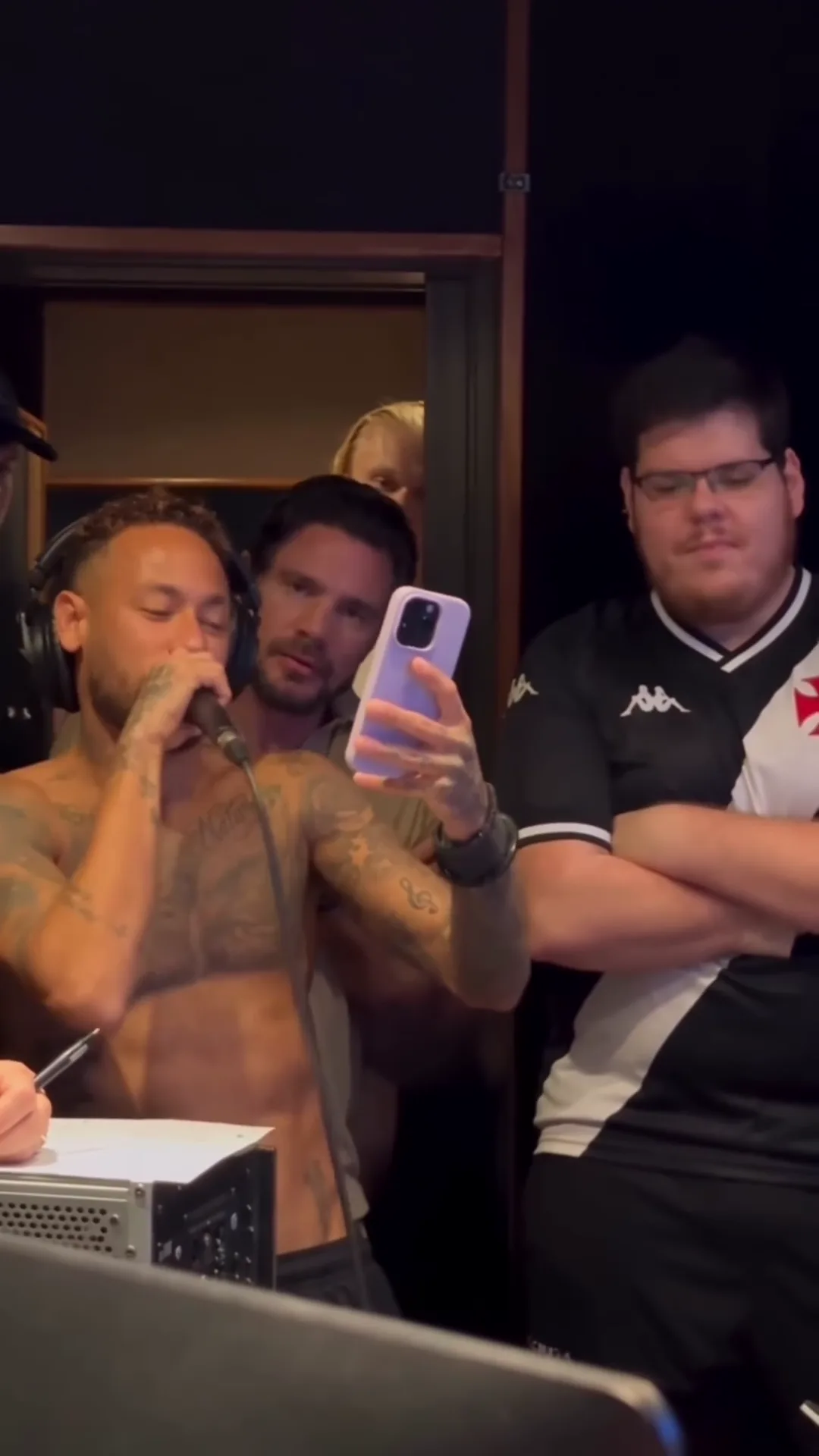
A wide handheld shot of the studio. The Singer stands behind the desk at the left with the microphone at the mouth, laughing and glancing down at a lilac phone held low. The Friend beside stands at the right with his arms down, and a man at the desk at the lower right looks at his own phone next to a white mannequin hand. Check that the Singer's face is clearly yours while it is half covered by the microphone.
02

4 to 7 s: the phone comes up

The camera drifts in. The Singer raises the phone to read, and the Friend beside folds his arms and sways his head. Check that both faces stay the same people as the camera moves and that the Friend beside's outfit is your photo's, not a striped shirt.

03

7 to 15 s: the verse

The Singer sings into the microphone, reading the lyrics off the phone held up beside the face. The Friend beside nods along with folded arms, a bearded man leans over the Singer's shoulder to read the phone and the Friend at the back peeks in from the doorway. This is the longest stretch: check the Singer's mouth with sound on and the Friend at the back's face whenever it shows.

04

About 15 s: the jump cut

The clip jumps to a closer framing. Check that hair, outfits and faces match on both sides of the cut; it is the easiest place for a face to drift.

05

15 to 20 s: the smirk

The Singer keeps going. The Friend beside looks down with a hand at his chest, then straightens up and gives a tight-lipped, satisfied smirk toward the camera, and a hand points in from the left edge. The smirk is the payoff: check the Friend beside's face and the pointing hand's fingers.

06

Text and marks

Throughout, check that no shirt, cap, phone, computer or sheet of paper shows readable letters, a crest or a logo. The reference had a club crest and kit-maker logos on the striped shirt and a logo on the black cap; your version asks for all of them to be plain.

07

Make yours

Open the Neymar Studio Hit trend, add the three photos and generate. Watch once with sound for the verse and once without sound for the faces, the cut and the hands.

Explore the Neymar Studio Hit trend

How to make it

Add a photo for each role shown below. All roles need a photo.

The roles in the Neymar Studio Hit original reference
Singer in the Neymar Studio Hit source video
Singer
Friend beside in the Neymar Studio Hit source video
Friend beside
Friend at the back in the Neymar Studio Hit source video
Friend at the back
  1. 01

    Add three photos

    One head-and-shoulders photo each for the Singer, the Friend beside and the Friend at the back: face forward, hair fully visible, no hat. Use your own photos or ones of people who agreed to appear.

  2. 02

    Choose the quality

    Pick 720p or 1080p and review the quote. It covers the full 20-second video.

  3. 03

    Check the singing and post

    Watch the verse with sound for the singer's mouth and the end for the friend's smirk, then download your vertical 9:16 MP4 with the original sound and label it as AI-made parody when you post.

01

Your faces, not theirs

The template follows the parody clip's camera and moves, but all three people come from your photos: face, hair, build and outfit. The reference singer's tattoos and the friend's striped football shirt are not kept, and none of the three reference faces is copied.

02

The original sound stays

Your video keeps the reference clip's soundtrack: the laughter and the sung verse over the beat. No separate audio goes to the video model and its own sound is thrown away; the singer's mouth follows the singing in the reference clip and the original track is put back at the end.

03

One studio, two shots

Twenty seconds of handheld phone footage in a dark recording studio: a laugh into the microphone, the phone raised to read the lyrics, the verse, a jump cut closer and a satisfied smirk from the friend at the end.

04

A parody, labelled as one

The preview is an AI-made parody, not real footage of Neymar or Casimiro Miguel, and neither made, endorsed or appears in it. Shirts, caps, the phone and the studio gear are asked for with no readable crest, logo or lettering in your version.

Photo tips

  • One person per photo
  • Face forward, hair visible, no hat
  • Put the boldest face on the Singer
  • Your own outfits stay in every frame
  • Turn the sound on for the verse
  • Label it as an AI parody

Questions & answers

What is the Neymar Studio Hit AI trend?

An AI-made parody of a footballer recording a new song. A shirtless singer who looks like Neymar laughs into a studio microphone, then sings a verse he reads off his phone, while a friend in a striped football shirt who looks like the streamer Casimiro Miguel stands beside him with folded arms and a third friend peeks in from the back. It travelled with the caption 'Neymar cantando novo HIT'. Oakgen's template keeps the studio, the camera and the sound and puts the people from YOUR photos in all three places.

Is the preview real footage of Neymar or Casimiro Miguel?

No. The preview is an AI-made parody clip, not real footage of Neymar, Casimiro Miguel or anyone else it resembles, and none of them made, endorsed or appears in it. Oakgen is not affiliated with or endorsed by them or by any club, league, brand or sponsor, and your video does not show them: the three people are the ones in your photos.

What song is he singing?

We could not identify it. The verse is a Portuguese-language vocal over a funk-style beat, and its first line sounds like 'Fiquei rico com a arte' ('I got rich from my art'), but we found no released song it matches, so we do not name one. The clip's caption only calls it a 'novo HIT', a new hit.

Does my video keep the singing?

Yes. Your video keeps the reference clip's original sound: the laughter at the start and the sung verse over the beat. Your photos change how the people look, not the voice or the words, and the template does not take a new song or voice recording.

Is the audio sent to the AI model?

No. No separate audio or voice sample is sent: the video model receives the reference clip and your photos, and whatever sound the model returns is thrown away. The singer's mouth follows the singing in the reference clip, and the original track is put back on the finished video. Oakgen does not clone or generate a voice for this template.

Why does it need three photos?

Because the singer and the friend beside him resemble well-known people, and the friend peeking in from the back may too, so Oakgen keeps none of the three faces and each needs a photo. The other people in the studio stay as background people from the AI parody.

Do I need to be shirtless or wear a football shirt?

No. There is no costume. Each person wears the outfit from their own photo in every frame, instead of the singer's bare tattooed chest or the friend's striped football shirt. The studio headphones stay on the singer as a prop.

Is a club or brand in my video?

None is meant to be. The reference clip shows a club crest, a kit-maker logo and a cap emblem, and the template asks for every shirt, cap, phone and piece of studio gear in your version to show no readable crest, logo, sponsor or lettering. Check your result for stray marks before you post. The trend is not connected to any club, league, brand or sponsor.

Can I put a pet in it?

Yes. A clear photo of a dog or cat can take any of the three places, with its own face, fur and markings. The friend beside and the friend at the back read best; as the singer, check the paws on the microphone and the phone before you post.

Whose photos can I use?

Your own, or photos of people who agreed to be in the video. Do not upload photos of Neymar, Casimiro Miguel, other celebrities or anyone who has not consented, and label the video as an AI parody when you share it.

How long is the video?

20 seconds in vertical 9:16, ready for Reels, TikTok and Shorts.

Is the preview generated by Oakgen?

No. It is the AI-made parody reference clip the trend comes from, used for the camera, moves and timing, not an Oakgen result.

How much does it cost?

1,062 credits per 720p video. The quote covers the complete 20-second video. Check it before generating.

Ideas for your next video

Plan a story, keep your character recognizable, and make the finished clip your own.

Explore the video trend playbook →

Make your Neymar Studio Hit video

Upload 3 photos. Everything else is set.

Make this video