ChatGPT
 Claude
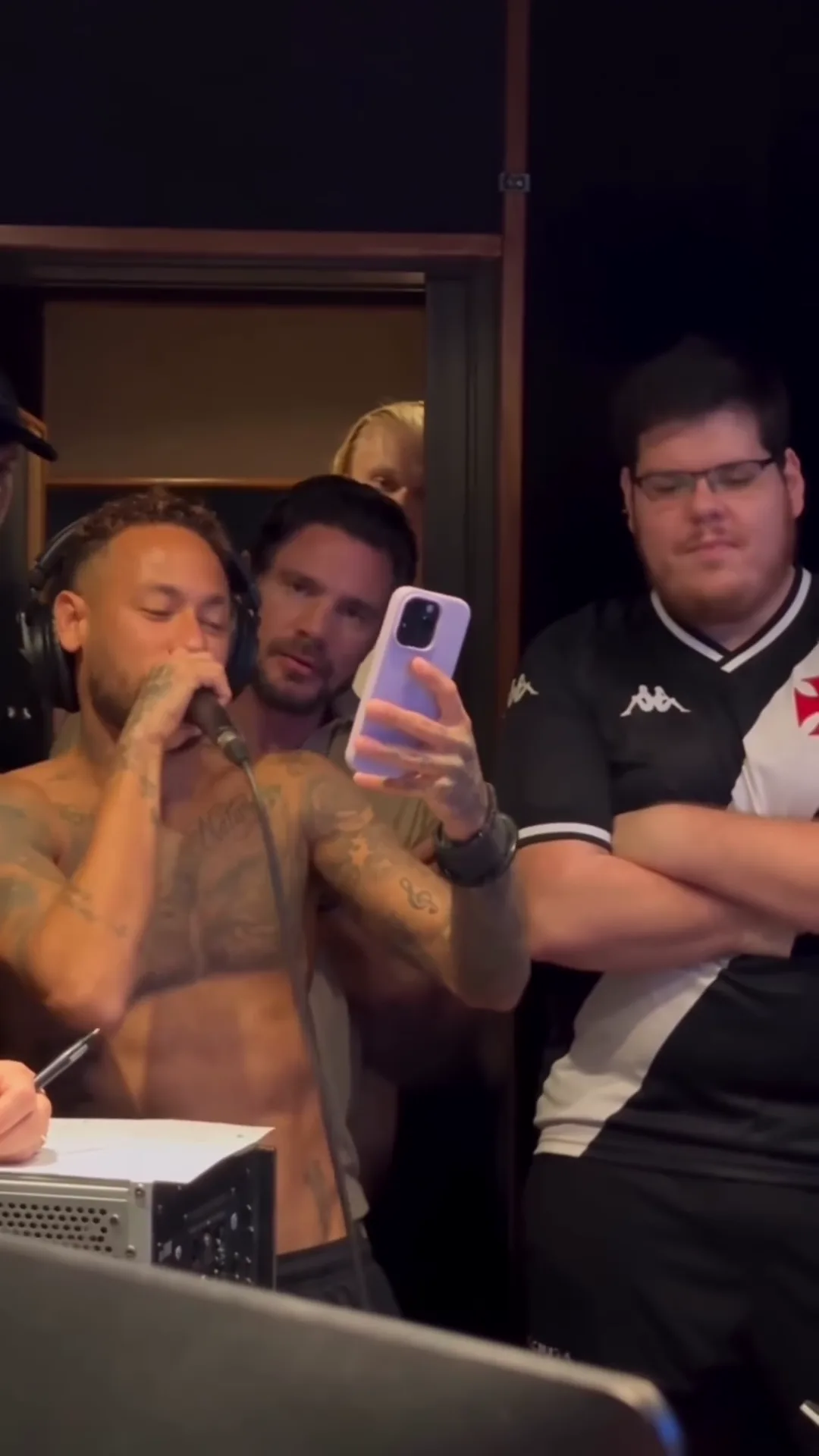
Your Neymar Studio Hit AI video comes out of Oakgen as a vertical 9:16 file, 20 seconds long, with the original laughter and sung verse on it and no on-screen text. That is already the right shape for Reels, TikTok and Shorts, so the editing is lighter than for a landscape trend. It still decides whether the joke lands: the caption, where you put text, how long you cut it and which frame people see before they tap. The preview and the template are an AI-made parody, not real footage of Neymar, Casimiro Miguel or anyone else it resembles, and not affiliated with or endorsed by them or by any club, league, brand or sponsor.
Make the studio session first
Add three photos for the Singer and the two friends and make the 20-second Neymar Studio Hit AI parody with the original sound, then come back to edit it.
Who this is for
You have generated the video, or you are about to, and you want it to work as a post rather than a file. If you have not made it yet, start with how to make the Neymar Studio Hit AI video.
How we worked this out
The timings below are measured on the reference parody clip: a speech-to-text pass over its soundtrack for when the laughter and the singing start, and a frame scan for the cut. They match the template, because the template keeps the reference's timing and sound. We have not measured how any platform ranks the post, so nothing here promises reach.
Edit 1: Write the caption
The parody travelled with "Neymar cantando novo HIT", Portuguese for "Neymar singing a new hit". The format works because it treats an obviously improvised studio take as a big release. Point that at your Singer:
- My cousin after one week of guitar lessons
- Group chat when someone says "I've been working on something"
- Me recording the verse I wrote in the back of a taxi
- When the friend who can't sing gets the aux and a microphone
- New single drops Friday (it does not)
Then give the Friend beside his line. His folded arms and the smirk at the end are the reaction shot, so a caption like "him pretending he didn't love it" lands on the last five seconds.
Edit 2: Place text clear of the faces
The frame has a natural layout:
| Area of the 9:16 frame | What is there | Text? |
|---|---|---|
| Top fifth | Dark acoustic wall above the doorframe | Yes: caption goes here |
| Middle | The three faces, the phone and the microphone | No |
| Bottom quarter | The desk, a computer tower, paper and the mic cable | Only small text, and it competes with the clutter |
Keep the caption to two lines in the top band. Platform buttons cover the right edge and the bottom on most apps, which is another reason to stay at the top.
Edit 3: Lyrics on screen, or not
It is tempting to subtitle the verse. Be careful: we could not identify the song, and our transcript is only confident about the first line, which sounds like "Fiquei rico com a arte" ("I got rich from my art"). Publishing a full lyric sheet for a song nobody can confirm invites "those aren't the words" comments. Two safer options:
- Subtitle only the opening line, from about 7.2 seconds, and let the rest play.
- Skip lyrics and put the joke in the caption instead.
Edit 4: Pick the cut
Three lengths work:
| Cut | Length | What it keeps | Best for |
|---|---|---|---|
| Full | 20 s | The laugh, the verse, the jump cut and the smirk | Reels, TikTok, Shorts |
| Verse and smirk | about 13 s, from 7 s | The singing and the reaction, no warm-up | Fast feeds, Stories |
| Just the laugh | about 4 s | The Singer cracking up into the mic | Replies and group chats |
If you trim, start on the first sung word at about 7 seconds rather than mid-laugh, and keep the ending: the smirk is the payoff.
Edit 5: Choose the cover
The best cover is a frame from the verse, with the phone up and the Friend beside's folded arms in shot, because it reads as "studio session" even as a small thumbnail. Avoid the first seconds, where the Singer's face is half behind the microphone and the frame is wide.
Common mistakes
- Presenting it as a real leak. Do not write it as if Neymar released a song, and do not tag real artists or labels.
- Covering faces with text. The middle of the frame is where the joke happens.
- Adding a louder track. If you add music on the platform, keep it under the verse so the singing stays audible.
- Using someone's photo without asking. Use your own photos or ones of people who agreed to appear.
Label it
Turn on the platform's AI-generated label or write "AI parody" in the caption. Describe the format in hashtags rather than a club or a person: #aiparody, #studiosession, #newhit and #aivideo say what the clip is without implying an official connection.
Related reading
For what the caption means and what we found about the song, read Neymar cantando novo hit: the clip, the song and the sound. For who should play each of the three roles, see the Neymar Studio Hit casting guide.
Frequently asked questions
Can I add the lyrics as subtitles?
Only with care. We could not identify the song or confirm its full lyrics, so we do not publish a lyric sheet. If you add words on screen, keep them to what you can clearly hear, or caption the joke instead of the lyrics.
Where should on-screen text go?
In the dark band at the top of the frame, above the doorframe. The faces sit in the middle third and the desk and microphone cable fill the bottom.
Is the singing in my video real?
It is the reference AI parody's own soundtrack, kept on your download exactly as it was. Oakgen does not clone or generate a voice for this template, and neither Neymar nor Casimiro Miguel made or endorsed the parody or the template.
How do I label it?
Say it is an AI parody in the caption or turn on the platform's AI label, and do not present the vocal as a real release or suggest a real person, club or brand is involved.