
Image trend

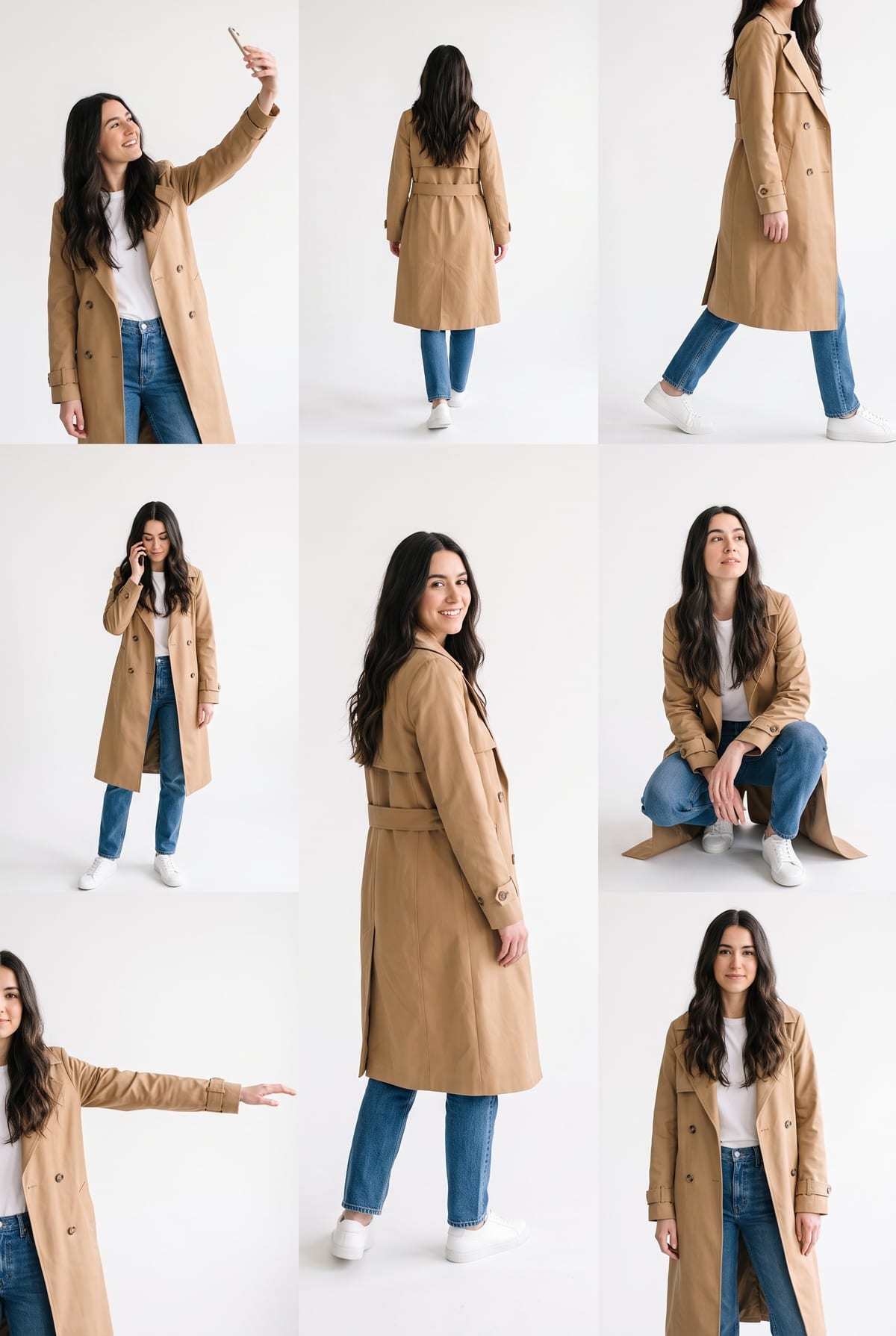
Instagram Lookbook AI Photo: The Multiple Pose Trend

Tutorials describe an Instagram effect called Lookbook that turns one selfie into a single frame showing the same person in several poses on white. This page explains what that result looks like and how Oakgen's Lookbook Poses template relates to it.

Final image
1 still
Your input
1 photo
Price
from 51 credits
Lookbook Poses example result
Lookbook PosesExample result

What the trend looks like

01

The look

One tall frame on a plain white background with about eight full-body figures of the same person: a selfie with the arm raised, a back view, a mid-stride walk, a phone call, a crouch and a reach. Each figure is cut out and placed on the page without a scene behind it.

02

Where the name comes from

The names "Instagram Lookbook" and "multiple pose photo editing" appear in a creator tutorial published on YouTube on October 16, 2026, which shows the effect inside Instagram's Restyle menu. We found no public Instagram documentation of a preset with that name, so treat it as the name tutorials use, not an official product name.

03

What Oakgen makes

Oakgen's Lookbook Poses is its own template. You upload one photo and it builds a similar sheet from it. It does not use Instagram's editor, is not affiliated with Instagram or Meta, and the pose set and layout are fixed.
Explore the Lookbook Poses trend

How to make it

One photo of you, laid out as a multi-pose lookbook sheet. Add one clear photo; the look is already set.

The photo you add

  • 1. You

    A clear photo of you, face and outfit visible, ideally from the waist up or full length.

  1. 01

    Upload your photo

    Pick a clear photo where your face and outfit are easy to see.

  2. 02

    We lay out the poses

    Your sheet is built in about a minute, with each pose on a white page.

  3. 03

    Download and post

    Save the image, or crop single poses for stories and carousels.

01

Many poses, one you

Selfie, walking, back view, phone call and a crouch, all in one frame.

02

Your outfit, repeated

The clothes, hair and accessories from your photo carry across every pose.

03

A clean white page

No scene and no text, so the sheet is easy to crop, post or reuse.

Photo tips

  • Face sharp and well lit
  • Outfit visible, waist up or full length is best
  • One person only, no one cut off at the edge
  • Avoid hats or sunglasses that hide your face

Questions & answers

How many photos do I need?

One: a clear photo of you with your face and outfit visible.

Is my photo private?

Your photos are used to make your image. Only upload photos of yourself, or of people who have agreed to it.

Can I use the result commercially?

Check your plan's terms for what you can do with generated images. They apply to your result.

How long does it take?

About a minute. You can leave the page; the finished Lookbook Poses image is saved to your assets.

Is this Instagram's Lookbook effect?

No. It is Oakgen's own template that makes a similar multi-pose sheet from one photo. It does not use or connect to Instagram's editor.

Can I choose the poses?

No. The pose set is fixed, and each result varies a little. Crop the poses you like.

Ideas for your next photo

Pick a premise, choose the right photo, and turn one finished image into a post worth sharing.

Explore the AI photo trend playbook →

Make your Lookbook Poses image

One photo, about a minute. The same you, in about eight poses, on one white sheet.

Make this image