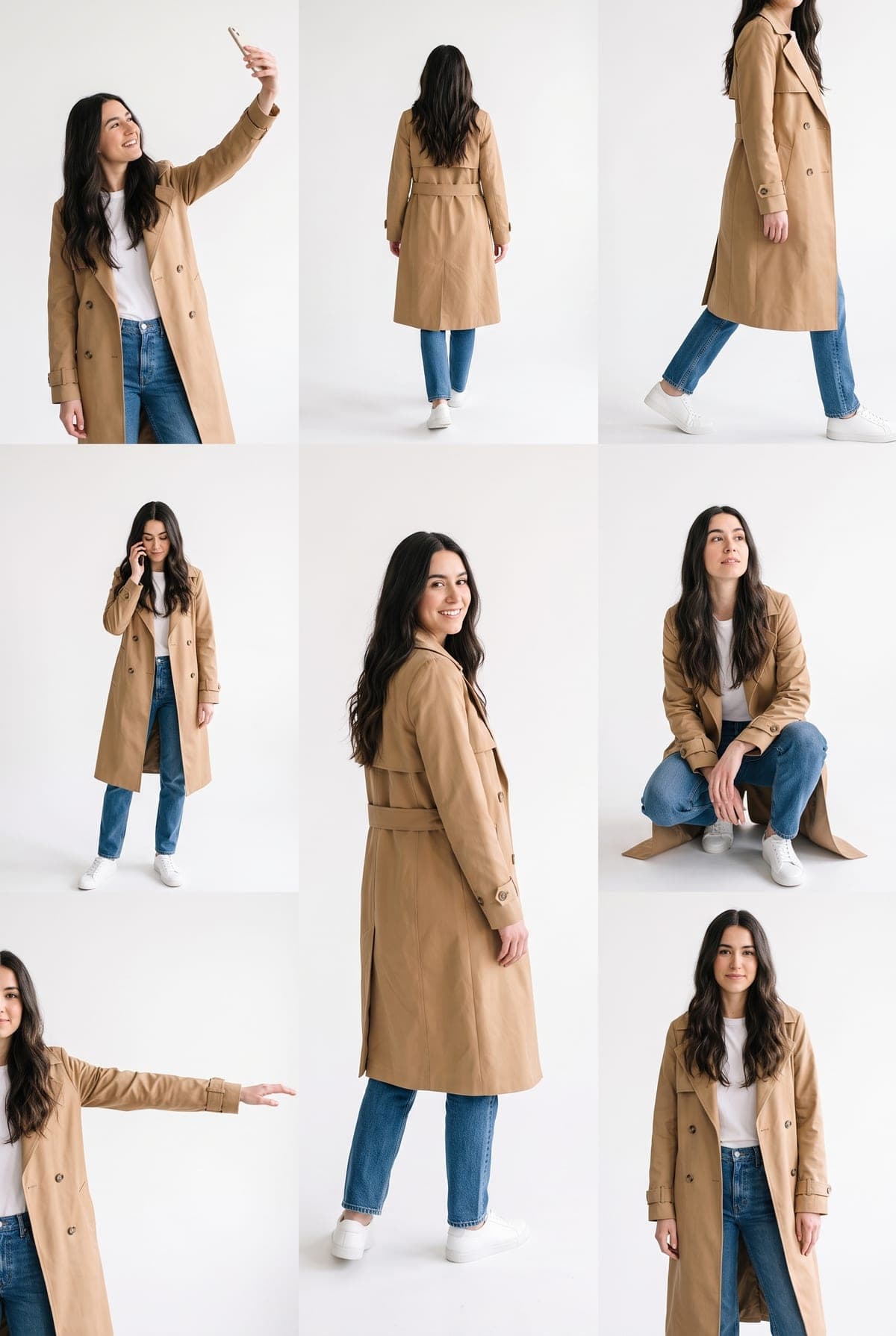
A lookbook is a fashion page that shows one outfit from several angles. The multiple-pose version now circulating on Instagram does the same for you: one photo in, one white page out, with the same person in about eight different poses. Lookbook Poses makes that sheet from a single photo of yourself. This guide is about the planning around it, meaning the outfit, the photo, the poses you will get and the posts you can cut from the result.
Make your lookbook sheet
Upload one clear photo of you. Your poses are laid out on a white page in about a minute.
Pick the outfit first
The sheet repeats the clothes from your photo in every pose, so the outfit is the creative decision. Choose something that reads from front and back, because one pose is seen from behind.
| Outfit type | Why it works | Watch out for |
|---|---|---|
| Tailored jacket and trousers | Clear shape from every angle, easy to repeat | Fine pinstripes or small logos can shift between poses |
| Dress or saree-style drape | Fabric movement suits the walking and reaching poses | Long hems can blur into the white page |
| Streetwear set | Distinct colours and layers help each pose look like the same outfit | Busy prints repeat less consistently |
| All one colour | The cleanest repeat across every figure | Can look flat; add one accessory |
Skip anything covering your face, such as a hat pulled low or sunglasses you do not want repeated. The selfie guide covers face, framing and the one-person rule in more detail.
Know the poses you will get
The pose set is fixed, which makes the sheet predictable but also means you cannot ask for a specific pose. A result shows about eight, and may show a ninth panel. It is built around these:
- A selfie with one arm raised.
- A back view, walking away.
- A mid-stride walk in profile.
- A phone call.
- A look over the shoulder.
- A low crouch.
- A reach with one arm out to the side.
- A relaxed standing pose facing the camera.
Each figure varies a little in scale and angle, and one or two may be cropped by the edge of the page. Results differ run to run, so a second run can give you a better crouch or a cleaner back view.
Turn one sheet into several posts
Because the sheet is a single tall image, you can use it in layers:
- The full sheet as the main post, captioned as a lookbook.
- Two or three poses cropped into a carousel, with the selfie pose as the cover.
- One pose per story, leaving room at the top and bottom for the app's buttons.
The captions and story layout guide goes through the crops in detail. If a figure looks wrong, you do not need to scrap the whole sheet: crop the poses that are right and drop the rest.
Captions that stay honest
The poses were generated from your photo, so the caption should not suggest a real shoot. Lines like these say so up front:
- "A whole lookbook from one photo. (AI)"
- "My outfit, every way to walk in it. Made with AI."
- "The lookbook I did not shoot."
Use only your own photo, or someone's who agreed. Some posts about this trend use a celebrity's likeness; that is not what this template is for.
Check before you post
Zoom into each pose and compare it with your original: face, hair, outfit colour, hands on the phone, both shoes in the crouch. The pose sheet checklist lists the usual flaws and when to rerun. If you are comparing this with the Instagram effect, Can't find the Lookbook effect? explains the differences, and the AI photo trend playbook compares Lookbook Poses with the other image trends.
When you are ready, open Lookbook Poses and make your sheet. No generated results or performance figures are claimed in this guide.
Frequently asked questions
What outfit works best for an AI lookbook pose sheet?
One clear, simple outfit that shows well from the front and the back, such as a jacket and trousers or a dress. The same outfit is repeated in all eight poses, so strong shapes and solid colours stay recognisable.
Can I pick the poses in my lookbook sheet?
No. The template uses a fixed set of poses: a selfie, a back view, a walk, a phone call, a look over the shoulder, a crouch, a reach and a relaxed standing pose. Each result varies a little, and you can crop the poses you like.
How do I post a lookbook sheet honestly?
Say it is AI-made in the caption. The poses were generated from one photo, so do not present the sheet as a real photoshoot or a studio session.