
Oakgen.ai

Video trend

Dam Wall Run AI Video: The Dam, the Crowd and the Sound

Most wall run clips use a stadium ramp or a city landmark. This one uses a dam: a huge curved concrete face, wet and streaked, with a crowd at the bottom. Nobody else calls it a dam wall run yet; it is our description of the scene. This page covers everything in the video that is not you, what it sounds like, and what to check in the background of your own version.

Final video
15 seconds
Your input
1 photo
Quality
720p
REFERENCE RECREATION15 SEC / 9 / 16
Wall RunSource: @jacksonzhangai · AI reel on Instagram

The scene around the runner

01

The wall

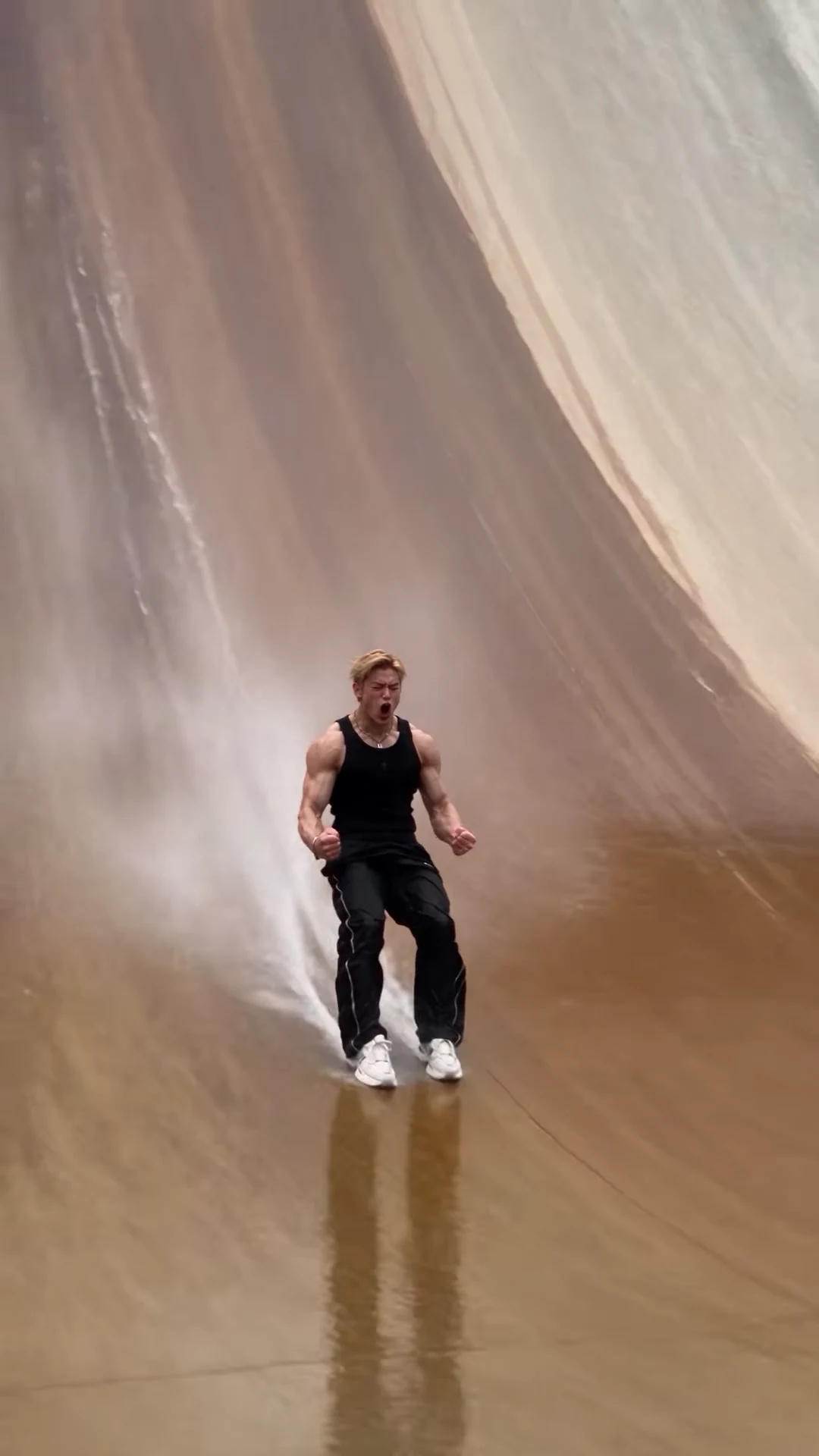
A curved concrete dam face that starts as a gentle slope at the bottom and bends up toward vertical at the crest. It is wet and streaked with brown water stains running downhill, which is what makes the splash landing believable on screen. A railing runs along the top, with a few spectators standing behind it.
02

The crowd and the guards

At the bottom, a line of guards in black stands in front of a packed grandstand under white tent roofs, with pink banners along the front and green hills behind. They are background people: they stay in your video and never take your face. The template asks for no readable lettering or logos on the banners.

03

The water

Water is part of the stunt. The apron at the bottom shines wet, the wall streams, and the landing at about 10 seconds throws a burst of spray around the runner's feet that keeps trailing during the slide. In your version the spray should start at the feet on landing, not before.

04

The sound

There is no song. The reel uses its original audio: footsteps on wet concrete, a whoosh, a splash on the landing, then the crowd roaring and the runner screaming. There is no dialogue, and the runner does not lip-sync. Your video keeps this original reference sound.

05

The frame and the camera

Portrait 9:16, 15 seconds, one handheld take with no cuts. The camera starts at eye level near the guards, tilts up to follow the sprint and the flip against the grey sky, then comes back down as the runner slides toward it and ends in a close-up. That makes it ready for Reels, TikTok and Shorts without cropping.

06

Checking the background

Faces in the crowd are small and soft, which is normal. What to look for: the guards should not change number or swap places between the start and the end, nobody at the railing should copy the flip, and no new words should appear on the banners. If one of those happens, run it again before changing your photo.

Explore the Wall Run trend

How to make it

Add a photo for the runner.

The roles in the Wall Run reference recreation
Runner in the Wall Run source video
Runner
  1. 01

    Add your photo

    Upload one clear photo of yourself or of someone who agreed to appear. A sharp, front-facing face with the whole head and hair visible works best; the outfit does not matter.

  2. 02

    Review quality and price

    Choose 480p, 720p or 1080p and review the quote. It includes the full video, your photo preparation and three scene preparations.

  3. 03

    Check the stunt

    Watch your face on the far-away run, through the flip and in the close celebration, then download your portrait MP4 with the original sound.

01

You are the runner

One photo gives the runner your face, hair and build. The template is built to replace the reference face; check the close-up before you share.

02

The stunt outfit stays

The black ribbed tank top, silver chain, black track pants with white piping and white sneakers are the look of the trend, so you wear them whatever your photo shows. Your hair stays your own.

03

The whole stunt in one take

The full 15 seconds: the start beside the security guards, the sprint up the curved wall, the flip off the top, the splash landing, the slide down and the fists-up celebration, on the original sound.

04

A credited AI source

The preview is @jacksonzhangai's AI reel. The stunt is physically impossible; the reel is the motion and timing reference, not an Oakgen result.

Photo tips

  • One person per photo
  • Sharp, front-facing face
  • Whole head and hair in frame
  • Any outfit works: the stunt look is added
  • Use a photo of someone who consented
  • Check your face in the close-up at the end

Questions & answers

What is the Wall Run AI trend?

It is a 15-second portrait AI clip of one person sprinting up the wet, curved concrete face of a huge dam while a crowd watches from a grandstand. At the top they flip into the air, land feet first in a burst of spray, slide down the wall and celebrate in front of the camera. Oakgen's template puts your face and hair on the runner and keeps the outfit, the dam, the crowd, the stunt and the sound.

Is the stunt real?

No. The reference is an AI-made reel, and nobody can run up a near-vertical wall or land a flip on it like that. Fact-checkers have flagged similar AI "stunt running" clips that are passed off as real, so label your video as AI when you share it.

Where does it come from?

From an Instagram reel posted by @jacksonzhangai on 23 October 2026. The runner in it is an AI likeness of a real person, so Oakgen's template is built to replace that face and a photo is required.

Do I have to wear the outfit?

The outfit is part of the trend. Whatever you wear in your photo, the video dresses you in the black ribbed tank top, silver chain, black track pants with white piping and white sneakers. Your face, hair and build come from your photo.

Is there a song?

No. The reel uses its original audio: footsteps on the wet concrete, a whoosh, a splashing landing, then a crowd roar and the runner's scream. There is no music or dialogue, and your video keeps that original sound.

Does the runner say anything?

No. The runner does not speak or lip-sync; after the landing they scream with an open mouth and shout toward the camera, without words, as in the reference.

Who else is in the video?

The security guards, the crowd in the grandstand and the spectators on the top of the dam stay as background people. Only the runner takes your face. The template asks for no readable lettering or logos on the banners.

Whose photo can I use?

Your own, or a photo of someone who agreed to be in the video. Do not upload photos of celebrities, public figures or anyone who has not consented, and label AI videos clearly when you share them.

How long is the video?

15 seconds in portrait 9:16, one continuous handheld take from the start at the bottom of the dam to the celebration.

Is the preview generated by Oakgen?

No. It is the credited AI reel used as the reference, not an Oakgen result. Review your face, hands and feet before sharing.

How much does it cost?

3,102 credits per 720p video. The quote includes your photo preparation, three scene references and the complete video. Check it before generating.

Ideas for your next video

Plan a story, keep your character recognizable, and make the finished clip your own.

Explore the video trend playbook →

Make your Wall Run video

Upload 1 photo. Everything else is set.

Make this video