
Video trend

UFC AI Video Generator: A Fight Clip From Two Photos

People who search for a UFC AI video generator usually want one of two things: a tool that animates a fighter they already know, or a way to put themselves and a friend in a fight clip. Oakgen's Holloway vs Gaethje template is the second one. You add a photo of each fighter and, if you like, a photo of the place; it makes an 11-second landscape fight that ends in a knockout, with the fight-broadcast sound. Oakgen is not affiliated with the UFC or with any fighter, and the template does not make UFC athletes: both fighters come from your photos.

Final video
11 seconds
Your input
2–3 photos
Quality
720p
THE ORIGINAL11 SEC / 16 / 9
Holloway vs GaethjeYour photo. This scene.

What this UFC-style generator does and does not do

01

What you actually get

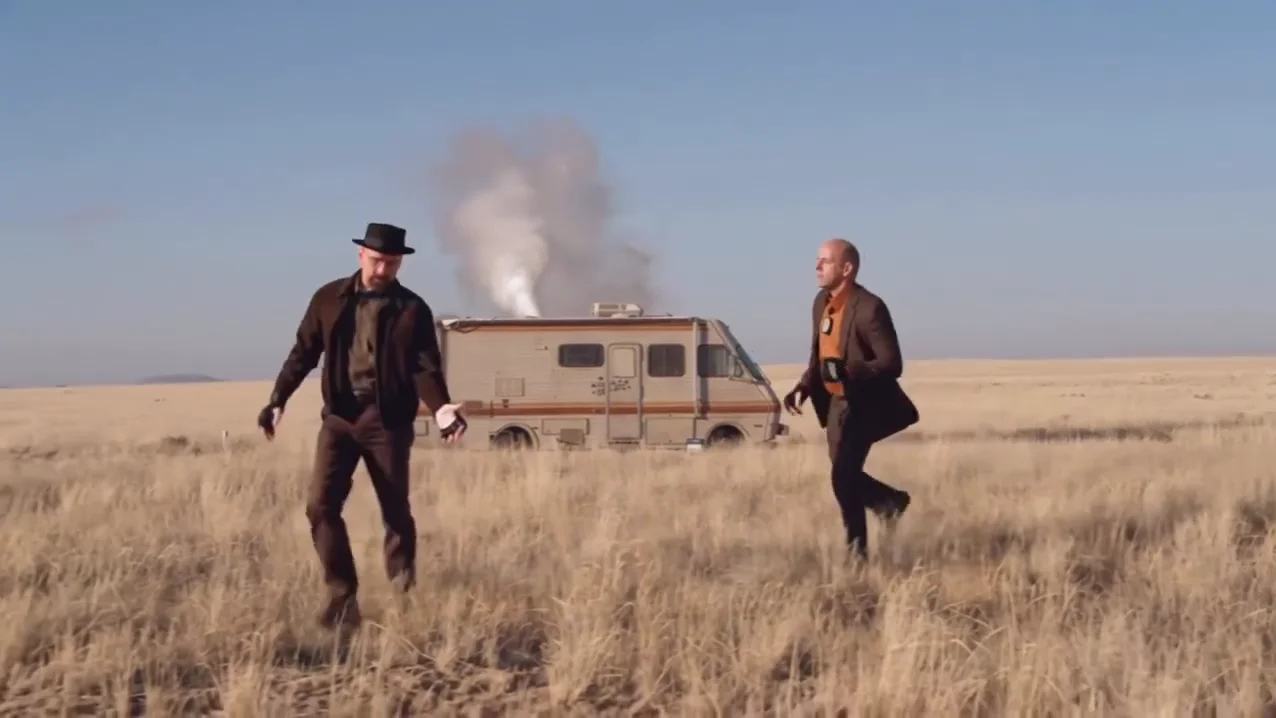
An 11-second 16:9 clip. Two fighters meet in the open, bounce and trade punches, clinch, and the one who started on the right finishes the one who started on the left, who ends the clip on the ground. The camera moves and the two cuts of the reference clip are kept, and so is its original sound: fight-broadcast commentary and crowd, no song.
02

What you give it

A photo for the left fighter and a photo for the right fighter. Both are required, because the motion guide replaces both original fighters with grey silhouettes. A third, optional photo changes the background. Each photo sets that fighter's face, hair, body and outfit; nothing of the reference clothing is kept.

03

What it cannot do

It cannot make a named UFC fighter, a belt, a ring announcer or UFC branding: the fight is built from your photos and the template adds no logos or lettering, and the gloves are plain black fight gloves. It also cannot rewrite the choreography. Who throws what and who goes down is set by the template; you choose who plays which side.

04

Who goes down

The left fighter starts the clip standing and ends it face down on the ground; the right fighter lands the finish and walks over them. If you want a friend to take the knockout, put them on the left. If you want to take it yourself, put your own photo there.

05

Quality, length and price

Choose 480p, 720p or 1080p. The video is always the full 11 seconds, and the credit quote on the template page includes both photo preparations. A background photo adds no preparation charge. Try a new pair of photos at 480p before spending on 1080p.

06

Before you post

Label the clip as AI-made and use photos only of people who agreed to appear. Because it shows one person being knocked out, keep the caption playful and do not post it as a real fight or a real person's injury.

Explore the Holloway vs Gaethje trend

How to make it

Add a photo for the left fighter and right fighter. The background is optional: add a photo to change it.

The roles in the Holloway vs Gaethje original reference
Left fighter in the Holloway vs Gaethje source video
Left fighter
Right fighter in the Holloway vs Gaethje source video
Right fighter
Background in the Holloway vs Gaethje source video
Background
  1. 01

    Pick your two fighters

    Upload a clear photo for the Left fighter, who goes down, and the Right fighter, who lands the finish. Full-body photos in the outfit you want carry through the clinch and the fall; everyone pictured should have agreed to appear.

  2. 02

    Choose a background, or keep the field

    Add a location photo in Background to change the setting, or skip it. Then pick 480p, 720p or 1080p and review the quote, which covers the full video and both fighter preparations.

  3. 03

    Check the finish

    Watch that both fighters keep their own face and outfit through the clinch, the punch lands before the fall and the knocked-out fighter ends on the floor, then download your 16:9 MP4 with the original sound.

01

Your fighters, your outfits

Each fighter takes the face, hair, build and complete outfit from their own photo. Nothing of the reference clothing is kept, so a suit photo gives a suit fight and a tracksuit photo gives a tracksuit fight. Both wear plain black fight gloves with no logos.

02

Change the background

An optional location photo moves the whole fight from the grass plain to a cage, a gym, a street, a kitchen or any wide place with a visible floor. Leave it empty to keep the original scene.

03

The whole 11 seconds

A wide stand-off, a close exchange and clinch, a closer cut for the finish and a low cut of the knocked-out fighter on the ground, with the camera moves and timing of the reference.

04

The original sound

The video keeps the reference's fight-broadcast commentary and crowd, identified as the call of the Holloway vs Gaethje finish at UFC 300. It is not music. Oakgen is not affiliated with the UFC or either athlete.

Photo tips

  • One person per photo
  • Full body in the outfit you want
  • Pick two visibly different fighters
  • Even light, no heavy shadows
  • A wide, flat background photo
  • Check the gloves and the fall

Questions & answers

What is the Holloway vs Gaethje AI trend?

It is an 11-second AI fight clip: two men bounce in their stances in an open field, trade punches and clinch, and the one on the right lands the finish while the one on the left drops face down in the grass. Its soundtrack is fight-broadcast commentary and crowd noise, identified from the audio as the call of the Holloway vs Gaethje finish at UFC 300. Oakgen's template puts your own two fighters in it and keeps the moves, the cuts and the sound.

Is this a UFC video or a video of Holloway and Gaethje?

No. Oakgen is not affiliated with the UFC, Max Holloway or Justin Gaethje, and neither athlete appears. The name comes from the fight whose broadcast call is the clip's soundtrack. Both fighters in your video come from your own photos, and the template adds no UFC logos or lettering.

Do I need two photos?

Yes. The Left fighter and the Right fighter each need a photo, because the template replaces both reference fighters with grey silhouettes, so neither of them is kept in your video. The background photo is the only optional one.

Who takes the knockout?

The Left fighter, who starts on the left, ends the clip face down on the ground. The Right fighter lands the finishing punch and walks past. Put whoever should lose in the Left slot.

Will the clothes in my photos show up in the video?

Yes. Each fighter wears the outfit in their own photo, not the reference clothing, and both wear plain black fight gloves. A full-body photo shows the outfit best through the clinch and the fall.

Can I change the background?

Yes. Add a location photo in the Background slot and the template tries to rebuild the whole place from it while keeping the fighters, the punches and the camera moves. A wide, evenly lit photo with a visible floor works best. Leave it empty to keep the original open field with the camper van and smoke.

Is there music?

No song. The sound is the reference's fight-broadcast commentary and crowd noise, and your video keeps it unchanged.

Whose photos can I use?

Your own, or people who agreed to appear. Do not upload photos of celebrities, public figures, athletes or anyone who has not consented, and label AI videos clearly when you share them. The clip shows a knockout, so keep it clearly a joke.

How long is the video?

About 11 seconds in landscape 16:9, from the first stand-off to the fighter on the ground.

Is the preview generated by Oakgen?

No. It is the AI reference clip the trend comes from, used as the motion and timing reference, not an Oakgen result. Review both faces, the outfits and the fall before sharing.

How much does it cost?

2,253 credits per 720p video. The quote includes both fighter preparations and the complete video; a background photo adds no preparation charge. Check it before generating.

Ideas for your next video

Plan a story, keep your character recognizable, and make the finished clip your own.

Explore the video trend playbook →

Make your Holloway vs Gaethje video

Upload 2–3 photos. Everything else is set.

Make this video