
Video trend

The Car Crash Walk-Away Scene in The Box AI Trend

The middle of The Box AI trend is the scene people remember: an old TV cuts into a night industrial lot, the lead dances, two cars collide behind them and one flips in a fireball while they walk toward the camera. It is also the scene where the lead is smallest in frame. This page explains what happens in it, which photos survive a wide shot, and how to turn the 16:9 file into a 9:16 post without losing the crash.

Final video
20 seconds
Your input
1–2 photos
Quality
720p
THE ORIGINAL20 SEC / 16 / 9
The BoxYour photo. This scene.

The lot scene, the photo and the vertical crop

01

What happens in the lot

The TV cut drops you into a dark industrial lot at night. The lead dances to the verse, two cars hit each other in the background, and one rolls over and bursts into flames. The lead never looks back and keeps walking toward the camera. In the reference the lead wears narrow black visor sunglasses here. Your version drops them unless your photo shows glasses, in which case your own frames stay on in every shot.
02

Why it looks familiar

Roddy Ricch's official video for The Box has a street race in which a car crashes and burns behind him, which Vulture described as dancing in front of an explosive game of chicken. The AI clip restages that idea, and the walk away from a fireball is a familiar action-film beat on its own.

03

Which photo holds up in a wide shot

At the start of the walk the face is small, so the model has few pixels to work with. A sharp photo with the face large in the frame, front light, eyes open and clearly visible, and no hair across the eyes gives the best result. Group photos, heavy filters and dark selfies tend to blur first here.

04

Pick 1080p for this scene

If the wide shot matters most to you, choose 1080p. The face is a small part of the frame until the lead gets close to the camera, and the extra resolution helps it stay recognisable. 720p is fine to test the photo first.

05

Cropping for 9:16

The file is 16:9. A full-height vertical crop keeps only about a third of the width, so a fixed centre crop can cut part of the crash out. Two options work. Keep the full 16:9 frame inside a 9:16 canvas, with your caption in the empty band above, or crop and move the window across the frame so the flip stays in view, then return to the lead as they get close.

06

Cutting just the lot scene

The lot scene works as a short on its own. The push-in through the TV starts at about 4.8 s and carries straight into the lot with no cut, and the podium begins at about 16.2 s. A cut from 4.8 s to 16 s gives you about 11 seconds of the TV, the dance, the crash and the walk, and stops before the press room.

07

Caption and label

Captions that pair a calm walk-away with a small disaster work best: 'Me leaving the group project after my part.' 'Walking out of the exam like I knew it.' Say the clip is AI-made in the caption or with the platform's AI label.

Explore the The Box trend

How to make it

Add a photo for the lead rapper. The background is optional: add a photo to change it.

The roles in the The Box original reference
Lead rapper in the The Box source video
Lead rapper
Background in the The Box source video
Background
  1. 01

    Add the lead rapper's photo

    Use a head-and-shoulders photo, face forward, hair fully visible and no hat. Use your own photo or one of someone who agreed to appear. Optionally add a wide landscape location photo in Background, with no people and no readable signs, to change the setting, or leave it empty to keep the original scenes.

  2. 02

    Choose the quality

    Pick 720p or 1080p and review the quote. It covers the full 20-second video.

  3. 03

    Check the podium and post

    Watch the table shot and the podium close-up with the sound on for the face and the mouth, and the lot for the dance, then download your landscape 16:9 MP4 with the original song and label it as an AI parody when you post.

01

Your face, not his

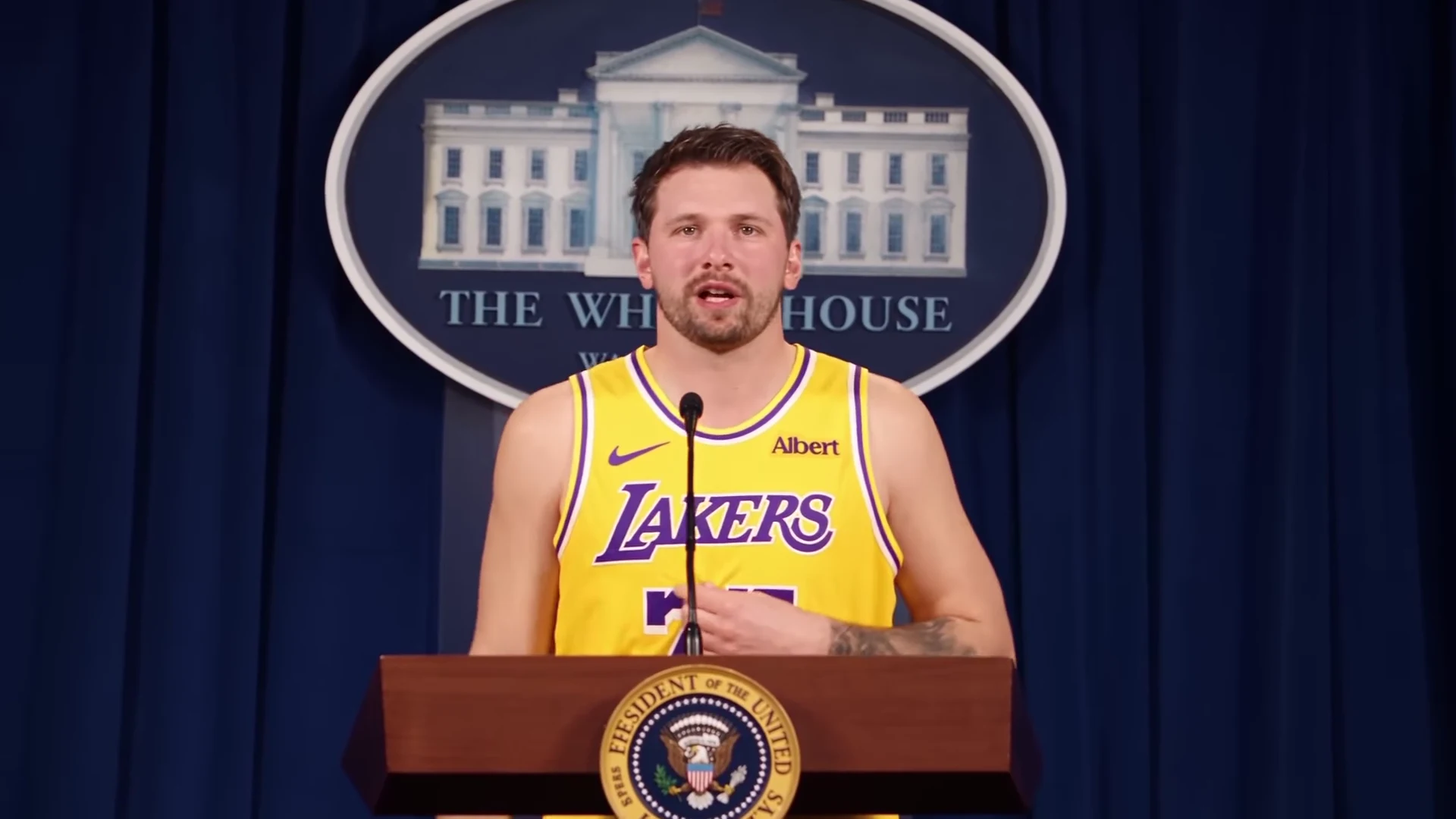
The template follows the parody clip's camera and moves, but the lead comes from your photo: face, hair, build and outfit in every shot. The reference's yellow basketball jersey with its team name, number and sponsor patch, the tattoo sleeve and the narrow visor sunglasses are not kept, and no one's likeness is copied from the reference.

02

Your place, if you want it

An optional Background photo tries to rebuild all three scenes in one place: the table of cash, the dance and car crash, and the podium, with the same shots and moves. Leave it empty to keep the dim living room, the night lot and the press-briefing set.

03

The original song stays

Your video keeps the reference clip's soundtrack, a verse of The Box by Roddy Ricch. No separate audio goes to the video model and its own sound is thrown away; the lead's mouth follows the reference clip and the original track is put back at the end. Oakgen does not clone or generate a voice.

04

Four shots in 20 seconds

A slow camera arc around the table of cash, a close-up of the man in the grey hoodie, a push through an old TV into a night lot where the lead dances while a blue car flips in a fireball, and a close-up at a press-briefing podium. The podium seal, the backdrop and the clothes are asked to carry no readable lettering.

05

A parody, labelled as one

The preview is an AI-made parody, not real footage of any real person, and nobody it resembles made, endorsed or appears in it. The song is only the sound the clip is set to; Oakgen is not connected to the artist, his labels or publishers, and does not license the song for your posts.

Photo tips

  • One person in the photo
  • Face forward, hair visible, no hat
  • Keep the mouth clear for the lip-sync
  • Your own outfit stays in every shot
  • Turn the sound on for the verse
  • Label it as an AI parody
  • An optional wide background photo with open floor

Questions & answers

What is The Box AI trend?

An AI-made rap music video parody set to The Box by Roddy Ricch. A lead rapper in a yellow basketball jersey lip-syncs behind a glass table of cash while a man in a grey hoodie counts it, the camera pushes through an old TV into a night lot where the lead dances as two cars collide and one flips in a fireball, and the clip ends with the lead at a press-briefing podium. Oakgen's template keeps the shots and the song and puts the person from YOUR photo in the lead's place.

Is the preview real footage?

No. The preview is an AI-made parody clip, not real footage of any real person, and nobody it resembles made, endorsed or appears in it. Oakgen is not affiliated with or endorsed by Roddy Ricch, his labels, any athlete, team, league, brand, sponsor or government body, and your video does not show the man in the reference: the lead is the person in your photo.

What song is it?

The Box by Roddy Ricch, from his debut album Please Excuse Me for Being Antisocial, released on 6 December 2019. It was released as a single on 11 January 2020 and spent 11 weeks at No. 1 on the Billboard Hot 100. Its official video came out on 28 February 2020, directed by Roddy Ricch and Christian Breslauer. The parody is not that video. Your video keeps the original recording from the reference clip.

Why is it called The Box?

Because that is the song playing under the clip. We name a template by its song when the song is how people search for it, so The Box is our label for this format, not an official title. We found no earlier public name for the AI clip.

Does my video keep the song?

Yes. Your video keeps the reference clip's original soundtrack, the verse of The Box with its beat. Your photo changes how the lead looks, not the words or the voice, and the template does not take a new song or voice recording. Oakgen does not license the song for your own posts, so check the platform's music rules before you share.

Is the song sent to the AI model?

No. No separate audio or voice sample is sent to the video model, and whatever sound the model returns is thrown away. The lead's mouth follows the lip movement in the reference clip, and the original soundtrack is put back on the finished video. Oakgen does not clone or generate a voice for this template.

Do I need a basketball jersey?

No. There is no costume. The lead wears the outfit from your photo in every shot, with your own hair and accessories, instead of the reference's yellow jersey, shorts, grey leggings, sneakers, tattoo sleeve and visor sunglasses. A photo that shows only the upper body gets plain dark trousers and trainers.

Who else is in the video?

Only the lead is replaced. The man in the grey hoodie who counts the cash, the hooded figure in the doorway and the man on the couch are background people from the AI parody and stay as they are, and nobody else takes your face.

Is the podium real?

No. The last shot is an AI-made press-briefing set with a seal on the podium and an oval backdrop. The template asks for the seal and the backdrop to carry no readable words, and the clothes no team name, number or logo. Check your result for stray lettering before you post, and keep it clearly a parody.

Can I change the background?

Yes, optionally. Add a location photo in the Background slot and the template tries to rebuild all three scenes in that one place, with its own floor, walls and sky, at the same time of day in every scene: the table of cash and the man counting it, the push through the old TV into a dance while the cars collide and one flips in a fireball, and the podium with its microphone. The shots, moves and timing stay. Use a wide landscape photo with no people and no readable signs, with enough open ground or floor for the car scene; an indoor photo becomes a large open floor of that place. Results can vary, so check the car scene, the lighting on the lead and the podium before you post. Leave it empty to keep the dim living room, the night lot and the press-briefing set. A background photo adds no cost.

Can I put a pet in it?

A clear photo of a dog or cat is accepted and the whole body follows the pet's species, but the clip is built around a person's lip-sync, hand gestures and dance, so a photo of a person gives the most reliable result.

What photo should I upload?

A sharp head-and-shoulders photo of one person, face forward, hair fully visible, mouth uncovered, with no hat or sunglasses. The table shot and the podium close-up show the face large, so a clear face matters.

Whose photos can I use?

Your own, or photos of people who agreed to be in the video. Do not upload photos of celebrities, athletes, politicians or anyone who has not consented, and label the video as an AI parody when you share it.

What quality can I choose?

720p or 1080p. 720p is the default and is enough for a first check of the face and the mouth; the wide shots in the night lot gain the most from 1080p.

How long is the video and what shape is it?

20 seconds in landscape 16:9 with four shots. Post it as it is, or place it on a vertical canvas for Reels, TikTok and Shorts.

Is the preview generated by Oakgen?

No. It is the AI-made parody reference clip the trend comes from, used for the shots and timing, not an Oakgen result.

How much does it cost?

1,062 credits per 720p video. The quote covers the complete 20-second video. Check it before generating.

Ideas for your next video

Plan a story, keep your character recognizable, and make the finished clip your own.

Explore the video trend playbook →

Make your The Box video

Upload 1–2 photos. Everything else is set.

Make this video