

 ChatGPT
 Claude
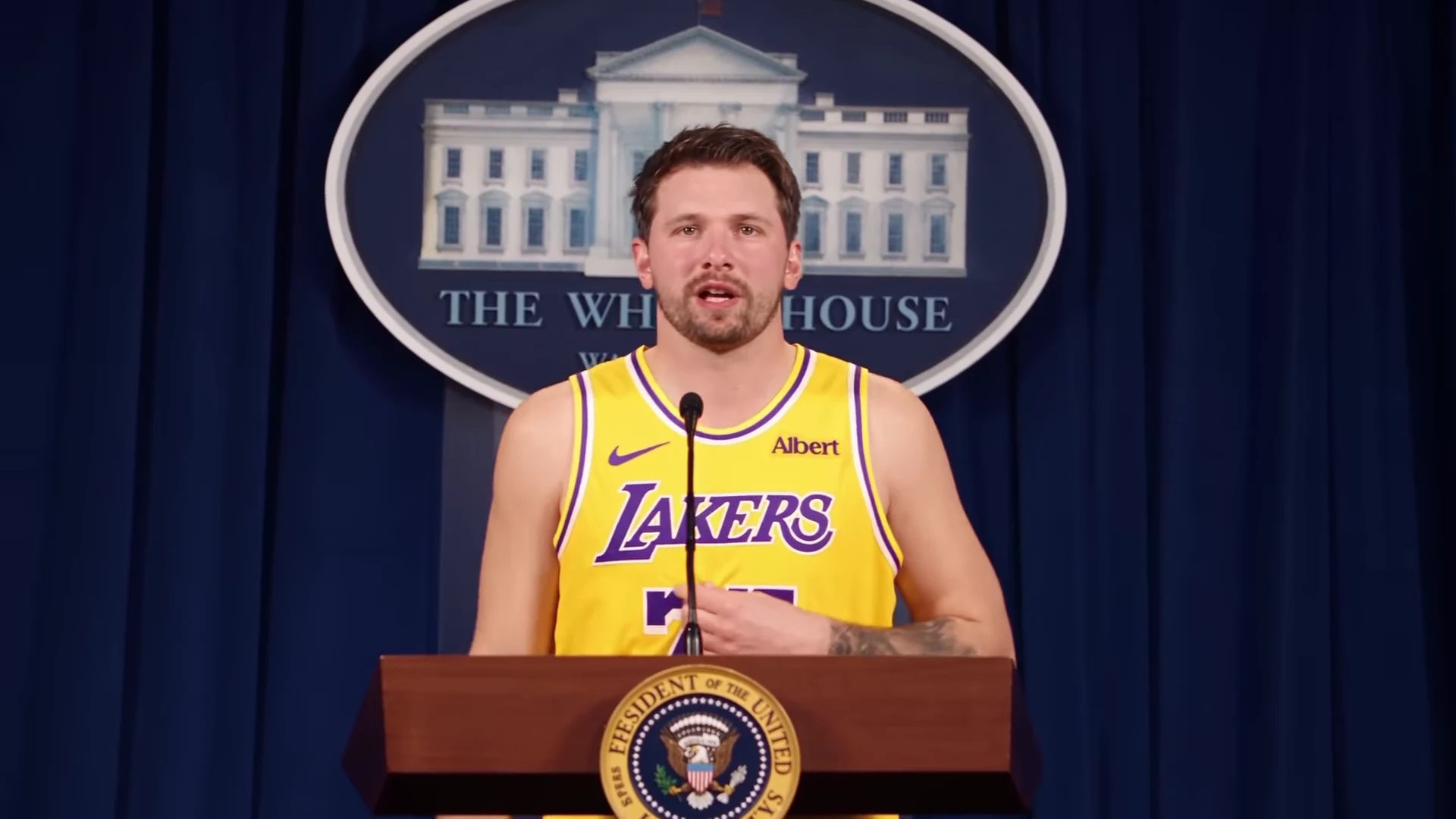
The best captions for The Box AI trend match the scene people will pause on: the cash table, the car crash in the night lot or the press-room podium. Below are 40 original lines, 15 sorted by scene and 25 sorted by who you are (gym, office, students, sports fans, founders). After them come where to put hook text, how to crop the 16:9 clip to 9:16, and which hashtags to use. The video itself comes from Oakgen's The Box template, one photo in, 20 seconds out, with Roddy Ricch's "The Box" on the soundtrack.
Make the video first
Add one photo for the lead rapper and get the 20-second The Box AI video with the cash table, the crash and the podium.
Disclosure: Oakgen is our product. The captions below are written by us and are free to use.
The three scenes your caption can point at
The video is 20 seconds in landscape 16:9. The first four seconds are a dim room with a glass table stacked with banded cash, where you lip-sync "I been movin' 'em out" while a man in a grey hoodie counts money. A one-second cut to an old CRT TV follows. From about 5 to 16 seconds you dance in a night industrial lot while two cars collide behind you and one flips in a fireball as you walk toward the camera. The last four seconds put you at a podium in front of a blue curtain, tapping your chest on "I'm a 2020 president candidate".
If you added the optional Background photo, the same three moments happen in your place instead, so these captions still fit. A good caption sets up one of those moments and lets the video pay it off. The background to each scene is in The Box AI trend explained.
15 captions by scene
The cash table
- Me explaining my budget spreadsheet to nobody.
- Payday energy, rent-due reality.
- When the group chat finally pays you back.
- Counting the tips from one shift like it is a heist.
- Accountant by day. This by night.
The crash in the night lot
- My plans this year walking away from the wreck.
- Leaving the meeting before anyone asks a follow-up.
- Me exiting the situationship. Do not look back.
- Walking out of my last exam like the building is on fire.
- The deadline behind me, exploding. Me, calm.
The podium
- Announcing my campaign for group chat admin.
- My running platform is a four-day week.
- Press conference: I will not be taking questions about my screen time.
- Officially running for captain of the five-a-side team.
- Every family dinner when someone asks what I do for work.
25 captions by persona
Gym
- Pre-workout kicked in during the warm-up set.
- Leg day ended. I am walking away from it like that car.
- Shadowboxing my excuses one by one.
- Coach said keep your form. My form is this.
- Announcing my bid for the squat rack I have been waiting on.
Office
- Me leaving the 4:58 pm meeting invite behind.
- Quarterly review, but make it a press conference.
- When the expense report finally clears.
- Out of office starts now. Do not follow.
- Running for president of the snack committee.
Students
- Walking out of finals week like it never happened.
- Me splitting the takeaway bill to the penny.
- Group project done. Group chat on fire. Not my problem.
- Campaigning for a deadline extension.
- Student loan arrives. Brief celebration.
Sports fans
- My team's defence behind me. I keep walking.
- Me after predicting the result in the group chat.
- Fantasy league manager, press conference edition.
- Walking away from my bracket like it is a crash scene.
- Running for commissioner of the office league.
Founders
- Pitch deck approved. Now I count it like this.
- Me shipping on Friday and walking away from the bugs.
- Press conference to announce we are pre-revenue.
- Investor update, but every slide is this video.
- Running for CEO of my own calendar.
A few rules for writing your own. Keep it under about ten words so it reads before the first cut. Make it about you, not about a real person. Do not caption it as if Roddy Ricch, an athlete or a team was involved.
Where to put the hook text
Text must never sit on your face. The face moves between scenes. You are seated at the table, small and moving in the wide lot shot, and centred behind the podium. Before you add text, pause your own result in three places.
- About 2 seconds in, at the cash table.
- About 8 seconds in, in the lot before the crash.
- About 18 seconds in, at the podium.
Find the area of the frame that is empty in all three pauses and put the hook there. If no area works for the whole clip, split the text. Use a short hook for the first four seconds only, and a second line that appears at the podium. The second line can be a payoff such as "and I approve this message".
On a vertical post with the clip letterboxed, the black bars above and below the video are free space. The hook goes in the top bar and the AI label or a short line in the bottom bar.
Keep text out of the strip where each app draws its buttons and caption. On a phone that is the bottom of the screen and the right edge. Look at a preview in the app before you post.
Cropping the 16:9 clip for Reels, TikTok and Shorts
The file is landscape. Vertical feeds are 9:16. You have three options.
| Option | What you keep | What you lose | When to use it |
|---|---|---|---|
| Post 16:9 as is | Everything | Smaller picture on a phone | YouTube, X, a landscape post |
| Letterbox in a 9:16 frame | The whole crash and podium | Picture size; bars above and below | Reels, TikTok, Shorts when you want text in the bars |
| Crop to 9:16 | A bigger face | About two thirds of the width | Only with a crop that follows the action |
A 9:16 crop of a 1920 by 1080 frame is about 608 pixels wide, roughly a third of the width. A fixed centre crop can lose the two cars as they enter from the sides around 10 seconds, and the crash is the payoff of the middle scene.
If you crop, move the crop window by hand. Keep it on your face at the table and the podium, pan as the cars come in, then follow your walk. If your editor cannot do that, letterbox instead.
Start from the 1080p version when you plan to crop. A crop enlarges the picture, and 720p gets soft faster. Choosing a quality is covered in how to make The Box AI trend video.
Get a 1080p version to crop
Pick 1080p on The Box template, read the credit quote and make the 20-second clip with your photo.
Hashtags without guesswork
We do not have hashtag performance data for this trend, so this section gives rules, not numbers.
On Instagram, five is the limit. Instagram's Help Center says you can use up to five hashtags on a post (Instagram Help Center, read 18 November 2026), a cap that Instagram chief Adam Mosseri announced in December 2025 (The Verge, 18 December 2025).
Choose tags that describe the video.
- One for the song, such as #thebox or #roddyricch.
- One for the format, such as #aivideo or #airap.
- One or two for your niche, such as #gymhumor, #officelife or #founderlife.
Do not tag the NBA player the reference resembles or a team. Nobody from either took part, and the tag can suggest they did. Skip tags that make it look like real footage, such as news or crash tags.
Label it as AI
Label every version. TikTok asks creators to label realistic AI-generated content and offers an AI-generated content setting before you post (TikTok Support, read 18 November 2026). YouTube requires disclosure when AI shows a realistic scene that did not happen (YouTube Help, read 18 November 2026). A night car crash qualifies.
Use only your own photo or one of someone who agreed. The song is a commercial recording that Oakgen puts back on the finished file. Oakgen does not license it for your posts, so check each platform's music rules for your account.
How we put this together
We wrote all 40 captions for this article on 18 November 2026. None is copied from the reference reel or from other posts, and none quotes the song beyond the two short lines that the video itself shows. The scene timings come from our inspection of the reference clip that day (20.04 seconds, 24 frames per second, landscape). The hashtag limit and the labelling rules were read on the platforms' help pages, with The Verge as a second source for the hashtag cap. We did not test which captions or hashtags perform best, and nothing here claims they will.
Related reading
For photo choice before you generate, read The Box AI trend photo guide. The scenes are compared with the 2020 music video in The Box music video scenes as an AI remake. If you post rap reels often, AI rap video trends compared and Solo, duo or squad AI rap trends will help you pick the next one.
The podium scene has its own page at 2020 president candidate AI video, and the crash at car crash walk away AI video. The song is covered on the Roddy Ricch The Box AI trend page, the tool on The Box AI video generator, and the look-alike question on Luka Dončić The Box AI video.
FAQ
Can I use the song lyrics as my caption?
Keep it to one short line at most, and avoid the explicit lines. An original caption about your own situation is usually funnier and does not lean on someone else's words.
How many hashtags should I use?
On Instagram, no more than five, because Instagram caps hashtags at five per post. On other platforms, keep the list short and specific. We have no data showing that more tags help. Use tags that describe the video, such as the song, AI video and your niche.
Should I tag Roddy Ricch or the NBA player the reel resembles?
No. Neither took part, and tagging them can suggest they did. Name the song in the caption if you like, and label the video as AI.
Do I need to label the video as AI?
Yes. TikTok asks creators to label realistic AI-generated content, and YouTube requires disclosure for realistic scenes that did not happen. Turn on the platform's AI label and say it in the caption.