
Video trend

Basketball Duo AI Video: Cast Both Roles

This scene has two different jobs: one character carries the ball and dunks, while the other contests under the hoop. Choose who does each action before uploading the photos.

Final video
12.04 seconds
Your input
1–2 photos
Quality
720p
REFERENCE RECREATION12.04 SEC / 9 / 16
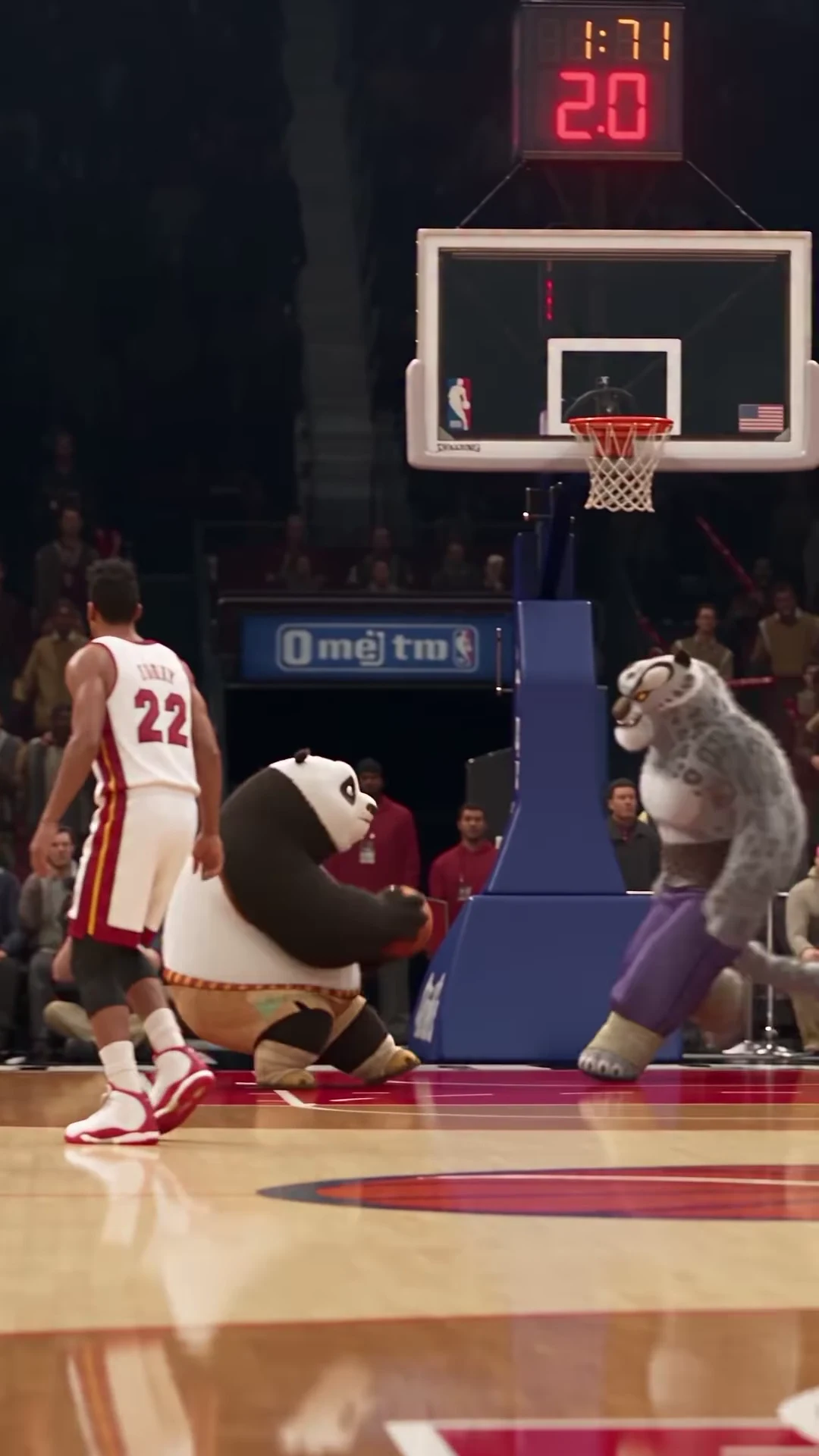
Poster DunkSource: @tisha_bimbo · Po and Tai Lung basketball AI recreation

Cast the action, then select the inputs

01

Role 1: the dunker

The dunker starts toward the left of the source frame, approaches with the basketball and rises toward the rim. This is the role for the character who should deliver the payoff. Assign the intended dunker’s photo to the dunker slot even if your personal reference photo places them on the right. Role assignment follows the named action, not the subject’s position inside an uploaded picture.

02

Role 2: the defender

The defender is closer to the basket, raises both arms to contest and remains visible as the pair descend. Give this slot its own clear reference if you want a second replacement. Do not assume a single group photograph automatically tells the tool which person should dunk and which should defend. Separate photos make the intended mapping clear.

03

One replacement leaves a deliberate contrast

Choose only the dunker to put your character opposite the source defender, or choose only the defender to keep the source dunker. The unselected role is intended to remain the reference character. A human dunker opposite Tai Lung and Po dunking over your chosen defender are therefore different creative premises. Select the role that makes your joke readable before deciding whether both need changing.

04

Two replacements create a complete pairing

Choose both roles when the relationship between the two uploaded characters matters. For example, two original team mascots with different colors can communicate a rivalry. Give each slot one consistent identity and outfit; do not upload a collage of several costume options. These are proposed casting ideas, not examples of qualified outputs.

05

Make the overlapping silhouettes readable

At the jump, the dunker and defender overlap in front of the backboard. If both references have nearly identical colors and outlines, the action can be harder for a viewer to follow. Consider a light top for one and a darker outfit for the other, or another visible distinction already present in the photos. This is a composition choice; it does not guarantee that generation will preserve every clothing detail.

06

Review the pair before submitting

Check the role labels against the two photos, remove an unintended selection and review the current credit quote. After generation, compare each character at the approach, overlap and landing. A good-looking pair of opening portraits is not enough if the roles exchange appearances during the contested jump. The fixed scene supplies the ball, basket and action; those are not additional upload slots.

Explore the Poster Dunk trend

How to make it

Choose the roles you want to change. Add a photo for each selected role.

Dunker in the Poster Dunk source video
Dunker
Defender in the Poster Dunk source video
Defender
  1. 01

    Cast your players

    Upload one clear character photo for the dunker, defender, or each. Check the role labels before choosing photos; the players overlap and change screen positions during the jump.

  2. 02

    Choose quality

    Select 480p, 720p or 1080p and review the quote for your selected roles. It includes the complete video plus character and scene preparation.

  3. 03

    Review the basket

    Watch the ball, hands, rim contact and landing before downloading. Check that each selected identity and outfit stays consistent when the players overlap.

01

Two distinct roles

The dunker carries the ball into the jump; the defender contests it with raised arms. Upload a photo for either role or cast both. Unselected roles keep their reference appearance.

02

The whole play

The approximately 12-second portrait sequence includes the approach, slow-motion jump, basket and reaction after landing. The template follows the Instagram recreation's timing.

03

Appearance from your photos

Your selected character's face, hair, outfit and species come from the uploaded photo. For a human replacement, choose clothing and body proportions you want to see throughout the jump.

04

A clearly credited reference

The preview is @tisha_bimbo's supplied AI recreation, not an Oakgen-generated example. The official NBA slow-motion clip is a strong motion match; the creator's exact source edit has not been confirmed.

Photo tips

  • One character per photo
  • Show the intended outfit
  • Keep the face and hair clear
  • Choose visibly different characters for two roles
  • Check the hands, ball and rim
  • Keep the basket in your final crop

Questions & answers

What is the Poster Dunk trend?

Poster Dunk is Oakgen's descriptive name for the supplied Po and Tai Lung basketball AI recreation. One character drives into a slow-motion dunk while the other contests the shot, then both land beneath the basket.

Can I replace just one player?

Yes. Upload a photo for the dunker or defender, or supply two photos to replace both. The role without an uploaded photo keeps its reference appearance. The full play is edited in every case.

Can I use a human photo instead of an animal?

Yes. A selected role uses your photo's character and outfit, including a human or animal. Inspect anatomy and identity through the jump: the reference's cartoon proportions should not carry over to a human replacement.

Is this the Ja Morant and Wembanyama dunk?

The official NBA slow-motion clip of Ja Morant dunking over Victor Wembanyama after the whistle is a strong match for the movement in the recreation. That connection is based on source comparison; the creator has not confirmed the exact edit. This template uses the Instagram recreation, not the NBA footage.

How long is the output?

The complete portrait video is approximately 12.04 seconds at 24 frames per second. It retains the source's final reaction; there is no shorter duration selector in this fixed template.

Does the video keep the reference sound?

Yes. The final MP4 retains the Instagram reference audio. We have not verified a track title and do not label it with a guessed song or artist.

Can I change the court or dunk with a prompt?

The court, camera movement and action sequence are fixed by this reference. Your choices are the replacement photos and output resolution.

Is the preview generated by Oakgen?

No. The preview is the attributed Instagram AI recreation. It demonstrates the scene and timing, not a measured result from your uploaded photos.

How much does it cost?

2,688 credits per 720p video. This full-cast quote includes both character preparations, scene references and the complete play. Selecting one role reduces character preparation cost; check your selected quote before generating.
Ideas for your next video

Plan a story, keep your character recognizable, and make the finished clip your own.

Explore the video trend playbook →

Make your Poster Dunk video

Upload 1–2 photos. Everything else is set.

Make this video