
Video trend

AI Dunk Video Photo Guide

A basketball jump reveals more than a face: arms extend, clothing moves and bodies overlap. Choose a photo that clearly communicates the character you want throughout that motion.

Final video
12.04 seconds
Your input
1–2 photos
Quality
720p
REFERENCE RECREATION12.04 SEC / 9 / 16
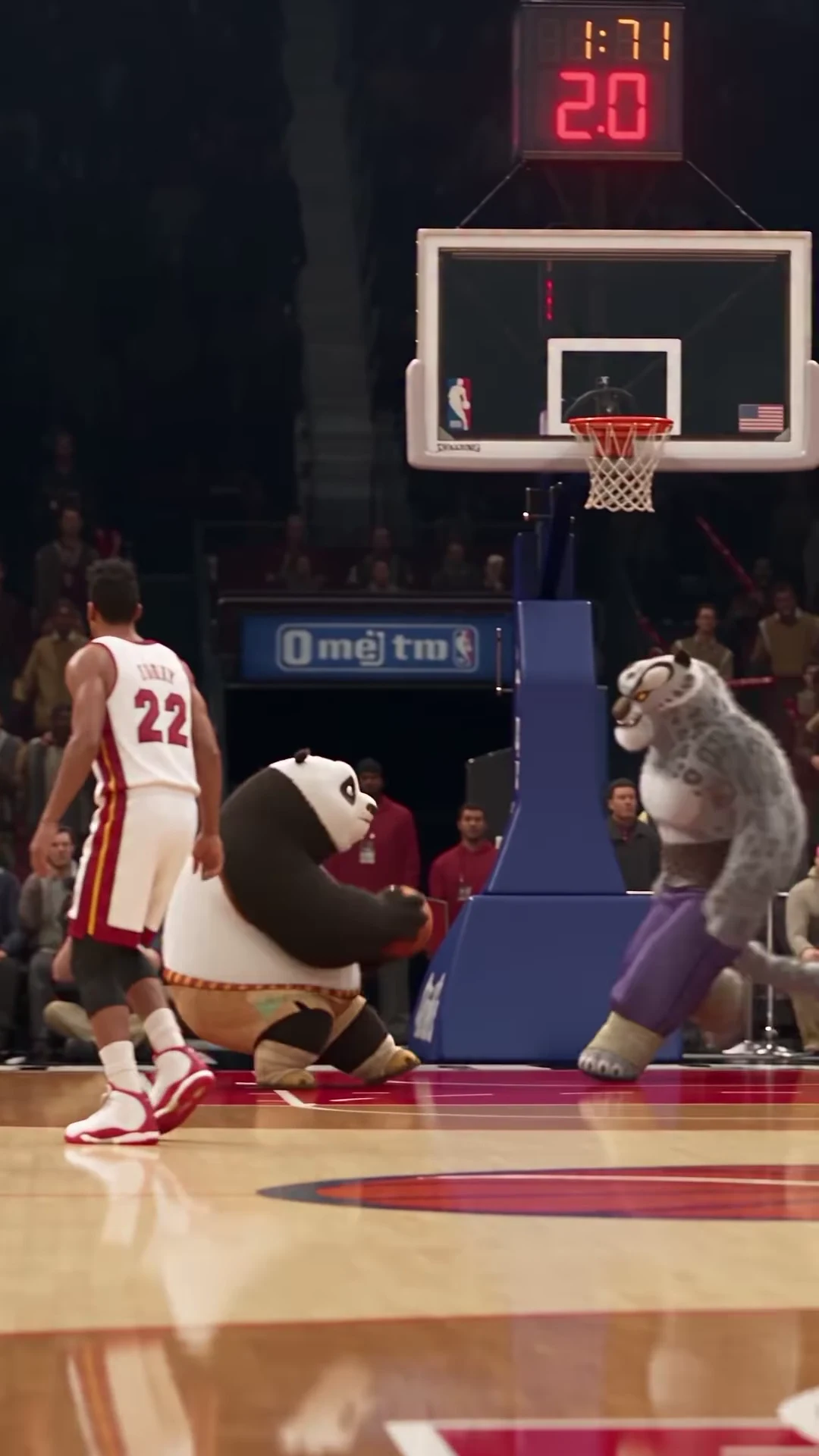
Poster DunkSource: @tisha_bimbo · Po and Tai Lung basketball AI recreation

Compare the information in your reference photos

01

Choose a clear subject over a matching action pose

A sharp standing photo is a more readable appearance reference than a tiny, blurred person already dunking. The trend supplies the action. You do not need a ball, a basketball court or the same raised-arm pose in the upload. Start with one clearly intended subject rather than a crowded team photograph.

02

Keep the face readable at ordinary size

Compare a close enough front or gently angled view with a distant full-body shot. If the full-body image reduces the face to a few indistinct pixels, use a sharper reference with useful clothing detail instead. The head should not be obscured by a ball, sunglasses glare, another person or an extreme crop. These choices communicate identity; they are not a promise of exact likeness in every frame.

03

Show the outfit that should travel through the jump

The source reveals the torso, waist and legs during the ascent. Choose an image where the desired clothing is visible, especially if its shape or color is part of the joke. A face-only crop does not describe a complete sports outfit. When comparing two suitable photos, prefer the one that gives both readable facial information and enough body/clothing detail for your intended result.

04

For animals or stylized characters, preserve the silhouette

Use a clear view of the head, ears and body shape that makes the character recognizable. The supplied recreation uses upright animal characters performing human basketball motion; an uploaded pet photo is an appearance reference, not proof that its anatomy will transfer perfectly. Inspect limbs and body proportions in the eventual output. Do not assume a hidden tail or cropped ears will be reconstructed exactly.

05

Remove ambiguity before adding a second role

Give the dunker and defender separate, unambiguous photos. A split image containing two people or several character drawings makes it less clear which appearance belongs to each slot. If you crop a group image, retain the intended subject’s head and relevant clothing rather than leaving another face at the edge. Both subjects need to remain distinguishable when they overlap near the rim.

06

Use a short comparison note

Before submitting, note why you chose the photo: “clear eyes, visible jacket, unobstructed hands” is more useful than “best photo.” After reviewing a result, compare the same details at the gather and landing. If you decide another attempt is worthwhile, change one relevant input and read the new quote first. This guide does not report a tested success rate or a guaranteed fix.
Explore the Poster Dunk trend

How to make it

Choose the roles you want to change. Add a photo for each selected role.

Dunker in the Poster Dunk source video
Dunker
Defender in the Poster Dunk source video
Defender
  1. 01

    Cast your players

    Upload one clear character photo for the dunker, defender, or each. Check the role labels before choosing photos; the players overlap and change screen positions during the jump.

  2. 02

    Choose quality

    Select 480p, 720p or 1080p and review the quote for your selected roles. It includes the complete video plus character and scene preparation.

  3. 03

    Review the basket

    Watch the ball, hands, rim contact and landing before downloading. Check that each selected identity and outfit stays consistent when the players overlap.

01

Two distinct roles

The dunker carries the ball into the jump; the defender contests it with raised arms. Upload a photo for either role or cast both. Unselected roles keep their reference appearance.

02

The whole play

The approximately 12-second portrait sequence includes the approach, slow-motion jump, basket and reaction after landing. The template follows the Instagram recreation's timing.

03

Appearance from your photos

Your selected character's face, hair, outfit and species come from the uploaded photo. For a human replacement, choose clothing and body proportions you want to see throughout the jump.

04

A clearly credited reference

The preview is @tisha_bimbo's supplied AI recreation, not an Oakgen-generated example. The official NBA slow-motion clip is a strong motion match; the creator's exact source edit has not been confirmed.

Photo tips

  • One character per photo
  • Show the intended outfit
  • Keep the face and hair clear
  • Choose visibly different characters for two roles
  • Check the hands, ball and rim
  • Keep the basket in your final crop

Questions & answers

What is the Poster Dunk trend?

Poster Dunk is Oakgen's descriptive name for the supplied Po and Tai Lung basketball AI recreation. One character drives into a slow-motion dunk while the other contests the shot, then both land beneath the basket.

Can I replace just one player?

Yes. Upload a photo for the dunker or defender, or supply two photos to replace both. The role without an uploaded photo keeps its reference appearance. The full play is edited in every case.

Can I use a human photo instead of an animal?

Yes. A selected role uses your photo's character and outfit, including a human or animal. Inspect anatomy and identity through the jump: the reference's cartoon proportions should not carry over to a human replacement.

Is this the Ja Morant and Wembanyama dunk?

The official NBA slow-motion clip of Ja Morant dunking over Victor Wembanyama after the whistle is a strong match for the movement in the recreation. That connection is based on source comparison; the creator has not confirmed the exact edit. This template uses the Instagram recreation, not the NBA footage.

How long is the output?

The complete portrait video is approximately 12.04 seconds at 24 frames per second. It retains the source's final reaction; there is no shorter duration selector in this fixed template.

Does the video keep the reference sound?

Yes. The final MP4 retains the Instagram reference audio. We have not verified a track title and do not label it with a guessed song or artist.

Can I change the court or dunk with a prompt?

The court, camera movement and action sequence are fixed by this reference. Your choices are the replacement photos and output resolution.

Is the preview generated by Oakgen?

No. The preview is the attributed Instagram AI recreation. It demonstrates the scene and timing, not a measured result from your uploaded photos.

How much does it cost?

2,688 credits per 720p video. This full-cast quote includes both character preparations, scene references and the complete play. Selecting one role reduces character preparation cost; check your selected quote before generating.

Ideas for your next video

Plan a story, keep your character recognizable, and make the finished clip your own.

Explore the video trend playbook →

Make your Poster Dunk video

Upload 1–2 photos. Everything else is set.

Make this video