
Video trend

B-Rabbit vs Papa Doc: Casting the Rapper and the Rival

The battle between B-Rabbit and Papa Doc is the scene this template borrows, and the two roles are very different jobs. One person talks, points and fills the frame; the other holds still and takes it. This page helps you and a friend decide who plays which, with screen time, photo advice and what to check for each role.

Final video
24 seconds
Your input
2 photos
Quality
720p
THE ORIGINAL24 SEC / 16 / 9
8 Mile Rap BattleYour photo. This scene.

The two roles, one by one

01

The Rapper: first photo

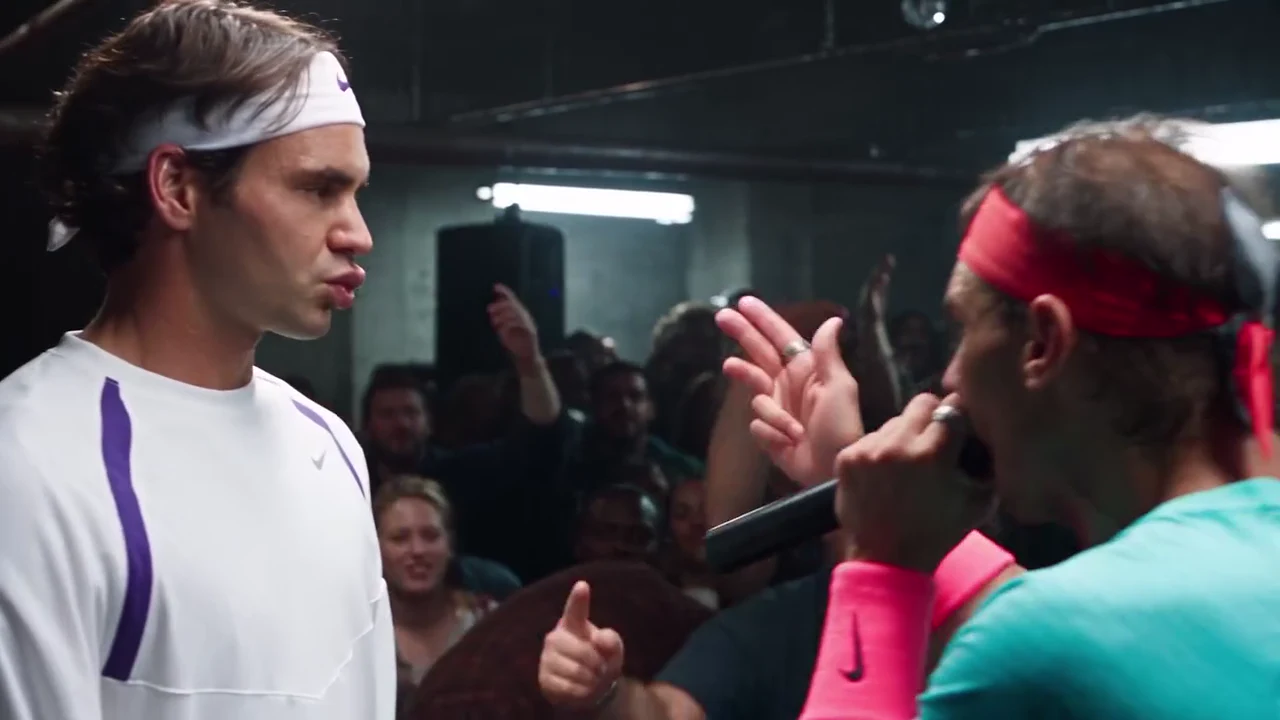
The Rapper does almost everything: glares at the rival, raises the microphone arm to hype the crowd, paces the stage, raps in a tight close-up, raises an arm to the room from behind, then raps and points in the two-shot. The Rapper is on screen in all seven shots, so the face in this photo carries the video.
02

The Rival: second photo

The Rival stands across from the Rapper and takes the verse. The back of the Rival's head fills the foreground of the opening shots, the Rival stands in the wide shot, and the face shows in profile on the left of the two-shot and again at the very end. It is the quieter role, and a deadpan face suits it.

03

Who should play which

Give the Rapper to whoever wants the spotlight, or to the person with the most expressive face. Give the Rival to the friend who can look unimpressed. Swapping the photos swaps the roles, so a rematch is one upload away.

04

Which photo for which role

Use a sharp head-and-shoulders photo for each, face forward, hair fully visible and no hat. For the Rapper, a photo with the mouth uncovered and a neutral or slightly intense expression gives the close-up the most to work with. For the Rival, a calm, closed-mouth photo reads best.

05

Outfits and accessories

There is no costume. Each person wears the outfit from their own photo in every shot, with their own hair and accessories, instead of the reference's teal tee, red headband, pink wristband, watch and ring or the rival's white sportswear. A photo that shows only the upper body gets plain, neutral trousers and shoes added for the shots that show the body.

06

Pets and unusual casting

A clear photo of a dog or cat can take either place, with its own face, fur and markings. Check the paws on the microphone in the Rapper's shots before you post. Two people in one photo will not work: each role needs its own photo with one person in it.

07

Not real footage, not affiliated

The preview is an AI-made parody clip, not footage from the film and not real footage of any real person, and neither performer in it is kept in your video. Oakgen is not affiliated with or endorsed by Eminem, the makers of 8 Mile, any film studio, record label, artist, club, brand or sponsor, or by anyone the clip resembles.

08

Cast it

Open the 8 Mile Rap Battle trend, add the Rapper first and the Rival second, then generate. Use photos of people who agreed to appear.

Explore the 8 Mile Rap Battle trend

How to make it

Add a photo for each role shown below. All roles need a photo.

The roles in the 8 Mile Rap Battle original reference
Rapper in the 8 Mile Rap Battle source video
Rapper
Rival in the 8 Mile Rap Battle source video
Rival
  1. 01

    Add the two photos

    Use a head-and-shoulders photo for the Rapper first and for the Rival second, face forward, hair fully visible and no hat. Use your own photos or ones of people who agreed to appear.

  2. 02

    Choose the quality

    Pick 720p or 1080p and review the quote. It covers the full 24-second video with both people replaced.

  3. 03

    Check the close-up and post

    Watch the rapper's close-up with the sound on and the face-off two-shot, then download your landscape 16:9 MP4 with the original soundtrack and label it as an AI parody when you post.

01

Your faces, not theirs

The template follows the parody clip's shots and moves, but both performers come from your photos: face, hair, build and outfit in every shot. The reference's headbands, wristband, watch, ring and athletic outfits are not kept, and no one's likeness is copied from the reference.

02

The original voice track stays

Your video keeps the reference clip's soundtrack: the final-battle verse, opening with the call to 'everybody from the 313', over its beat and the roar of the crowd. No separate audio goes to the video model; the original track is put back at the end. Oakgen does not clone or generate a voice.

03

24 seconds, 7 shots, one packed room

A tight stage shot over the rival's shoulder, a wide shot of the stage and the crowd, a close-up of the rapper rapping into the microphone, a shot from behind with an arm raised to the room, a face-off two-shot with pointing, and a last look between the two.

04

A parody, labelled as one

The preview is an AI-made parody, not footage from the film and not real footage of any real person. The crowd stays as in the reference, and the performers' clothes are asked for with no readable lettering or logos. The trend is not connected to Eminem, the film's makers, any studio, label, artist or brand.

Photo tips

  • One person per photo
  • Face forward, hair visible, no hat
  • Put the most expressive face on the Rapper
  • Keep the Rapper's mouth clear in the photo
  • Use photos of people who agreed
  • Label it as an AI parody

Questions & answers

What is the 8 Mile Rap Battle AI trend?

An AI-made parody of the final rap battle in the 2002 film 8 Mile. A rapper in a headband works a packed warehouse crowd, raps into a black microphone and points at a rival in white sportswear who stands stone-faced across from him, and the verse opens with the call to 'everybody from the 313'. Oakgen's template keeps the shots, the crowd and the soundtrack and puts the people from YOUR photos in both places.

Is the preview real footage from the film?

No. The preview is an AI-made parody clip, not footage from the film and not real footage of any real person. Oakgen is not affiliated with or endorsed by Eminem, the makers of 8 Mile, any film studio, record label, artist, league, club, brand or sponsor, or by anyone the clip resembles, and your video does not show them: the two people are the ones in your photos.

What song or beat is it?

The clip keeps the film's final-battle verse, performed by Eminem, rapped over the instrumental of 'Shook Ones, Pt. II' by Mobb Deep (1995), the beat the film uses for that scene. It is not 'Lose Yourself', the film's Oscar-winning theme song, which plays after the battle. Oakgen does not license the soundtrack for your own posts, so check the platform's music rules before you share.

Does my video keep the voice?

Yes. Your video keeps the reference clip's original voice track and beat: the verse and the crowd. Your photos change how the two performers look, not the words or the voice, and the template does not take a new script or voice recording.

Is the voice sent to the AI model?

No. No separate audio or voice sample is sent to the video model, and whatever sound the model returns is thrown away. The mouths follow the rapping in the reference clip, and the original track is put back on the finished video. Oakgen does not clone or generate a voice for this template.

Are there subtitles?

No. This reference clip has no on-screen subtitles, and the template asks the model for no captions or text. The soundtrack carries the verse, and you can add your own captions in your editor before you post. The lyrics contain strong language.

Why does it need two photos?

Because both performers resemble real people, Oakgen keeps neither of them: the Rapper and the Rival each need a photo, and the template replaces both completely. The crowd stays as background people from the AI parody.

Who else is in the video?

The packed crowd stays as in the AI parody: the people waving their hands behind and between the two performers. Only the Rapper and the Rival are replaced, and nobody else takes your face.

Who should be the Rapper and who the Rival?

The Rapper is on screen in every shot, hypes the crowd, raps into the microphone and points, so give it to whoever wants the spotlight. The Rival stands still and takes it, which suits the friend who can look unimpressed. Swap the photos to swap the roles.

Do I need a headband or a teal top?

No. There is no costume. Each person wears the outfit from their own photo in every shot, with their own hair and accessories, instead of the reference's red headband, teal tee, wristband, watch and ring or the rival's white sportswear. A photo that shows only the upper body gets plain, neutral trousers and shoes.

What photos work best?

A sharp head-and-shoulders photo of one person, face forward, hair fully visible and no hat. Keep the mouth clear in the Rapper's photo, because the close-up is the biggest test of the video.

Can I put a pet in it?

Yes. A clear photo of a dog or cat can take either place, with its own face, fur and markings. Check the paws on the microphone in the Rapper's shots before you post.

Whose photos can I use?

Your own, or photos of people who agreed to be in the video. Do not upload photos of Eminem, other celebrities or anyone who has not consented, and label the video as an AI parody when you share it.

Which quality can I choose?

720p or 1080p. 720p is the default and is enough for a phone feed; 1080p keeps the faces sharper in the wide shot of the crowd. The quote covers the full video either way.

How long is the video and what shape is it?

24 seconds in landscape 16:9, with 7 shots cut to the beat. Post it as it is, or place it on a vertical canvas for Reels, TikTok and Shorts.

Is the preview generated by Oakgen?

No. It is the AI-made parody reference clip the trend comes from, used for the shots and timing, not an Oakgen result.

How much does it cost?

1,274 credits per 720p video. The quote covers the complete 24-second video with both people replaced. Check it before generating.

Ideas for your next video

Plan a story, keep your character recognizable, and make the finished clip your own.

Explore the video trend playbook →

Make your 8 Mile Rap Battle video

Upload 2 photos. Everything else is set.

Make this video