ChatGPT
 Claude
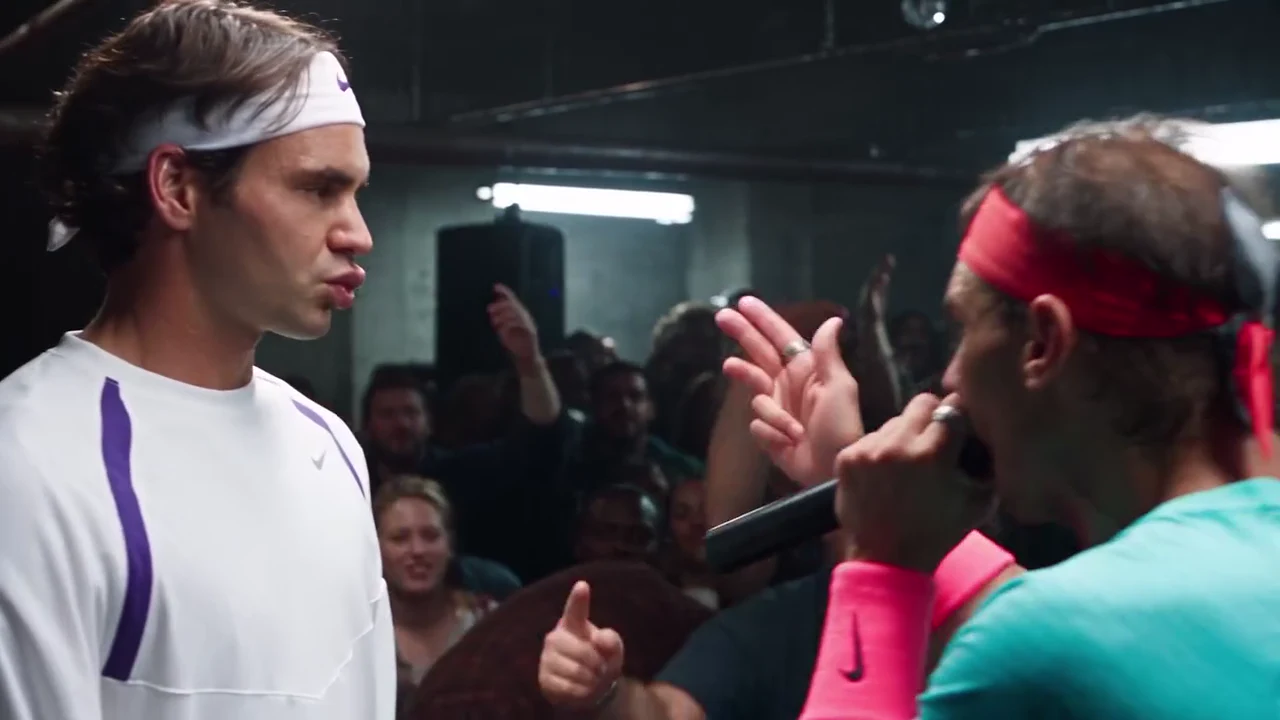
If you are going to put two friends into the final battle of 8 Mile, it helps to know why that scene is the one people keep rebuilding. This article covers the film facts we could verify, the beat under the scene, why a rap battle fits a two-photo AI video so well, and how to edit and post your result. The preview is an AI-made parody, not footage from the film and not real footage of any real person, and Oakgen is not affiliated with or endorsed by Eminem, the makers of 8 Mile, any film studio, record label or artist, or by anyone the clip resembles.
Put two friends in the battle
Add one photo for the Rapper and one for the Rival and make the 24-second 8 Mile Rap Battle AI parody with the original soundtrack.
Who this is for
You have seen the clip, or the film, and you want to understand what the parody copies before you make your own. If you want the step-by-step instead, start with how to make the 8 Mile Rap Battle AI video.
How we worked this out
The film facts come from the film's published cast and crew listings and release dates, the beat from the film's music coverage and the song's own history, and the clip's timings from a machine transcript and a shot-by-shot review of the reference. We did not measure search demand or reach, so nothing here promises either.
The film and the scene
8 Mile is a 2002 American drama directed by Curtis Hanson from a script by Scott Silver and released by Universal Pictures in the United States on November 8, 2002. Eminem plays Jimmy Smith Jr., a Detroit rapper who performs as B-Rabbit. The title comes from 8 Mile Road, which runs between Detroit and its northern suburbs.
The final battle is the climax. Rabbit faces the rival crew's leader, Papa Doc, at a Detroit club. He goes first, names his own weak points before the other side can, then turns his rival's comfortable background against him, and Papa Doc hands the microphone away without an answer. The verse opens with a call to "everybody from the 313", the Detroit area code, and the crowd's hands go up with it.
The beat
The scene is rapped over the instrumental of "Shook Ones, Pt. II" by Mobb Deep, a 1995 track from their album The Infamous. The film plays the same track over its opening titles and brings it back for the final battle, and Rabbit works the song's hook into his verse. Mobb Deep's recording appears on More Music from 8 Mile, a follow-up album of songs from the film. The film's main soundtrack album, 8 Mile: Music from and Inspired by the Motion Picture, came out on October 29, 2002 and includes "Lose Yourself", which won the Oscar for Best Original Song. That song plays after the battle, not during it, so a clip of the battle itself is not "Lose Yourself".
What the parody is, and is not
The reference is a short AI-made recreation: a rapper in a teal tee and a red headband works a packed warehouse crowd and raps at a rival in white sportswear. It follows the staging of the scene, not the plot, and it is not the film's set or footage. The audio is a cut of the final-battle verse over the beat, running from the first call to the crowd to the "who's afraid of the Big Bad Wolf" line at about 19 seconds, and it ends mid-line at 24 seconds.
Why the format suits a two-person lip-sync video
Four things make the scene a good template for two photos:
- Two clear roles. One person delivers and fills the frame; the other holds still. You never have to guess who is who.
- A crowd that carries the energy. The crowd's raised hands do much of the work, so the two faces only have to hold up in a few shots.
- Big, readable gestures. Pointing, an arm raised to the room and a counted-off hand are easy for a video model to follow and easy for viewers to recognise.
- A long-running remix culture. The battle has circulated as an audio-swap meme since 2015, so viewers already know the shape of the joke and your version lands without explanation.
The limit is the mouth. No separate audio is sent to the model, so the Rapper's lip sync follows the reference rather than the sound and is not guaranteed on every syllable. The close-up at about 12 to 15.6 seconds is where to check it. More on that is on rap battle lip sync AI video.
Edit 1: Fit 16:9 onto a vertical canvas
Your download is a 24-second landscape 16:9 file with no on-screen text. Do not crop it to 9:16: in the two-shot the rival stands at the left edge and the rapper at the right, and a centre crop cuts one of them off. Instead:
- Make a 1080 x 1920 canvas.
- Place the full video in the middle at full width (1080 x 608).
- Put the caption in the band above it and any subtitles just below.
- Use a plain dark background rather than a blurred copy of the video.
Edit 2: Write the caption
The format works best when the caption sets up a face-off. Some that fit:
- Me and my brother settling who gets the last slice
- Group chat vs the one person who did not reply
- My sister explaining why she is not sorry
- Me at the family dinner when someone brings up my old haircut
- My team vs the team that lost the group project
Keep the caption above the video, not over the faces.
Edit 3: Decide on subtitles
The reference has no subtitles, and the template asks the model for no text, because video models turn on-screen words into garbled letters. If you want captions, add them in your editor. The lyrics contain strong language, so for a general audience you may prefer to caption the situation rather than the words.
Edit 4: Pick a cut
| Cut | Length | What it keeps | Best for |
|---|---|---|---|
| Full | 24 s | Both call-and-response chants, the close-up, the two-shot | Reels, TikTok, Shorts |
| Close-up and two-shot | about 12 to 21.4 s | The rapper's close-up and the face-off | Stories, fast feeds |
| Opening call | first 6 s | The call to the crowd and the microphone raised | Replies, a loop |
If you trim, cut on a shot change so the beat does not jump.
Common mistakes
- Cropping to 9:16. One of the two performers ends up cut in half.
- Using a photo with something covering the mouth. The Rapper's close-up is the whole video.
- Implying it is the film. Do not present it as a real clip, and do not write it as if Eminem or the film's makers said or did anything.
- Using someone's photo without asking. Use your own photos or photos of people who agreed to appear.
- Adding a second song over the original. If you add one, keep it low enough that the verse stays audible, and check the platform's music rules, because the soundtrack is a commercial recording that Oakgen does not license for your own posts.
Label it
Turn on the platform's AI-generated label or write "AI parody" in the caption. Describe the format in hashtags rather than a film or a person: #aiparody, #rapbattle and #aivideo say what the clip is without implying an official connection.
Related reading
For the casting of the two roles, read B-Rabbit vs Papa Doc AI video: cast the rapper and the rival. The scene facts in a shorter form are on 8 Mile final battle AI video: the scene behind the parody, and the overview page is the 8 Mile rap battle AI trend.
Frequently asked questions
Is the 8 Mile Rap Battle preview real footage from the film?
No. The preview is an AI-made parody clip, not footage from the film and not real footage of any real person. Oakgen is not affiliated with or endorsed by Eminem, the makers of 8 Mile, any film studio, record label or artist, or by anyone the clip resembles.
What beat is the final battle rapped over?
The scene uses the instrumental of 'Shook Ones, Pt. II' by Mobb Deep, a 1995 track from their album The Infamous. The film uses the same track over its opening titles and brings it back for the final battle.
Is the clip's soundtrack 'Lose Yourself'?
No. 'Lose Yourself' is the film's Oscar-winning theme song and plays after the battle. The verse in the clip is the final-battle verse over the Mobb Deep beat.
Does my video keep the rap battle sound?
Yes. The original soundtrack is kept and put back on the finished file. No separate audio is sent to the video model, and Oakgen does not clone or generate a voice.
Should I crop the video to 9:16?
No. The two performers stand at opposite sides of the frame in the two-shot, so a centre crop cuts one of them. Place the full 16:9 frame on a vertical canvas instead.
How do I label it?
Say it is an AI parody in the caption or turn on the platform's AI label, and do not suggest a real person, studio or artist is involved.