
Video trend

AI TV Scene With Friends: Casting the Brick by Brick Car Speech

The fun of a recast TV scene is the casting. The Brick by Brick template gives you two parts that could not be more different: one person who talks for 11 seconds straight and one who says nothing. Who you put in each seat decides whether the clip is a joke, a roast or a tribute. Here is how to cast it and how to post it without trouble.

Final video
14 seconds
Your input
2 photos
Quality
720p
THE ORIGINAL14 SEC / 16 / 9
Brick by BrickYour photo. This scene.

Casting the two seats

01

The Speaker carries the clip

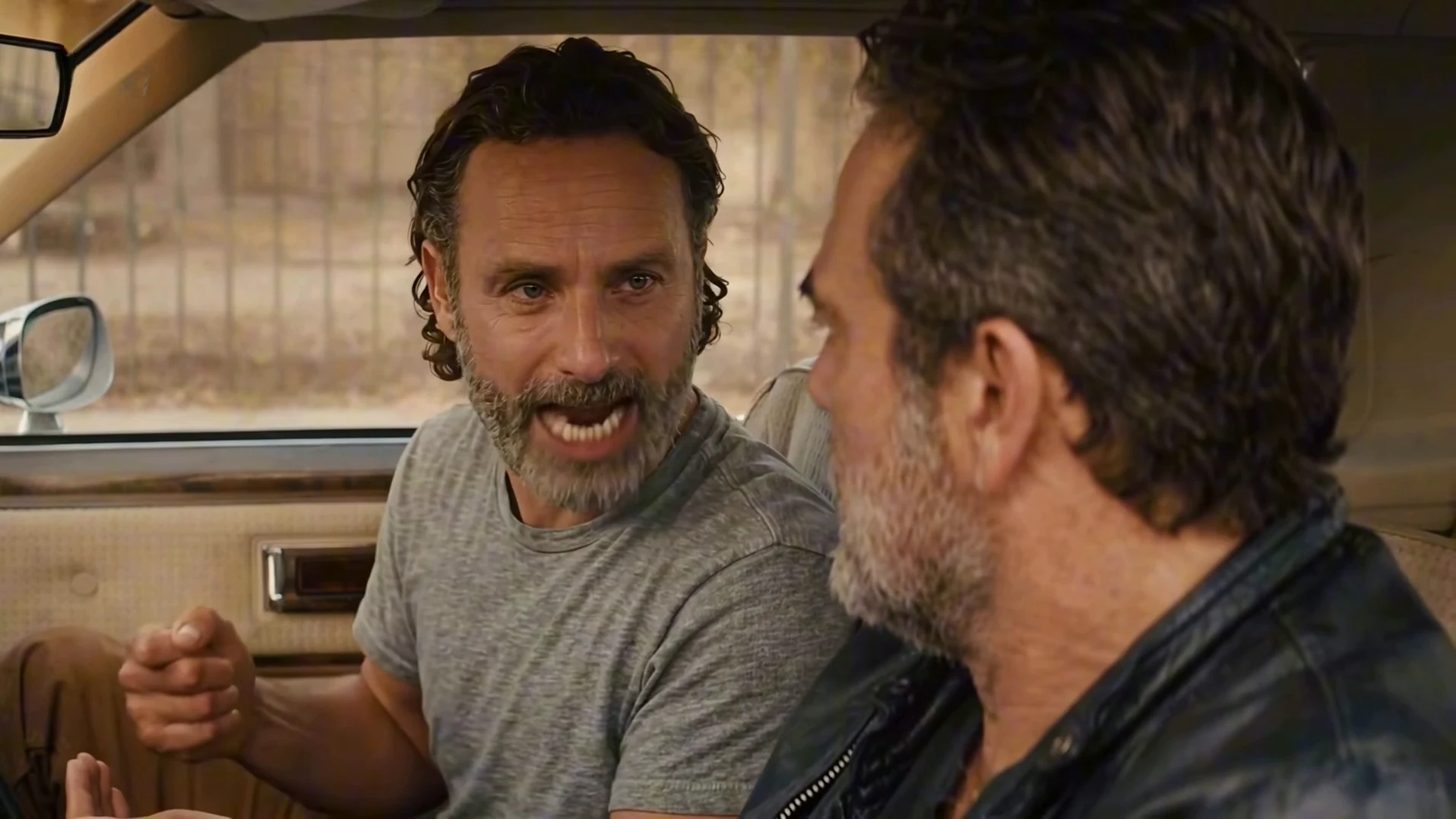
The person in the passenger seat gives the whole speech, about claiming credit for building something and refusing to let it be torn down. It is funniest when that person plausibly could say it: the friend who founded the group chat, the one who organised the trip, the sibling who always does the dishes.
02

The Driver is the straight face

The driver listens, eyes on the road, and only turns their head near the end. Cast the person who is being told off: the friend who keeps changing plans, the new teammate, the roommate who moved the furniture. Their silence is the punchline.

03

Pairings that work

Boss and employee, older and younger sibling, two co-founders, a coach and a player, two characters you designed yourself. Pick two people who look clearly different so they stay in their own seats through the cut.

04

Get agreement first

Use only photos of people who agreed to appear, and never photos of actors, celebrities or strangers. The speech is heated and the audio is explicit, with strong swearing and a racial slur, so ask both people whether they are comfortable being in it before you make it, not after.

05

Posting it

Label the video as AI-made. Because of the language, keep it off accounts aimed at younger audiences and out of places where the slur would be heard as your own words. A caption that sets up the in-joke, for example who built what, works better than quoting the line.

Explore the Brick by Brick trend

How to make it

Add a photo for each role shown below. All roles need a photo.

The roles in the Brick by Brick original reference
Speaker in the Brick by Brick source video
Speaker
Driver in the Brick by Brick source video
Driver
  1. 01

    Pick the speaker

    Upload a clear photo of the person who gives the speech. A sharp face with the whole head visible works best, because the speaker faces the camera for the whole close shot. Everyone pictured should have agreed to appear.

  2. 02

    Pick the driver and the quality

    Upload the driver's photo; a side or three-quarter face works, since the driver is seen mostly in profile. Choose 480p, 720p or 1080p and review the quote, which covers the full video and both preparations.

  3. 03

    Check the speech

    Watch the speaker's mouth through the speech, the driver's closed lips and both faces in the wide windshield shot at 12 seconds, then download your 16:9 MP4 with the original audio.

01

Two roles, two photos

The Speaker talks for almost 11 seconds; the Driver keeps their eyes on the road and says nothing. Each takes the face, hair, build and outfit from their own photo, so you choose who lectures whom.

02

The whole scene

All 14 seconds in landscape: the close two-shot through the passenger window with the full speech, then the cut to a wide shot through the windshield of the beige car.

03

The original audio

Your video keeps the clip's original voice and timing. You record nothing, and your photo does not change the voice. The audio is explicit: it has strong swearing and a racial slur, so it is not for every audience.

04

Any pair

Friends, a boss and an employee, siblings or two characters you designed. The reference performers are replaced by grey silhouettes in the motion guide, so neither of them is reused.

Photo tips

  • One person per photo
  • A sharp face for the speaker
  • A side-on face works for the driver
  • Pick two people who look different
  • Your own outfits stay
  • Use photos of people who agreed

Questions & answers

What is the Brick by Brick AI trend?

It is a 14-second landscape AI video of a heated talk in the front seat of a beige vintage car. The passenger turns to the driver and delivers the "I built this brick by brick" speech, gesturing with both hands, while the driver keeps looking ahead; then the shot cuts to a wide view through the windshield. Oakgen's template puts your two people in both seats and keeps the car, the cut and the original audio.

Where is the line from?

The speech is from the TV drama Snowfall (season 3, episode 9, "Blackout"), where it is also said from the passenger seat of a car. The AI clips that spread online re-cast that audio with other faces. This is an unofficial fan-style template that is not connected to the show or its makers, and its picture is not original footage.

Is the audio explicit?

Yes. The original speech contains strong profanity and a racial slur, and your video keeps that audio unchanged. Think about where you post it and who will hear it. The template cannot remove or replace words.

Will it use my voice?

No. The video keeps the clip's original voice and timing, whoever is in the photos. You do not record anything.

Do I need two photos?

Yes. The Speaker and the Driver each need a photo, because the motion guide replaces both men from the reference with grey silhouettes, so neither of them is kept.

Who talks?

Only the Speaker, in the passenger seat. The Driver listens with closed lips, hands on the wheel, and only turns their head near the end. Put whoever should give the lecture in the Speaker slot.

Do we keep our own clothes?

Yes. There is no costume. Each person wears the outfit from their own photo instead of the reference's t-shirt and leather jacket.

Whose photos can I use?

Your own, or photos of people who agreed to be in the video. Do not upload photos of actors, celebrities or anyone who has not consented, and label AI videos clearly when you share them.

Does the mouth match the words?

The speaker's mouth follows the timing of the reference performance, and the original audio is restored at the end. These are instructions to a model, so watch the close shot before posting and re-run if the lips clearly drift.

How long is the video?

14 seconds in landscape 16:9: about 12 seconds of close two-shot with the speech, then the wide windshield shot.

Is the preview generated by Oakgen?

No. It is the AI reference clip the trend comes from, used as the motion and timing reference, not an Oakgen result. Its two performers are never reused.

How much does it cost?

2,829 credits per 720p video. The quote includes both photo preparations and the complete video. Check it before generating.

Ideas for your next video

Plan a story, keep your character recognizable, and make the finished clip your own.

Explore the video trend playbook →

Make your Brick by Brick video

Upload 2 photos. Everything else is set.

Make this video