
Video trend

Old Town Road Red Convertible AI Video: What to Check in Each Shot

Your result is four shots with one person in some and two in others, so a problem in one shot can hide behind a good one. This guide goes through the clip in order, with the time range of each shot and the details worth a close look. Use it after you generate, with the file open on a screen larger than your phone if you can.

Final video
15 seconds
Your input
2 photos
Quality
720p
THE ORIGINAL15 SEC / 16 / 9
Old Town RoadYour photo. This scene.

Shot-by-shot checks for the four shots

01

How to review it

Play the file three times: once with sound, once muted and once by stepping through the cuts at about 3.1 s, 7.6 s and 11.8 s. The people in your photos should look the same in every shot where they appear. Do not judge a shot by a single paused frame, because mouths and hands change quickly.
02

Shot 1, 0 to 3.1 s: the car on the street

The camera tracks alongside the moving car, and only the Suited rider is in the shot. Check the rider's face and posture in the open red convertible and confirm that the person in your photo, not a stranger, is in the seat. The canvas money bag should hang outside the door with a single plain dollar symbol and no other lettering.

03

Shot 2, 3.1 to 7.6 s: dancing at the novelty shop

The Singer dances in front of the roadside shop in a medium shot. Check the full upper body: the outfit from your photo, the hands while dancing and the mouth following the song. Shop signs and price tags are asked to stay blank, so a readable word or number on one is a flaw worth noting before you post.

04

Shot 3, 7.6 to 11.8 s: the close-up to camera

This handheld close-up is where a weak photo shows most. Look at the eyes, the teeth and the mouth shape, since the mouth follows the lip movement in the reference. Behind the face, the shelf of toys should read as a soft blur of color. If glasses were on in your photo, check that both lenses are intact.

05

Shot 4, 11.8 to 13.5 s: the overhead shot

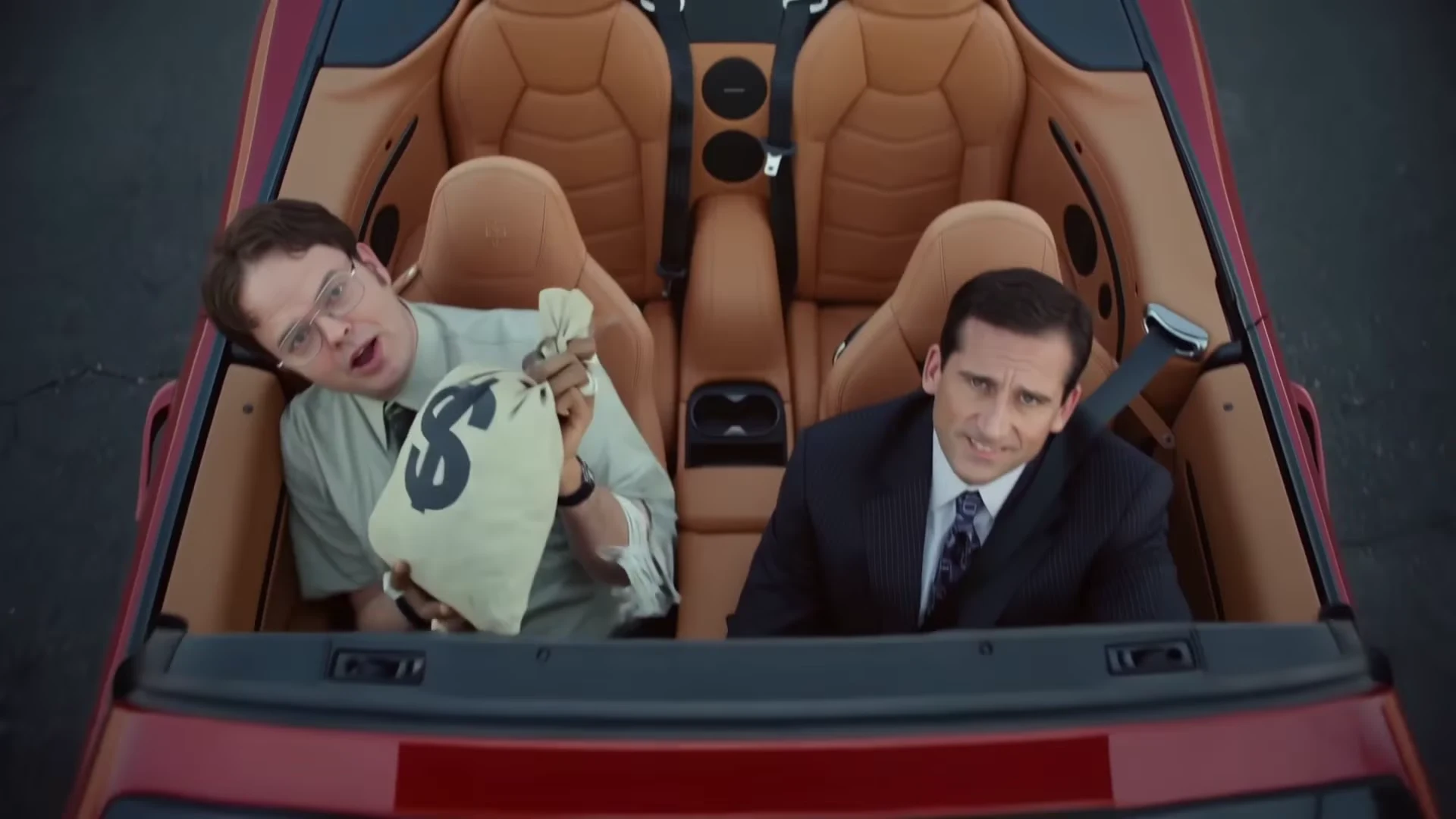
The camera looks straight down into the car. The Singer sits on the left holding the money bag up, and the Suited rider sits on the right looking up with a small smile. This is the only shot with both people, so compare their sizes and skin tones side by side and check that the two faces do not look like a copy of each other.

06

Shot 4, 13.5 to 15 s: empty asphalt

As the car drives away, the last second and a half is bare road with two faint tire marks, and the template does not put the people in the car then. Check the end of the file for a person, a hand or a stray shape on the asphalt. If you plan to loop the clip, this is a natural, quiet place to make the loop point.

07

The blank-lettering check

The template asks the model for no readable text on the car, the shop signs, the price tags or the plates. Pause on shots one, two and four and scan for invented words or a logo. Apart from the one plain dollar symbol on the money bag, any readable mark is a generation artifact, and you can crop it out or generate again.

08

If one shot is off

Look at the photo before you look at the settings. If a face looks unstable in the close-up, look first at the photo: glasses, a hat or shadow across the eyes are the likeliest suspects. Trying a brighter, more frontal photo is a cheaper experiment than jumping to a higher quality, and putting the two results side by side shows which change helped.

Explore the Old Town Road trend

How to make it

Add a photo for each role shown below. All roles need a photo.

The roles in the Old Town Road original reference
Singer in the Old Town Road source video
Singer
Suited rider in the Old Town Road source video
Suited rider
  1. 01

    Add the two photos

    Use a head-and-shoulders photo each for the Singer and the Suited rider, face forward, hair fully visible and no hat. Use two different photos so the pair reads as two people. Use your own photos or ones of people who agreed to appear.

  2. 02

    Choose the quality

    Pick 720p or 1080p and review the quote. It covers the full 15-second video with both people replaced.

  3. 03

    Check the close-up and post

    Watch the close-up and the overhead shot with sound, then download your landscape 16:9 MP4 with the original song and label it as an AI-made video when you post.

01

Your faces, not theirs

The template follows the clip's four shots and moves, but both people come from your photos: face, hair, build and outfit in every shot. The reference men's green shirt, striped tie, glasses, pinstripe suit and watches are not kept, and no one's likeness is copied from the reference.

02

The song stays

Your video keeps the clip's original soundtrack, a 15-second stretch of Old Town Road. No separate audio or voice sample goes to the video model; the singer's mouth follows the lip movement in the reference clip and the original track is put back at the end. Oakgen does not clone or generate a voice.

03

Four shots in 15 seconds

A low tracking shot along a red convertible, a medium shot of the singer dancing at a roadside novelty shop, a close-up straight to camera and a top-down shot of both of you in the car before it pulls away. Signs, badges and plates are asked to stay blank.

04

An AI clip, labelled as one

The preview is an AI-made clip, not real footage of any real person, and nobody it resembles made or endorsed it. The song is only the sound the clip is set to; Oakgen is not connected to Lil Nas X, Billy Ray Cyrus, their labels or any publisher.

Photo tips

  • One person per photo
  • Two different photos
  • Face forward, hair visible, no hat
  • Keep glasses off if you can
  • Your own outfits stay in every shot
  • Label it as an AI-made video

Questions & answers

What is the Old Town Road AI trend?

An AI-made music-video-style clip set to the song Old Town Road by Lil Nas X: a suited man in an open red convertible with a canvas money bag, a second man who sings and dances in front of a roadside novelty shop, a close-up straight to camera and a top-down shot of both men in the car before it drives away. Oakgen's template keeps the shots, the cuts and the soundtrack and puts the people from YOUR two photos in the singer's and the rider's places.

Is the preview real footage?

No. The preview is an AI-made clip, not real footage of any real person, and nobody it resembles made or endorsed it. Oakgen is not affiliated with or endorsed by Lil Nas X, Billy Ray Cyrus, their labels, or any other artist, label, brand or sponsor, and your video does not show anyone from the reference: the singer and the rider are the people in your photos.

What song is it?

Old Town Road by Lil Nas X, first released on 3 December 2018 over a beat by the producer YoungKio. It spent a then-record 19 weeks at number one on the Billboard Hot 100 in 2019, and a remix with Billy Ray Cyrus followed in April 2019. The clip plays a 15-second stretch of the song and your video keeps it.

Is this the official music video?

No. The official video for the Old Town Road remix is a separate, time-travelling Western directed by Calmatic. This template is an unofficial AI-made clip set to the same song, and Oakgen does not recreate or reuse the official video.

Does my video keep the voice?

Yes. Your video keeps the reference clip's original soundtrack, the song. Your photos change how the two people look, not the words or the voice, and the template does not take a new script or voice recording.

Is the voice sent to the AI model?

No. No separate audio or voice sample is sent to the video model, and whatever sound the model returns is thrown away. The singer's mouth follows the lip movement in the reference clip, and the original soundtrack is put back on the finished video. Oakgen does not clone or generate a voice for this template.

Can I post it on TikTok or Instagram?

You can download and share it, but the song is a commercial recording and Oakgen does not license it for your posts. Check the music rules of the platform you post on, and label the video as AI-made.

Are there subtitles?

No. This reference clip has no on-screen subtitles, and the template asks the model for no captions or text. You can add your own captions in your editor before you post.

Do I need two photos?

Yes. The Singer and the Suited rider each need a photo, because the template replaces both men in the reference clip completely, so neither of them is kept in your video. Two different photos make the pair read as two people.

Who should be the singer?

The person with the more expressive face. The singer gets the dancing at the novelty shop, the close-up straight to camera and the money bag in the overhead shot. The suited rider sits in the car, looks calm in the first shot and looks up with a small smile at the end.

Do we have to wear a suit or a green shirt?

No. There is no costume. Each person wears the outfit from their own photo in every shot, with their own hair and accessories, instead of the reference men's shirt, suit, tie, glasses and watches. A photo that shows only the upper body gets plain dark trousers and shoes.

Are brands, signs or number plates in my video?

None is meant to be. The template asks for the car, the shop signs and every price tag to show no readable lettering, logos or numbers, apart from one plain dollar symbol on the money bag. Check your result for stray marks before you post.

Can I put a pet in it?

A clear photo of a dog or cat is accepted and the whole body follows the pet's species, but the clip is built around a person's posture, dancing and hands, so photos of people give the most reliable result. Check the mouth in the close-up before you post.

Whose photos can I use?

Your own, or photos of people who agreed to be in the video. Do not upload photos of artists, other public figures or anyone who has not consented, and label the video as AI-made when you share it.

What kind of photo works best?

A sharp head-and-shoulders photo, face forward, hair fully visible, mouth uncovered and no hat or sunglasses. One person per photo. Glasses can be read as part of the face, so a photo without them is the safest choice.

What quality can I choose?

720p or 1080p. 720p is enough for a phone feed; 1080p keeps the faces sharper in the close-up.

How long is the video?

15 seconds in landscape 16:9, with 4 shots. Place it on a vertical canvas for Reels, TikTok and Shorts.

Is the preview generated by Oakgen?

No. It is the AI-made reference clip the trend comes from, used for the shots and timing, not an Oakgen result.

How much does it cost?

796 credits per 720p video. The quote covers the complete 15-second video with both people replaced. Check it before generating.

Ideas for your next video

Plan a story, keep your character recognizable, and make the finished clip your own.

Explore the video trend playbook →

Make your Old Town Road video

Upload 2 photos. Everything else is set.

Make this video