
Video trend

Ilia Topuria vs Justin Gaethje AI Video: Photo Guide

The Ilia Topuria vs Justin Gaethje AI video needs exactly two photos, and they do different jobs. One person ends the clip as the only face in a close-up; the other spends most of it covering up, trading punches and lying on the floor. This guide shows which photo goes where, what each one replaces from the reference clip and which pictures to leave out. The clip is styled after the Topuria vs Gaethje matchup, but your photos replace both people in it, so choose people you know. Oakgen is not affiliated with the UFC or any fighter.

Final video
12 seconds
Your input
2–3 photos
Quality
720p
THE ORIGINAL12 SEC / 984 / 934
Gaming Room KnockoutYour photo. This scene.

Choosing the Winner and Loser photos

01

Two photos, two roles, both required

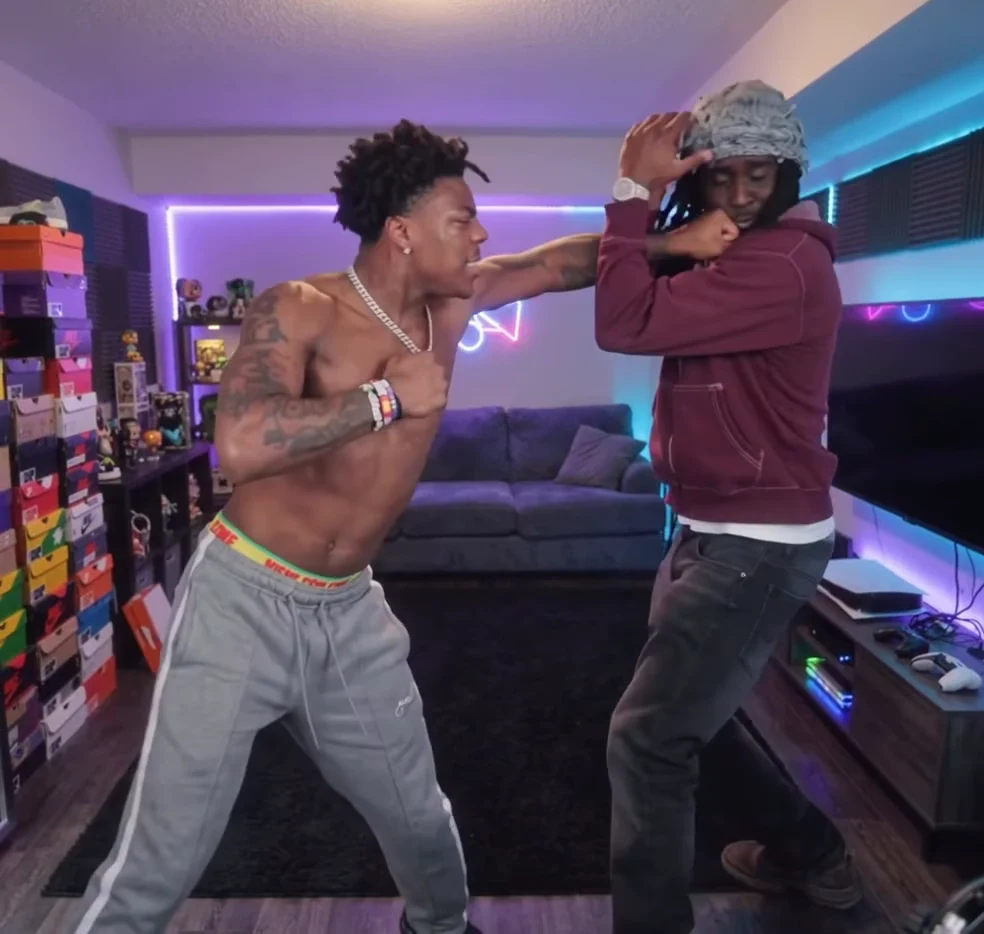
Slot 1 is the Winner and slot 2 is the Loser, and the tool will not start with one of them missing. The Winner stands on the left in the wide shots, throws the punches, kneels over the Loser and appears alone in the closing close-up. The Loser stands on the right, covers his head, drops to his knees and then lies on the floor. The two roles are not the two fighters named in the title: they are placeholders that your photos fill. Choose the roles first, then the photos.
02

The Winner photo: your sharpest face

Use a head-and-shoulders photo, face forward, in even light, with the hair fully visible and no hat. The Winner's face fills the frame for the last two seconds, so this is the photo where sharpness, an open expression and a clean view of the face matter most. A relaxed smile suits the grin at the end. Avoid sunglasses, masks, heavy beauty filters and strong shadows across the face.

03

The Loser photo: clear and different from the Winner

The same head-and-shoulders rule applies, with hair fully visible. The Loser's face is seen in the wide shots, in the clinch and on the floor from a high angle, so a clear, evenly lit face helps most. Pick someone who looks clearly different from the Winner in hair, build or colouring, because two similar faces are easier to confuse in the clinch. Do not use the same person for both roles.

04

What is replaced from the reference clip

The two people in the reference clip are not kept: their faces, skin tone, age and build are replaced by your photos, and no fighter's face or voice is used. The Winner's short twisted hair, tattoos, chain, bracelets, bare chest and grey tracksuit trousers are replaced, as are the Loser's long dreadlocks, grey knitted beanie, maroon hoodie, jeans, boots and watch. A beanie, watch, chain or tattoo appears only if the photo shows it, and a photo that shows only the upper body gets plain, neutral trousers and plain shoes. The neon room, camera cuts and timing stay.

05

Photos to skip

Skip group photos, photos of children, photos of strangers, and photos of celebrities, athletes, fighters or other public figures. That includes Ilia Topuria and Justin Gaethje: the clip is styled after their matchup, but it does not use their faces, and you must not upload their photos. Skip heavily filtered selfies and pictures with faces cut off at the edge. Printed text and logos on shirts do not carry into the clip, so a plain top gives a more predictable result. Only use photos of adults who have agreed to appear.

06

Pre-flight check and quality

Before you generate, confirm that the Winner photo is the best face, that both faces are clearly different, that no hat hides a hairline and that both people agreed. Then choose 720p or 1080p. Both cost the same flat rate and the quote shown in the tool covers the whole 12-second clip, so check it there. Label the finished video as AI-made when you post it, and do not present it as a replay of UFC Freedom 250. Oakgen is not affiliated with or endorsed by the UFC or any fighter.

Explore the Gaming Room Knockout trend

How to make it

Add a photo for the winner and loser. The background is optional: add a photo to change it.

The roles in the Gaming Room Knockout original reference
Winner in the Gaming Room Knockout source video
Winner
Loser in the Gaming Room Knockout source video
Loser
Background in the Gaming Room Knockout source video
Background
  1. 01

    Choose who wins and who falls

    Upload one clear head-and-shoulders photo for the Winner, who throws the punches and ends on the grin, and one for the Loser. Face forward, hair fully visible and no hat. Optionally add a wide location photo in Background to change the setting, or leave it empty to keep the neon gaming room.

  2. 02

    Choose quality and review credits

    Pick 720p or 1080p. Both qualities cost the same, and the quote covers the whole 12-second video.

  3. 03

    Check the punch and the close-up

    Watch that both faces and outfits stay the same through the clinch and the drop, and that the winner's face is clear in the final close-up. Download the MP4 with the music.

01

Two fighters, two photos

One photo casts the winner and one casts the loser. Each photo supplies a face, hair and outfit; the neon room, the sofa and the desk with its keyboard stay. An optional Background photo tries to move the whole fight to a new place.

02

A fight with a punchline

The wide shots show the stand-off, the punches and the clinch. A high-angle cut shows the loser on the floor, and the last two seconds are a close-up of only the winner laughing into the camera.

03

Staged, not graphic

It is a playful knockout: no blood, no weapons and no injuries. The loser covers up, drops and lies dazed.

04

The music comes back

Your video keeps the clip's own music, put back at the end of the run. The clip has no speech and the song is not identified here, so swap the audio if a platform flags it.

Photo tips

  • Head and shoulders, face forward
  • The Winner's photo is the face in the final close-up, so pick the best one
  • Hair fully visible, no hat in either photo
  • Two clearly different people, one per photo
  • Upload only photos of people who agreed to appear
  • Label the video as AI-made when you post it
  • An optional wide background photo with a visible floor

Questions & answers

What is the Gaming Room Knockout AI trend?

It is a 12-second clip in a neon-lit gaming room: a shirtless man in grey tracksuit trousers and a man in a maroon hoodie and a knitted beanie square up, trade punches and clinch, the man in the hoodie drops to the floor, and the clip ends on the winner grinning into the camera. Oakgen's template puts the two people from your photos in their places and keeps the room, the camera cuts and the timing.

Is this the Topuria vs Gaethje fight?

The reference clip is styled after Ilia Topuria vs Justin Gaethje, who fought at UFC Freedom 250 on the White House lawn on 14 June 2026; Gaethje won by a corner-stoppage TKO. The clip is a staged knockout in a gaming room, not footage or a replay of that fight. Oakgen is not affiliated with or endorsed by the UFC, any promotion or any fighter, uses no fighter's face or voice, and asks you not to upload photos of fighters or other public figures.

Do I need to be shirtless or wear a hoodie?

No. Each fighter wears the outfit and hair from their own photo. A beanie, watch, chain or tattoo appears only if that photo shows it.

Who wins and who falls?

The Winner, who starts on the left, throws the punches, kneels over the Loser and is the only person in the final close-up. The Loser, who starts on the right, ends on the floor.

Is there music or speech in the video?

There is a music bed and no speech. Your video keeps the clip's own soundtrack, put back at the end of the run. The song is not identified on this page, so if Instagram, TikTok or YouTube mutes or flags the audio, replace it with licensed music in your editor.

Is it violent?

It is a staged, playful knockout with punches, a clinch and a fall, and no blood, weapons or injuries. Keep it a joke: ask both people before you use their photo, and do not post it in a way that suggests a real fight.

Can I use a pet photo?

This template is built for two people. The fight uses fists and a clinch, so animal photos are not what it is cast for and results are not checked.

Can I change the background?

Yes, optionally. Add a location photo in the Background slot and the template tries to rebuild the whole place from it, with its own floor, walls and sky, while keeping both fighters, the strikes, the camera moves and the timing. A wide, evenly lit photo with a visible floor works best, and it should give a plain wall behind the winner for the final close-up and a flat floor for the knockout. Results can vary, so check the floor, the walls and both fighters' lighting before you post. Leave it empty to keep the neon gaming room. A background photo adds no cost.

Is the preview made with Oakgen?

No. The preview is the reference clip the template follows, not a video made from your photos. Your video has your two people in the fighters' places.

How long is the video and which quality can I choose?

12 seconds in the clip's near-square frame, from the first punch to the closing grin, in 720p or 1080p.

How much does it cost?

637 credits per 720p video. The quote covers the complete video at either quality. Check it before generating.

Ideas for your next video

Plan a story, keep your character recognizable, and make the finished clip your own.

Explore the video trend playbook →

Make your Gaming Room Knockout video

Upload 2–3 photos. Everything else is set.

Make this video