
Video trend

Conor McGregor vs Jose Aldo AI Video: Photo Guide

Two photos decide the whole Conor McGregor vs Jose Aldo AI video: one casts the Winner and one casts the Loser. This guide covers which photo goes in which slot, what the template replaces, why nobody's age is copied from the reference clip, and the choices that make the slaps, the bag swing and the fall look wrong. The template is styled after the 13-second knockout at UFC 194, but your photos should only ever be of adults you know who agreed to appear.

Final video
13 seconds
Your input
2–3 photos
Quality
720p
THE ORIGINAL13 SEC / 720 / 960
Grandma vs Grandpa FightYour photo. This scene.

Choosing the two photos

01

The short answer

Two photos of two different people, one person per photo. Each photo should be head and shoulders, face forward, in even light, with the hair fully visible and no hat. Upload the Winner first and the Loser second. Both photos are required: the template cannot start with one. You then choose 720p or 1080p, which cost the same flat rate; the quote in the tool covers the whole 13 seconds.
02

Who goes in which slot

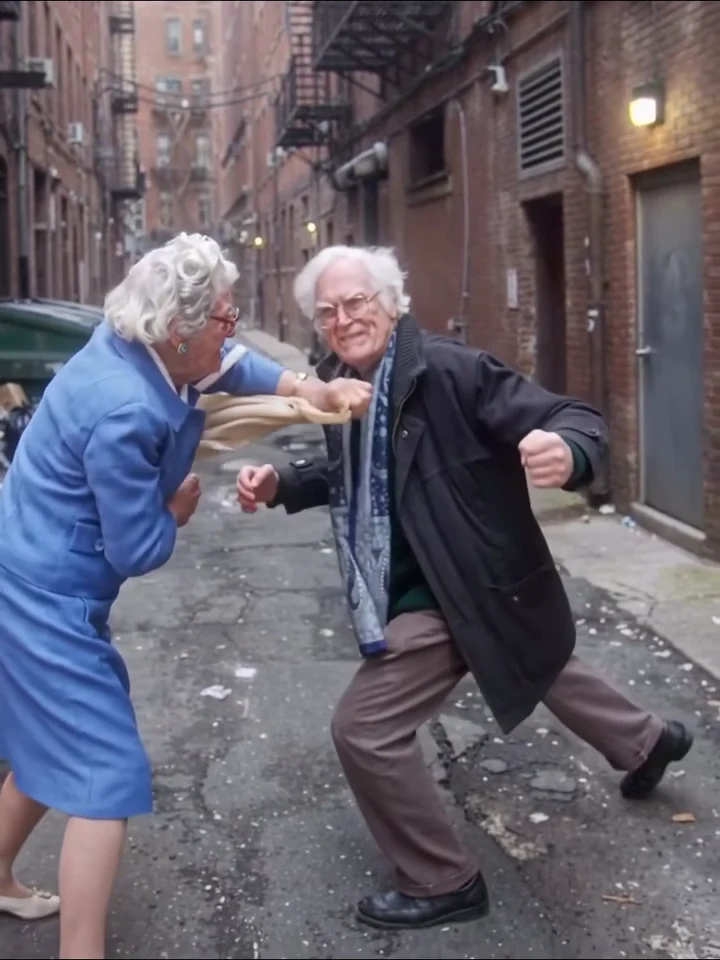
The Winner is the fighter on the right of the first wide shot who carries the two bags, slaps the other fighter, swings the tote bag, shoves, and ends the clip standing over the other with their back to the camera. The Loser is the one on the left who squares up, takes the slaps and the bag, staggers backwards, falls onto the asphalt and ends on the ground. Put the person you want to see win in slot one and the person you want to see take the fall in slot two.

03

Face size and framing

The first 4.5 seconds or so are one wide, still shot of the whole alley, so both faces are small at the start. After that the camera cuts closer for the slaps and the bag swing, and the faces get larger. A sharp, close face photo keeps the likeness readable in both shots. Full-body photos are not needed: if your photo shows only the upper body, the Winner gets plain, neutral trousers or a skirt and plain shoes, and the Loser gets plain, neutral trousers and shoes.

04

Hair, glasses and scarves

The reference Winner has silver-white wavy hair, round glasses, earrings and a blue textured skirt suit, and the reference Loser has short white hair, round glasses, a dark wool overcoat, a green sweater and a blue patterned scarf. None of that is kept. You get the hair, the outfit and any glasses or jewellery from your photo, and a scarf, a coat or glasses appear only if the photo shows them. Take hats off for the cleanest result.

05

Nobody's age is copied, and the bags stay as props

The people in the reference clip are elderly, but neither fighter's face, skin tone, age or build is kept: each fighter takes the face and hair from their own photo, so you do not need to find an older person, and you should not choose a photo to make fun of how old someone looks. One thing is fixed by the action: the cream tote bag and the small white shoulder bag stay as plain props with the Winner, with no lettering or logos on them, even if your photo shows a different bag.

06

Make the two photos clearly different

The fighters share many close frames during the slaps and the grapple, and the Winner stands over the Loser in the last shot. Two photos with the same hair colour, the same top and the same background make them hard to tell apart. Choose one lighter and one darker outfit, or one with long hair and one with short. Avoid group pictures, sunglasses, masks, heavy filters, celebrities, strangers and children.

07

Older relatives, fighters and public figures are not photo material

The clip is styled after a famous UFC knockout, and that makes the temptation obvious: do not upload photos of Conor McGregor, Jose Aldo, any other fighter or any public figure. Do not use photos of grandparents or older relatives who have not agreed to appear. The template is for you and adults you know who said yes. No fighter's face or voice is used, and Oakgen is not affiliated with the UFC or any fighter.

Explore the Grandma vs Grandpa Fight trend

How to make it

Add a photo for the winner and loser. The background is optional: add a photo to change it.

The roles in the Grandma vs Grandpa Fight original reference
Winner in the Grandma vs Grandpa Fight source video
Winner
Loser in the Grandma vs Grandpa Fight source video
Loser
Background in the Grandma vs Grandpa Fight source video
Background
  1. 01

    Choose who wins and who falls

    Upload one clear head-and-shoulders photo for the Winner and one for the Loser, face forward, hair fully visible and no hat. Pick two people who look clearly different from each other. Optionally add a wide location photo in Background to change the setting, or leave it empty to keep the brick alley.

  2. 02

    Choose quality and review credits

    Pick 720p or 1080p. Both qualities cost the same, and the quote covers the whole 13-second video.

  3. 03

    Check the slaps and the fall

    Watch that both faces and outfits stay the same through the slaps, the bag swing and the fall, and that nobody gets extra limbs. Download the 3:4 MP4 with the music.

01

Two fighters, two photos

One photo casts the winner and one casts the loser. Each photo supplies a face, hair and outfit; the brick alley, the dumpsters and the fire escapes stay. An optional Background photo tries to move the whole fight to a new place.

02

A full 13-second fight

A wide stand-off, a cut to a closer shot for the slaps and the tote-bag swing, the stagger, the fall and a closing shot of the winner standing over the loser, all with the reference clip's timing and camera.

03

Staged, not graphic

It is slapstick: no blood, no weapons and no injuries. The tote bag is the only prop that swings, and the loser ends lying on the asphalt for the last second and a half.

04

The music comes back

Your video keeps the clip's own music, put back at the end of the run. The clip has no speech and the song is not identified here, so swap the audio if a platform flags it.

Photo tips

  • Head and shoulders, face forward
  • Hair fully visible, no hat in either photo
  • Two clearly different people, one per photo
  • Upload only photos of people who agreed to appear
  • Check the bag swing and the fall for extra limbs
  • Label the video as AI-made when you post it
  • An optional wide background photo with a visible floor

Questions & answers

What is the Grandma vs Grandpa Fight AI trend?

It is a 13-second clip in a brick alley: an elderly woman in a blue skirt suit with two bags and an elderly man in a dark overcoat and scarf square up in martial-arts stances, trade slaps, she swings a tote bag, he staggers and falls, and she stands over him. Oakgen's template puts the two people from your photos in their places and keeps the alley, the camera cuts and the timing.

Is this the McGregor vs Aldo fight?

The reference clip is styled after Conor McGregor vs Jose Aldo at UFC 194 on 12 December 2015 in Las Vegas, which McGregor won by knockout in 13 seconds, the fastest finish in UFC title-fight history. This clip is a staged alley fight of about the same length, not footage or a replay of that fight. Oakgen is not affiliated with or endorsed by the UFC, any promotion or any fighter, uses no fighter's face or voice, and asks you not to upload photos of fighters or other public figures.

Do I need a blue suit or an overcoat in my photo?

No. The reference fighters' suit, coat, scarf, glasses, hair and bags are replaced. Each fighter wears the outfit and hair from their own photo, and glasses or a scarf appear only if that photo shows them. The tote bag stays as a plain prop.

Who wins and who falls?

The Winner swings the tote bag and is standing at the end. The Loser staggers, falls and ends the clip on the ground. Put whoever should take the fall in the Loser slot.

Is there music or speech in the video?

There is a music bed and no speech. Your video keeps the clip's own soundtrack, put back at the end of the run. The song is not identified on this page, so if Instagram, TikTok or YouTube mutes or flags the audio, replace it with licensed music in your editor.

Is it violent?

It is a staged slapstick fight with slaps, a bag swing and a fall, and no blood, weapons or injuries. Keep it a joke: ask both people before you use their photo, and do not post it in a way that suggests a real fight or a real injury.

Can I use a pet photo?

This template is built for two people. The fight uses hands, a bag and a fall, so animal photos are not what it is cast for and results are not checked.

Can I change the background?

Yes, optionally. Add a location photo in the Background slot and the template tries to rebuild the whole place from it, with its own floor, walls and sky, while keeping both fighters, the strikes, the camera moves and the timing. A wide, evenly lit photo with a visible floor works best, and it should give flat ground to square up on and to fall onto. Results can vary, so check the floor, the walls and both fighters' lighting before you post. Leave it empty to keep the brick alley. A background photo adds no cost.

Is the preview made with Oakgen?

No. The preview is the reference clip the template follows, not a video made from your photos. Your video has your two people in the fighters' places.

How long is the video and which quality can I choose?

13 seconds in the clip's 3:4 frame, from the first stand-off to the winner standing over the loser, in 720p or 1080p.

How much does it cost?

690 credits per 720p video. The quote covers the complete video at either quality. Check it before generating.

Ideas for your next video

Plan a story, keep your character recognizable, and make the finished clip your own.

Explore the video trend playbook →

Make your Grandma vs Grandpa Fight video

Upload 2–3 photos. Everything else is set.

Make this video