Step 1: choose the photo
The template has one slot, Customer. Add one photo with one subject in it: yourself, someone who has agreed to appear, or your pet. The cashier is never on camera, only a voice and a hand, so there is no second photo to add.
Video trend
This is the how-to page for making the card declined trend, also known as the ChatGTT or "I heard you the first time bro" meme, with your own photo. Short version: you add one photo for the customer, Oakgen rebuilds the 14-second checkout take with you at the counter, and you check the result before posting. Below are the steps in order and the decisions that matter at each one. If you want the joke explained first, read ChatGTT Lookin' Ahh AI Video: The Card Declined Meme.
The template has one slot, Customer. Add one photo with one subject in it: yourself, someone who has agreed to appear, or your pet. The cashier is never on camera, only a voice and a hand, so there is no second photo to add.
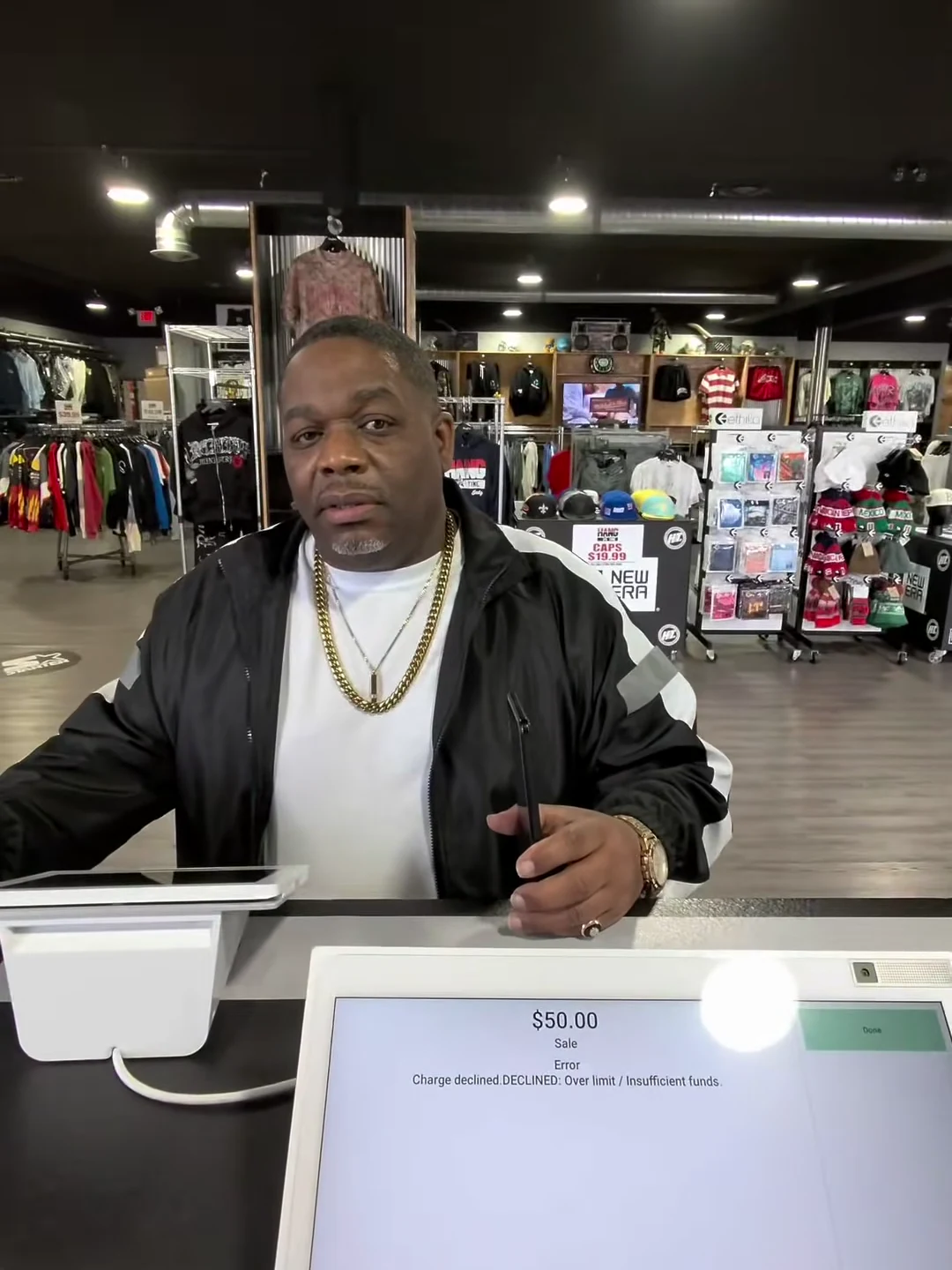
The customer is seen from about the waist up behind a counter, facing the camera for most of the take, with a large till screen covering the bottom of the frame. So the face and upper body are what show. A sharp, front-facing photo with the face large and evenly lit suits that. If you want a particular look at the counter, use a photo that shows that outfit; the reference customer wears a black track jacket with white sleeve stripes over a white T-shirt.
Choose 480p, 720p or 1080p. The studio shows the credit quote for your choice before you generate, and it covers the customer photo preparation, one scene reference and the full 14-second video. The output is a portrait 3:4 MP4 with the original sound.
You cannot change the dialogue, the store, the camera movement or the cashier's hand. The soundtrack is the original exchange, and the customer's mouth is made to follow his lines in it. The counter, the white card terminal on the left, the point-of-sale screen showing the decline and the store behind all come from the reference. Your photo decides who stands at the counter.
Watch it three times. First with the sound off: the face should stay stable, and the phone should be at the ear near the start, come up near the ear briefly at about 7.5 seconds, and go back to the ear at the end. Second with sound: the mouth should move on the customer's lines and make no word-forming movement from about 5 to 8 seconds while the cashier repeats "the card declined". Third, watch the counter and the screen for drift; there are no cuts to hide it. If the mouth drifts, try a clearer, more front-facing photo.
Say that the video is AI-made. Do not present the sound as your own; it comes from the @hangtimeindytv TikTok, and you can credit it if you show the source. If you post the reference next to your version, label them separately. For where captions fit around the till screen and when to show them, see I Heard You the First Time Bro AI Video.
Choose the roles you want to change. Add a photo for each selected role.
Upload one clear photo of yourself, or of someone who has agreed to appear, with the face and the outfit you want at the counter.
Choose 480p, 720p or 1080p. The credit quote covers the full 14-second video plus the photo and scene preparation.
Watch that your mouth moves on the customer's lines and stays quiet while the cashier repeats the declined line, then download your portrait MP4 with sound.
Your photo replaces the customer at the counter: face, hair and outfit. The cashier stays behind the camera, so only their hand appears, reaching for the card and pointing at the screen.
The 14 seconds run from the card going on the reader, through the back-and-forth about rushing, the repeated declined line and the customer's comeback, to the phone going back to the ear.
A single handheld portrait shot from behind a streetwear store counter, with the card terminal and the till screen in the foreground. No cuts, no added ending.
The preview is a 14-second window of the @hangtimeindytv TikTok clip that the meme audio comes from, not an Oakgen result. The person in it is shown only as the reference.
It is a checkout-counter skit filmed from behind the till: the customer's card keeps getting declined, the cashier keeps saying so in the same flat voice, and the customer snaps back. Oakgen lets your photo play the customer.
Transcribed from the clip by machine, so the wording may differ slightly. The cashier says "just keep it on there, bro", "you rushing it" and then "the card declined" several times in a flat voice. The customer answers "no, you rushing me", "I heard you the first time, bro, why you keep saying it like a robot?" and closes with a short "ChatGTT lookin'" jab.
It is the customer's closing joke, a deliberate misspelling of ChatGPT: the cashier repeats the same line like a chatbot. People use "ChatGTT" and "I heard you the first time bro" as names for this meme, and the original clip carries the #chatgtt hashtag.
The audio and the scene come from a longer checkout video posted on TikTok by @hangtimeindytv on 26 July 2026. Template sites describe Hangtime Indy as an Indianapolis streetwear store; we have not confirmed that ourselves. The trend uses the 14-second card-declined exchange from it.
Yes. Pet accounts have reused the same audio with a dog at the counter, for example an Instagram reel by @goldenretrieverswitze. The customer role accepts a pet photo as well as a person, but we have not reviewed a pet result yet, so check yours before sharing.
Only use photos of yourself or of people who have agreed to appear. Do not upload private photos of others or anyone's likeness without permission, and label AI videos clearly when you share them.
Yes. The final MP4 keeps the original exchange between the customer and the cashier. Generated lip sync can vary, so check that only the customer's lines move your mouth.
The output is 14 seconds in portrait 3:4 format, covering the whole card-declined exchange.
No. The counter, the camera and the dialogue are fixed by this reference. Your choices are the photo and the output resolution.
No. It is the original reference clip, not an Oakgen result. Generated likeness, hands and the phone can vary, so review your video before sharing.
2,808 credits per 720p video. The quote includes the customer photo preparation, one scene reference and the full 14-second video. Review the selected resolution's quote before generating.
Plan a story, keep your character recognizable, and make the finished clip your own.
Why the 14-second card declined (ChatGTT) take works: back-to-back lines, four flat repeats, an off-camera cashier, and what the customer does with the phone.
Review your finished Card Declined (ChatGTT) video by timestamp, spot the photo choices behind each flaw, and fix it with one change per re-run.
Upload 1 photo. Everything else is set.