
Image trend

Ryuk-Style Shinigami Selfie: How to Make It

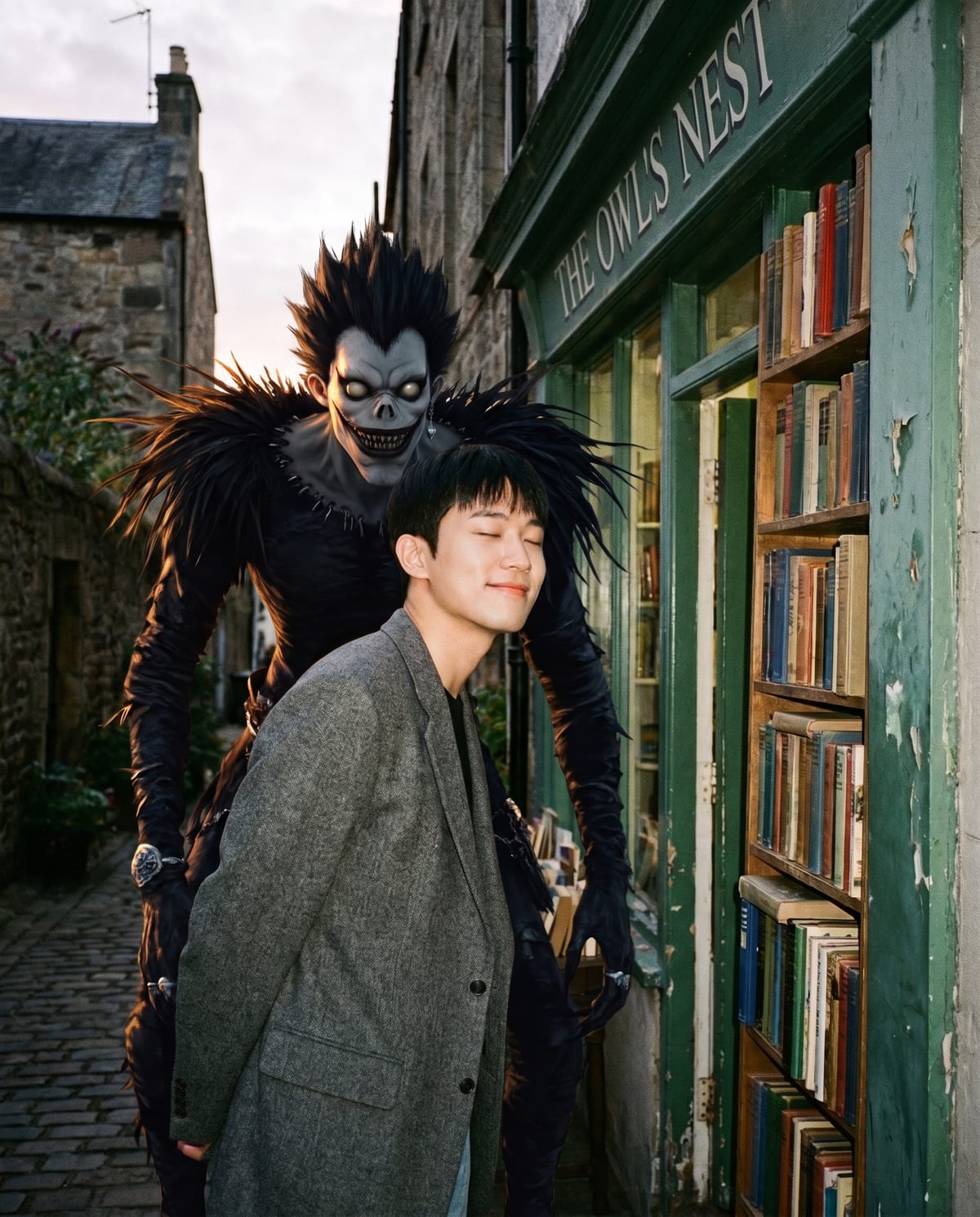
Many Ryuk-behind-you edits are built by cutting the character out and layering him into a video template. Ryuk Spotted takes a different route: one photo in, one finished candid photo out, with the figure and the lighting handled for you.

Final image
1 still
Your input
1 photo
Price
from 51 credits
Ryuk Spotted example result
Ryuk SpottedExample result

From your photo to a candid street shot

01

Step 1: pick a photo of you facing the camera

Use a clear photo where you look toward the lens, wear your own outfit and have a calm or neutral expression. Your clothes and stance stay much as they are in the upload, so what you upload is roughly how you will stand in the street scene. A shot with some empty space at your side leaves room for him.

02

Step 2: upload it and start the image

Add the photo to the single slot on the Ryuk Spotted page. There is no pose selector, scene choice or apple option; the shinigami always appears beside or just behind you in a street or shop-alley setting. The page says it takes about a minute, and the 4:5 image is saved to your assets.

03

Step 3: decide how to reveal it

The joke works best when viewers spot him a beat after they see you. Post the full image as it is, or plan a two-slide reveal with a crop of just you first. Either way, say it is an AI image, and check the lighting match before you share.

Explore the Ryuk Spotted trend

How to make it

Caught on camera with a shinigami over your shoulder. Add one clear photo; the look is already set.

The photo you add

  • 1. You

    A clear photo of you, facing the camera, in your own outfit.

  1. 01

    Upload your photo

    Pick a clear photo of you in your own outfit.

  2. 02

    We bring him in

    He appears beside or behind you, lit to match the scene, in about a minute.

  3. 03

    Download and post

    Save the image and share it anywhere.

01

Looks like a real photo

The light, shadows and grain on you and on him are matched, so it reads as one candid shot.

02

Still you

Your face, outfit and relaxed expression stay as in your photo.

03

Eerie, not gory

The mood is creepy and playful, with nothing violent.

Photo tips

  • Clear, front-facing photo
  • A relaxed, neutral expression works best
  • Leave some space beside you in the frame
  • Street, shop alley or night scenes look great

Questions & answers

Does this make a Ryuk-style selfie or turn me into a shinigami?

It creates an unofficial fan-style portrait of you with a shinigami beside or behind you. You remain the human subject in your own outfit; the template does not turn you into the creature. The intended composition is a candid street-style photograph with the figure looming over your shoulder.

Can I select an apple pose or a bedroom scene?

There is no pose or scene selector in this template. It uses a street or shop-alley composition with the shinigami beside or behind you. Other Ryuk-style examples may show an apple or a bedroom, but those are not selectable options in this one-photo flow.

How many photos do I need?

One: a clear photo of you.

Is my photo private?

Your photos are used to make your image. Only upload photos of yourself, or of people who have agreed to it.

Can I use the result commercially?

Check your plan's terms for what you can do with generated images. They apply to your result.

How long does it take?

About a minute. You can leave the page; the finished Ryuk Spotted image is saved to your assets.

Is this official?

No. It is an unofficial fan-style look and is not affiliated with the creators of Death Note.
Ideas for your next photo

Pick a premise, choose the right photo, and turn one finished image into a post worth sharing.

Explore the AI photo trend playbook →

Make your Ryuk Spotted image

One photo, about a minute. You stay calm. He stays behind you.

Make this image