1. Pick who plays which dancer
The Left dancer lip-syncs at the start, does the backflip and leads the waving finish. The Right dancer dances, turns and waves in sync. Give the left slot to whoever wants the bigger moment.
Video trend
You do not need to learn the routine or land a backflip. The Huss Huss Huss template on Oakgen takes two photos, one for each dancer, and returns the full 17-second dance with both of you in it and the original sound on top. Here is the whole process, from picking photos to posting.
The Left dancer lip-syncs at the start, does the backflip and leads the waving finish. The Right dancer dances, turns and waves in sync. Give the left slot to whoever wants the bigger moment.
One photo per person, each sharp, well lit and facing the camera, with the hair fully visible. Full-body or knee-up photos work best, because the dancers are seen head to toe and turn their backs. Use your own photos or ones of adults who agreed to appear.
Open the Huss Huss Huss trend, put one photo in the Left dancer slot and the other in the Right dancer slot. Both are required. The poster shows which side is which.
720p is enough for a phone feed. 1080p keeps the faces sharper, which helps here because the faces are small in a full-length shot. The quote covers the whole 17-second video and shows before you generate.
Watch the result with sound and look at three moments: the backflip around 2 to 4 s, the back-to-camera turn around 7 to 9.5 s, and the waving finish at the end. Faces should match your photos when they come back round.
Download the vertical MP4, which already has the soundtrack, and post it to Reels, TikTok or Shorts. A caption that fits the meme is: in this town everybody goes out partying except us. Turn on the platform's AI-generated label.
Add a photo for each role shown below. All roles need a photo.
Use a sharp photo each for the Left dancer and the Right dancer, face forward, hair fully visible and, if you can, the full body with the outfit you want to dance in. Use two different photos so the pair reads as two people. Use your own photos or ones of people who agreed to appear.
Pick 720p or 1080p and review the quote. It covers the full 17-second video with both dancers replaced.
Watch the backflip, the back-to-camera turn and the finish with sound, then download your vertical 9:16 MP4 with the original soundtrack and label it as an AI-made video when you post.
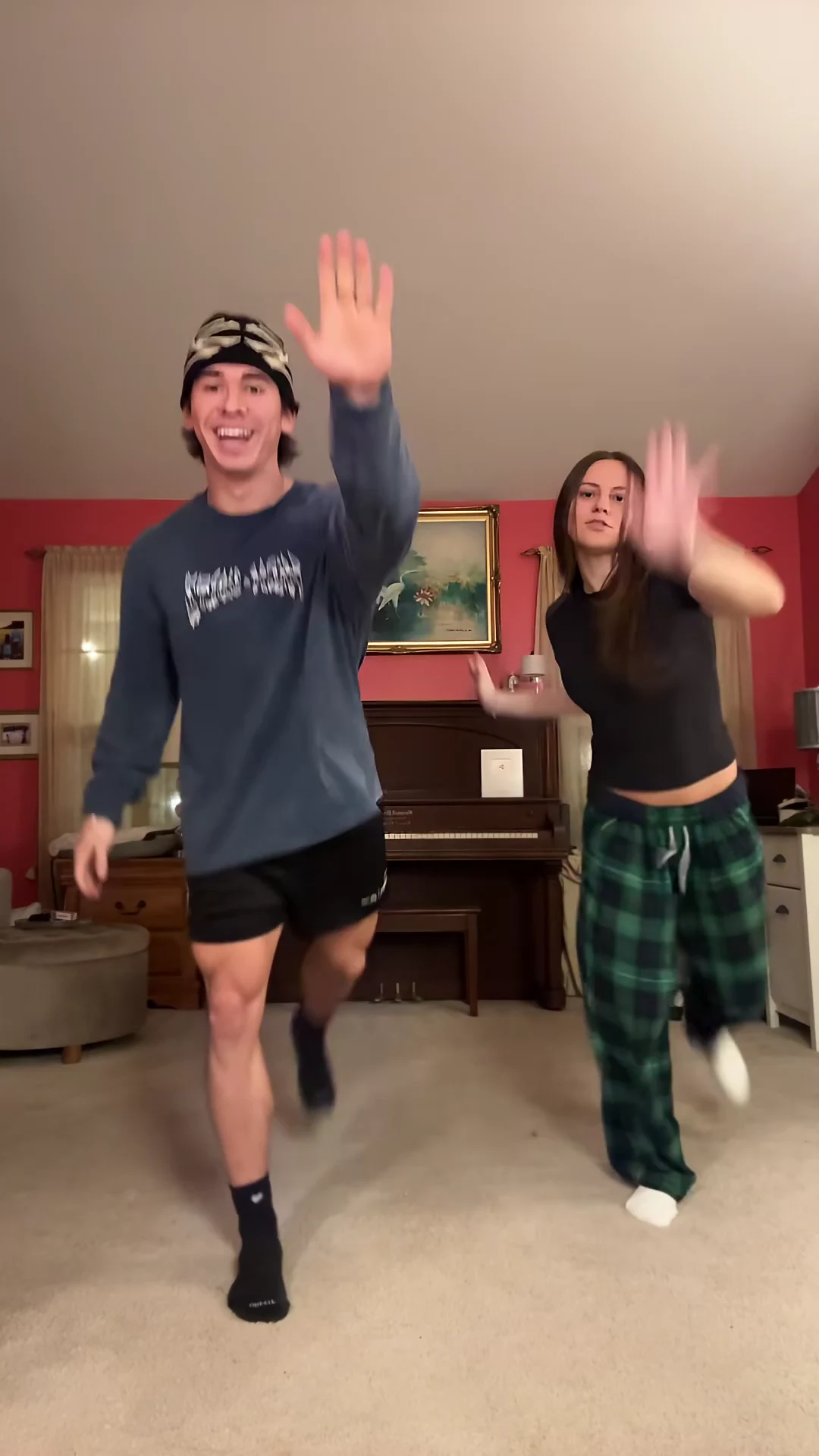
The template follows the clip's moves and timing and asks the model to take both dancers from your photos: face, hair, build and outfit in every frame, including the backflip and the turns, instead of the reference dancers' beanie, sweatshirt, shorts, crop top and plaid trousers. Check the flip and the turns in your result before you post.
Your video keeps the reference clip's original soundtrack. No audio or voice sample goes to the video model; the lip-sync follows the mouth movement in the reference clip and the original track is put back at the end. Oakgen does not clone or generate a voice.
A locked vertical phone shot of a living room with red walls and an upright piano. The left dancer's lip-sync and backflip open it, then both dancers groove, turn their backs, spin back, clap above their heads and finish waving and running in place.
The video is 9:16 from the start, so it fits Reels, TikTok and Shorts without cropping. Picture frames and the plaque on the piano are asked to stay blank.
A two-person dance video from the Huss Huss Huss dance trend: two people side by side in a living room, a lip-sync to camera, a standing backflip, a back-to-camera turn, a spin back, a clap above the head and a waving, run-in-place finish. Oakgen's template keeps the moves, the timing, the room and the reference clip's soundtrack and asks the model to put the people from YOUR two photos in the two dancers' places.
A November 2026 meme. It started with a Roblox animation in which a blocky basketball player says that everybody in his town goes out partying except him and pants huss, huss, huss between lines, the sound of heavy breathing while training. The audio was remixed and became the sound for lip-syncs and a two-person dance, which this template recreates.
No. Huss Valley is a separate Roblox tag game. This template is a real-person dance video set to the meme's sound, and Oakgen is not affiliated with or endorsed by Roblox or the game's developers.
No. The preview is the reference dance video the trend comes from, used for the moves and timing, not an Oakgen result. The template asks the model to show only the people in your photos in both dancers' places; check your result before you post.
Yes. Your video keeps the reference clip's original soundtrack. Your photos change how the two dancers look, not the sound, and the template does not take a new voice recording.
No. No audio or voice sample is sent to the video model, and whatever sound the model returns is thrown away. The lip-sync follows the mouth movement in the reference clip, and the original soundtrack is put back on the finished video. Oakgen does not clone or generate a voice for this template.
Yes. The Left dancer and the Right dancer each need a photo, because the template is set up to replace both people in the reference clip. Two different photos make the pair read as two people.
The person who wants the bigger moment. The left dancer lip-syncs to camera at the start, does the backflip and leads the waving finish. The right dancer dances, turns and waves in sync beside them.
No. The moves come from the reference clip, so your photo does the backflip and the dance for you. Check the flip and the turns in your result before you post.
Whatever is in your photos. Each person wears the outfit from their own photo in every frame instead of the reference beanie, sweatshirt, shorts, crop top and plaid trousers. A photo that shows only the upper body gets plain trousers or shorts and socks, because both dancers are seen full length.
A sharp, well-lit photo of one person facing the camera, hair fully visible and no sunglasses. A full-body or knee-up photo is best, because the dancers are seen head to toe and turn round, so the outfit and the back of the hair show.
A clear photo of a dog or cat is accepted and that role follows the pet's species, but the clip is built around people's dancing, a backflip and hands, so photos of people give the most reliable result.
You can download and share it. The soundtrack belongs to its creators and Oakgen does not license it for your posts, so check the music rules of the platform you post on, and label the video as AI-made.
Your own, or photos of adults who agreed to be in the video. Do not upload photos of children, public figures or anyone who has not consented, and label the video as AI-made when you share it.
No. The reference clip has no on-screen text, and the template asks the model for no captions or text. Add your own caption in the app when you post.
720p or 1080p. 720p is enough for a phone feed; 1080p keeps the faces sharper, which helps because the dancers are seen full length.
17 seconds in vertical 9:16, one continuous shot with no cuts.
903 credits per 720p video. The quote covers the complete 17-second video with both dancers replaced. Check it before generating.
Plan a story, keep your character recognizable, and make the finished clip your own.
Upload 2 photos. Everything else is set.