
Video trend

Glowing Red Eyes AI Video: Where They Appear and How to Check Them

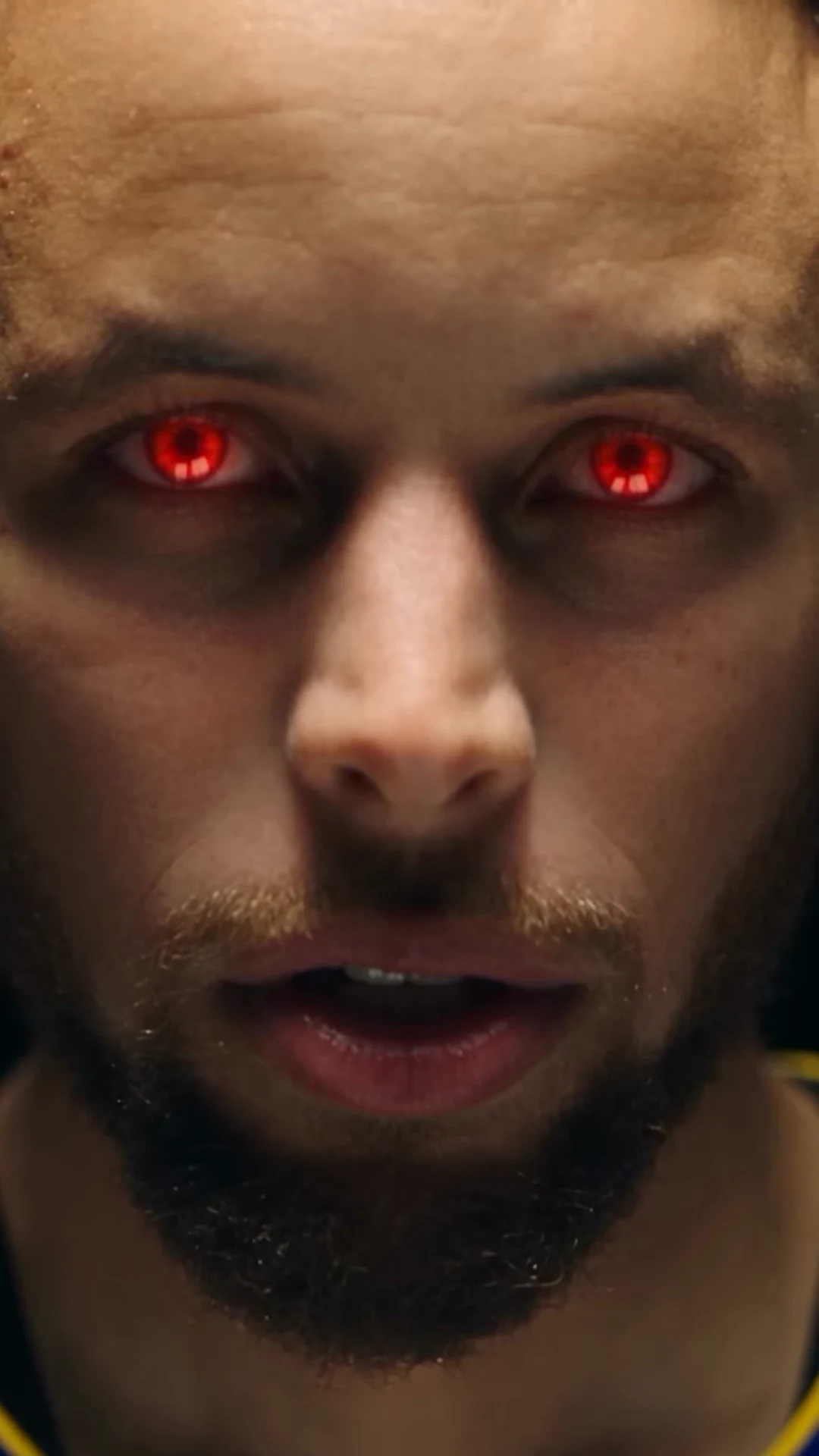
The red eyes are the payoff of Red Eye Verse, but they are on screen for less than three seconds in total. They appear in three close-ups, and your eyes keep their natural colour everywhere else. Knowing exactly where they land tells you what to inspect and what to leave alone.

Final video
21.04 seconds
Your input
1 photo
Quality
720p
REFERENCE RECREATION21.04 SEC / 9 / 16
Red Eye VerseSource: @silkdamage (klim) · AI rap booth reel

Three red-eye moments and how to review them

01

The three windows

Glowing red eyes appear in three places. First, an extreme face close-up in warm light from about 14.08 to 15.29 seconds (frames 338 to 367 at 24 fps), right after the gaze lifts on the black stage. Second, the end of the quick push-in at the shop security gate, from about 17.6 to 18.33 seconds (frames 422 to 440). Third, the final dark blue face close-up from about 20.04 to 21.04 seconds (frames 481 to 505), which ends the video.

02

Every other shot keeps your eye colour

The booth verse, the full-body stage shots, the grocery aisle, the wide gate shot and the blue-room thumbs-up and chain shots are not red-eye moments in the reference, so the template keeps your natural eyes there. If you see a red tint in the booth or the aisle, note the time; it is outside where the reference puts the effect. The red eyes apply only to your own eyes, not to lights, props or the background.

03

How to review each window

Pause at the start, middle and end of each window. Check that both eyes glow, that the glow stays on the eyes rather than spreading across the eyelids or cheeks, and that the eyes are still shaped like yours. Then compare the face around them with your booth shots: the same brows, nose and skin. The first close-up at 14.08 seconds is the largest view of your face in the whole video, so it is the best place to judge likeness.

04

Watch the gate push-in at full speed too

The gate moment is built from quick jump cuts that push in toward the face and only turn red at the end. Frame-by-frame review can make the earlier steps look abrupt, because the reference itself jumps. Watch it once at normal speed with sound to judge whether the red eyes land as a beat. Then step through the last few frames before the cut to the blue room at 18.33 seconds.

05

What you cannot change

The positions, colour and number of red-eye moments are fixed by the template. You cannot turn the effect off, move it to the booth or add it to other shots, and the soundtrack and cuts are fixed as well. Your choices are the photo and the output resolution. If you want a version without red eyes, this template is not the right one.

06

Photos that help the close-ups

Since the close-ups fill the frame with your face, choose a photo with both eyes open and clearly visible. Sunglasses or tinted lenses hide the information the effect is applied to, and strong reflections on clear glasses can do the same. Higher output resolution gives the close-ups more detail; read the quote for each option before you choose. No result quality is claimed here, as no Oakgen example of this trend exists yet.
Explore the Red Eye Verse trend

How to make it

Choose the roles you want to change. Add a photo for each selected role.

Rapper in the Red Eye Verse source video
Rapper
  1. 01

    Add your photo

    Upload one clear photo of the rapper: face visible, hair and outfit as you want them. Use a photo of yourself or of someone who has agreed to appear.

  2. 02

    Choose quality

    Pick 480p, 720p or 1080p and review the quote. It covers the full 21-second video plus your photo and scene preparation.

  3. 03

    Review every cut

    Watch the booth verse for mouth timing, then check that the same face holds through the stage, aisle, gate and blue-room shots and the red-eye close-ups.

01

One photo, every shot

Your photo plays the rapper in every shot with a person in it: the booth verse, the stage, the aisle, the gate and the blue room. Face, hair and outfit come from the photo, so wear what you want to see in every cut.

02

A verse, then a montage

The first 12.5 seconds stay in a warm wood-panelled vocal booth at a hanging condenser mic. The last 8.5 seconds cut quickly between four locations, ending on a close-up with glowing red eyes.

03

Red eyes where the reference has them

The glowing red eyes appear only in the face close-ups, the same as the reference. Everywhere else your eyes keep their natural colour.

04

A credited AI reference

The preview is @silkdamage's AI reel, not an Oakgen result. The rap is the reel's own audio; we could not identify it as a released song, so we do not name one.

Photo tips

  • One person in the photo
  • Face clearly visible
  • Wear the outfit you want in every shot
  • Plain clothes work best
  • Check the mic does not hide too much
  • Watch the red-eye close-ups

Questions & answers

What is the Red Eye Verse trend?

Red Eye Verse is Oakgen's descriptive name for an AI rap reel in which a rapper delivers a verse at a studio booth mic, then cuts through a fast montage that ends on glowing red eyes. Your photo replaces the rapper in every shot.

What song is in the video?

We could not match the rap to a released song or artist, and the reel does not name its audio. It may be an original or AI-generated track. The final MP4 keeps the reel's own sound, and we do not label it with a guessed title.

Is the rapper a real basketball player?

The reference performer is an AI-generated figure in a basketball jersey that resembles a real player. Oakgen is not affiliated with any player, team or league. Your result uses your photo and outfit, without team names, numbers or logos.

Will my video show a basketball jersey?

Only if your photo shows one. The rapper wears the outfit from your photo in every shot, and the template asks for plain clothes with no team or sponsor logos.

How long is the output?

The portrait 9:16 video is about 21.04 seconds at 24 frames per second, covering the booth verse and the full montage to the final red-eye close-up.

Does it keep the original sound?

Yes. The finished MP4 keeps the reference rap and beat. The vocal runs almost the whole clip, so check the mouth timing in the booth shots.

Can I change the locations or the lyrics?

No. The booth, the montage locations, the cuts and the audio are fixed by the reference. Your choices are the photo and the output resolution.

Can I use a photo of someone else?

Only use photos of yourself or of people who have agreed to appear, and do not use a celebrity's likeness. Label AI videos clearly when you share them.

Is the preview generated by Oakgen?

No. The preview is the credited Instagram AI reel by @silkdamage. It shows the scene and timing, not a result made from your photo.

How much does it cost?

4,597 credits per 720p video. The quote covers the full 21-second video, your photo preparation and the scene references for the booth and each montage location.

Ideas for your next video

Plan a story, keep your character recognizable, and make the finished clip your own.

Explore the video trend playbook →

Make your Red Eye Verse video

Upload 1 photo. Everything else is set.

Make this video