
Oakgen.ai

Video trend

Come Back and Back AI Video: Cast Both Dancers From Photos

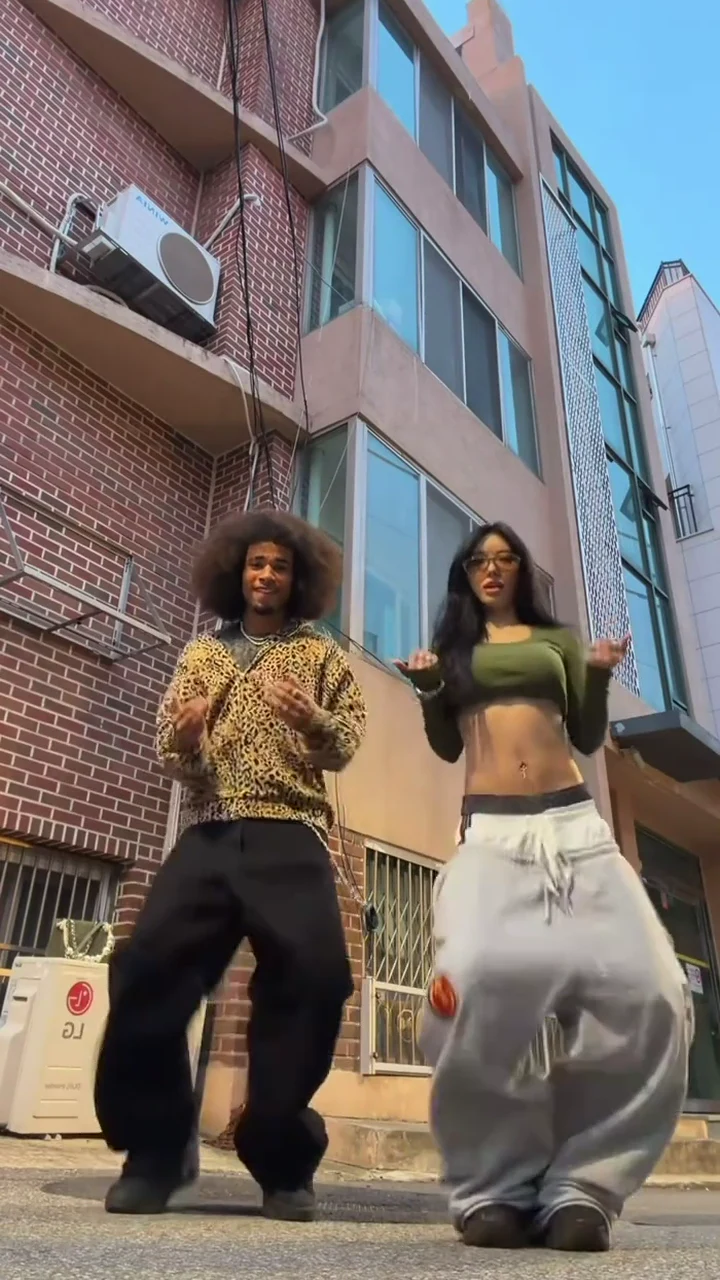
The Come Back and Back template has two dancers, one fixed low camera and one take of about 20 seconds in a sunny alley. You replace both dancers with two photos; the alley, the routine, the timing and the sound stay. This page is about those two photos: what they change, how the sides work and how to pick photos that still look like you when the dancers step toward the camera at the end.

Final video
19.79 seconds
Your input
2 photos
Quality
720p
REFERENCE RECREATION19.79 SEC / 9 / 16
Come Back and BackYour photo. This scene.

Casting the two dancers

01

What the two dancers do

Both dancers stand side by side and dance the same jersey club routine in sync: bouncing steps with the knees turning in and out, hand rolls at the chest, a crossed-arm pose at about 10 seconds, wide arm swings, hands up by the head, and finally both step forward toward the camera on the ground, smiling at the lens, still visible head to shoes.
02

Left dancer and right dancer

The tool has two slots, Left dancer and Right dancer. Whoever you put in the Left slot dances on the left of the frame for the whole take and ends slightly in front when both step toward the camera. The Right dancer stays on the right. The template is told never to swap the two, so decide the sides before you upload.

03

What each photo changes

Face, hair, skin tone, build and the outfit in the photo. There is no template costume: if your photo shows a hoodie and jeans, the dancer wears a hoodie and jeans. The reference dancers' faces, hair and clothes are removed, and neither reference face is ever kept, which is why both photos are required.

04

Photos that work best

One person per photo, standing, face to the camera, in even light, ideally full length from head to shoes. The routine is mostly legs and feet seen from a low angle, so a full-length photo gives the AI the trousers and shoes it needs; a head-and-shoulders selfie leaves the lower half to guesswork.

05

The hard moment for a photo

In the last two seconds both dancers step toward the camera, so their faces get bigger in the frame, seen slightly from below. A sharp, front-facing photo with the whole face visible, no sunglasses and no hand over the face, holds up best there. Check both faces in that final step-in before you post.

06

What stays fixed

The quiet alley, the red-brick apartment building, the white air-conditioner units, the blue sky, the low camera, the moves, their timing and the slowed sound "Wyw my sweetie #JerseyClub - Slowed" by nissi & 25Hzz. The preview on the trend page is the reference clip, not an Oakgen result.

Explore the Come Back and Back trend

How to make it

Add a photo for the left dancer and right dancer.

The roles in the Come Back and Back reference recreation
Left dancer in the Come Back and Back source video
Left dancer
Right dancer in the Come Back and Back source video
Right dancer
  1. 01

    Pick the two dancers

    Upload a clear photo for the Left dancer and the Right dancer. A full-length photo, face to shoes, works best. Use only photos of people who agreed to appear.

  2. 02

    Review quality and price

    Choose 480p, 720p or 1080p and review the quote. It includes the full video, both photo preparations and three scene references.

  3. 03

    Check the dance

    Watch that the two faces never swap, the feet land on the beat and both faces hold up as you step toward the camera at the end, then download your portrait MP4 with the original sound.

01

Two photos, two dancers

Each photo casts one dancer: face, hair, build and the outfit in the photo. The left dancer stays on the left and the right dancer on the right for the whole take.

02

The whole routine in one take

All 20 seconds from one low camera: the bouncing jersey club steps, the hand rolls, the crossed-arm pose, the wide arm swings and the step toward the camera at the end, on the original sound.

03

Your own outfits

There is no costume. Each dancer wears the outfit from their photo, so full-length photos give the most faithful result.

04

A real reference clip

The preview is the reference dance clip the template follows. It is the motion and timing reference, not an Oakgen result.

Photo tips

  • One person per photo
  • Full-length photos work best
  • Sharp, front-facing faces
  • Decide who dances on the left
  • Use photos of people who consented
  • Check both faces in the last step-in

Questions & answers

What is the Come Back and Back AI trend?

It is a portrait AI clip of about 20 seconds in which two people dance the same jersey club routine side by side to the slowed sound "Wyw my sweetie #JerseyClub - Slowed": bouncing footwork, hand rolls at the chest, a crossed-arm pose, wide arm swings and a final step toward a camera on the ground. Oakgen's template puts you and a friend in the two dancers' places and keeps the alley, the moves, the timing and the sound.

Why is it called Come Back and Back?

Because many TikTok posts of this dance are captioned "come back and back", and Google suggests the phrase together with "dance trend" and "dance tutorial". The sound itself is titled "Wyw my sweetie", so you will see both names; they are the same trend.

What is the song?

"Wyw my sweetie #JerseyClub - Slowed" by nissi & 25Hzz. It is the slowed version from their EP "Wyw my sweetie #JerseyClub", released on 28 August 2026, which also has the original-speed track. Your video keeps the sound from the reference clip.

Do we both need a photo?

Yes. The two dancers in the reference are real people, so each role needs a photo and neither reference face is ever kept.

Which side is which?

The Left dancer stays on the left of the frame and ends slightly in front when both step toward the camera; the Right dancer stays on the right. They never swap sides.

What do we wear in the video?

What you wear in your photos. There is no template costume, so full-length photos show the AI your real outfits; with a head-and-shoulders photo the AI has to fill in the rest of the outfit.

Whose photos can I use?

Your own, or photos of people who agreed to be in the video. Do not upload photos of celebrities, public figures or anyone who has not consented, and label AI videos clearly when you share them.

Do the dancers sing along?

No. Nobody lip-syncs; mouths stay closed, relaxed or smiling while the sound plays, as in the reference.

How long is the video?

About 20 seconds in portrait 9:16, one fixed low camera from the first bounce to the final step toward the camera.

Is the preview generated by Oakgen?

No. It is the reference dance clip the template follows, not an Oakgen result. Review both faces, hands and feet before sharing.

How much does it cost?

4,132 credits per 720p video. The quote includes both photo preparations, three scene references and the complete video. Check it before generating.

Ideas for your next video

Plan a story, keep your character recognizable, and make the finished clip your own.

Explore the video trend playbook →

Make your Come Back and Back video

Upload 2 photos. Everything else is set.

Make this video