
Oakgen.ai

Video trend

The TV Couple Hat Reveal AI Trend: Where the Finger Swipe Reveal Comes From

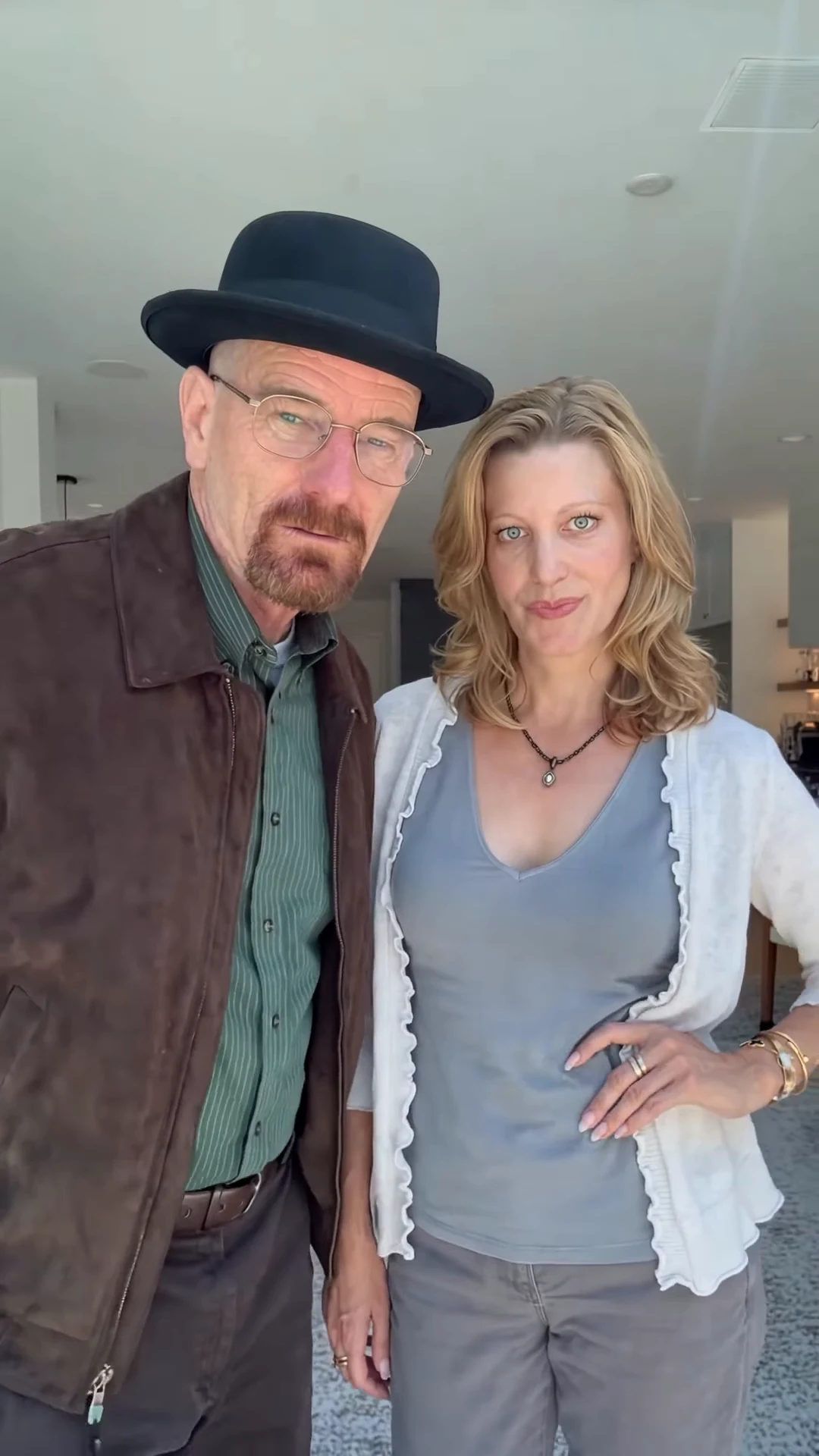
If the reference clip looks familiar, that is on purpose. The post it comes from is an AI video captioned "Walt and Skyler" with the hashtag #breakingbad, and the black pork-pie hat that appears after the swipe is the kind of hat Walter White wears in Breaking Bad. This page explains what that means for the template, and what it does not.

Final video
15 seconds
Your input
2 photos
Quality
720p
REFERENCE RECREATION15 SEC / 9 / 16
Finger Swipe RevealYour photo. This scene.

The reference, explained

01

What the reference is

An AI-generated reel published on Instagram on 28 October 2026. It shows a man and a woman made to resemble the Breaking Bad characters Walt and Skyler White, standing in a bright house, with the man's fingers over the lens until he swipes them away and is wearing the black hat. The caption names the two characters; it does not give the trend a name, which is why the template is called Finger Swipe Reveal after what happens in it.
02

Why the hat lands

In the show the black pork-pie hat marks the moment the mild chemistry teacher becomes his dangerous alter ego, so a hat appearing on a deadpan face reads as a transformation joke even to people who only half remember the series. The template keeps that hat and that deadpan stare.

03

What the template does not use

Neither face from the reference is kept. Both roles need a photo, and the template replaces each person's face, hair and clothes with the ones in your photos. Nothing from the show is included beyond a plain black hat, and Oakgen is not affiliated with the series or its makers.

04

Making your own version

Cast yourselves: the Hat wearer stands on the left and gets the hat, the Partner stands on the right. You do not need to look like the characters. The joke works with any pair, a couple, two friends, a parent and grown child, because the reveal is the same: a hat, a stare and a laugh.

05

Photos to avoid

Do not upload photos of the actors, other celebrities or anyone who has not agreed to appear. Use your own photos or photos of people who said yes, and label the result as AI when you post it.

06

The sound

Your video keeps the original sound from the reference clip. We have not identified the music or a song title, so we do not name one; if you post to a platform with its own sound library, you can also pick a sound there.

Explore the Finger Swipe Reveal trend

How to make it

Add a photo for the hat wearer and partner.

The roles in the Finger Swipe Reveal reference recreation
Hat wearer in the Finger Swipe Reveal source video
Hat wearer
Partner in the Finger Swipe Reveal source video
Partner
  1. 01

    Pick the two people

    Upload a clear photo for the Hat wearer and the Partner. Front-facing, waist-up photos with the whole face and hair visible work best. Use only photos of people who agreed to appear.

  2. 02

    Review quality and price

    Choose 480p, 720p or 1080p and review the quote. It includes the full video, both photo preparations and three scene references.

  3. 03

    Check the reveal

    Watch that the faces under the fingers match the faces after the swipe, that the hat appears only after the fingers clear and that nobody swaps sides, then download your portrait MP4 with the original sound.

01

A reveal with no cut

The fingers lift and sweep down out of frame in one continuous move at about nine seconds, and the hat is simply there. Nothing is edited in after; the timing comes from the reference clip.

02

The hat comes with the template

The person on the left gains a flat-topped black felt pork-pie hat with a narrow brim, sitting on their own hair. The partner wears no hat.

03

Your own faces and outfits

Each photo casts one person: face, hair, build and the clothes in the photo. Before the swipe only your noses, smiles and outfits show below the fingers; after it both faces are fully visible.

04

A real reference clip

The preview is the original reference clip the template follows. It is the motion and timing reference, not an Oakgen result.

Photo tips

  • One person per photo
  • Whole face and hair visible
  • Decide who gets the hat
  • Waist-up photos work best
  • Use photos of people who consented
  • Check the faces right after the swipe

Questions & answers

What is the Finger Swipe Reveal AI trend?

It is a portrait AI clip of about 15 seconds: two people stand side by side in a selfie shot while one of them holds two fingers flat across the lens, hiding both pairs of eyes. At about nine seconds the fingers swipe down out of frame and the person on the left is revealed wearing a black pork-pie hat, then both look into the camera, glance at each other and laugh. Oakgen's template puts you and someone else in the two places and keeps the room, the hand move, the timing and the sound.

Why is it called Finger Swipe Reveal?

After the action itself: two fingers cover the camera and a swipe reveals the change. We did not find an established public name for this exact clip, so the name describes what you see. You may know the move from hand-over-the-lens outfit-change transitions; this one keeps a single take and changes only the hat.

What is the sound?

Your video keeps the original sound from the reference clip. We have not identified the music or any song title, so we do not name one.

Do we both need a photo?

Yes. The two people in the reference look like real people, so each role needs a photo and neither reference face is ever kept.

Who gets the hat?

Whoever you put in the Hat wearer slot. That person stands on the left, holds the fingers over the lens and wears the black hat after the swipe. The Partner stands on the right and never wears a hat. They never swap sides.

What do we wear in the video?

What you wear in your photos, plus the black hat for the Hat wearer after the reveal. There is no other template costume.

Whose photos can I use?

Your own, or photos of people who agreed to be in the video. Do not upload photos of celebrities, public figures or anyone who has not consented, and label AI videos clearly when you share them.

How long is the video?

15 seconds in portrait 9:16, one handheld selfie take with the swipe at about nine seconds.

Is the preview generated by Oakgen?

No. It is the original reference clip the template follows, not an Oakgen result. Review both faces, the hand and the hat before sharing.

How much does it cost?

3,173 credits per 720p video. The quote includes both photo preparations, three scene references and the complete video. Check it before generating.

Ideas for your next video

Plan a story, keep your character recognizable, and make the finished clip your own.

Explore the video trend playbook →

Make your Finger Swipe Reveal video

Upload 2 photos. Everything else is set.

Make this video