
Video trend

Turn Yourself Into the Joker With AI: Pick the Right Photo

Joker face paint hides a lot: the white base flattens skin tone, the black around the eyes covers the eye area and the red smile redraws the mouth. What is left for people to recognise you by is the shape of your face, your nose, jaw, hairline and hair. This page is about choosing the one photo that keeps those visible, so the Joker in the clip still looks like you.

Final video
6.04 seconds
Your input
1 photo
Quality
720p
REFERENCE RECREATION6.04 SEC / 9 / 16
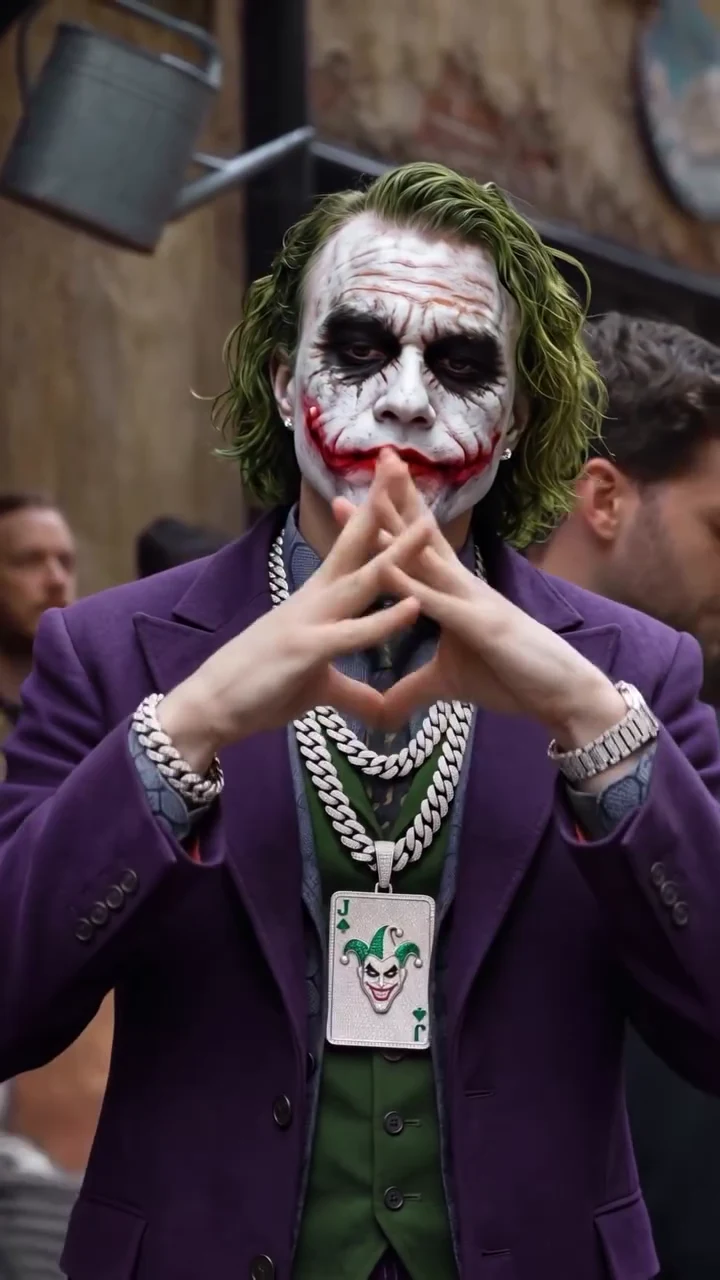
Joker in the HoodSource: @rdiiak · Joker street hand-signs AI clip

What survives the paint

01

What the paint covers and what it leaves

In the reference, the white paint covers the whole face, the black reaches from the brows to the cheekbones and the red extends from the corners of the mouth up the cheeks. Face shape, nose, jawline, ears, hairline and hair are untouched. Oakgen keeps your own haircut and hair colour rather than the source's long green hair, so your hair is the strongest clue that it is you.

02

The photo that works best

A sharp, front-facing photo at eye level, with your whole face, both ears and your hairline visible, in even daylight or soft indoor light. Keep a neutral or closed-mouth expression: the performer in the clip never opens his mouth, so a wide grin in the photo adds nothing. One person only, no other faces in the frame.

03

Photos to avoid

Sunglasses and tinted glasses hide the eye shape the paint is drawn around. Hats and hoods hide the hairline, which matters more than usual here. Heavy beauty filters, strong side light, low-angle selfies and photos where a hand or phone covers part of the face all remove the features that still show through the makeup. Avoid group photos; the template needs one clear person.

04

Glasses, beards and long hair

If you always wear glasses, a photo without them usually reads better under the paint; we have not tested how glasses carry through the makeup. A beard or moustache comes from your photo, and the template asks for the red smile to be painted around it. Long hair is kept at its own length, so it may cover the jacket collar and part of the chains. We have not reviewed a generated result yet, so check both in yours.

05

Clothing in your photo does not matter

Whatever you wear in the photo, the template dresses you in the purple suit jacket, green waistcoat, patterned shirt and tie, silver chains, joker-card pendant, bracelet and watch. You do not need a costume, and a head-and-shoulders photo is enough, because the clip shows the performer from the waist up.

06

Checking the result

When your clip is back, compare it with your photo at the start, when the face is fully visible above the crossed fists, and again near the end. If the face drifts toward the source performer or the hair turns green, try a sharper, better-lit photo. Each attempt is a separate generation, so read the studio quote before you start.
Explore the Joker in the Hood trend

How to make it

Choose the roles you want to change. Add a photo for each selected role.

Joker in the Joker in the Hood source video
Joker
  1. 01

    Upload one photo

    Use a sharp, front-facing photo with your whole face and hairline visible. Glasses, hats and heavy filters make the face harder to read once it is painted.

  2. 02

    Choose quality

    Pick 480p, 720p or 1080p and check the quote. It covers the full clip plus preparing your photo and the costumed scene reference.

  3. 03

    Check the paint and hands

    Before you share, watch that the face still looks like you under the makeup and that the fingers stay clean when they press together into the triangle.

01

You, painted as the Joker

Your face, haircut and hair colour come from your photo. The template paints that face with white makeup, dark smudged eyes and the red scarred smile, so friends can still tell it is you under the paint.

02

The costume comes with it

Purple suit jacket, green waistcoat, patterned shirt and tie, stacked silver chains with a joker-card pendant, bracelet and watch. You do not need a costume in your photo; everyday clothes are replaced.

03

The same hand signs

The 6-second portrait clip keeps the crossed fists, the heart and triangle hand shapes, the hand rubbing and the cupped-hands finish, in one continuous shot with the crowd behind you.

04

A credited AI source

The preview is @rdiiak's AI clip, made with Zyka AI according to its caption. It is the motion and timing reference, not an Oakgen result, and the original performer's face is never reused.

Photo tips

  • One person per photo
  • Face the camera
  • Show your hairline
  • Skip sunglasses and hats
  • Use even light
  • Check the hand signs

Questions & answers

What is the Joker in the Hood trend?

It is a short AI clip of a man in Joker face paint and a purple suit with silver chains, throwing hand signs at the camera in a crowded street. A commenter under the source and other creators describe these clips as the Joker "in the hood" or "in da hood". Oakgen puts your face under the paint.

Do I keep the Joker makeup?

Yes. That is the trend. Your face shape, features and hair come from your photo, and the template adds the white face paint, dark smudged eyes and red scarred smile on top.

Do I need a costume in my photo?

No. The purple suit, green waistcoat, chains, card pendant, bracelet and watch are part of the template, whatever you wear in your photo.

Will I get green hair?

No. Your haircut and hair colour come from your photo, so you are easier to recognise under the paint. The source's long green hair is not copied.

How long is the video?

About 6 seconds, portrait 9:16, one continuous shot from the crossed fists to the cupped-hands finish.

Does it keep the original sound?

Yes. The final MP4 keeps the source's audio, a rap vocal over a beat. Instagram lists it only as original audio by the creator, so we do not name a track or artist. The performer does not lip-sync; the mouth stays closed.

Whose photo can I use?

Use a photo of yourself or of someone who agreed to be in the video. Do not upload photos of public figures or anyone who has not consented.

Is the preview generated by Oakgen?

No. It is the credited source clip by @rdiiak, shown for its look, moves and timing. Review the face, paint and hands in your own result before posting.

Is this an official Joker or Batman product?

No. The Joker is a DC character. This is an unofficial fan-style template and is not affiliated with or endorsed by DC or Warner Bros.

How much does it cost?

1,465 credits per 720p video. The quote includes preparing your photo, the costumed scene reference and the complete clip. Check it before generating.

Ideas for your next video

Plan a story, keep your character recognizable, and make the finished clip your own.

Explore the video trend playbook →

Make your Joker in the Hood video

Upload 1 photo. Everything else is set.

Make this video