
Video trend

Studio Neutral Zone Caption Ideas: Write the Rivalry in One Line

The Studio Neutral Zone video carries no words on screen, and the track is someone else's verse, so the caption is where your joke lives. This page breaks down why the original caption works, gives formats you can adapt, and shows where text can go in the landscape frame without covering a face.

Final video
20.04 seconds
Your input
2 photos
Quality
720p
REFERENCE RECREATION20.04 SEC / 16 / 9
Studio Neutral ZoneSource: @downey.ai · original AI reel on Instagram

Writing and placing the caption

01

Why the original works

"The studio is a neutral zone" names the place and the rule in six words and leaves the viewer to recognise the rivals. It works because the audience already knew the feud. Your caption has to supply what your audience does not already know: who the two sides are.

02

Formats to adapt

"[Side A] and [side B] in one booth." "When the [rival team] fan shows up to your session anyway." "Ceasefire for 20 seconds." "The studio is a neutral zone, even for [rivalry]." Keep it to one line and put the rivalry first, so it lands before the first cut at about 6 seconds.

03

Who to name

Name the sides, not private details. "Me vs my brother" is fine; tagging someone who did not agree is not. Say the video is AI-made, credit the original reel by @downey.ai, and do not tag or name the real rappers as if they were in your video.

04

Where text can go in the frame

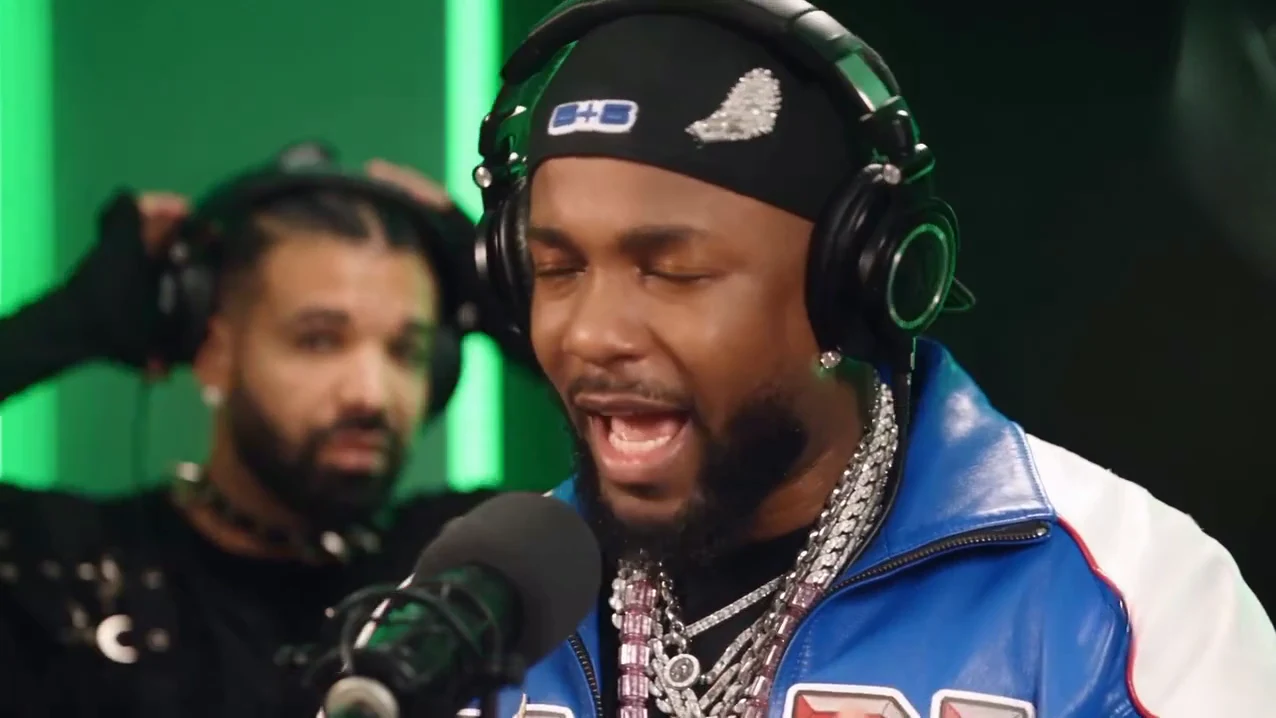
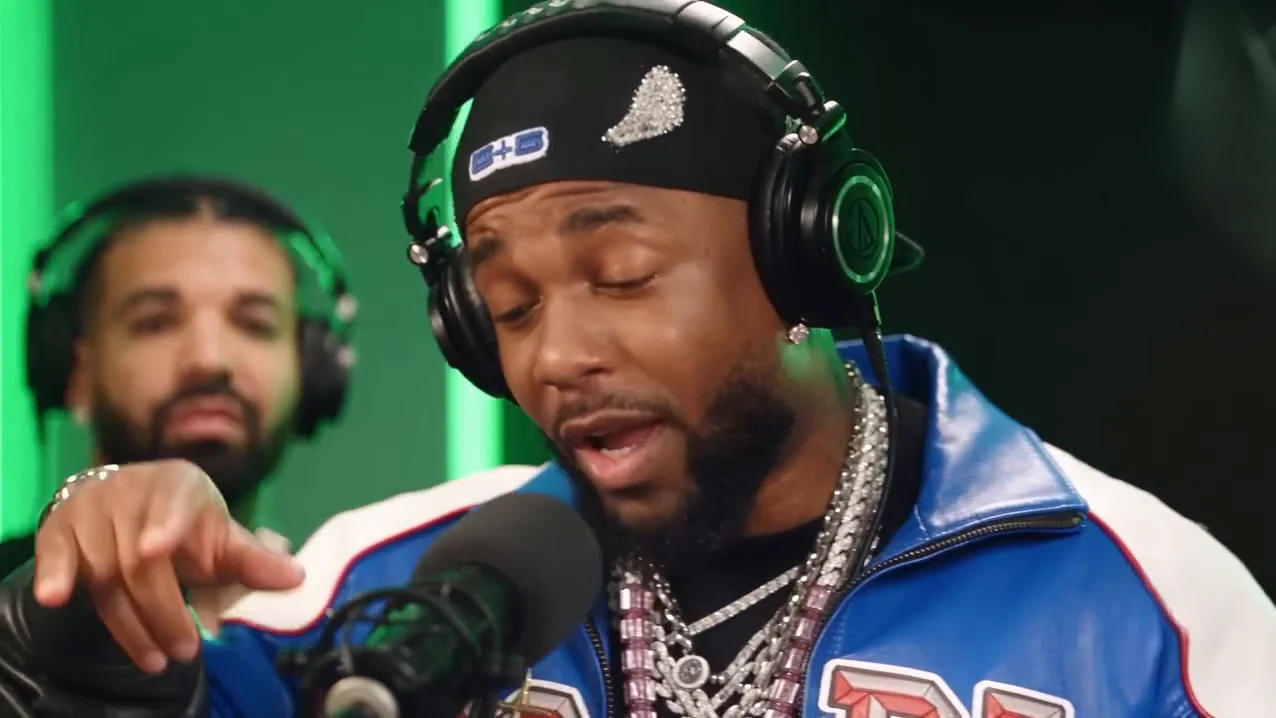
The clip is landscape 16:9. In the close-ups the rapper's face and the microphone sit in the centre and the partner on the left, so the lower right and upper right are the safest areas. In the wide shot the rapper moves between the centre and the right, so keep text to the top edge above the light strips. Avoid the centre band where the faces and the microphone are.

05

For vertical platforms

If you crop to 9:16, centre the crop on the microphone. The partner on the left can fall out of a tight crop in the close-ups, which removes the joke, so check every shot after cropping or use a letterboxed 16:9 frame instead.

06

Timing on-screen text

If you add on-screen text in your editor, show the setup in the first two seconds, before the partner leans in at about 4.4 seconds, and leave the wide shot from about 6 seconds clear so viewers can see both people.

Explore the Studio Neutral Zone trend

How to make it

Add a photo for the rapper and partner.

Rapper in the Studio Neutral Zone source video
Rapper
Partner in the Studio Neutral Zone source video
Partner
  1. 01

    Pick who raps and who vibes

    Upload a clear photo for the rapper and one for the partner, each of someone who agreed to appear. Photos that show the face and the top half of the outfit work best.

  2. 02

    Review quality and price

    Choose 480p, 720p or 1080p and review the quote. It includes the full video, both photo preparations and three scene preparations.

  3. 03

    Check the mouths

    Watch that only the rapper's mouth follows the verse and the partner only grins and nods, then download your landscape MP4 with the original track.

01

Two roles, both yours

The rapper is at the microphone for the whole verse, in close-up and in the wide shot. The partner stands behind, nodding, grinning and reacting, and never raps. Each takes the face, hair and outfit from their own photo.

02

The whole booth session

The 20-second landscape clip keeps the close-up, the cut to the wide booth shot at about 6 seconds, the cut back at about 14 seconds and the last wide beat, with the original track.

03

Your clothes, the booth's headphones

The jacket, durag and chains in the reference are not a costume. Both people wear what they wear in their photos, plus the studio headphones the scene needs.

04

A credited AI source

The preview is @downey.ai's AI reel, made with Higgsfield according to its caption, with its station watermark removed. It is the motion and timing reference, not an Oakgen result, and its faces are never reused: both roles come from your photos.

Photo tips

  • One person per photo
  • Use sharp, front-facing faces
  • Show the top you want to wear
  • Pick two visibly different people
  • Use photos of people who consented
  • Check that only the rapper raps

Questions & answers

What is the Studio Neutral Zone trend?

It is a 20-second AI clip set in a green freestyle booth: one rapper performs a verse at the microphone while a second person, the rival you would not expect there, stands behind vibing to it. The creator captioned it "The studio is a neutral zone", and Studio Neutral Zone is Oakgen's name for it, taken from that caption.

Where does it come from?

From an Instagram reel posted by the AI creator @downey.ai on 23 October 2026, made with Higgsfield according to its caption. The two people in it are AI likenesses of two famous rappers known for a public feud, which is the joke of the caption. We have not found an older version or another public name for it.

What song is it?

Instagram labels the reel's audio as "On The Radar Freestyle" by Drake and Central Cee. Oakgen keeps that original track in your video; you cannot swap the song inside the template.

Do I have to replace both people?

Yes. The rapper and the partner each need a photo, so the AI likenesses from the reference never appear in your video.

Which role is which?

The rapper is at the microphone for the whole clip and does all the rapping, in close-up and in the wide shot. The partner stands behind on the left in black, nodding, grinning, covering a smile and moving to the beat, and never raps.

Whose photos can I use?

Use photos of yourself or of people who agreed to be in the video. Do not upload photos of celebrities, public figures or anyone who has not consented, and label AI videos clearly when you share them.

Is this the same as Fetty Wap On The Radar?

No. Fetty Wap On The Radar is a separate Oakgen trend made from a different, 15-second booth performance in which both people perform. Studio Neutral Zone is a different 20-second clip and song, where only the rapper raps and the partner reacts behind.

What about the logos in the original?

The reel carried a station watermark in the bottom-right corner and a station logo on the wall. Oakgen's reference copy has both removed and the template asks for a plain wall and no station marks, so you can add your own text when you post.

How long is the video?

About 20 seconds in landscape 16:9, matching the reference from the first bar to the last wide shot.

Is the preview generated by Oakgen?

No. It is the credited AI reel used as the reference, not an Oakgen result. Review faces, hands and mouths in your video before sharing.

How much does it cost?

4,324 credits per 720p video. The quote includes both photo preparations, three scene references and the complete video. Check it before generating.
Ideas for your next video

Plan a story, keep your character recognizable, and make the finished clip your own.

Explore the video trend playbook →

Make your Studio Neutral Zone video

Upload 2 photos. Everything else is set.

Make this video