0 to 5.8 seconds: the Rapper alone
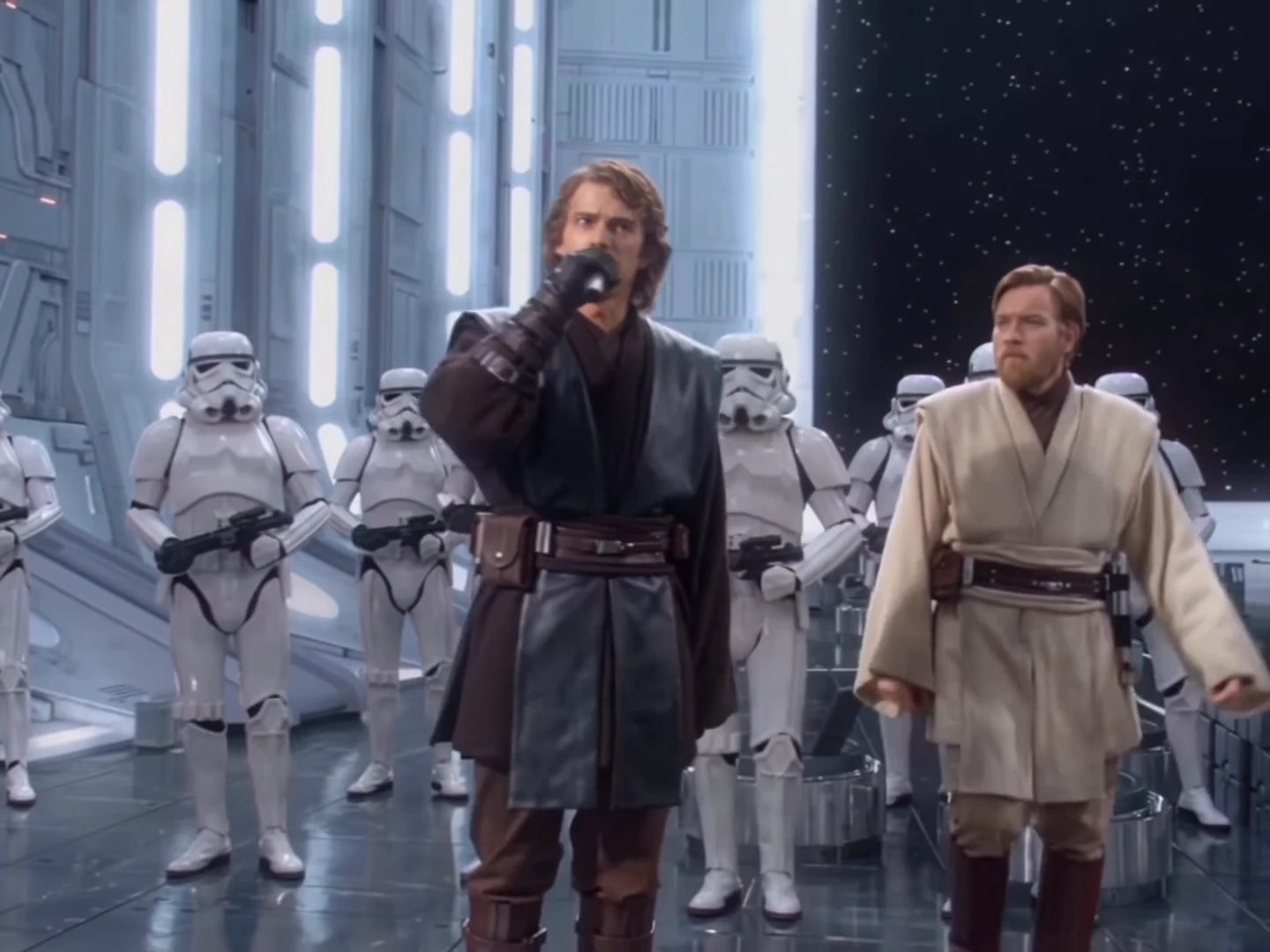
A medium close-up of the Rapper at the microphone in front of the trooper ranks, pulling back to a full-body shot. The Rapper raps the opening lines; the Singer is not in shot.
Video trend
The Gangsta's Paradise template is 30 seconds long and has seven shots, which is more than most trends. Knowing where each cut falls, who is visible and who sings makes it easier to choose the photos and to check the result. Times below are from the 24 frames per second template.
A medium close-up of the Rapper at the microphone in front of the trooper ranks, pulling back to a full-body shot. The Rapper raps the opening lines; the Singer is not in shot.
A three-quarter shot. The Singer enters from the left, glances at the Rapper and leaves on the left; the Rapper turns towards them, wipes their brow and the camera closes in on the Rapper's face. The Singer is silent.
A wide shot of both performers walking towards the camera through the hangar. The Rapper raps; the Singer walks alongside without singing.
A medium close-up of the Rapper alone, rapping hard and pointing at the lens. A sharp, front-facing Rapper photo pays off most here.
A wide shot down the hangar as the Rapper walks forward, waves and points upward, then a push into the raised arm.
A short close shot of the Rapper with the Singer behind, then the troopers lined up holding microphones as a backing choir. The Rapper's head rises into the bottom of the frame, silent, and the Singer steps in from the bottom left at about 27 seconds to sing the chorus.
Add a photo for the rapper and singer. The background is optional: add a photo to change it.
Upload a clear photo of the person who raps. A sharp, front-facing face with the whole head visible works best, because the rapper fills the frame in several close-ups. Everyone pictured should have agreed to appear.
Upload the singer's photo; a full-body photo helps, since the singer is mostly seen walking in wide shots. Add a location photo in Background if you want a different setting, or skip it. Choose 480p, 720p or 1080p and review the quote, which covers the full video and both preparations.
Watch the rapper's mouth in the close-ups, both faces in the wide shots and the singer's chorus at the end, then download your 4:3 MP4 with the song.
The Rapper performs the verse for about 24 seconds; the Singer stays silent in the background and then sings the closing chorus. Each takes the face, hair, build and outfit from their own photo.
All 30 seconds in 4:3 landscape: close-ups at the microphone, wide shots down the hangar, the two walking side by side and the trooper choir at the end, with the cuts in the same places.
Your video keeps the clip's soundtrack, "Gangsta's Paradise" by Coolio featuring L.V. The song is not sent to the video model; the mouths follow the motion guide and the song is put back at the end.
An optional location photo moves the whole performance out of the hangar into a street, a studio, a stage, a kitchen or any wide place. Leave it empty to keep the original hangar and its rows of guards.
Friends, siblings, a boss and an employee, or two characters you designed. The reference performers are replaced by grey silhouettes in the motion guide, so neither is reused.
It is a 30-second 4:3 AI music video set in a white sci-fi hangar lined with armoured troopers. One performer raps the verse of "Gangsta's Paradise" into a handheld microphone in close-ups and wide shots, a second performer walks past and then sings the chorus at the end, and the troopers raise microphones as a backing choir. Oakgen's template puts the two people from your photos in it.
"Gangsta's Paradise" by Coolio featuring L.V., from 1995. The reference clip uses the original recording, and your video keeps that soundtrack.
An AI-made fan parody with look-alikes of two Jedi from the Star Wars prequels. This template is an unofficial fan-style format, not connected to Lucasfilm, the films or the song's rights holders, and neither look-alike is kept in your video.
Yes. The Rapper and the Singer each need a photo, because the motion guide replaces both performers with grey silhouettes, so neither of them is kept. A third photo, for the Background, is optional.
Yes. Add a location photo in the Background slot and the template tries to build the whole performance in that place, keeping both performers, the cuts and the camera moves. The hangar and the armoured guards are removed. A wide, evenly lit photo with a visible floor works best. Leave it empty to keep the hangar.
The Rapper performs the verse for most of the video. The Singer is silent while walking past and sings the chorus in the last few seconds. Put whoever should own the microphone in the Rapper slot.
No. There is no costume. Each person wears the outfit from their own photo instead of the reference's dark and beige robes. The hangar and the armoured guards stay as they are unless you add a background photo.
No. The video keeps the original recording, whoever is in the photos. You do not record anything.
The song is not sent to the video model, because famous recordings are refused. The mouths follow the movement tracked from the reference performance, and the song is restored at the end. These are instructions to a model, so check the close-ups before posting and re-run if the lips clearly drift.
Your own, or photos of people who agreed to be in the video. Do not upload photos of actors, celebrities or anyone who has not consented, and label AI videos clearly when you share them.
30 seconds in 4:3 landscape, in seven shots, ending on the trooper choir and the Singer's chorus.
No. It is the AI reference clip the trend comes from, used as the motion and timing reference, not an Oakgen result. Its two performers are never reused.
6,090 credits per 720p video. The quote includes both photo preparations and the complete video. Check it before generating.
Plan a story, keep your character recognizable, and make the finished clip your own.
Make the Gangsta's Paradise AI hangar video step by step: choose the Rapper and Singer photos, read the quote, check the close-ups and post it responsibly.
Why the Star Wars Gangsta's Paradise AI parody works, what the song is, what the template keeps and how to cast the Rapper and the Singer in your own version.
Upload 2–3 photos. Everything else is set.