
Oakgen.ai

Video trend

Floating Chair AI Video: Be the One in the Chair From One Photo

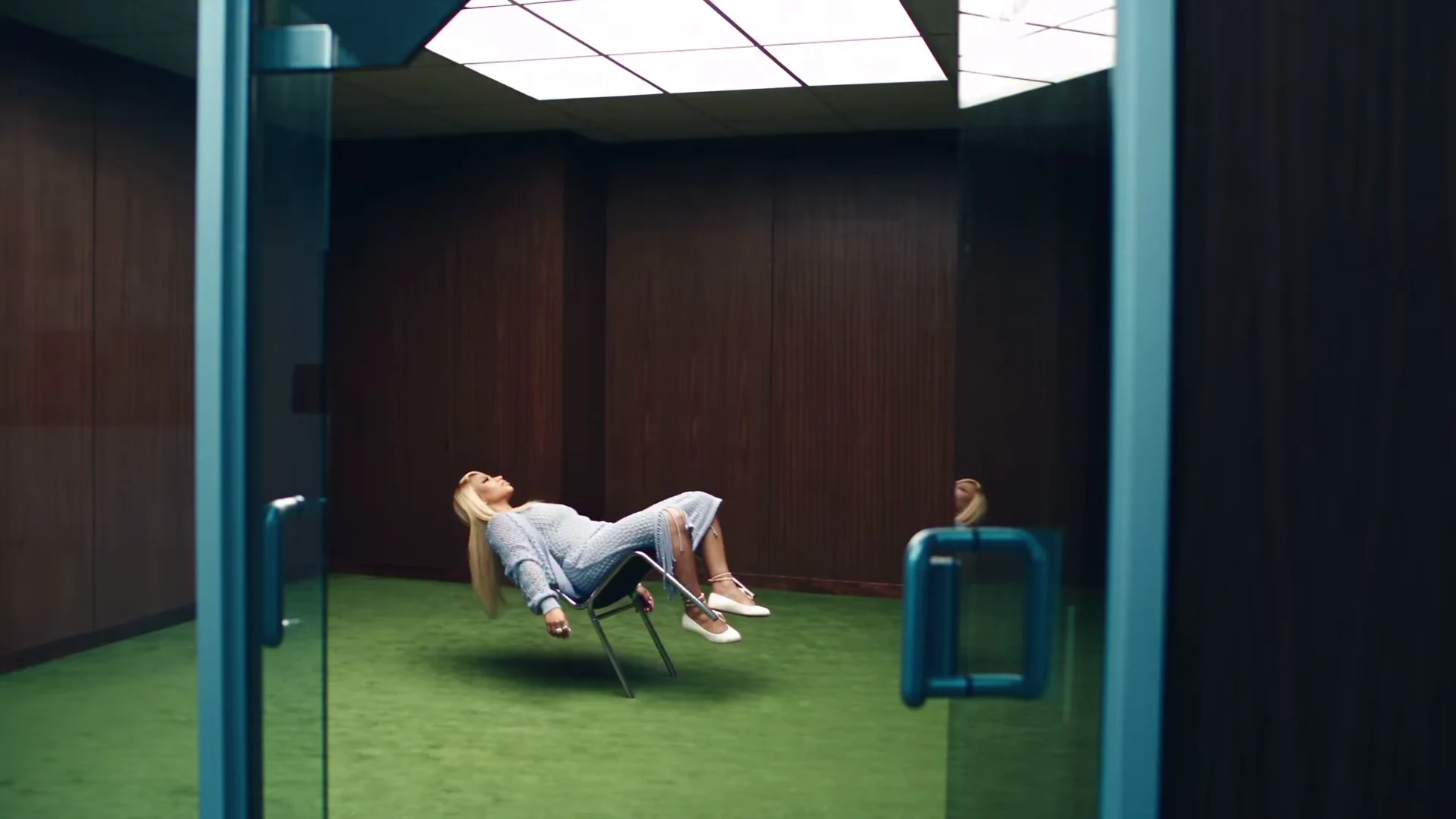
The Floating Chair clip has one person in it: the one leaning back in a chair that hovers above a green carpet. You replace that person with a single photo; the room, the chair, the outfit, the cuts and the sound stay. This page is about that photo: what it changes, what it cannot change and how to pick one that holds up in top-down close-ups and a head-back lean.

Final video
19 seconds
Your input
1 photo
Quality
720p
THE ORIGINAL19 SEC / 16 / 9
Floating ChairYour photo. This scene.

Casting yourself in the chair

01

Where you appear

Almost everywhere. You are small and far away in the opening wide shot through the glass door, side-on in the two lean-back shots at about 3.5 and 15.5 seconds, and very close in the top-down face close-ups that fill most of the 19 seconds. The short cutaways show only the chair legs, your shoes, the knit skirt and a hand on the chair frame.
02

What your photo changes

Your face, hair and build. Unlike many templates, the outfit does not come from your photo: the powder-blue open-knit cardigan, top and long skirt, the cross necklace, the ankle bracelets and the white flats are the look of the trend and are put on you whatever you wear in the picture. Your haircut and hair colour stay your own.

03

The photo that works best

One person, face sharp and turned towards the camera, the whole head and hair in frame, no sunglasses or hat. The close-ups are shot from above and very near the lens, so the face carries the clip. Even light on both sides of the face helps, because the head tilts and turns in almost every close-up.

04

The hard moments for a photo

Two moments test it. In the lean-back side shots the head tips all the way back and the hair hangs toward the floor, so your hairline and the back of your hair are partly invented; a photo that shows the full length of your hair helps. At about 11 to 12 seconds the hair whips across the face as the head turns, and the face has to come back as the same person afterwards.

05

One photo, and it is required

The person in the reference clip is an AI likeness of a real person, so the template always replaces that face and the studio will not start until you add a photo. There is only one slot. Use your own photo or one of someone who agreed to appear, never a celebrity or public figure.

06

What stays fixed

The empty wood-paneled room, the bright ceiling panel, the green carpet, the glass door, the hovering chrome chair, the powder-blue outfit, every cut and the original soundtrack. Your photo does not add a shot or move a cut. The preview on the trend page is the original AI reference clip, not an Oakgen result.

Explore the Floating Chair trend

How to make it

Add a photo for the performer.

The roles in the Floating Chair original reference
Performer in the Floating Chair source video
Performer
  1. 01

    Add your photo

    Upload one clear photo of yourself or of someone who agreed to appear. A sharp, front-facing face with the whole head and hair visible works best; the outfit does not matter.

  2. 02

    Review quality and price

    Choose 480p, 720p or 1080p and review the quote. It includes the full video, your photo preparation and four scene preparations.

  3. 03

    Check the close-ups

    Watch your face in the top-down close-ups, check the hands and the chair in the short cutaways, then download your landscape MP4 with the original sound.

01

You are in the chair

One photo gives the performer your face, hair and build in the wide shot, the side shots and every close-up. The template is built to replace the reference face and hair; check the close-ups before you post.

02

The powder-blue look stays

The open-knit powder-blue cardigan, top and long skirt, the cross necklace, the ankle bracelets and the white flats are the look of the trend, so you wear them whatever your photo shows. Your hair stays your own.

03

Every cut on the beat

All 19 seconds in the reference's cuts: the wide shot through the glass door, the chair legs hovering above the carpet, the side shots of the lean back and the top-down close-ups, on the original sound.

04

The original reference

The preview is the original AI reference clip the trend comes from, not an Oakgen result. It shows the shots and timing your video follows.

Photo tips

  • One person per photo
  • Sharp, front-facing face
  • Whole head and hair in frame
  • Any outfit works: the powder-blue look is added
  • Use a photo of someone who consented
  • Label the video as AI-made

Questions & answers

What is the Floating Chair AI trend?

It is a 19-second landscape AI clip of one person leaning far back in a chrome chair that hovers above a green carpet in an empty wood-paneled room. It cuts between a wide shot through a glass door, close-ups of the chair legs and white flats floating above the carpet, side shots of the lean back with the hair falling toward the floor, and top-down close-ups of the face singing to the camera. Oakgen's template puts your face and hair on the performer and keeps the outfit, the room, the cuts and the sound.

Why is it called Floating Chair?

We did not find an established public name for this clip, so Oakgen names it after what happens in it: a chair that floats while someone leans back in it. It is a descriptive name, not a sound or meme title.

Is the chair really floating?

No. The reference is an AI-made clip; the hovering chair is part of the effect. Label your video as AI-made when you share it.

What song is in it?

We have not identified the music. The reference has its own soundtrack, and your video keeps that original sound, but we do not name a song or artist we could not confirm.

Do I have to wear the outfit?

The outfit is part of the trend. Whatever you wear in your photo, the video dresses you in the powder-blue open-knit cardigan, top and long skirt, the cross necklace, the ankle bracelets and the white flats. Your face, hair and build come from your photo.

Does my hair change?

No. The template asks for your own haircut, length and colour, not the reference's platinum-blonde bob. Longer hair falls back further in the lean-back shots; short hair works too.

Whose photo can I use?

Your own, or a photo of someone who agreed to be in the video. Do not upload photos of celebrities, public figures or anyone who has not consented, and label AI videos clearly when you share them.

Can I use a photo of my pet?

The template is written for a person leaning back and singing in close-up. An animal photo is not blocked, but the result is untested and the close-ups may not look right.

How long is the video?

19 seconds in landscape 16:9, in the reference's cuts. You are on screen in the wide shot, the side shots and the face close-ups; the short cutaways show the chair legs, your shoes and a hand on the chair.

Is the preview generated by Oakgen?

No. It is the original AI reference clip the trend comes from, not an Oakgen result. Review your face, hands and the chair before sharing.

How much does it cost?

3,920 credits per 720p video. The quote includes your photo preparation, four scene references and the complete video. Check it before generating.

Ideas for your next video

Plan a story, keep your character recognizable, and make the finished clip your own.

Explore the video trend playbook →

Make your Floating Chair video

Upload 1 photo. Everything else is set.

Make this video