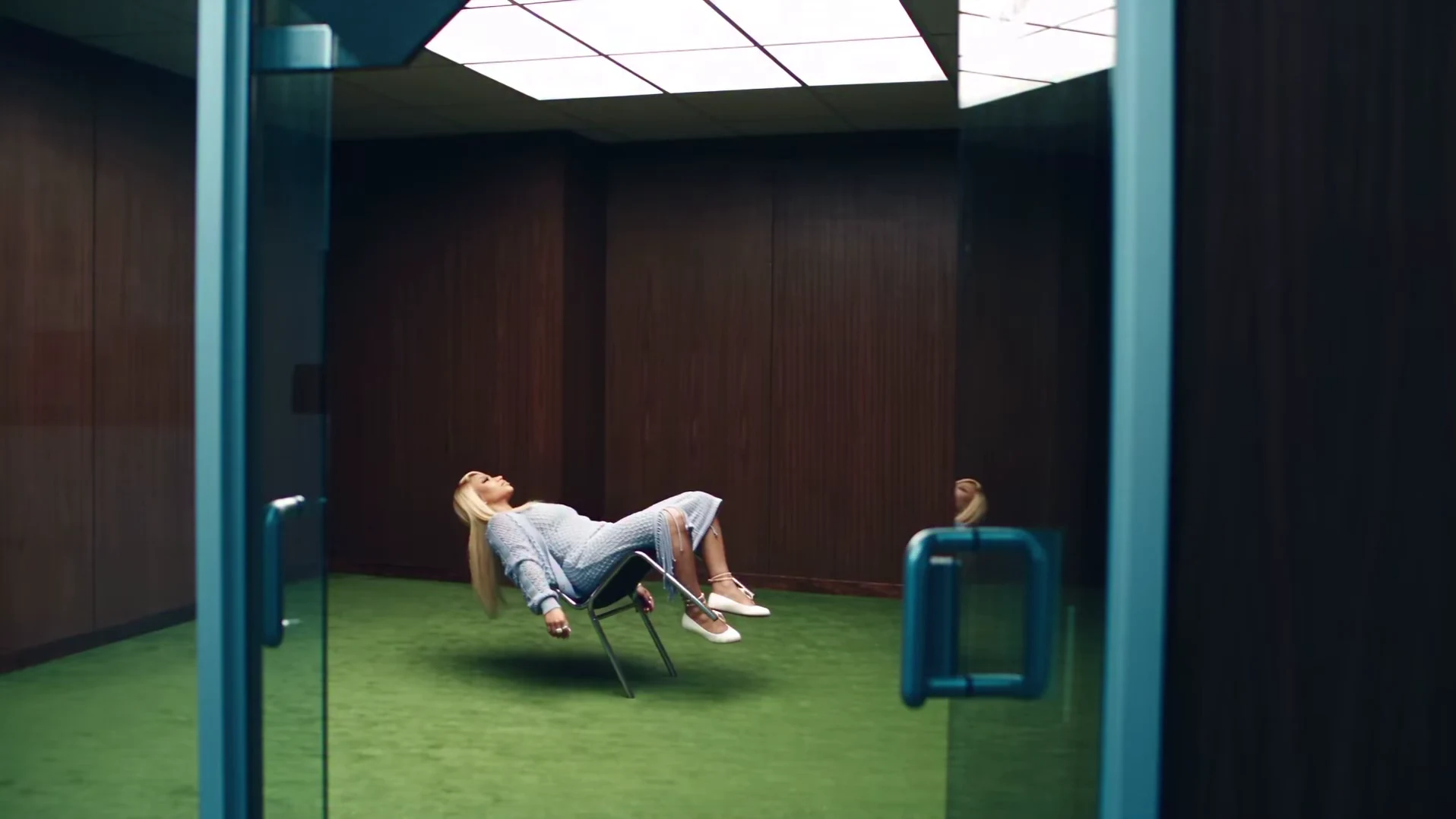
The Floating Chair AI trend puts you in a chrome chair that hovers above a green carpet in an empty wood-paneled room. You lean so far back that your hair falls toward the floor, and between quick shots of the chair legs floating above the carpet, the camera looks down at your face as you sing along to the music. You supply one photo. This guide goes from that photo to posting, in order. If you want to know how the effect is put together first, read the Floating Chair trend explained.
Take a seat in the floating chair
Add one photo, review the quote and make the 19-second Floating Chair video with the original sound.
What the template gives you
One landscape 16:9 video, 19 seconds long at 24 fps, with the reference's original soundtrack. You replace one person, the one in the chair. Everything else is set: the dark wood paneling, the bright ceiling panel, the green carpet, the open glass door with teal frames in the first shot, the hovering chrome chair and the powder-blue outfit.
| Time (about) | What happens | Your face on screen |
|---|---|---|
| 0 to 1.2 s | Wide shot through the glass door: you recline in the chair floating above the carpet | Small, far away |
| 1.2 to 3.3 s | Chair legs and white flats hovering, then a top-down close-up | Yes, in the close-up |
| 3.3 to 3.9 s | Side shot: you lean far back, hair hanging toward the floor | Mostly turned away |
| 3.9 to 11 s | Face close-ups, broken by quick cutaways of the chair, your shoes and a hand | Yes |
| 11 to 15.8 s | Hair whips across the face, then a second lean-back side shot | Yes, then turned away |
| 15.8 to 19 s | A last top-down close-up to the end | Yes |
The timings are rounded from the reference clip. The shot-by-shot breakdown describes each cut in more detail.
Step 1: Pick the photo
Use one photo of one person: you, or someone who agreed to appear. Never a celebrity or public figure. What matters, in order:
- A sharp, front-facing face. The top-down close-ups fill most of the 19 seconds and sit very close to the lens.
- The whole head and hair. In the lean-back shots your hair hangs down toward the floor, so a photo that shows its full length helps.
- Even light. The head tilts and turns in almost every close-up, so both sides of the face need to be readable.
Avoid group photos, sunglasses, hats and heavy filters. The template will not start without the photo. What your photo controls goes into the hard moments for a photo in this clip.
Step 2: Know what happens to your outfit
This trend has a fixed look. Whatever you wear in your photo, the video dresses you in a loose powder-blue open-knit cardigan over a matching top, a long fitted knit skirt with fringed slits, a cross necklace, thin ankle bracelets and white flat shoes. The look is part of the trend, and it is what the chair-leg and skirt cutaways show.
Your haircut, hair length and hair colour stay your own. The template asks for your hair, not the reference's platinum-blonde bob.
Step 3: Pick a quality and read the quote
Open the Floating Chair template, add your photo to the Performer slot and pick 480p, 720p or 1080p. 720p is preselected. The studio shows the price before you generate. The quote covers your photo preparation, four scene preparations and the full video. Read it for the quality you picked, every time. To test a new photo, the lowest quote is the cheapest way to see how it comes out. Settings, price and output explains each choice.
Step 4: Know what to expect
We have not timed a run, so we will not promise a wait. Three things to know before it lands:
- The cuts are fast. Some shots last half a second. That is the reference's rhythm, not a glitch.
- The sound is the reference's own. We have not identified the music, so we do not name a song or artist. Your video keeps the original soundtrack, and the cuts and head moves are timed to it. Nobody speaks.
- The preview is the original reference. The trend page shows the AI clip the trend comes from. We have not reviewed a generated result yet, so use the preview for the shots and timing only.
Step 5: Check it, then post it
Watch it once with sound and once muted. Look at your face in the close-ups, especially after the hair whips across it at about 11 seconds, check that the chair never touches the carpet, and count fingers in the hand cutaway. The result checklist covers each check and when to re-run.
Then let the calm do the work. A caption about being completely unbothered fits, like "Me after logging off on Friday". Keep text over the wide shot or the chair cutaways, not over your face. The video is landscape, so it shows with bars above and below in a vertical feed; those bars are room for a caption. There is more in captions and posting tips.
Say that the video is AI-made, and use photos only of people who agreed to appear.
Related reading
- The Floating Chair trend explained: what the clip is and how the effect is made.
- The trend shot by shot: every cut and where your face is biggest.
- How to check your result: the chair, the face, the hands and leftover marks.
Frequently asked questions
How many photos do I need for the Floating Chair video?
One, for the person in the chair. It is required, and there are no other roles.
Do I keep my own clothes?
No. The powder-blue open-knit cardigan, top and long skirt, the cross necklace, the ankle bracelets and the white flats are the look of the trend and are put on you. Your face, hair and build come from your photo.
What song is in it?
We have not identified the music. Your video keeps the reference's original soundtrack, but we do not name a song or artist we could not confirm.
What shape and length is the video?
19 seconds, landscape 16:9, in about a dozen quick cuts between the floating chair and close-ups of your face.
Is the preview video made by Oakgen?
No. It is the original AI reference clip the trend comes from. It is not an Oakgen result.