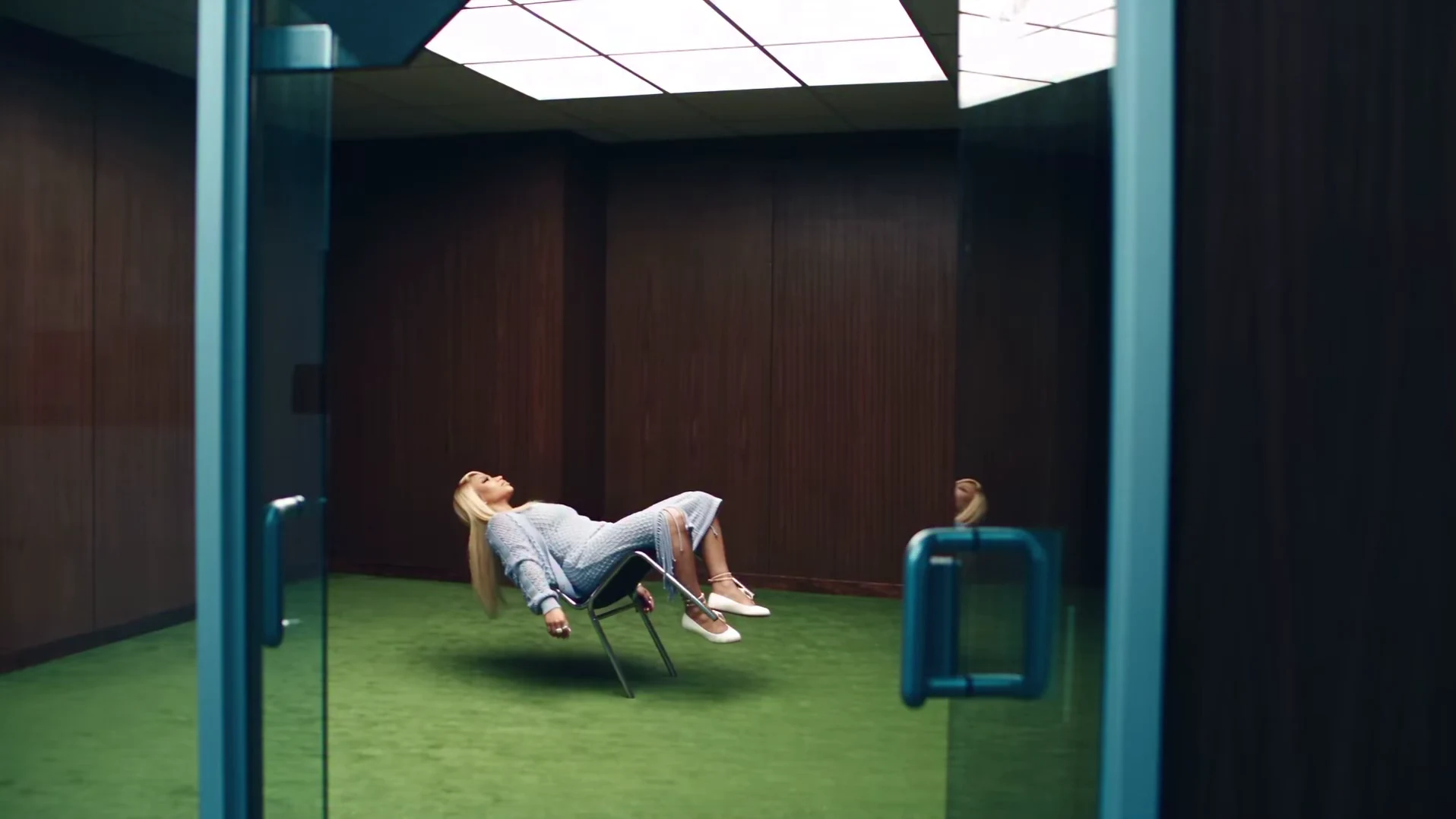
The Floating Chair clip is 19 seconds of calm that should not be possible. A person in a powder-blue knit outfit leans far back in a chrome chair that hovers a few centimetres above a green carpet, in an empty room lined with dark wood. The camera cuts between the floating chair legs, side shots of the lean with the hair hanging toward the floor, and top-down close-ups of the face singing along to the music. This article explains what the clip is, what we could and could not confirm about it, and how Oakgen's template rebuilds it around your photo. To go straight to making one, follow how to make the Floating Chair AI trend.
Make your own floating chair video
One photo puts you in the hovering chair for the full 19-second video with the original sound.
What the clip shows
Watched frame by frame, the reference has about a dozen cuts in 19 seconds:
- One wide shot, through an open glass door with teal frames. It is the only shot that shows the whole room: the dark wood panels, the bright ceiling panel, the green carpet and the chair floating in the middle with a soft shadow below it.
- Short cutaways of the chair legs and white flats hovering above the carpet, the knit skirt against the chair frame, and a hand resting on the chair. These sell the effect: they are the proof that nothing touches the floor.
- Two side shots of the lean back, each about half a second, with the head tipped back and the hair falling toward the floor.
- Face close-ups, most of them shot from above against the green, arms spread wide, lips moving with the music. They take up most of the running time.
The shot-by-shot breakdown lists every cut with rough timings.
The chair is not floating
The reference is an AI-made clip, not a stunt or a camera trick. The hovering chair, the lean that no real chair would survive and the hair that hangs straight down are all generated. That matters when you post your own version: label it as AI-made so nobody thinks it is real.
The person in the reference is an AI-generated likeness of a real person. We do not name them, and the template never keeps that face. It is also why your photo is required.
What we know about the name and the sound
We checked before naming the trend. When we added it on 28 October 2026, web searches, including for Instagram, TikTok and YouTube posts, turned up related ideas, such as AI levitation effects and other floating-person templates, but no established public name for this clip. So we named it after what happens in it, the way a viewer would describe it: Floating Chair. Other words people may use for the same effect, such as "levitating chair" or "hovering chair", are descriptions, not names we found in use.
The music is unidentified. The clip has a soundtrack that the cuts and the head moves follow, and some viewers have guessed at a song, but we could not confirm it from a reliable source. A local speech-to-text pass did not pick up clear lyrics either. So we do not name a song or artist, and we do not claim the person is singing a specific song. Your video keeps the original soundtrack either way.
How Oakgen rebuilds it around you
The template does not paste your face onto the reference. It generates the whole clip again, from four inputs:
- The motion of the reference. A line-drawing version of the original clip sets the timing: the cuts, the camera framing, the lean back, the hair moves and the mouth movements in the close-ups. It controls movement only, not anyone's face or clothes.
- Your photo. It is prepared before generation so the video model can follow your face, hair and build closely. The model is told to remove the preparation marks from the finished video.
- Four scene references. From your photo and four frames of the reference, the template makes still images of you in the room: the wide shot, a lean-back side shot and two close-ups. They show the video model what you look like in this scene, in the powder-blue outfit.
- The original sound, lined up with the motion from the first frame, so the cuts and the mouth movements stay on the beat. The finished video keeps that soundtrack.
That is why the quote in the studio covers three things: your photo preparation, the four scene references and the full 19-second video. Settings, price and output breaks this down.
What stays fixed and what is yours
Yours: your face, your hair and your build, in every shot.
Fixed: the room, the glass door, the green carpet, the hovering chair, every cut, the soundtrack and the outfit. The powder-blue open-knit cardigan, top and long skirt, the cross necklace, the ankle bracelets and the white flats are the look of the trend, so you wear them whatever your photo shows. What your photo controls explains which photos hold up in the close-ups and the lean.
What can still go wrong
AI video is not perfect. In this clip, the places to look are the face after the hair whips across it at about 11 seconds, the chair legs in the cutaways (they should never touch the carpet) and the hand on the chair frame. We have not reviewed a generated result yet, so the preview on the trend page is the original reference, not an Oakgen result. The result checklist covers what to check and when to re-run.
Related reading
- How to make the Floating Chair AI trend: the full workflow from photo to posting.
- Captions and posting tips: caption shapes, text placement and the landscape format.
Frequently asked questions
Is the floating chair real?
No. The reference is an AI-made clip. The hovering chair, the impossible lean and the soft shadow under the chair are all part of the generated effect.
Is Floating Chair the official name of the trend?
No. When we added it on 28 October 2026 we did not find an established public name for this clip, so Oakgen names it after what happens in it. It is a descriptive name, not a sound or meme title.
What song is in the Floating Chair clip?
We have not identified it. The clip has a music track, but we could not confirm the song from a reliable source, so we do not name a song or artist. Your video keeps the original soundtrack.
Who is the person in the reference?
An AI-generated likeness of a real person. Oakgen does not name them, and the template always replaces that face with the photo you upload.
Can I make my own floating chair video?
Yes, as an openly AI video. Oakgen's Floating Chair template puts your face and hair on the person in the chair from one photo and keeps the room, the chair, the outfit, the cuts and the sound.