ChatGPT
 Claude
AI photo effects take a photo and redraw it with a ready-made instruction. You can turn a portrait into a newspaper front page, a travel snap into a 1920s poster, or a daytime street into night. You can try on shoes or piercings before buying. Their cousins, AI identifiers, go the other way: they look at a photo and tell you what logo, haircut or outfit is in it.
This guide covers ten of them on Oakgen: seven effects and three identifiers. For each one you get what it does, what you have to give it, what it costs and where it falls short. Each has its own how-to post, linked below. You can browse every preset in Oakgen's template library and every identifier in the analyzer tools.
The ten tools at a glance
All facts come from Oakgen's template and analyzer definitions and pricing, checked on 2026-11-16. Effects run on Nano Banana Pro (the default), Nano Banana 2 or GPT Image 2. At 1K those cost 51, 28 and 72 credits per render.
| Tool | What it does | You provide | Main options | Typical time | Guide |
|---|---|---|---|---|---|
| Newspaper Front Page | Puts your photo on a front page under your headline | Photo, headline | Modern, Vintage, Tabloid | 10 to 15 s | Newspaper generator with photo |
| Vintage Poster | Redraws a photo as a flat-colour lithograph poster | Photo | Art Nouveau, 1920s Travel, 1950s Ads, 1960s Psychedelic | 8 to 12 s | Turn a photo into a vintage travel poster |
| Day to Night | Relights a daytime scene as night | Photo | City Lights, Moonlit, Starry, Neon | 10 to 15 s | Day to night photo AI |
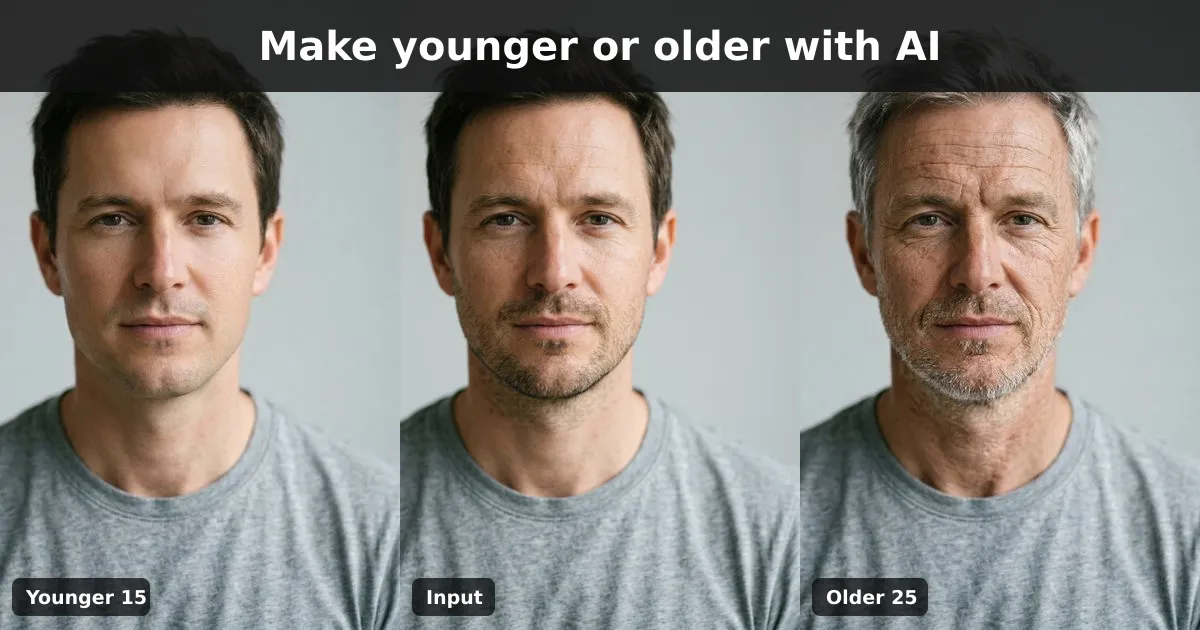
| Age Transformer | Makes a person look younger or older | Portrait | Younger or older, 5 to 40 years | 10 to 15 s | AI age progression |
| Piercing Try-On | Previews a piercing on your photo | Portrait | Ear studs, hoops, nose, septum, lip, eyebrow and more | 8 to 12 s | Virtual piercing try-on |
| Shoe Try-On | Previews a type of shoe on your feet | Full-body photo | Sneakers, heels, boots, loafers and more, plus colour | 10 to 15 s | Virtual shoe try-on |
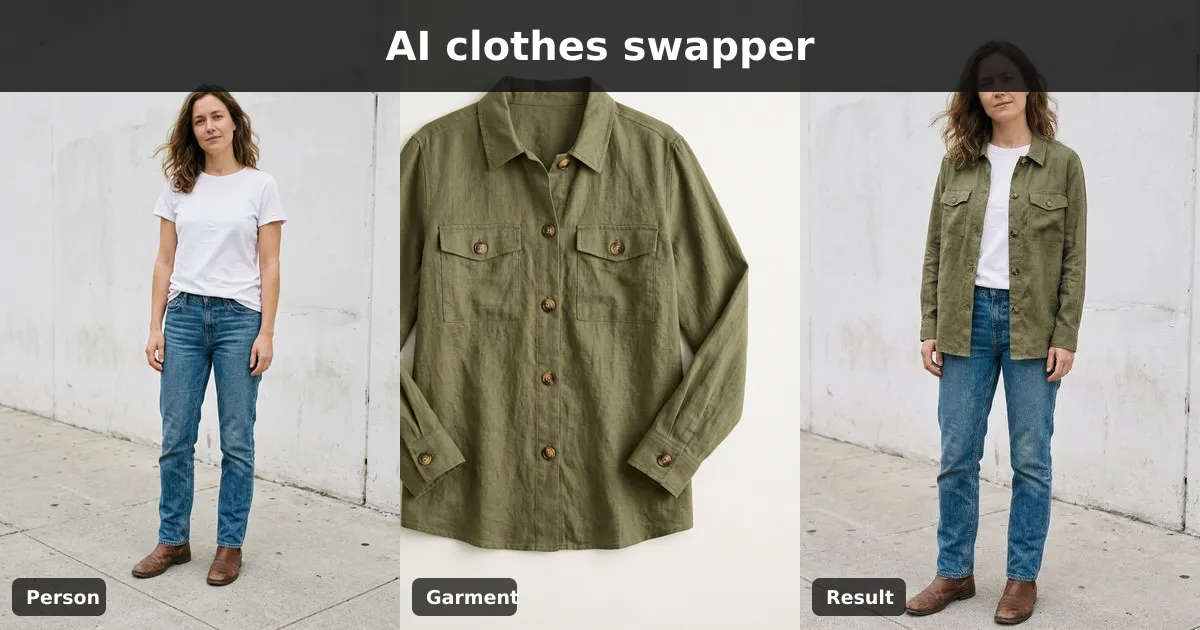
| Clothes Swapper | Puts an outfit from one photo onto a person in another | Person photo, outfit photo | Two reference images | 15 to 25 s | AI clothes swapper |
| Logo Identifier | Names the likely brand and explains the visual clues | Photo with a logo | Analysis only | 10 to 15 s | What logo is this? |
| Haircut Identifier | Names the likely cut and gives salon search terms | Photo of the hair | Analysis only | 10 to 15 s | What haircut is this? |
| Outfit Identifier | Lists the garments, fit, colours and shopping terms | Outfit photo | Analysis only | 10 to 15 s | Identify clothes from a photo |
The identifiers cost 5 credits with GPT-4o or 3 with GPT-4o mini, and Oakgen returns the credits if an analysis fails.
Effects versus identifiers
The ten tools split cleanly in two.
Effects make a new image. You give a photo and a few choices, and the template writes the prompt for you. That is the whole value over typing a prompt into a general image model. You get tested wording, sensible defaults, and instructions that steer the model away from common failures. For example, the day to night template tells the model to avoid a result that is "just darkened, no lights."
Identifiers answer a question. They read the image and return a likely answer with the evidence they used. They are not a database lookup. Treat the answer as a strong lead and confirm it, especially for brands.
Three real examples
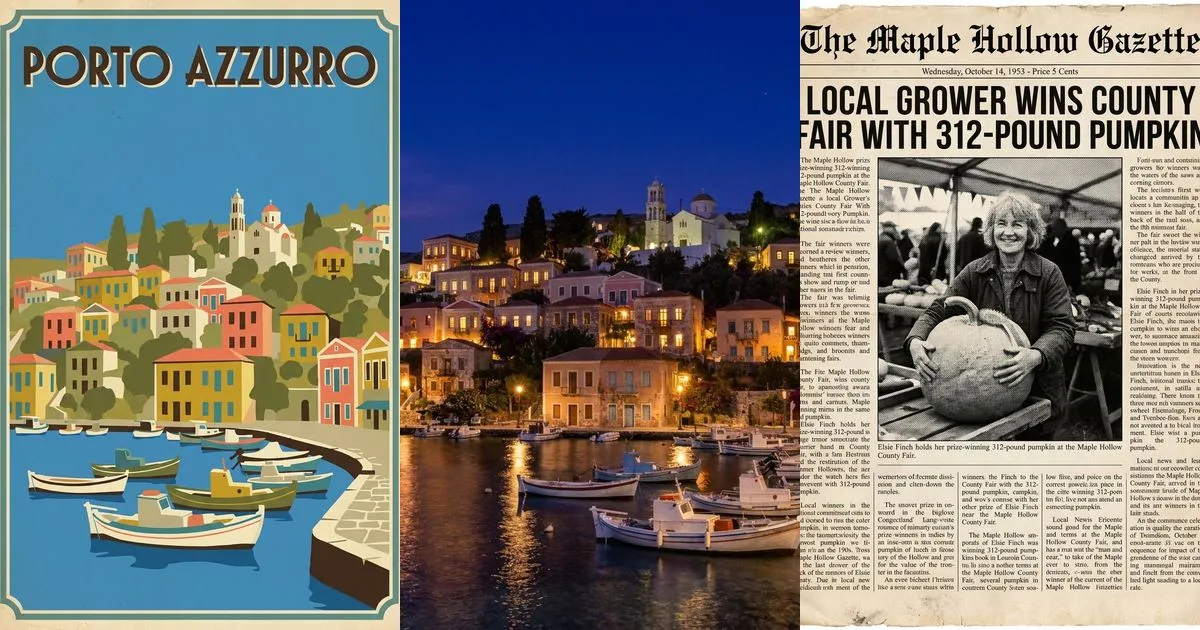
We ran three of the effects for this series on 2026-11-16, using AI-generated inputs so no real person or place is involved.
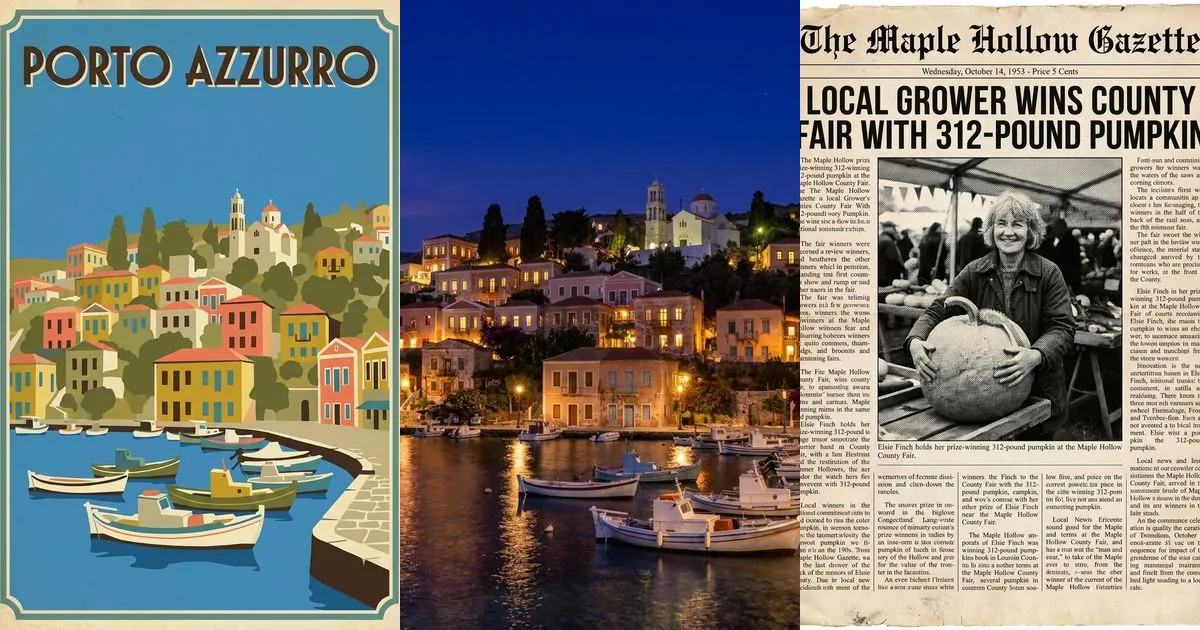
Left to right: Vintage Poster (1920s Travel), Day to Night (City Lights), Newspaper Front Page (Vintage). All three on Nano Banana Pro at 1K, 51 credits each. The people and places are AI-generated.
What we learned from the three runs:
- Short text renders well, long text does not. The poster title and the newspaper headline came out spelled correctly. The newspaper's small body columns were garbled filler.
- Layout survives the change. The bell tower, quay and boats stayed in place through both the poster and the night version. That is why image-to-image beats a text-only prompt for real places.
- Models add things. The night version gained café tables and extra lamps. Fine for mood, wrong for a real-estate listing.
Open the template library and try an effect on your own photo.
How to pick the right one
Start with what you need the image for, not with the effect.
- A gift or a joke: the newspaper front page. Vintage for a birthday, Tabloid for a laugh.
- Wall art or a travel keepsake: the vintage poster on the 1920s Travel preset, then upscale.
- A marketing shot that needs an evening mood: day to night. Check for invented details.
- A "what will I look like" question: the age transformer for fun, or the try-ons before buying.
- A shopping decision: piercing, shoe or clothes try-on to compare styles. Not to check fit.
- "What is this?": the logo, haircut or outfit identifier, with a reverse image search as a second check.
Using the tools: what is the same everywhere
Every effect page works the same way. You can open it signed out, upload a photo, pick the options and the model, and press Open in Oakgen. Your settings carry into the app, where generation needs a paid plan, because Oakgen has no free plan. The price shows before you run.
Our standard workflow:
- Test on Nano Banana 2 (28 credits at 1K) until the options and wording are right.
- Render the keeper on Nano Banana Pro (51 credits), or try GPT Image 2 (72 credits) when instructions need to be followed very literally.
- Fix small problems in the image editor instead of re-rolling the whole image.
- Upscale before printing with the image upscaler.
For headshot-style portraits rather than effects, Photo Studio is the better starting point.
Common mistakes across all ten
- Using a blurry photo. Every effect rebuilds from your input. A soft face stays soft.
- Writing long text into an image. Keep headlines and titles to a few words.
- Treating a try-on as a fitting. It shows style, not size or comfort, and it is not medical advice for piercings.
- Trusting an identifier blindly. Confirm brand names, especially before using them commercially. A logo match does not give you any right to use the trademark.
- Editing real people without consent. Ageing someone, swapping their clothes or putting them on a fake front page can mislead or hurt them. Use your own photos or get permission, and label edits.
- Shipping invented details. Models add lamps, signs and accessories. Remove them when the image has to show something real.
What it costs
On 2026-11-16 at 1K, Oakgen's pricing returned 51 credits for Nano Banana Pro, 28 for Nano Banana 2 and 72 for GPT Image 2 per effect render, and 3 to 5 credits per identifier analysis. Higher resolutions cost more. Oakgen has no free plan; see pricing for current plans.
Pick the job, open the matching tool, and start with any of the ten AI photo effects. Each guide above walks through one of them step by step.
Frequently asked questions
What are AI photo effects?
AI photo effects are presets that send your photo to an image model with a ready-made instruction, such as 'turn this into a 1920s travel poster' or 'make this person 15 years older'. Unlike a filter, the model redraws the image, so it can change lighting, style, clothing or age, not just colour.
Which AI photo effect should I start with?
Start from the job. For a gift or joke, use the newspaper front page. For wall art, the vintage poster. For marketing photos that need an evening mood, day to night. For shopping decisions, the piercing, shoe or clothes try-ons. To find out what something is, use the logo, haircut or outfit identifier.
Are Oakgen's AI photo effects free?
No. Oakgen has no free plan. You can open each tool page and set it up while signed out, but generating or analysing needs a paid plan. On 2026-11-16 a photo effect cost 28 to 72 credits per render at 1K depending on the model, and an identifier cost 3 to 5 credits.
Do AI try-ons show exactly how something will look?
No. A virtual try-on is a preview drawn by an image model. It is useful for comparing styles, but it cannot show exact fit, size, comfort or how a piercing will heal. Check sizing with the retailer and ask a professional piercer about placement.
How accurate are AI identifiers for logos, haircuts and outfits?
They give a likely answer with the visible evidence, not a guaranteed match. A logo identifier can be wrong about small or lookalike brands, and an outfit identifier describes garments and search terms rather than finding the exact product. Reverse image search such as Google Lens is a good second check.
Can I use photos of real people?
Only photos you have the right to use, and never to deceive. Ageing, clothes swaps and fake front pages about real people can mislead or embarrass them. Use your own photos or ones you have permission for, and label edits when you share them.