ChatGPT
 Claude
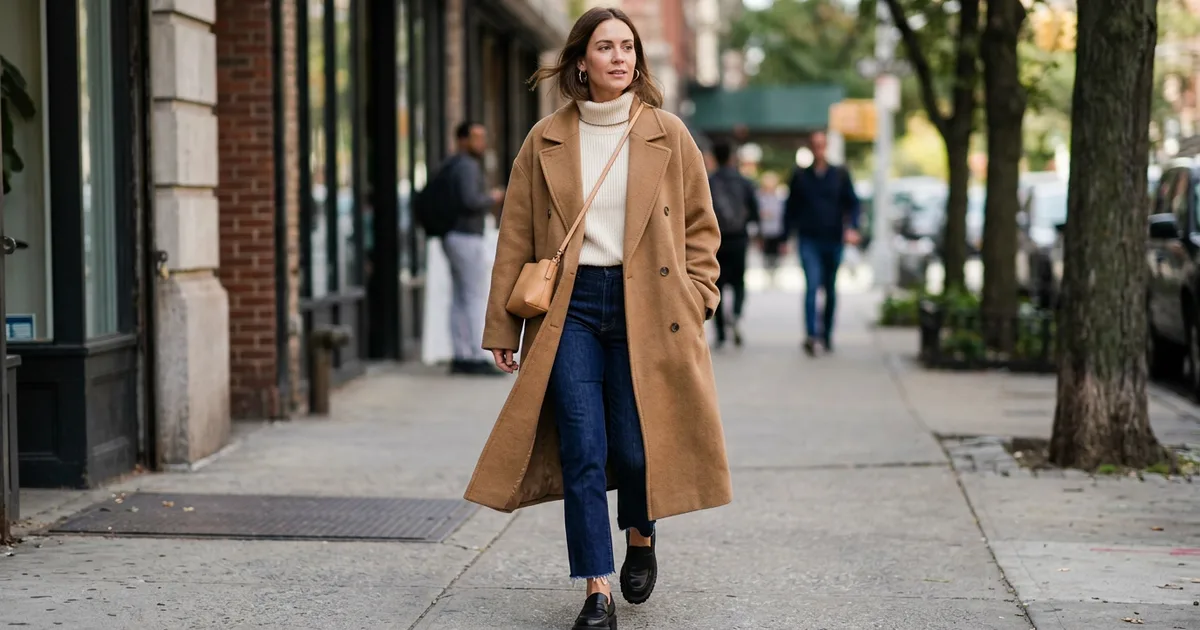
A clothing identifier works in one of two ways. Visual shopping search (Google Lens, Amazon Lens, Pinterest Lens) tries to match the photo to products for sale, and for popular items that is often enough. When it fails, you need to name the clothes properly: garment type, silhouette, color, pattern, material cue and details. Those words find the piece, or a close version, almost anywhere.
Oakgen's AI outfit identifier does the second job. Upload a photo and it breaks the outfit into each visible garment and accessory, with fit, color and material cues, style references and ready-to-paste search terms. It doesn't search stores, and it only names a brand when a logo or label is readable. So use Lens to find the exact item, and the identifier when you need the right words.
Quick answer: which outfit identifier to use
| Method | Best for | Strength | Weakness | Cost note |
|---|---|---|---|---|
| Google Lens | Finding the exact or similar product online | Shows similar products, prices and where to buy | Misses vintage, small labels and unbranded basics | Free |
| Amazon Lens | Buying a close version on Amazon | Upload or snap a photo, circle the item | Only searches Amazon's catalog | Free in the Amazon app |
| Pinterest Lens | Styling ideas and similar looks | Finds the piece styled in many ways | Not built for exact matching | Free |
| Captions and comments | Creator and influencer outfits | Often links the actual items | Only works when the creator tagged them | Free |
| Oakgen AI Outfit Identifier | Naming every piece and getting search terms | Garment-by-garment breakdown, fit and color notes | No store matching; brand only if visible | 5 credits (GPT-4o) or 3 (GPT-4o mini) |
My order: caption and comments, then Google Lens one garment at a time, then descriptive search. I'd pay for an analysis when Lens returns lookalikes that are clearly wrong and I can't put the difference into words.
Why visual search alone isn't enough
Google's own help page says that for apparel, Lens lets you "find similar products and where to buy them" (Google Search Help, read 2026-11-16). Similar is the key word. Google also lets you add text to an image search to change color or pattern (Google Blog, 2024-10-03), and Amazon Lens supports uploading a photo and circling the item you want (About Amazon, 2024-07-22).
Here is where it breaks. A cream turtleneck has thousands of near-identical matches. A vintage coat may not be for sale anywhere. And a search for "brown coat" will not find the one with dropped shoulders and a double-breasted front. Precise vocabulary is what narrows the results, both in Lens's "add to your search" box and in a normal store search.
A worked example: one outfit, broken down
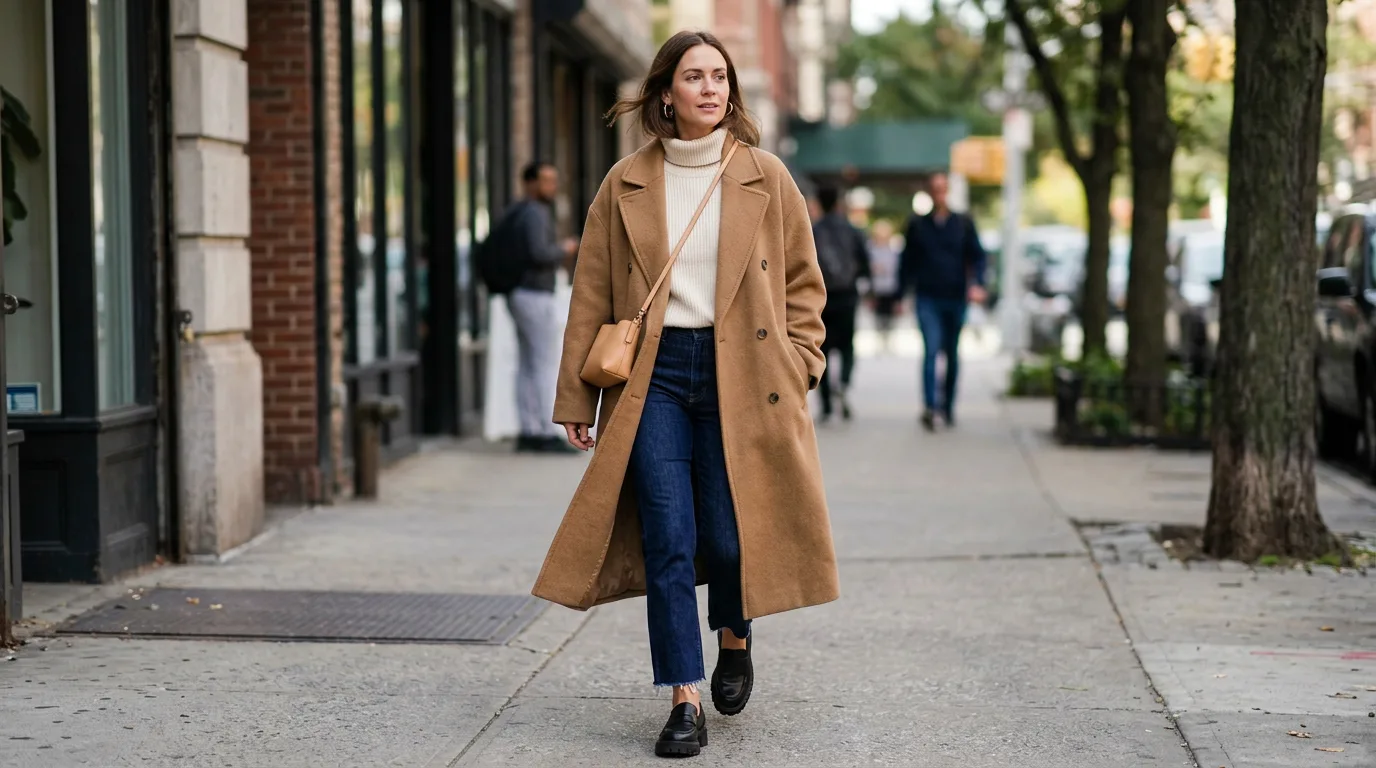
AI-generated image of a fictional person, made in Oakgen with Nano Banana 2.1 (14 credits). The clothes are generated, not real products.
How I'd describe each piece:
- Coat: oversized, longline (below the knee), double-breasted, notch lapels, camel, wool-look. Search:
oversized camel double breasted longline coat. - Top: cream ribbed knit turtleneck, slim fit. Search:
cream ribbed turtleneck sweater. - Jeans: dark indigo wash, straight leg, cropped at the ankle with a raw (frayed) hem. Search:
dark wash straight leg jeans raw hem ankle. - Shoes: black leather loafers, chunky lug sole. Search:
black chunky lug sole loafers. - Bag: small tan crossbody on a thin strap. Search:
small tan leather crossbody bag thin strap. - Jewelry: gold hoop earrings, medium size.
That is roughly the shape of an Oakgen Outfit Identifier report: Outfit Summary, Garments and Accessories, Silhouette and Fit, Color, Pattern, and Material Cues, Style References, Search Terms, and Confidence and Limitations. Note what it can't tell you: whether the coat is real wool, who made it, or what it cost. Those stay estimates.
Name Every Piece in the Photo
Get a garment-by-garment breakdown with fit, color and material cues, plus search terms you can paste into any store.
Clothing vocabulary: the words that find the piece
This is the table to keep. Pick one word from each row that applies, and your search gets far more specific.
| Attribute | Words to use | Example search phrase |
|---|---|---|
| Garment type | blazer, trench, shacket, cardigan, shell top, midi skirt, wide-leg trousers | "linen wide-leg trousers" |
| Silhouette | oversized, boxy, cropped, longline, A-line, bodycon, relaxed | "boxy cropped blazer" |
| Fit details | dropped shoulder, high-rise, straight leg, tapered, slim, slouchy | "high-rise tapered trousers" |
| Neckline | crew, V-neck, turtleneck, mock neck, square, boat, halter | "black mock neck top" |
| Sleeve | puff, balloon, raglan, cap, bishop, sleeveless | "white balloon sleeve blouse" |
| Length | cropped, hip-length, midi, maxi, ankle, knee-length | "navy midi slip skirt" |
| Closure | double-breasted, single-breasted, zip-front, wrap, button-down | "double-breasted wool coat" |
| Pattern | pinstripe, houndstooth, gingham, herringbone, ditsy floral, Breton stripe | "grey herringbone overcoat" |
| Material cue (estimate) | ribbed knit, cable knit, denim, satin, corduroy, leather-look, linen-look | "brown corduroy jacket" |
| Wash or finish | raw hem, distressed, stonewash, matte, glossy, brushed | "light wash raw hem jeans" |
| Color | name the shade, not just the family: camel, oatmeal, olive, ecru, burgundy | "oatmeal cable knit sweater" |
| Style reference | quiet luxury, workwear, preppy, Y2K, minimalist, western | "western suede fringe jacket" |
| Shoes | loafers, Mary Janes, Chelsea boots, ballet flats, mules, chunky sneakers | "brown suede Chelsea boots" |
| Bags and accessories | crossbody, baguette, tote, bucket bag; hoop, stud, chain | "black leather baguette bag" |
Use color names with care. A warm phone filter can turn grey into taupe. If the color matters, check it against another photo of the same piece.
Photo checklist for a better result
- Full body, head to toe, for outfits. Oakgen's tool asks for a full-body image with clear fabric detail.
- One garment per search in Lens. Crop or circle it.
- Daylight, no heavy filter. Filters change color and texture.
- Close-up of details if you have it: buttons, collar, stitching, hem.
- Context in the text box. Tell Oakgen whether you want one item, the full outfit or shopping terms (up to 500 characters).
How to use Oakgen's outfit identifier
- Open the outfit identifier. Signed-out visitors see the tool overview and pricing; sign in to run an analysis.
- Upload a JPG, PNG or WebP photo up to 20 MB.
- Add optional context.
- Choose GPT-4o (default, 5 credits) or GPT-4o mini (3 credits). It takes about 10 to 15 seconds; failed analyses are refunded automatically.
- Paste the Search Terms section into Google Lens's "add to your search" box or into a store's search bar.
Oakgen has no free plan, so for the occasional "where is that jacket from" question, the free tools above are the sensible first stop. Credits come with a paid Oakgen plan.
After you identify the clothes
If you'd rather see the look on yourself before you buy, Oakgen has two image tools for that. The virtual try-on for clothing previews a garment on your own reference photo, and the clothes swapper applies a different outfit while keeping the person and scene. They are previews, not fit guarantees. Our guides on the AI clothes swapper and outfit changer and virtual shoe try-on go further, and why AI trend outfits change explains a common frustration with generated looks.
Common mistakes
- Searching the whole outfit at once. Lens picks one thing. Choose it yourself.
- Using vague words. "Brown coat" loses to "camel double-breasted longline coat".
- Treating "similar" as "same". Check the details: buttons, lapels, hem, sole.
- Believing a fabric guess. Check the care label; GINETEX's care symbols guide helps you read it.
- Assuming a logo proves authenticity. It doesn't, and the identifier won't claim it does.
- Skipping the caption. Creators often tag the exact items.
Related reading
- AI photo effects and identifiers guide, the hub for this series.
- What haircut is this?, the same method for hair.
- What logo is this?, for brand marks on clothing and products.
Frequently asked questions
How do I identify clothes from a photo?
Run the photo through a visual shopping search such as Google Lens, Amazon Lens or Pinterest Lens, selecting one garment at a time. If the exact item doesn't come up, describe each piece by garment type, silhouette, color, pattern, material cue and details, and search those words.
What is the best free clothing identifier?
Google Lens is the best free starting point for most people because it shows similar products, prices and where to buy. Amazon Lens is useful if you shop on Amazon, and Pinterest Lens is good for finding the look styled in other ways.
Can an AI outfit identifier find the exact brand?
Only when a readable logo, label or distinctive mark is visible. Oakgen's outfit identifier is instructed not to guess a brand as fact; otherwise it describes each garment and gives search terms. It doesn't search stores or return exact product matches.
How do I find an outfit from a picture on Instagram or TikTok?
Check the caption, tags and comments first, since creators often link items. Then screenshot a clear frame, crop one garment, and search it with Google Lens. Use descriptive terms for anything that doesn't match.
Can a photo tell me what fabric a garment is made of?
Not reliably. Lighting, filters and compression change texture and color. Treat any fabric guess as an estimate and check the care label or product listing before buying.
How much does Oakgen's outfit identifier cost?
As of 2026-11-16, each analysis costs 5 credits with GPT-4o (the default) or 3 credits with GPT-4o mini, and failed analyses are refunded automatically. Oakgen has no free plan.
Turn an Outfit Photo Into a Shopping List
Get each garment named, with fit and color notes and search phrases for finding close alternatives.