ChatGPT
 Claude
A newspaper generator with photo upload puts your picture on a front page under a headline you write. There are two kinds. Template makers drop your photo into a fixed layout and let you type every word. AI generators redraw the photo itself as newsprint, with halftone dots, aged paper and period type. Use a template when the article text has to be readable. Use AI when the photo has to look like it was actually printed.
Oakgen's newspaper front page generator is the AI kind. You upload a photo, type a headline, pick Modern, Vintage or Tabloid, and the model builds the page around your picture. It is quick for a birthday gift, a milestone post or a "breaking news" joke. It is not the tool for a four-column class newspaper with real stories, and we say below which tools are.
Which newspaper generator should you use?
We looked at the pages ranking for this search on 2026-11-16. Most of them are free browser templates. A few are AI image tools. They suit different jobs.
| Tool | Type | Best for | Weak spot | Cost note (2026-11-16) |
|---|---|---|---|---|
| Oakgen Newspaper Front Page | AI image-to-image | A photo that looks printed: halftone, paper, era type | Small body text comes out as filler | 28 to 72 credits per render; paid plans only |
| 10015.io Newspaper Generator | Browser template | Front page or torn clipping with your own story text | Layout is fixed; photo is a halftone filter, not redrawn | Free; photo stays on your device |
| Gizmobench Newspaper Generator | Browser template | Printable class or club paper, 1 to 4 columns, A3 to Letter | Every page carries a novelty notice | Free |
| PhotoFunia Daily Newspaper | Photo effect | A fast joke image with your title | Little control over layout or style | Free |
| Dreamina (CapCut) newspaper maker | AI text or image to image | Many layout variations from one prompt | You write the whole prompt yourself | Free daily credits, per its page |
Our take: if your story has to be read, start with 10015.io or Gizmobench. If the picture is the point, an AI generator gives a much more convincing result. The Oakgen template saves you writing the prompt, and you pick from three styles.
How the Oakgen newspaper generator works
These details come from the template's definition in Oakgen's code, checked on 2026-11-16.
- Input: one photo.
- Headline: required text field ("e.g., Local Hero Saves the Day").
- Newspaper style: Modern News (the default), Vintage News, or Tabloid. Vintage is described in the prompt as "vintage 1950s newspaper style."
- Models: Nano Banana Pro (the default), Nano Banana 2, and GPT Image 2.
- Estimated time: 10 to 15 seconds.
The template turns these into a single instruction for the model: build a front page around the photo with your headline and a realistic newspaper layout. It also tells the model to avoid bad typography and an amateur layout. You can add an optional prompt of your own, which is where you name the paper or ask for a date line.
You can open the tool signed out, upload a photo and set every option. When you click Open in Oakgen, your settings carry into the app. Generation needs an account on a paid plan, because Oakgen has no free plan.
Example: a county-fair front page
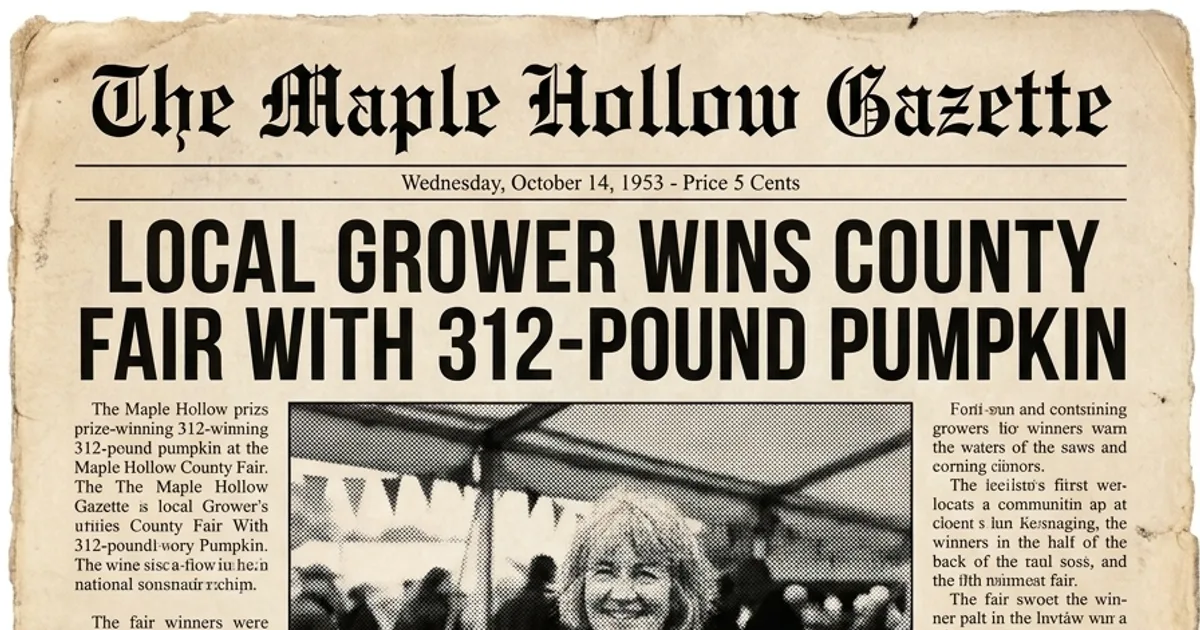
We generated a fictional woman with a prize pumpkin first, so no real person is involved. Then we ran her through the template's Vintage style on Nano Banana Pro with the headline "LOCAL GROWER WINS COUNTY FAIR WITH 312-POUND PUMPKIN", and we added "Masthead 'THE MAPLE HOLLOW GAZETTE'" as our own prompt.
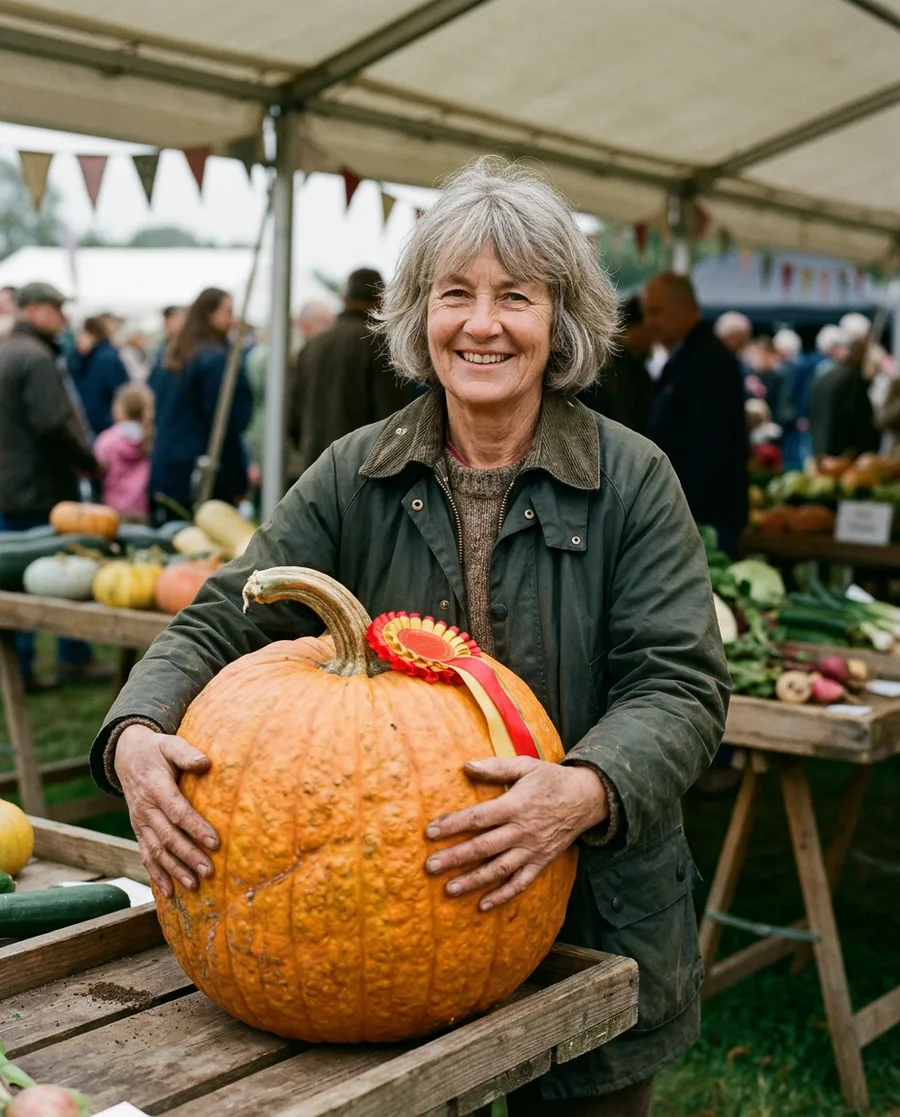
Input: an AI-generated portrait. The person is not real.
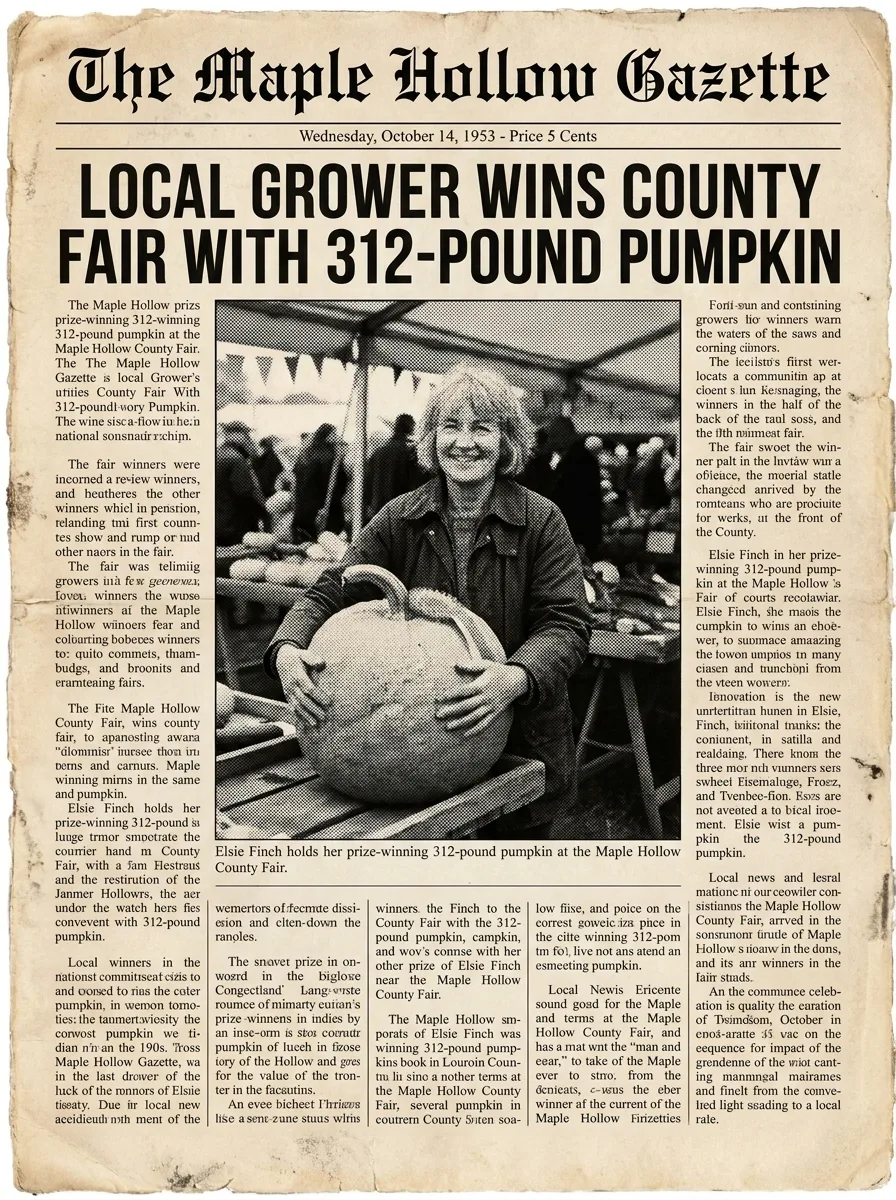
Output: the Vintage News style on Nano Banana Pro, 1K, 51 credits. The person is AI-generated.
What worked: the masthead, the headline, the date line and the halftone photo all read like a real 1950s paper. The model even added a caption under the photo.
Where it broke: the body columns are nonsense. Some words are real and others are garbled, as happens with most image models. At phone size nobody notices. Printed at A4, someone will try to read it. So we would post this as is, but for a framed gift we would cover the columns with real text in an editor.
Try the newspaper generator with your own photo. Write the headline first. It is the only text the model is reliably good at.
Step by step: make a front page from a photo
- Pick a photo with one clear subject. A face, a dog, a cake, a car. Busy group shots get shrunk to fit the layout and lose their punch.
- Write the headline in capitals and keep it under about ten words. Short headlines render more cleanly and look more like a real front page.
- Choose the style for the occasion. Modern suits announcements and brand news. Vintage suits birthdays, anniversaries and "the day you were born" gifts. Tabloid suits jokes and dramatic punchlines.
- Add a masthead and date in the optional prompt. For example: "Masthead 'THE PEMBERTON POST', dated June 3, 1974." Invent the paper name.
- Generate on Nano Banana Pro first. Switch to Nano Banana 2 if you want cheaper variations of a layout you already like.
- Fix the small text afterwards if it will be printed. Open the result in the Oakgen image editor or any design tool and lay real text over the columns.
Headline formulas that work
This is our own swipe file. Each line works with the matching style.
| Occasion | Style | Headline formula | Example |
|---|---|---|---|
| Birthday | Vintage News | [NAME] TURNS [AGE]: TOWN CELEBRATES | MARGARET TURNS 80: TOWN CELEBRATES |
| New job | Modern News | [NAME] JOINS [COMPANY] AS [ROLE] | PRIYA JOINS NORTHWIND AS HEAD OF DESIGN |
| Pet joke | Tabloid | [PET] CAUGHT IN [CRIME] SCANDAL | BISCUIT CAUGHT IN SOFA-SHREDDING SCANDAL |
| Wedding | Vintage News | [A] AND [B] SAY "I DO" | SAM AND ALEX SAY "I DO" |
| Product launch | Modern News | [PRODUCT] SELLS OUT IN [TIME] | TRAIL KIT SELLS OUT IN 48 HOURS |
| Retirement | Vintage News | [NAME] HANGS UP [TOOL] AFTER [N] YEARS | DEREK HANGS UP HIS WRENCH AFTER 40 YEARS |
Common mistakes
- Long headlines. Past about ten words, the model shrinks the type or breaks lines oddly. Cut words.
- Expecting a readable article. AI body text is texture, not copy. Use a template tool if the story has to be read.
- Copying a real masthead. Do not put your photo under the name of a real newspaper. It can confuse people and runs into trademark problems. Make up a name.
- Fake news about real people. A front page about a real person doing something they did not do can mislead people even as a joke. Keep it clearly playful, and label satire when you post it.
- Low-resolution photos. The model rebuilds the photo as halftone, so a blurry face stays blurry. Start with the sharpest photo you have.
- Testing on the expensive model. If you are trying ten headlines, test the layout on Nano Banana 2 (28 credits at 1K) and render the final on Nano Banana Pro.
What it costs
Oakgen charges credits per render. On 2026-11-16 at the default 1K setting, Oakgen's pricing returned 51 credits for Nano Banana Pro, 28 for Nano Banana 2 and 72 for GPT Image 2. Higher resolutions cost more. The tool shows the price before you generate.
Oakgen has no free plan, and every plan is a monthly credit allowance. As a rule of thumb, 1,000 credits buys about 19 front pages on Nano Banana Pro or 35 on Nano Banana 2 at 1K. Check pricing for current plans.
Where to go next
The newspaper template sits in a family of "make it look published" effects. The magazine cover template does the same for a glossy cover, and the movie poster template suits a film-style announcement. For a retro print you can frame, see our guide on how to turn a photo into a vintage travel poster. The AI photo effects guide covers all ten tools in this series.
If you have a photo and a headline ready, make your newspaper front page in Oakgen. Pick Vintage for a gift and Tabloid for a laugh.
Frequently asked questions
What is the best newspaper generator with photo upload?
It depends on what you need. If you want exact, editable body text and a print-ready A4 or Letter page, a browser template such as 10015.io's or Gizmobench's newspaper generator is better, because you type every word. If you want the photo itself redrawn into a convincing printed page with halftone, paper texture and era typography, an AI image-to-image tool such as Oakgen's Newspaper Front Page template does that part better.
Can an AI newspaper generator write readable article text?
Not reliably. In our test the headline and masthead came out clean, but the small body columns were filler with garbled words. Treat AI body copy as texture. If people need to read the story, use a template tool where you type it, or add the text in an editor afterwards.
How do I make an old newspaper image from a photo?
Upload the photo to Oakgen's Newspaper Front Page template, choose the Vintage News style (the template describes it as a 1950s newspaper style), write the headline, and generate. The model renders aged paper, halftone print and period type around your photo.
Is it legal to make a fake newspaper?
Making a novelty front page for a gift or a joke is common, but you should not copy a real newspaper's masthead or present an invented story about a real person as true news. Use an invented paper name, and label satire as satire when you post it. This is general guidance, not legal advice.
How much does the Oakgen newspaper generator cost?
Each render uses credits. At the default 1K setting on 2026-11-16, Oakgen quoted 51 credits for Nano Banana Pro (the default model), 28 credits for Nano Banana 2 and 72 credits for GPT Image 2. Oakgen has no free plan; check the pricing page for current plans.
Can I use the newspaper generator without an account?
You can open the tool page, upload a photo, write the headline and pick the style and model while signed out. Generating happens inside Oakgen after you sign in on a paid plan, and the tool carries your settings over.