
Video trend

Thomas Is Trippin AI Video: The Flat Cap Skit Explained

"Thomas is trippin" is the caption on the @ausar.ai post that Oakgen's Flat Cap Tweaking template follows. If you searched the caption, this page says what the clip is, what the caption does and does not tell you, and how to make your own version with your photos. Guesses are labelled as guesses.

Final video
15 seconds
Your input
1–2 photos
Quality
720p
REFERENCE RECREATION15 SEC / 4 / 3
Flat Cap TweakingSource: @ausar.ai · You Tweaking template, 1920s cast

What the caption does and does not tell you

01

Where the caption sits

The post, published October 22, 2026 by @ausar.ai, is captioned "Thomas is trippin", followed by an invitation to comment "Ausar" for the template link and a note that it can be recreated with any photo. Its hashtags are #ausarai, #ai, #viral and #peakyblinders. That hashtag is the only link to a TV series on the post, and the only basis for saying the name Thomas probably points at a character from that show. This page is a fan-style parody guide, not affiliated with or endorsed by the rights holders. Oakgen's product is called Flat Cap Tweaking and uses your photos, not any actor's likeness.

02

What the clip actually shows

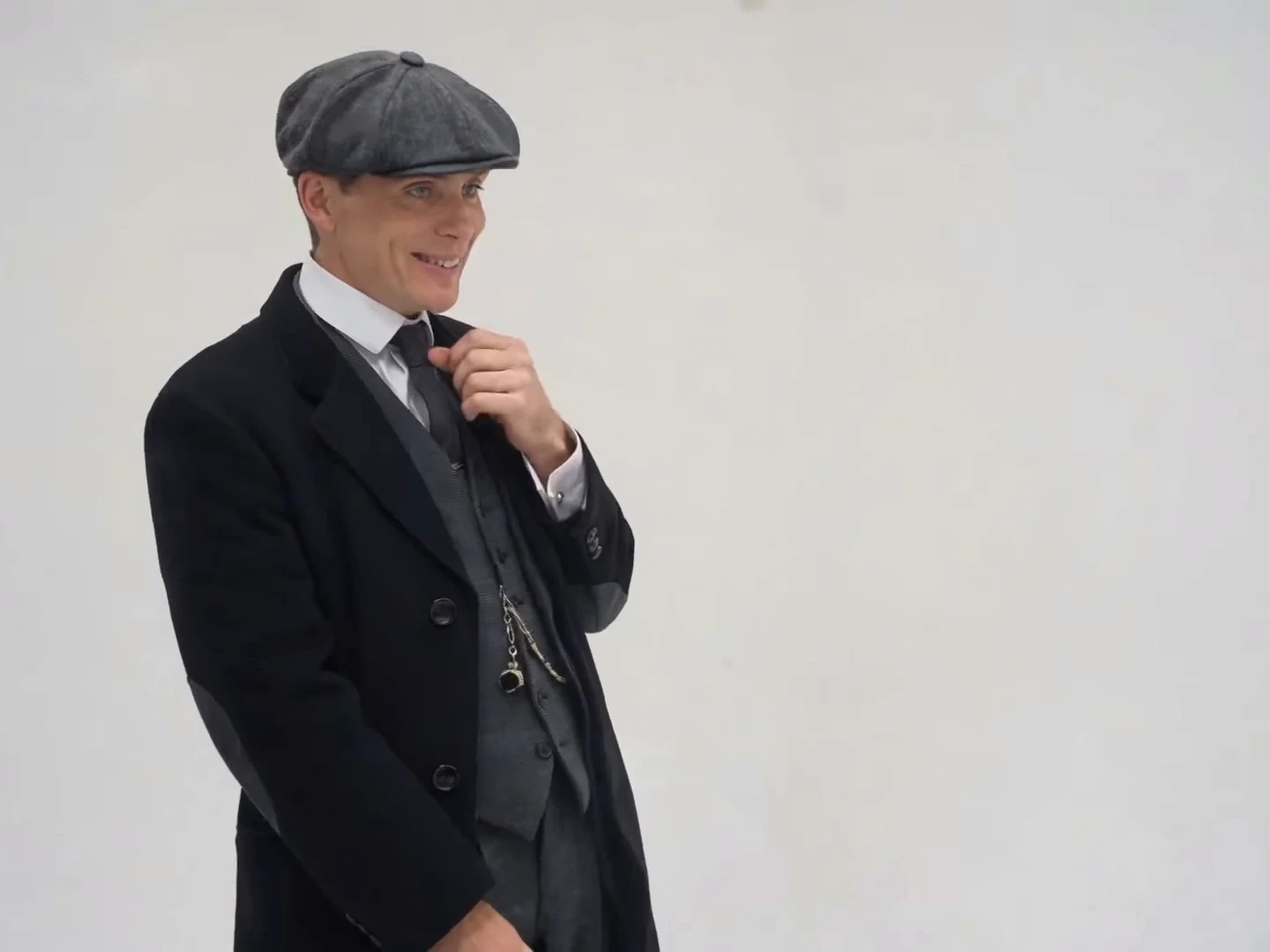
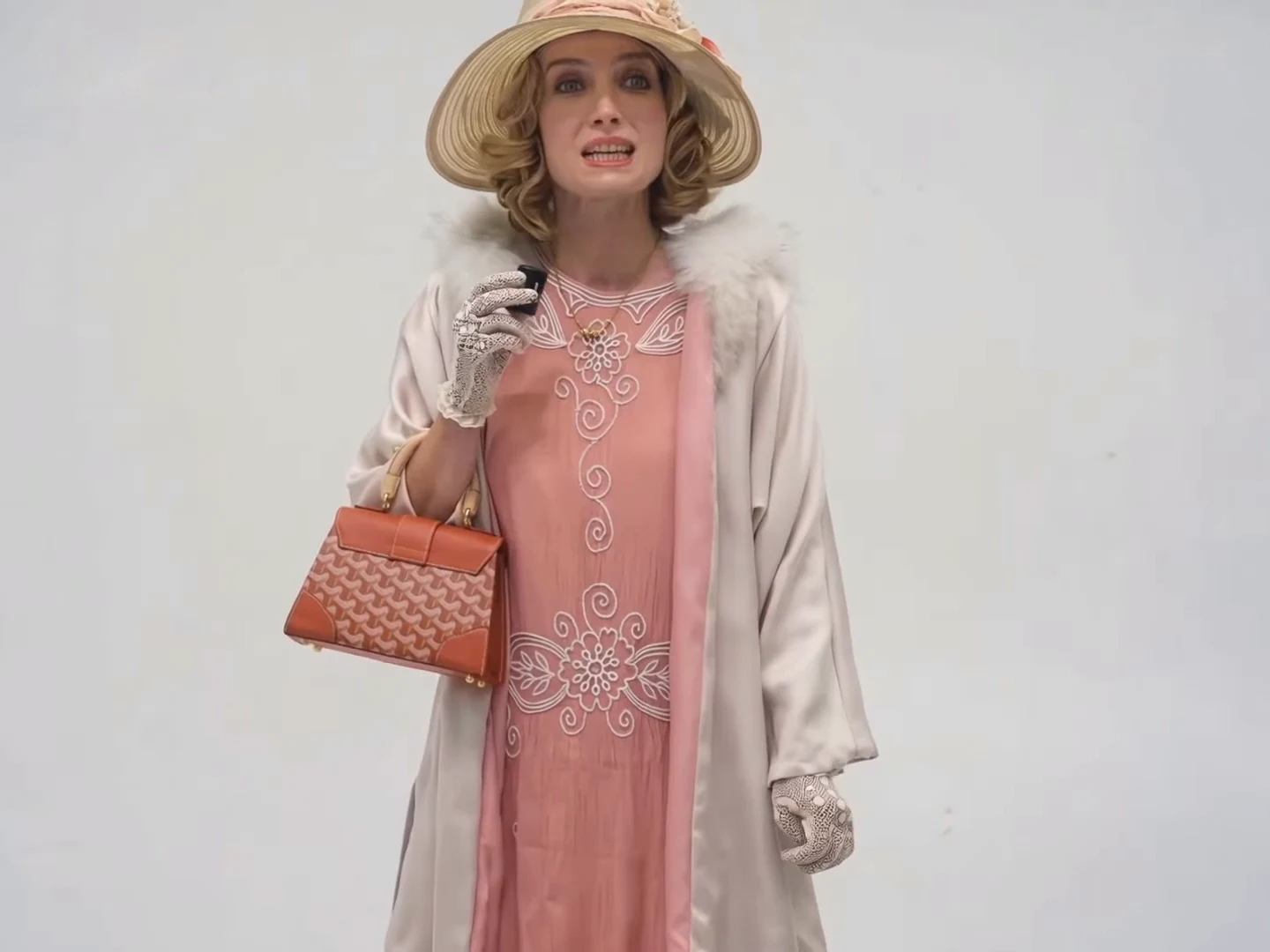
A man in a grey flat cap, long black overcoat and three-piece suit stands on a plain light-grey backdrop, turning a small black device in his fingers and touching his collar and lip. A woman in a flowered wide-brim hat, a pink 1920s dress and a fur-collared coat holds a similar device, an orange handbag on her arm, and laughs. The edit cuts between them and never shows both at once. The device looks like the transmitter of a clip-on microphone.

03

What "trippin" and "tweaking" mean here

In casual speech, trippin and tweaking both mean acting erratic or overreacting. The caption uses one and the dialogue uses the other: the woman says "Oh, he tweaking!", the man asks "I'm tweaking? How?" and she answers "You tweaking!" Transcribed from the clip by speech-to-text and a video model; wording may differ slightly, and we have not checked it by ear against the original. Oakgen treats the clip as a comic overreaction and nothing more.

04

The same skit as Walt is trippin

A day earlier @ausar.ai posted the same template with a different cast, captioned "Walt is trippin". The soundtracks of the two posts are identical when the waveforms are lined up, and the cut pattern is the same eleven alternating shots. Ausar's template page lists one card for this structure, "You Tweaking". So the caption changes with the costumes while the skit stays the same. Oakgen offers both casts: You Tweaking with the pork-pie hat and white cardigan, and Flat Cap Tweaking with the 1920s outfits.

05

What nobody has confirmed

We found no page that names the sound, the original creator or an earlier upload of the exchange, and we could not confirm Instagram's audio label for the post. We do not know whether the footage was filmed or already AI-made, or whether the voices were added afterwards. Searching the exact caption returned no other pages, so we make no claim that people search for it; this page exists for anyone who copies the caption into a search box.

06

Making your own version

Open Flat Cap Tweaking, add a photo of yourself or someone who has agreed to appear for the flat cap character, the handbag character or both, and check the quote. If you mention the reference when you post, credit @ausar.ai and label your video as AI-made. You can write your own caption in the same spirit, such as a name followed by "is trippin", but keep it about the people who agreed to be in it.

Explore the Flat Cap Tweaking trend

How to make it

Choose the roles you want to change. Add a photo for each selected role.

Flat cap character in the Flat Cap Tweaking source video
Flat cap character
Handbag character in the Flat Cap Tweaking source video
Handbag character
  1. 01

    Choose your characters

    Add a clear photo for the flat cap character, the handbag character or both. Use photos of yourself or of people who have agreed to appear. One character per photo.

  2. 02

    Review quality and price

    Choose 480p, 720p or 1080p. The credit quote includes the full 15-second edit and the preparation of only the photos you select.

  3. 03

    Check the skit

    Watch each cut, check that the right character is in each shot, that the cap, hat and handbag stay consistent, and review the close-up before downloading your landscape MP4 with sound.

01

Two characters, two photos

The flat cap character and the handbag character come from your photos: face, hair and outfit. Add both to cast the whole skit, or add one and keep the other from the reference.

02

Period look, cut by cut

The 15-second clip alternates between a man in a flat cap, long overcoat and three-piece suit and a woman in a flowered wide-brim hat, pink 1920s dress and fur-collared coat, on a plain grey studio backdrop. They are never in the same frame, so each photo only has to work for its own shots.

03

Reactions on the beat

Both characters hold a small black device like a clip-on microphone transmitter and react with a hand to the mouth, the collar or the chin. The man's voice and the woman's voice trade short lines, so check that each mouth moves only on its own voice.

04

An attributed AI source

The preview is the credited @ausar.ai post, not an Oakgen result. It uses the same soundtrack as the You Tweaking template. We have not verified the original sound or who made it, so we do not label it with a guessed source.

Photo tips

  • One character per photo
  • Use sharp, front-facing faces
  • Wear a cap, hat or long coat for the period look
  • Use photos of people who consented
  • Check the close-up near the end

Questions & answers

What is the Flat Cap Tweaking AI trend?

It is a short studio reaction skit in 1920s costume where two characters take turns reacting to each other: a man in a flat cap and long overcoat, and a woman in a flowered hat with an orange handbag. In slang, tweaking means acting wild or erratic, and the skit plays that for comedy. Oakgen's version lets your photos play both roles.

What do they say in the Flat Cap Tweaking video?

Transcribed from the clip by machine, so the wording may differ slightly. The lines that come through consistently are "he tweaking" and "you tweaking" in the woman's voice, "I'm tweaking, how?" in the man's voice and a short "huh?" at the end. The male voice belongs to the flat cap character and the female voice to the handbag character, and a voice can run over the other person's shot. The other lines are unclear, so we do not quote them. The original audio and who made it are not verified.

How is it different from You Tweaking?

The soundtrack, the dialogue and the eleven alternating shots are the same; we compared the two reference soundtracks and they match. The cast and costumes differ: You Tweaking has a pork-pie hat and a white cardigan, Flat Cap Tweaking a flat cap, three-piece suit, flowered hat and fur-collared coat. The cut times differ by up to about a tenth of a second.

Is this a Peaky Blinders meme?

The credited post's caption and hashtag point to a character from that show, so the skit is a fan-style parody. Oakgen is not affiliated with the show, and the template uses your photos rather than any actor's likeness.

Can I use a photo of someone else?

Only use photos of yourself or of people who have agreed to appear. Do not upload private photos of others or anyone's likeness without permission, and label AI videos clearly when you share them.

How many photos do I need?

Add one photo per character, up to two. A role left empty keeps the character from the reference. Because the two never share a frame, each photo only affects its own shots.

Will I get the 1920s outfit?

The roles take their outfit from your photo where it shows one. A photo in a cap, hat or long coat is more likely to keep the period look; an everyday photo gives an everyday outfit on the same set. Check the result.

Does it keep the original sound?

Yes. The final MP4 keeps the reference dialogue and reactions. We have not verified the original audio or its creator, so we do not guess its source. Generated lip sync can vary, so check each cut.

How long is the video?

The output is 15 seconds in landscape 4:3 format, covering the full alternating sequence.

Is the preview generated by Oakgen?

No. It is the attributed @ausar.ai post, shown as a source reference. Likeness, cap, hat and handbag details can vary in generated results, so review your video before sharing.

How much does it cost?

3,173 credits per 720p video. This two-role price includes both photo preparations. Selecting fewer roles reduces preparation costs; the complete video is still edited. Review your selected quote before generating.
Ideas for your next video

Plan a story, keep your character recognizable, and make the finished clip your own.

Explore the video trend playbook →

Make your Flat Cap Tweaking video

Upload 1–2 photos. Everything else is set.

Make this video