
Video trend

Sunset Beach Walk Reel: Captions, Crops and Loops

A six-second clip is short enough to loop and long enough to need one good caption. These notes are for editing a downloaded Muscle Beach Strut result before you post it.

Final video
6 seconds
Your input
1 photo
Quality
720p
REFERENCE RECREATION6 SEC / 9 / 16
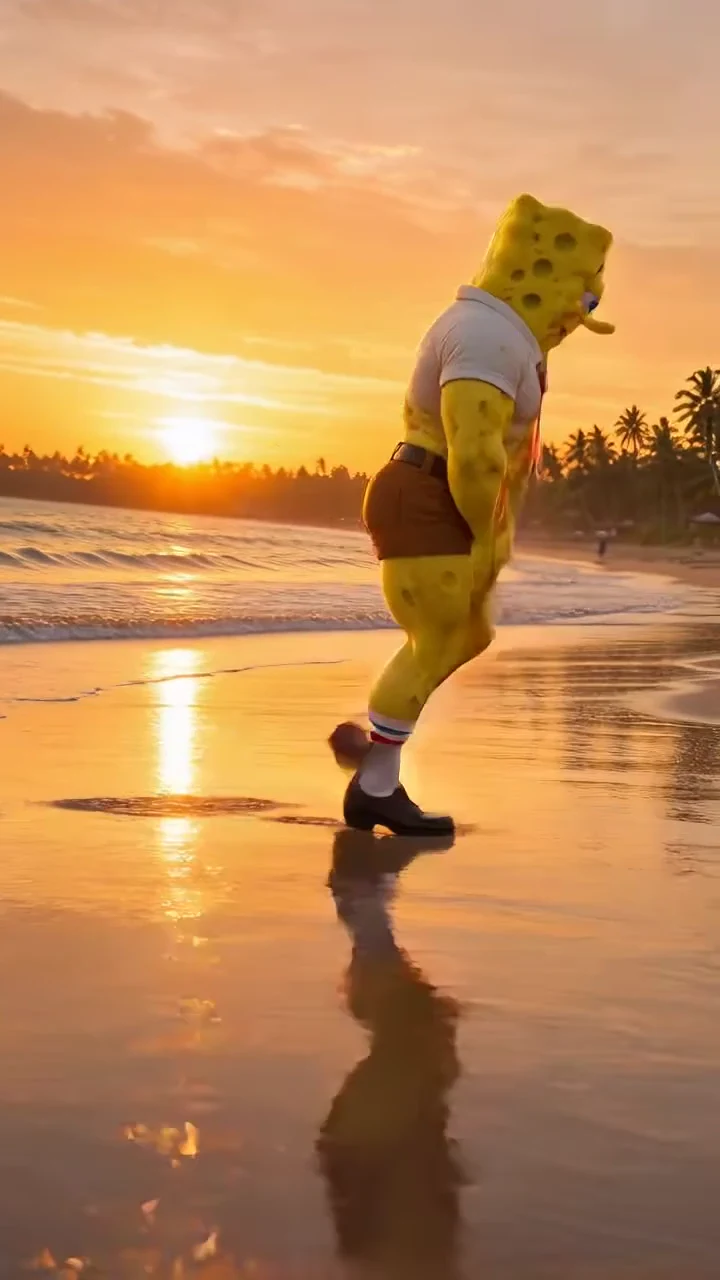
Muscle Beach StrutSource: @noiron.ai · muscular SpongeBob beach strut AI reel

Edit around the walk, the squat and the grin

01

Keep the full vertical frame

The source is 9:16, framed from a low angle with the whole body visible and reflections in the wet sand below. That already fits Reels, TikTok and Shorts. Cropping in to make the character bigger usually cuts off the feet or the reflection, which are part of the look. If you need a square or landscape version, place the whole vertical clip on the wider canvas rather than cropping its top and bottom.

02

Put text where the character is not

At the start the figure is at its largest, with the head near the top edge, so a caption across the top would cover it during the opening walk. As the character recedes, the sky above it opens up. App buttons and captions also cover the right edge and the bottom. Check your caption at the opening walk, the bend and turn, and the final squat. Keep text off the face in the last second, when the grin is the only frontal view.

03

Time the punchline to the final grin

The frontal squat and grin arrive only in the last half second to a second. A setup line during the long profile walk, such as “Me after one gym session,” then either nothing or a short punchline on the final grin lets the pose land. Do not put the punchline earlier: until about 5.5 seconds the character is still walking, bending or turning away from the lens. Original caption ideas: “Leg day was yesterday,” “HR said business casual,” “Walking into Monday like.” These are suggestions for your editor, not text the trend adds.

04

Build a loop that resets on purpose

Because the shot is static, the jump from the ending back to the start is visible: the clip ends with a smaller figure squatting and facing the camera, and restarts with a much larger figure in profile, head near the top edge, walking left. That size and pose change can work as a deliberate reset in time with the beat, or you can let the grin hold for a moment and let the platform replay it. Avoid speeding up or reversing the clip to hide the cut; it changes the timing that makes the strut readable.

05

Keep picture and beat together

The result keeps the source beat. If you trim or loop, move the audio with the same section of video so the steps and flex stay on the music. Adding a louder track on top can bury the beat; if you add your own sound, lower it under the original or replace it entirely, and check that you have the rights to whatever you add.

06

Label it honestly

If you post your version next to the original, credit the source reel and label which clip is yours. If you post only your version, a caption such as “Made with an AI trend template” avoids implying the motion was filmed. If your platform offers an AI-generated content label, use it where it applies.
Explore the Muscle Beach Strut trend

How to make it

Choose the roles you want to change. Add a photo for each selected role.

Strutter in the Muscle Beach Strut source video
Strutter
  1. 01

    Choose the strutter

    Upload one photo with a clear face, visible hair and the outfit you want on the beach. A full-body photo helps the clothing carry through the walk.

  2. 02

    Review quality and price

    Choose 480p, 720p or 1080p and review the credit quote. It includes the video plus the photo and scene preparation for your character.

  3. 03

    Check the strut

    Watch the feet on the wet sand, the turn to camera and the face in the final grin before downloading your portrait MP4 with sound.

01

You, but built

Your face, hair and outfit come from your photo, rendered with the trend's exaggerated bodybuilder physique: broad shoulders, pumped arms and heavy legs.

02

The whole strut

The 6-second portrait clip keeps the profile swagger walk, the turn to camera and the low flexing squat that ends on a grin.

03

Golden-hour beach

The sunset, surf, palm trees and mirror reflections on the wet sand stay the same, with one static low camera and no cuts.

04

An attributed AI source

The preview is @noiron.ai's AI reel of a muscular SpongeBob-style character. It is a source reference, not an Oakgen-generated result.

Photo tips

  • One character per photo
  • Keep the face and hair clear
  • Show the outfit you want
  • Full-body photos work best
  • Check the face after the turn

Questions & answers

What is the Muscle Beach Strut trend?

It is a fixed sunset-beach scene where one hyper-muscular character struts along the wet sand, turns to the camera and drops into a low bodybuilder flex. Muscle Beach Strut is Oakgen's descriptive name for the supplied AI reel.

Is this the buff SpongeBob video?

The reference is @noiron.ai's AI reel captioned "SpongeGuy humbles the ocean", showing a muscular, photoreal SpongeBob-style character. In Oakgen, your uploaded photo replaces that character entirely.

Will my character look muscular?

Yes. The template keeps your face, hair, skin and outfit but gives the character the trend's exaggerated bodybuilder build. Inspect the result to check the likeness before sharing.

How many photos do I need?

One. The single photo casts the strutter for the whole clip, from the profile walk to the frontal flex.

How long is the video?

The output is 6 seconds in portrait 9:16 format, matching the full reference strut.

Does it keep the original sound?

Yes. The final MP4 keeps the reference beat. We have not verified the track's title, so we do not label it with a guessed song or artist.

Can I change the beach or moves with a prompt?

No. The beach, camera and strut are fixed by this reference. Your choices are the photo and the output resolution.

Is the preview generated by Oakgen?

No. It is the attributed source AI reel. Generated likeness and footwork can vary; review your result before sharing.

How much does it cost?

1,324 credits per 720p video. The quote includes one character preparation, two scene references and the full video. Review the selected resolution's quote before generating.

Ideas for your next video

Plan a story, keep your character recognizable, and make the finished clip your own.

Explore the video trend playbook →

Make your Muscle Beach Strut video

Upload 1 photo. Everything else is set.

Make this video