Six seconds is short. A post built on Muscle Beach Strut has room for one setup, one payoff and a replay, and very little else. This plan covers what to put where, and how to label the clips so viewers know which one you made.
Make your Muscle Beach Strut first
Upload one photo, get your character's strut, then come back to plan the post.
Know what each clip is
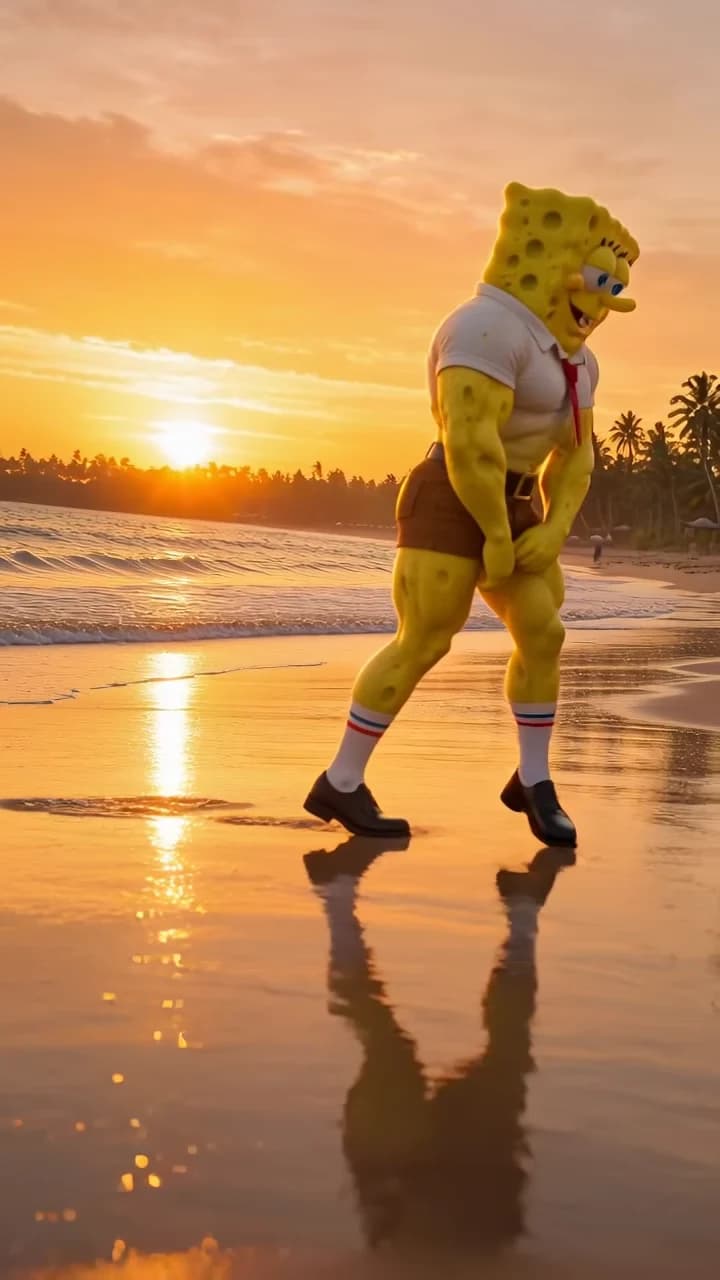
The supplied reference reel is from the Instagram account noiron.ai (display name OrionAi), dated October 18, 2026, captioned “SpongeGuy humbles the ocean.” It is itself an AI-generated clip of a muscular sponge character. The cover image on this article comes from it.
That matters for labels. “Original clip” and “My version” describe the two accurately. Putting the source under a “Made with Oakgen” label would claim something it does not show. If you post only your version, “Made with an AI trend template” avoids implying the walk was filmed. The source guide has more on identifying the clip; a credit identifies footage, it does not by itself grant permission to reuse it everywhere.
The beat in the clip has no verified title or artist. Do not tag a song name you cannot confirm; if your platform shows the audio label from the source post, that is the label to trust.
Map the post onto the beats
The clip is one static shot. Approximate landmarks from the source:
| Time | What happens | What to do in your edit |
|---|---|---|
| 0 to ~3 s | Profile swagger toward screen-left, arms pumping; figure at its largest, head near the top edge | Show the setup caption, clear of the head |
| ~3 to 4 s | Still striding, getting smaller in frame | Keep the setup caption |
| ~4 to 4.5 s | Leans forward, head down, turning to face screen-right | Clear the caption as the body bends |
| ~5 s | Rises in a three-quarter view facing screen-right, hands near the thighs | Leave the frame clean for the wind-up |
| ~5.5 s to end | Faces the camera in a low, wide squat, hands on the thighs, grinning | Optional short punchline, kept off the face |
The motion map describes each beat in more detail. Times are landmarks from inspection, not frame-exact cut points; find them in your own downloaded result before editing.
Write a hook that sets up the flex
The best captions make the viewer expect something ordinary, then the final squat answers it. That payoff arrives only in the last half second to a second, so the setup has the long profile walk to itself and the punchline belongs on the grin, not before it. Original examples:
- Setup “First day back at the gym,” then nothing during the flex.
- Setup “HR said business casual,” punchline “I said casual.” on the grin.
- Setup “My dog after one walk,” punchline “He's insufferable now.”
Keep the setup to one line during the walk. Two blocks of text in six seconds is usually more than a viewer reads. These are suggestions for your editor, not text the trend generates.
Place captions in the sky above the horizon and away from the right edge and bottom, where app buttons sit. The figure is largest at the start, with the head near the top edge, then recedes, so a caption across the top can cover the head early on. Check the caption at the opening, the bend and turn, and the final grin. The captions, crops and loops guide covers placement and square or landscape versions.
Choose a structure
Two structures fit the format:
| Part | Your version only | Original, then yours |
|---|---|---|
| Opening | Your character walks in with the setup caption | Label “Original clip” and show the source walk |
| Middle | The walk recedes, bends and turns with no new text | Cut to “My version” at the same beat, such as the moment the body bends forward |
| End | Frontal squat and grin, optional punchline | Your character's squat and grin play out |
| Replay | Platform loops the six seconds | End on your grin so the replay starts with the comparison again |
For the comparison, cut on a matching motion, not equal timestamps chosen at random. The forward bend, around four seconds in, is a clear landmark in both clips. Keep each clip's audio attached to its own picture so the steps stay on the beat across the cut.
Make the loop work
Because the camera never moves, the restart is obvious: the clip ends with a smaller figure squatting and facing the camera, then jumps back to a much larger figure in profile, head near the top edge, walking left. You can treat that size and pose change as a deliberate reset on the beat, or let the grin hold briefly and let the platform replay it. Avoid reversing or speeding up the clip to disguise the jump; it changes the timing that makes the strut readable.
If you add your own sound, keep the original beat underneath or replace it fully, and make sure you have the rights to what you add.
Check before posting
Watch the finished edit at phone size with sound. Is it clear which clip is yours? Does the caption leave the squat and the face clear? Does the loop reset on the beat rather than mid-step? For the generated footage itself, run through the frame-by-frame review checklist, especially hands at the squat and the reflection in the sand.
If you have not picked a character yet, read Pick a Character Who Earns the Flex first. When you are ready, open the Muscle Beach Strut studio and review its current quote. No generated results or performance figures are claimed in this plan.