
Video trend

Car Repair Skit AI Template: The Two Roles

The template has two roles, each with its own photo slot, and which photo goes into which slot decides who does what. This page covers the left role and the right role, what each does across the 15 seconds, the lines each speaks, and what that means for choosing photos. The characters are described only as they appear on screen.

Final video
15 seconds
Your input
1–2 photos
Quality
720p
THE ORIGINAL15 SEC / 9 / 16
Car RepairYour photo. This scene.

Meet the left role and the right role

01

Left role: the bow-tie character at the engine

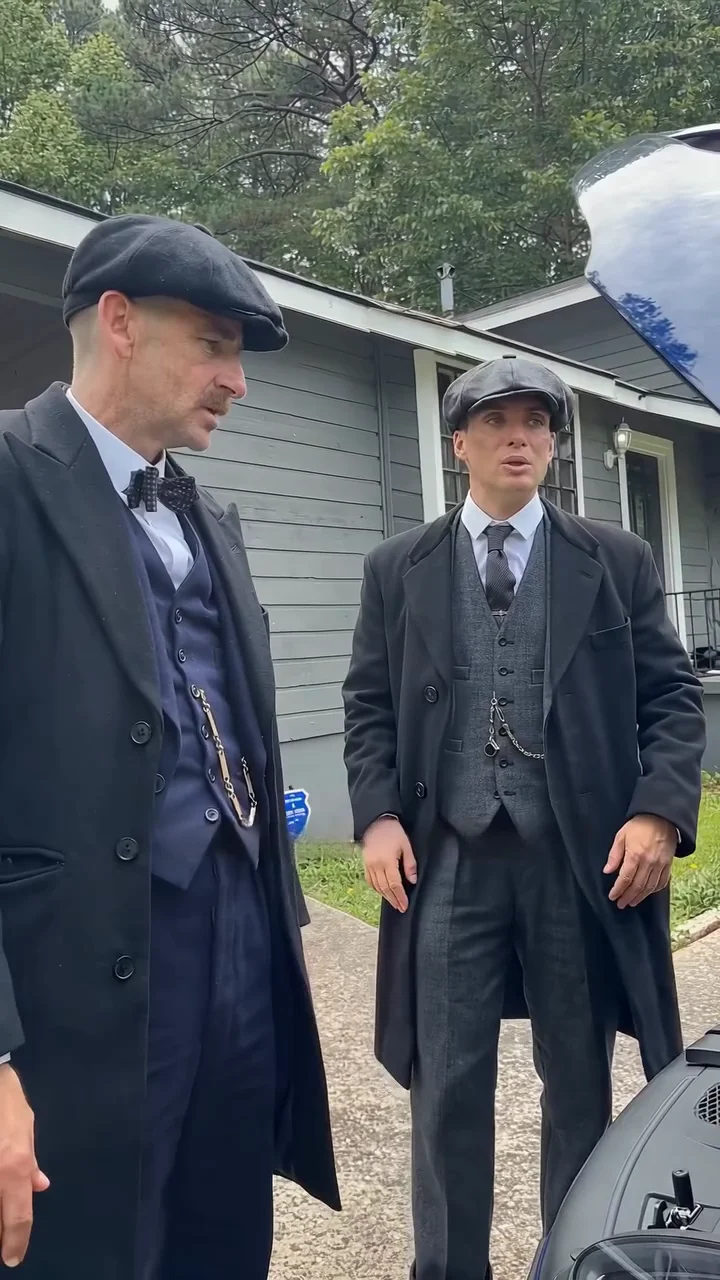
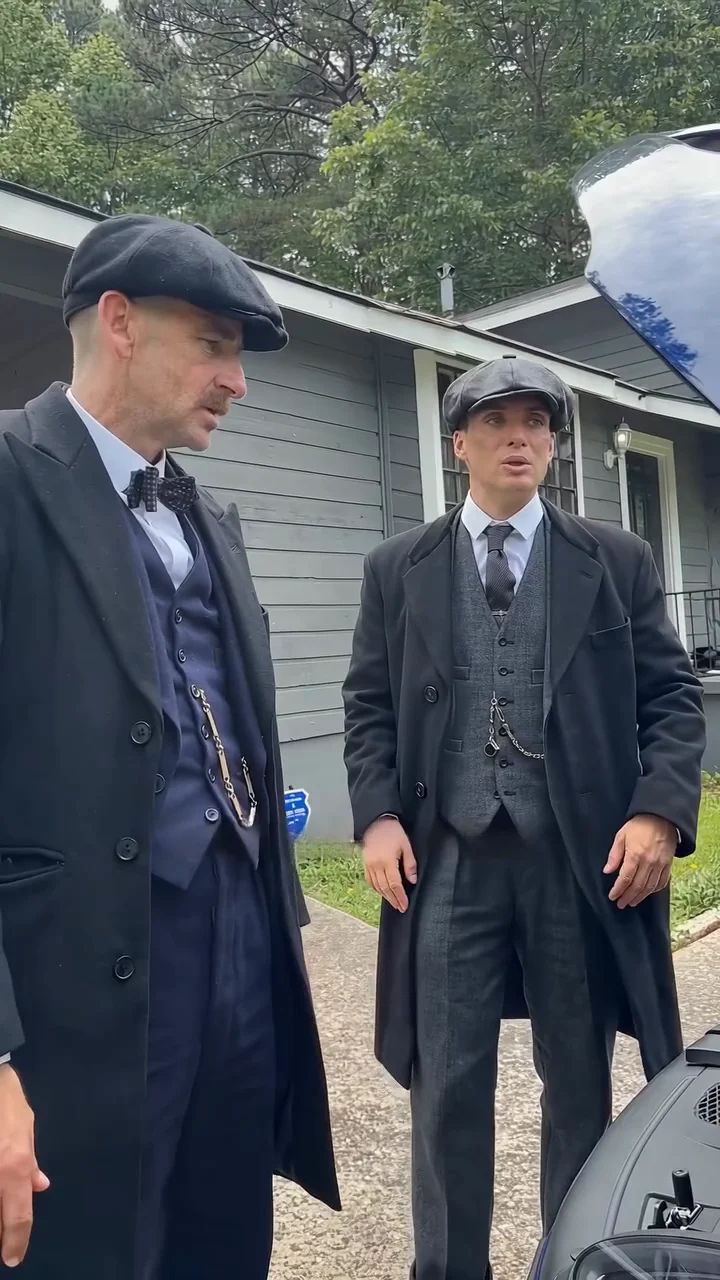
Taller, in a dark flat cap, a white shirt with a black polka-dot bow tie, a navy waistcoat with a pocket-watch chain and a long black overcoat. For roughly the first second this figure is bent over the open hood with a hand on the plastic housing, face turned down. By about 2.5 seconds both roles are standing and the grey-suited figure is fully in view. From roughly eight seconds the left figure sits large at the left edge of the frame in profile, listening and gesturing with an open hand. At five seconds the face sits about a quarter of the way in from the left and a quarter of the way down.

02

Right role: the grey-suit character in the yard

In a dark flat cap and a grey three-piece suit with a tie and watch chain, under a long black overcoat worn open. At one second this figure is half hidden behind the other, head tilted toward the engine. By about 2.5 seconds he stands beside the bow-tie figure with hands behind his back, and from about five seconds he faces the camera for the rest of the clip. The right role's mouth is clearly moving through the long excuse, with both arms out in a shrug near the end. The face sits a little over two-thirds of the way across the frame and about a third down at five seconds.

03

Who speaks which line

Left says the opening diagnosis (0.0 to 1.8 s), the transmission line (2.5 to 3.8 s), "Yes, you did" (6.8 to 7.8 s) and the closing question (12.9 to 15.0 s). Right says "What?" (1.9 to 2.4 s), a short denial whose wording is disputed (4.5 to 5.5 s), "Nuh-uh" (8.0 to 8.5 s, heard in one transcript only) and the excuse (8.7 to 12.6 s). The transmission line is car slang for the car part. The wording comes from speech-to-text and a video model and may differ slightly; the dialogue page has the full script.

04

Which photo goes where

The tool labels the left role Bow-tie character and the right role Grey-suit character, each with its own slot, so add each person's photo to the matching one. You can fill one role or both; an empty role keeps the character from the reference. As a rule of thumb, give the grey-suit slot your clearest front-facing photo, because that face speaks for most of the clip. For the bow-tie slot, a photo that shows the whole head and face clearly helps, since that figure is mostly bent over, in profile or at the frame edge. This comes from watching the reference and has not been tested.

05

What the scene fixes and what is open

The yard, house, car, handheld camera and costume looks belong to the reference scene. How much of your photos' hair, skin tone and clothing carries over, especially the flat caps and long overcoats, is something to check in the result rather than assume. If you want the closest match, use photos of people already dressed in similar dark overcoats and flat caps.

06

What this page does not claim

No generated example of this template is published here, and there is no measured success rate for any photo pairing. The finished video keeps the source soundtrack, strong language included. Upload only people who have agreed to appear, and label the result as AI-made when you share it.
Explore the Car Repair trend

How to make it

Choose the roles you want to change. Add a photo for each selected role.

Bow-tie character in the Car Repair source video
Bow-tie character
Grey-suit character in the Car Repair source video
Grey-suit character
  1. 01

    Pick the two roles

    Add a clear photo for the bow-tie character, the grey-suit character or both. Use photos of yourself or of people who have agreed to appear. One character per photo.

  2. 02

    Review quality and price

    Choose 480p, 720p or 1080p. The credit quote covers the complete 15-second edit and the preparation of only the photos you select.

  3. 03

    Check the exchange

    Watch who speaks when, check both faces in the yard and review the hood scene at the start before downloading your portrait MP4 with sound.

01

Two roles, two photos

The bow-tie character leans over the engine, makes the accusation and delivers the deadpan closing question. The grey-suit character stands in the yard, denies it and gives the long explanation. Your photos replace both, or one of them.

02

One continuous take

The handheld 15-second portrait clip has no cuts: a suburban yard, a grey clapboard house and a black car with its hood up. The camera and body motion follow the reference.

03

The whole exchange

The final MP4 keeps the reference sound, so the diagnosis, the accusation, the denial, the long excuse and the closing question play out in order. The clip ends on that question, as the reference does.

04

A reference clip, not a result

The preview is the reference clip this template follows, not an Oakgen result. We have not verified the original sound or who made the clip.

Photo tips

  • One character per photo
  • Use sharp, front-facing faces
  • Show the cap, bow tie or suit you want
  • Use photos of people who consented
  • Check both mouths, including the closing question

Questions & answers

What is the car repair AI trend?

It is a one-take driveway skit where one man in a flat cap and bow tie argues over an open car hood and another in a flat cap and grey three-piece suit gives a long explanation in the yard. Oakgen lets your photos play both roles.

What is the "You F'd the Transmission" trend?

It is the name people use for this skit, written here with a softened spelling and the car part spelled out. The clip's abbreviated wording is car slang for the transmission: the bow-tie character spots the problem under the hood, and the twist comes from the second character reacting as if he had heard something else. We did not find the original skit or the creator of its audio. The accusation and the closing question both come from the bow-tie character.

Can I use a photo of someone else?

Only use photos of yourself or of people who have agreed to appear. Do not upload private photos of others or anyone's likeness without permission, and label AI videos clearly when you share them.

How many photos do I need?

Add one photo per role, up to two. A role left empty keeps the character from the reference. Both characters share the yard, so check both faces in the result.

Does it keep the original sound?

Yes. The final MP4 keeps the reference dialogue, and that original soundtrack contains strong language, so it may not suit every audience or platform. We have not verified the original audio or its creator, so we do not label it with a guessed source. Generated lip sync can vary, so check the long speech and the closing question.

How long is the video?

The output is 15 seconds in portrait 9:16 format and covers the whole reference take.

Can I change the dialogue or scene with a prompt?

No. The yard, the car, the camera and the dialogue are fixed by this reference. Your choices are the photos and the output resolution.

Is the preview generated by Oakgen?

No. It is the reference clip and not an Oakgen result. Generated faces, caps and car details can vary, so review your video before sharing.

How much does it cost?

3,173 credits per 720p video. This two-role price includes both photo preparations. Selecting fewer roles reduces preparation costs; the complete video is still edited. Review your selected quote before generating.

Ideas for your next video

Plan a story, keep your character recognizable, and make the finished clip your own.

Explore the video trend playbook →

Make your Car Repair video

Upload 1–2 photos. Everything else is set.

Make this video